This Week In Security: Getting Back Up To Speed

Editor’s Note: Over the course of nearly 300 posts, Jonathan Bennett set a very high bar for this column, so we knew it needed to be placed in the hands of somebody who could do it justice. That’s why we’re pleased to announce that Mike Kershaw AKA [Dragorn] will be taking over This Week In Security! Mike is a security researcher with decades of experience, a frequent contributor to 2600, and perhaps best known as the creator of the Kismet wireless scanner.

He’ll be bringing the column to you regularly going forward, but given the extended period since we last checked in with the world of (in)security, we thought it would be appropriate to kick things off with a review of some of the stories you may have missed.


Hacking like it’s 2009, or 1996

Hello all!  It’s a pleasure to be here, and it already seems like a theme of the new year so far has bringing in the old bugs – what’s old is new again, and 2026 has seen several fixes to some increasingly ancient bugs.

Telnet

Reported on the OpenWall list, the GNU inetd suite brings an update to the telnet server (yes, telnet) that closes a login bug present since 2015 linked to environment variable sanitization.

Under the covers, the telnet daemon uses /bin/login to perform user authentication, but also has the ability to pass environment variables from the client to the host. One of these variables, USER, is passed directly to login — unfortunately this time with no checking to see what it contains. By simply passing a USER variable of “-froot”, login would accept the “-f” argument, or “treat this user as already logged in”. Instant root!

If this sounds vaguely familiar, it might be because the exact same bug was found in the Solaris telnetd service in 2007, including using the “-f” argument in the USER variable. An extremely similar bug targeting other variables (LD_PRELOAD) was found in the FreeBSD telnetd service in 2009, and other historical similar bugs have afflicted AIX and other Unix systems in the past.

Of course, nobody in 2026 should be running a telnet service, especially not exposed to the Internet, but it’s always interesting to see the old style of bugs resurface.

Glibc

Also reported on the OpenWall list, glibc — the GNU LibC library which underpins most binaries on Linux systems, providing kernel interfaces, file and network I/O, string manipulation, and most other common functions programmers expect — has killed another historical bug, present since 1996 in the DNS resolver functions which could be used to expose some locations in the stack.

Although not exploitable directly, the getnetbyaddr resolution functions could still ease in breaking ASLR, making other exploits viable.

Address Space Layout Randomization (ASLR) is a common method of randomizing where in memory a process and its data are loaded, making trivial exploits like buffer overflows much harder to execute. Being able to expose the location of the binary in memory by leaking stack locations weakens this mechanism, possibly exposing a vulnerable program to more traditional attacks.

MSHTML

In February, Microsoft released fixes under CVE-2026-21513 for the MSHTML Trident renderer – the one used in Internet Explorer 5. Apparently still present in Windows, and somehow still accessible through specific shortcut links, it’s the IE5 and Active-X gift that keeps giving, being actively exploited.

Continue reading “This Week In Security: Getting Back Up To Speed”

Slaying Dragons In Notepad

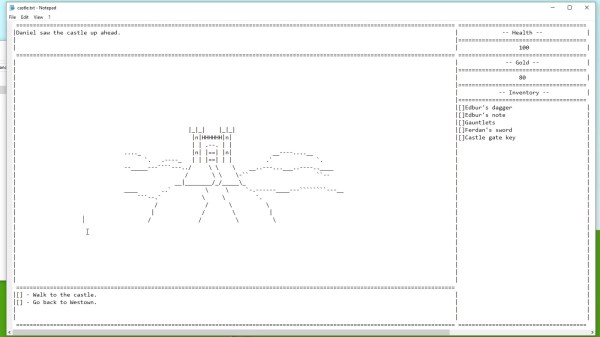
We all have our favorite text editor, and are willing to defend its superiority above all other editors by any means necessary. And then there’s Notepad. But what Notepad may lack in text manipulation features, it compensates with its inconspicuous qualities as a gaming platform. Yes, you read that correctly, and [Sheepolution] delivers the proof with a text-based adventure game running within Notepad.

What started out with [Sheepolution] jokingly wondering what such a game may look like, ended up as an actual implementation as answer to it. Behind the scenes, a script written in Lua using the LÖVE framework — for which he also created an extensive tutorial — monitors the state of several text files that make up the game world. Each location is a separate text file to open in Notepad, showing the current state of the game, telling the story with text and ASCII art, and offering choices to the player. The game is played by modifying and saving those text files, which the script then processes to push the gameplay forward by simply updating the content of those files with the new state. Check out the game’s trailer after the break to get a feel of what that looks like.

Unfortunately, Notepad itself doesn’t automatically reload the file when its content changes, so to provide a smoother gaming experience, [Sheepolution] modified the open source implementation Notepad2 to work around this, and bundled it as part of the game’s executable. Initially, he even added animations to the ASCII graphics, but in the end decided against most of them to avoid constant disk writes and race conditions caused by them.

Sure, this is no Game Boy emulator in a text editor, and it may not be as groundbreaking as Notepad’s latest feature, but it’s always amusing to see alternative uses for well-established tools.

Continue reading “Slaying Dragons In Notepad”

Windows Notepad Now Supports Unix Line Endings

In what is probably this century’s greatest advancement in technology, Windows Notepad now supports Unix line endings. This is it, people. Where were you when Kennedy was assassinated? Where were you when Neil Armstrong set foot on the moon? Where were you when Challenger blew up? Where are you now?

Previously, Windows Notepad only supported Windows End of Line Characters — a Carriage Return (CR) and Line Feed (LF). Unix text documents use LF for line endings, and Macs use CR for line endings. The end result of this toppling of the Tower of Babel for End of Line characters is a horrific mess; Windows users can’t read Unix text files in Notepad, and everything is just terrible. Opening a Unix text file in Windows produces a solid block of text without any whitespace. Opening a Windows text file in anything else puts little rectangles at the end of each line.

Starting with the current Window 10 Insider build, Notepad now supports Unix line endings, Macintosh line endings, and Windows line endings. Rejoice, the greatest problem in technology has now been solved.

Editing Your FPGA Source

[Dave] noted that in a recent poll of FPGA developers, emacs was far and away the most popular VHDL and Verilog editor. There are a few reasons for this – namely, emacs comes with packages for editing your HDL of choice. For those of us not wanting to install (and learn) the emacs operating system, [Dave] got Notepad++ to work with these packages.

Notepad++ already has VHDL and Verilog highlighting along with other advanced text editor features, but [Dave] wanted templates, automated declarations and beautification. To do this, he used the FingerText to store code as snippets and call them up at the wave of a finger.

As [Dave] writes his code, the component declarations constantly need to be updated, and with the help of a Perl script [Dave] can update them with the click of a hotkey. Beautification is a harder nut to crack, as Notepad++ doesn’t even have a VHDL or Verilog beautifier plugin. This was accomplished by installing emacs and running the beautification process as a batch script. Nobody can have it all, but we’re thinking [Dave]’s method of getting away from emacs is pretty neat.