
OCR Automatically Reads A Power Meter

ocr-used-to-read-a-power-meter

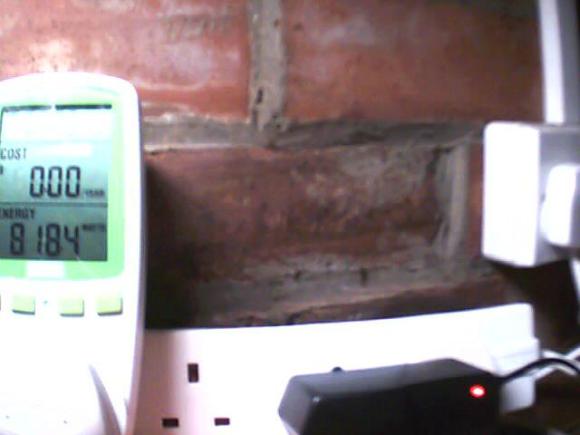
[Chris] tried his hand at using Optical Character Recognition in his server power monitoring rig. The image above is what the IP camera used in the setup sees. He’s included a bright light to ensure that the contrast is as great as possible. After applying a threshold filter to the captured still, he is able to process the image to test all seven segments of every digit.

He uses Mathematica for the processing. We’re not familiar with the particulars of the language, but it’s easy enough to see the main parts of the program. Line six of his source code applies the image filters and then the program loops through the assigned location of each digit, testing segment combinations to ascertain what number is shown. Things get hairy when it comes to the decimal point. We gather that the meter can show varying degrees of precision based on the total number of digits needed (like a Digital Multimeter). But [Chris’] setup has a difficult time reliably detecting that decimal point because of its size. He uses a shortcut to get around this, knowing that his server never pulls less than 300W so he corrects the output (by multiplying it by ten) if the reading is below that benchmark.

Of course it would be easier to crack open the monitor and glean data electronically (that’s how the Tweet-A-Watt does it) but then [Chris] wouldn’t have had the fun of playing with OCR.

Google Your Home With A Roomba

[youtube=http://www.youtube.com/watch?v=bKRH6uQwOgg]

Meet GåågleBot. GåågleBot is a modified roomba that will not only vacuum your home, but collect data while it does it. While it is carrying out its normal duties as a floor cleaner, it will take pictures, collecting and analyzing all the data for later searches.  With built in OCR, you can actually search for things using text strings.

Aside from just carrying out its normal job, you can also remote control it via the web. You can even control theirs!

[via Boing Boing]

DS Based Reader For The Blind

[Epokh] has release some homebrew software that uses a Nintendo DS as a voice reader for documents. This is extremely useful for blind and visually impaired folks who normally use screen readers but can utilize this technology for reading books, documents, and email on the go. Future versions look to add an email client and implement OCR via the camera for reading documents on the go.

The flite package is utilized to provide the text to speech functionality. We’re familiar with this package and judging by the video after the break, it lost nothing in the port to the DS hardware. [Epokh] pointed out that similar readers can cost $1500 when a DS sells for around $130. We can’t wait to see the final version fleshed out!

Continue reading “DS Based Reader For The Blind”

Are You Human? Then Type Out This Book

type_this_text

Google has acquired reCAPTCHA and plans to use the system for digitizing books. Wait… what? CAPTCHA is the method of requiring a user to type in a visually obscured word to prove they are human. How can this digitize books? The answer is a bit obscure and takes some time to discover, but you’ll have fun along the way. Continue reading “Are You Human? Then Type Out This Book”

High Speed Book Scanner From Trash

book_scanner

[Daniel] sent us his entry to the Epilog laser cutter challenge on instructables. He made a book scanner, mainly out of found parts. The bulk of the project was salvaged from dumpsters, though if you’re not comfortable with that, the free section of craigslist might be able to do the job. The cameras are loaded with CHDK, using StereoData maker, and custom software to compile the images into PDFs. They did a fantastic job of documenting every step of the construction, including helpful tips for some of the more complicated parts. There are several videos in the instructable, so be sure to check them out. We’re particularly amused by the extra step of making the photo captions visually interesting. At 79 steps, it’s a long read, but well worth it.

MegaUpload Captcha Cracking In JavaScript

megaupload-the-leading-online-storage-and-file-delivery-service

This was certainly the last thing we expected to see today. [ShaunF] has created a Greasemonkey script to bypass the captcha on filehosting site Megaupload. It uses a neural network in JavaScript to do all of the OCR work. It will auto submit and start downloading too. It’s quite a clever hack and is certainly helped by the simple 3 character captcha the site employs. Attempting to do the same thing with ReCAPTCHA has proven much more difficult.

UPDATE: [John Resig] explained of how it works.

[via Waxy]







