3D Printed PC Case Focuses On Ease Of Access

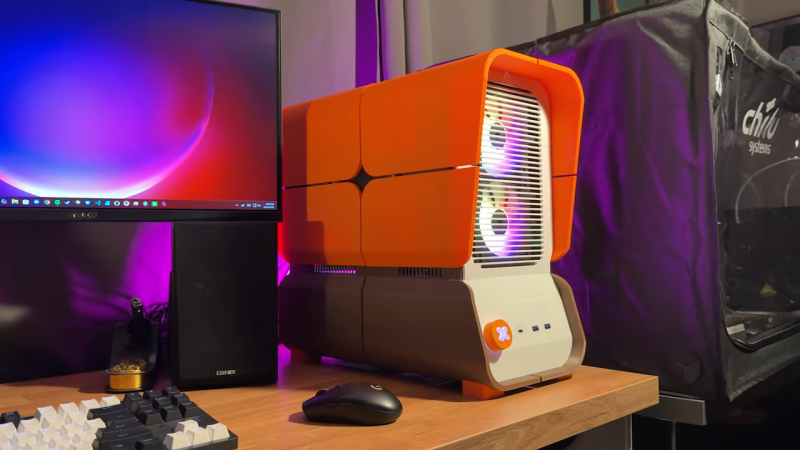
There are all kinds of fun, glowing PC cases on the market these days. However, if you want something that focuses on serviceability over flash while still looking stylish, you might like the Makeyo MK01. It’s a PC case that you can print yourself, and [Marst_art] has published a video on what it’s like to whip one up at home.

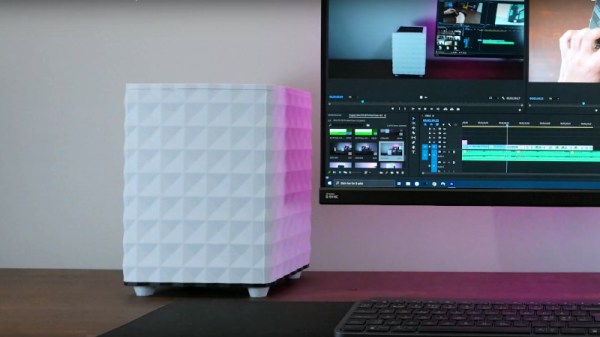
The MK01 is assembled from lots of smaller parts, so the components can be made on any 3D printer that has a print area of 210 x 210 mm or more. All the outer panels are affixed to the main chassis with magnets, which makes servicing easy. You can just pop off panels when you need to get inside without undoing any fasteners or clips.

Plus, the cool thing about the MK01 is that since you’re printing it yourself, you can easily make whatever mods you like prior to printing it out. [Marst_art] notes that he threw in a USB-C port to the front panel for easy access, and a few internal mounts for 2.5″ SSDs. He also made some mods to the power switch assembly. It also bears noting—you get to choose your own color scheme when you make one of these. This level of customization is something you simply don’t get when you buy off the shelf!

[Marst_art]’s video is a useful guide if you’re planning to undertake such a build yourself. It outlines what it’s like to actually print one of these things on a consumer printer, and how the settings will influence the final look and feel. It’s worth noting that you’ll probably want to print this in ABS or another filament that can handle high heat, unless you’re building a very cool running machine.

It’s not just a great looking case, it’s a highly functional one, too. Files are available on Printables if you’d like to make your own. We’ve featured other printed cases before, too.

Continue reading “3D Printed PC Case Focuses On Ease Of Access”
Dead Amstrad Becomes Something New

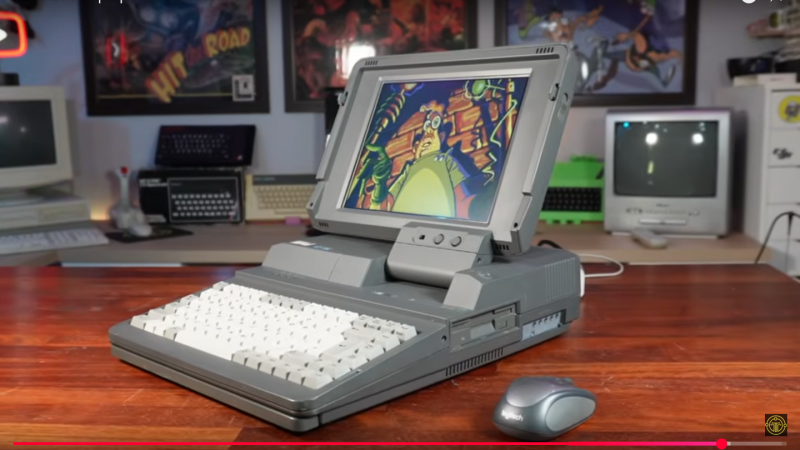
When you run into old hardware you cannot restore, what do you do? Toss it? Sell it for parts? If you’re [TME Retro], you hide a high-end mini PC inside an Amstrad-shaped sleeper build.

The donor  laptop is an Amstrad ALT-286 with glorious 80s styling that [TME Retro] tried to save in a previous video. Even with help from the community there was no saving this unit, so we can put away the pitchforks and torches. This restomod is perhaps the best afterlife the old Amstrad could have hoped for.

At first [TME Retro] was going to try and fit an iPad Pro screen, but it turned out those don’t have the driver-board ecosystem the smaller iPads do, so he went with a non-retina LCD panel from Amazon instead. Shoving an LCD where an LCD used to live and sticking an expensive mini-PC inside a bulky 80s case is not the most inspiring of hacks, but that’s not all [TME Retro] did.

Continue reading “Dead Amstrad Becomes Something New”

PC Case Makes Portable Power Supply

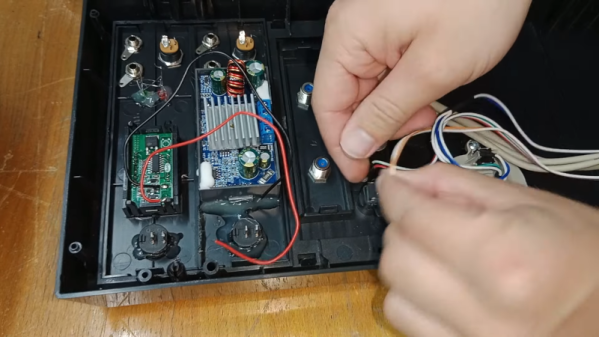
Recently, we’ve seen a lot of semi-portable power stations. These have some big rechargeable battery and various connection options. [Dereksgc] wanted to make his own and decided the perfect housing would be a small PC tower case. (Video, embedded below.) It makes sense. There are plenty of easy-to-work front panel inserts, a power supply box with an AC cord (the power supply is long gone), and it is big enough to fit the battery. You can see the result in the video below.

The bulk of the work was installing power supply modules and a charge controller on floppy disk blank panels. The battery — a 50 Ah LiFePO4 unit — fits nicely in the bottom. Some of the buttons and connectors find use in the new incarnation.

Continue reading “PC Case Makes Portable Power Supply”

Enter The Matrix With This Custom PC Side Panel

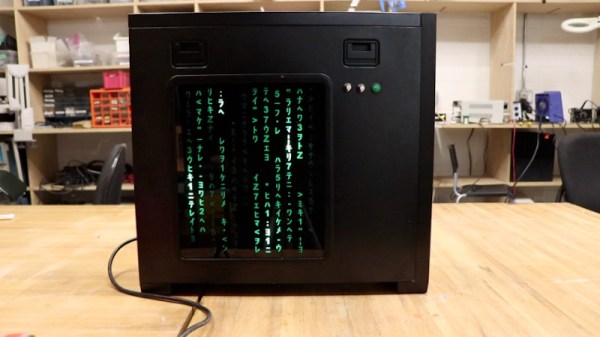
With a new Matrix movie out now, it’s hardly a surprise that we’re starting to see more and more projects centered around the franchise’s iconic “Digital Rain” effect. A few particularly unique examples have floated to the top of this virtual tsunami of green-tinted sushi recipes, such as this very slick RGB LED PC side panel built by [Will Donaldson].

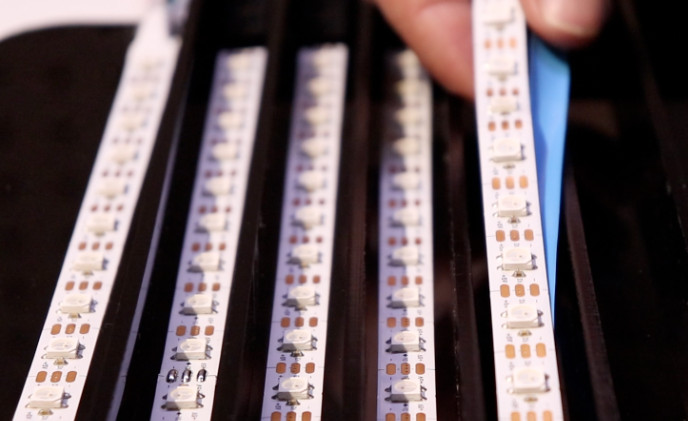
In place of the normal clear window in his PC case, [Will] has mounted a black acrylic sheet that has had all of the “code” characters laser-cut from it. Behind that is an array of WS2812B LED strips, nestled into vertically aligned channels that keep the light from bleeding out horizontally. A sheet of frosted plastic is sandwiched between the two, which helps diffuse the light so the individual LEDs aren’t as visible.

All of the LEDs are connected to a NodeMCU ESP8266 by way of a 74AHCT125 level-shifter, though [Will] notes you could certainly use a different microcontroller with some tweaks to the code. As it stands, the user selects from various lighting patterns using two potentiometers and a button that have been mounted next to the panel. But if you were so inclined, it certainly wouldn’t take much to adapt the firmware so that the lighting effects could be triggered from the PC.

The sticklers will note that this means the characters can’t actually change or move, but as you can see in the video below, it still looks quite impressive when the LEDs get going behind them. If you’re looking to recreate the look on a considerably smaller scale, check out this Arduino library that can make it rain on a TFT display with just a few lines of code.

Continue reading “Enter The Matrix With This Custom PC Side Panel”

3D Print An Entire PC Case

With laptops having become a commodity item and single-board computers having conquered the lower end for our community, building a PC for yourself is no longer the rite of passage that it once was; except perhaps if you are a gamer. But there is still plenty of fun to be had in selecting and assembling PC hardware, especially if as [makerunit] did, you design and 3D-print your own case.

This is no motherboard in an old pizza box, but instead a highly compact and well-designed receptacle for a reasonable-performance gaming machine with an ITX motherboard. The chassis holding all the parts sits inside a slide-on textured sleeve, and particular attention has been paid to air flow and cooling. The GPU card is a little limited by the size of the case and there’s no room at all for a conventional hard drive, so a PCIe SSD board takes that role.

We’d hazard the opinion that were this case cranked out by the likes of Apple it would be hailed as some kind of design masterpiece, such is its quality. It certainly shows that there’s so much more to building your own PC than the normal rectangular tower case.

Over the decades we’ve brought you so many PC cases, a recent-ish one that’s worth a look is this Lego Minecraft one for an Intel NUC motherboard.

Continue reading “3D Print An Entire PC Case”

You Won’t Believe How Much Tech Is Hiding In This Desk

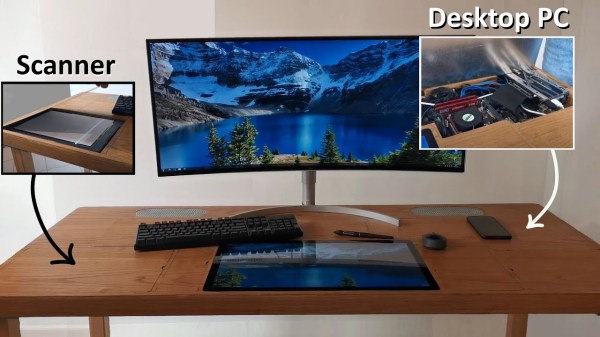
Say what you will about office life: there were definitely some productivity perks, but the coffee is much better at home. Like many of us, [Pierre] has been working from home for the last year or so. And as much as he might enjoy spending so much time in his small Parisian apartment, it lacks many of the amenities of the office such as a scanner, printer, and, you know, a reasonable amount of space in which to work.

Inspired by another build, [Pierre] set out to build his dream desk that is maximum PC power in minimum space. It is chock full of easily-accessible cavities that hide everything you’d expect, plus a few things you don’t, like a flatbed scanner, a printer, a router, and a wireless charging pad. One cavity is dedicated to I/O, and another has three international power sockets. The only thing it doesn’t hide is the 22″ pen display that [Pierre] uses for sketching, signing documents, and occasionally as a second monitor.

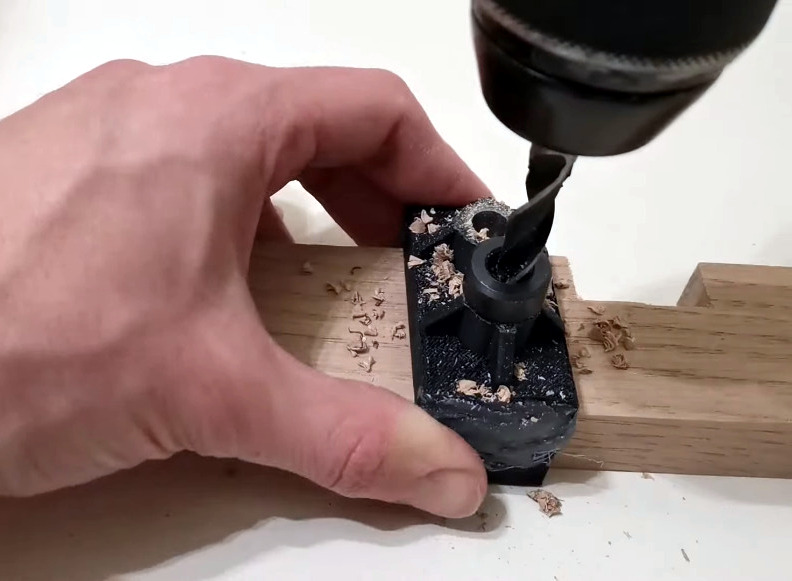
A home-brew jig makes consistent dowel drilling much easier.

This desk may look like solid wood, but the top is a veneer that’s glued on to a custom-cut 1mm steel sheet. The inside frame is made of hardwood and so are the legs — one of them has a hidden channel for the only two cords that are even somewhat visible — the power and Ethernet cables. He joined all the frame pieces with dowel rods, and made a 3D-printed and metal-reinforced drilling jig to get the holes just right.

[Pierre] started this build by planning out the components and making meticulous notes about the dimensions of every piece. Then he sketched it and modelled it in FreeCAD to get all the cavities and cable runs correct and ensure good airflow through the desk. After that it was on to woodworking, metalworking, and PCB fab for relocated and hidden display controls and a custom-built amplifier.

It’s obvious that a lot of thought went in to this, and there’s a ton of work appreciate here, so clear off that inferior desk of yours and check out the build video after the break. Wish you had a PC desk? [Pierre] is seriously considering a Kickstarter if enough people show interest.

Are you into minimalism, but don’t want to build something of this magnitude? There’s more than one way to get there.

Continue reading “You Won’t Believe How Much Tech Is Hiding In This Desk”

PC Cases Are Still Stuck In The Dark Ages, But We Can Fix This

In the dawning of the IBM PC era, the computer case was a heavy, stout thing. These were industrial machines, built with beefy paddle power switches, and weighing as much as a ton of bricks. Painted in only the ugliest beige, they set the tone for PC design for the next couple of decades.

At the turn of the millennium, the winds of change swept through. The Apple iMac redefined the computer as a hip, cool device, and other manufacturers began to reconsider their product aesthetics. Around the same time, the casemodding scene took off in earnest, with adherents building ever wilder battle stations for internet clout and glory.

With all the development that has gone in the last 40 years of the PC platform, we’ve seen great change and improvement in almost every area. But in building a new rig this past month, this writer discovered there’s one element of the modern PC that’s still trapped in the past.

Continue reading “PC Cases Are Still Stuck In The Dark Ages, But We Can Fix This”