Testing The Efficiency Of PCB Etchants

etchIn the interest of the scientific method [Feynmaniac] (great name, btw) over on Instructables has posted a little experiment on something we all, no doubt, care about: putting PCB traces in copper clad boards with the most common etchants out there.

The experiment used the ‘ol standard, ferric chloride, and the safe, inexpensive newcomer, vinegar, hydrogen peroxide, and table salt. Finding the most efficient mixture of ferric chloride is easy: just use what’s in the bottle. The vinegar and H2O2 requires some stoichiometry, though, and [Feynmaniac] calculated that with an 8% acetic acid solution and the most commonly available 3% peroxide solution, a 2:3 ratio of peroxide to vinegar is the best. Salt to taste, or until everything turns green.

Four copper clad boards were used for the test, masked off in a ‘barcode’ pattern. Two methods of applying the etchant were used: either rubbing the etchant on with a sponge, or immersing the boards in a bath of the etchant being tested.

In terms of speed, ferric chloride was by far the fastest, with 3 minutes until the board was etched using the rubbing method, or 10 minutes when simply immersed. Vinegar/peroxide took longer with 11 minutes rubbed, and 20 minutes immersed. No differences in the quality of the etch were noticed.

While ferric chloride was by far the fastest etchant, it does have the downside of being environmentally unfriendly and fairly expensive. The vinegar and peroxide etchant is safe, cheap, and can be found in any grocery store on the planet.

This experiment didn’t test other common etchants like HCl and H202, or cupric chloride (which is is the byproduct of HCl and H202). Still, it’s a good confirmation that the vinegar and peroxide method actually works, in case you were wondering.
Spin A PCB For Your Most Beloved Sensors

sensorstick-breakout

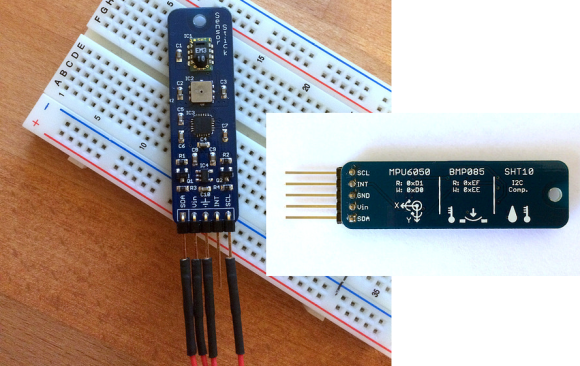
If you follow [Ioannis’] lead you’re going to thank yourself every time you sit down to work on a new prototype. He took all of the sensors which he most commonly uses and spun one dev board to host them all.

As long as you’re willing to wait for delivery, the cost of small-run professionally made PCBs has become unbelievably reasonable. That’s really nice when you need to test your layout before exploring larger production. But it also means you can develop your own dirt-cheap yet reliable dev tools. This example combines three sensors which all communicate via I2C:

  • MPU6050 accelermoter/gyro
  • BMP085 pressure sensor
  • SHT10 humidity sensor

Obviously this is a great idea, but key is the cheat sheet which [Ioannis] included on the bottom of the board. It testifies as to which chips are on the board, but also includes the device addresses for the data bus. We’ve adopted the mantra that if a breadboarded prototype is not working, it’s always a hardware problem. For those oft-used parts this should alleviate some of the heartache at your bench.

You could still make something like this without spinning or etching a board. You’ll just have to be creative with the soldering.

Building EL Displays On A PCB

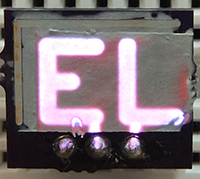
ELElecrolumiscent displays have seen a huge swing in popularity recently, but only in limited forms like EL wire or flat EL panels. You can, of course, cut and bend these wires and panels to suit any purpose, but custom shaped EL displays are just the bee’s knees. They’re not hard to fabricate, either: with cheap custom PCBs, all it takes to make custom EL panels is just a few chemicals.
[Nick]’s method of fabricating custom EL displays uses an exposed copper layer on a PCB you’d pick up from OSHpark or any of the random board houses in China. The process consists of designing a display – be it a few letters, pixels, or a seven-segment arrangement. The display ‘stack’ is a layer of painted-on dialectric, a phospor, and finally a translucent conductive ink that connects the display segments to ground. It looks like an extremely easy process, and from the pictures it looks like [Nick] is making some EL displays of reasonable quality.

[Nick]’s work was inspired by the grand poobah of homebrew electrolumiscent displays, [Jeri Ellsworth], who managed to make a similar EL pixel on a PCB. [Nick]’s display looks great, though, and with a little work some custom segment displays should be very possible.

Dirt Cheap Dirty Boards Offers Dirt Cheap PCB Fab

When your project is ready to build, it’s time to find a PCB manufacturer. There are tons of them out there, but for prototype purposes cheaper is usually better. [Ian] at Dangerous Prototypes has just announced Dirt Cheap Dirty Boards, a PCB fabrication service for times where quality doesn’t matter too much. [Ian] also discussed the service on the Dangerous Prototypes forum.

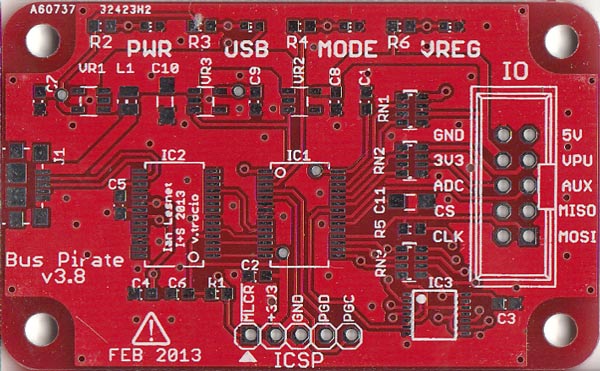
The boards are definitely cheap. $12 USD gets you ten 5 cm by 5 cm boards with 100% e-test and free worldwide shipping. You can even choose from a number of solder mask colors for no additional cost. [Ian] does warn the boards aren’t of the best quality, as you can tell in the Bus Pirate picture above. The silkscreen alignment has some issues, but for $1.2 a board, it’s hard to complain. After all, the site’s motto is “No bull, just crappy PCBs.”

The main downside of this service will be shipping time. While the Chinese fab house cranks out boards in two to four days, Hong Kong Post can take up to 30 days to deliver your boards. This isn’t ideal, but the price is right.

Cordwood Puzzle Kit Without Instructions

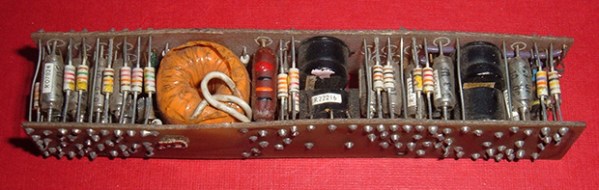
What you see above is a cordwood circuit, an interesting circuit construction technique from before the days of integrated circuits. The circuit consists of two circuit boards arranged parallel to each other with components holding them apart. This was, for its day, the densest circuit construction technique, used in everything from late 50s aerospace tech to huge computers that filled rooms.

The folks over at Boldport have a love for interesting PCBs and are apparently aficionados of antiquated tech, leading them to create their own cordwood circuit. Here’s the best part: it’s a kit, without assembly instructions.

The cordwood puzzle assembles into a bunch of LEDs that will light up when power is applied. Not much, but there’s a few FETs in there that allow you to control them all individually with a microcontroller. The real fun is trying to assemble the kit: both sides of the cordwood circuit are identical, meaning there’s going to be holes that aren’t meant to be filled, components that will need to be soldered, and most likely a bit of swearing.

Still, this is an exceptionally small circuit for something using this construction technique. If you know of a denser and more modern cordwood circuit out there, leave a note in the comments. If you want to know what the kit looks like when it’s built, [Phil Wright] has your back.

Manual Pick And Place

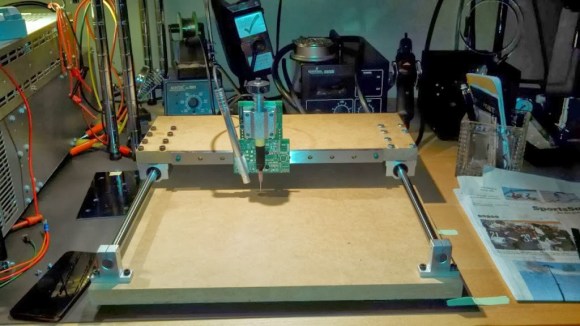
picknplacePopulating a large surface mount PCB can take forever. [craftycoder] from Freeside Atlanta has built a great looking manual pick and place machine, removing the need for tweezers. No more will passives stick to your tweezers while you are trying to place them on your PCB!
We have seen a lot of pick and place machines in the past few years. What makes this one stand out is its simplicity and the no-nonsense build. This pick and place is built on an MDF platform, uses bearings from Amazon, standard 12 mm rails, and has a small camera for a close-up look at your part placement. Sure it is a manual method, but it beats painstakingly placing each part with tweezers. It would be interesting to see how much this entire build cost; we expect that it was not too expensive. See this thing in action in the video after the break.

We hope this project has inspired you to go out and make something cool! If so, let us know what you have made!
Continue reading “Manual Pick And Place” →

The Credit Card Sized GameBoy

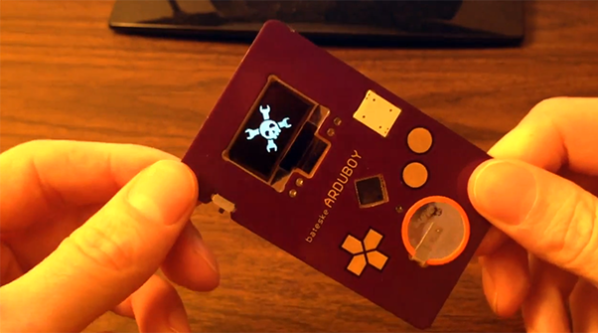
Think you’ve seen every possible type of Arduino based hand held video game? [Kevin] managed to coax something new out of the theme with a very clever credit card sized console that uses some very interesting construction techniques.

The inspiration for this project began when [Kevin] dropped an SMD resistor into a drill hole on a PCB. This resistor fell right through the hole, giving him the idea creating a PCB with milled cutouts made to fit SMD components. With a little experimentation, [Kevin] found he could fit a TQFP32 ATMega328p  – the same microcontroller in the Arduino – in a custom square cutout. The rest of the components including a CR2016 battery and OLED display use the same trick.

The rest of the design involved taking Adafruit and Sparkfun breakout boards, and modifying the individual circuits until something broke. Then, off to Eagle to create a PCB.

[Kevin]’s experiment in extremely unusual PCB design worked, resulting in a credit-card sized “Game Boy” that’s only 1.6 millimeters thick. The controls are capacitive touch sensors and he already has an easter egg hidden in the code; enter the Konami code and the Hackaday logo pops up to the tune of [Rick Astley]’s magnum opus.

Now [Kevin] is in a bit of a bind. He’d like to take this prototype and turn it into a crowd sourced campaign. In our opinion, this “Game Boy in a wallet” would probably do well on a site like Tindie, but any sort of large scale manufacturing is going to be a rather large pain. If you have any wishes, advice, of complaints for [Kevin] he’s got a few links at the bottom of his project page.