DIY PCB Exposure Box Looks Professionally Made

diy_double_sided_exposure_box

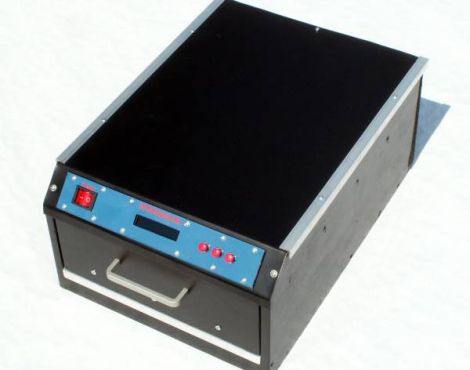
[Stynus] was frustrated with the fact that he would have to flip his PCBs over mid way through the exposure process, so he decided the best course of action would be to build his own double-sided PCB exposure box.

He scored some UV LEDs on eBay, and after waiting a few weeks for PCBs to arrive, he was ready to start construction. The box contains a sliding glass shelf, which is positioned between two sets of LED panels. The setup lets him simultaneously etch both sides of any PCB, up to 20cm x 30cm in size. The exposure box is run by a PIC 16F628P and features an LCD status panel as well as a small handful of controls. [Stynus] programmed the box to retain the length of the last exposure, making it easy to replicate his results time after time.

Towards the end of the build log he shows off some pictures of the completed exposure box, which looks very professionally done. It’s a great job all around, and we would gladly take one for our workshop in a heartbeat.

Shock Yourself To Better Health!

cranial_electrotherapy_stimulation_rig

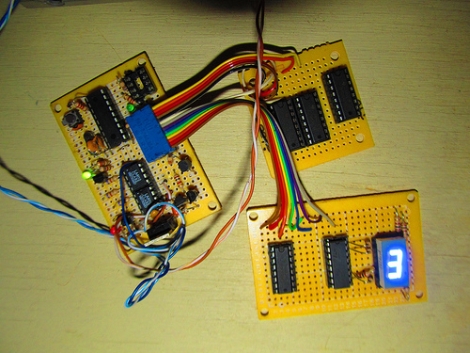
Flickr user [n Bryan] has been keeping busy lately, trying his hand at developing some cranial electrotherapy stimulation instruments for home use. While visions of [Peter Venkman] electrocuting hapless college students initially came to mind, this sort of therapy is not the same thing, nor as painful as what is depicted in the film.

Cranial electrotherapy stimulation relies on small currents which are pulsed along a patient’s skull at specific bioactive frequencies. It is believed that these treatments can have positive responses on the nervous system, and in fact has been approved by the FDA for certain ailments such as insomnia and anxiety. [n Bryan’s] rig is controlled by a PIC 16F88, which generates both the carrier and pre-programmed bioactive frequencies used in electrotherapy sessions.

As with all things that involve strapping electrodes to your head, take caution if you plan on replicating his work in any way, shape or form. With that said, we’d be willing to give it a shot.

[via BuildLounge]

Stretch Your Circuit’s Battery Life By Putting Your PIC To Sleep

pic_power_savings

[Rajendra Bhatt] wrote in to share the latest in a series of PIC tutorials, which covers the microcontroller’s Sleep mode – a very useful tool for limiting current consumption in battery-powered applications.

He discusses how to put the PIC in sleep mode, as well as some common mistakes to watch out for, such as accidentally allowing I/O pins to sink or source current while sleeping. [Rajendra] also walks through the various ways a PIC can be brought out of sleep mode, focusing the majority of his tutorial to the mcu’s watchdog timer.

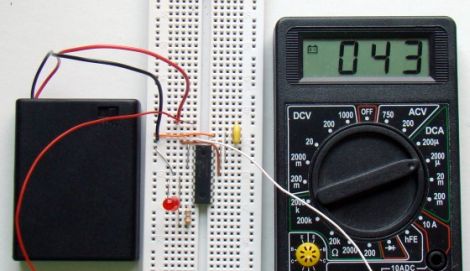
Using a PIC16F628A, he constructs a test circuit which allows him to demonstrate the power savings gained by using sleep mode rather than the microcontroller’s built-in delay function. The circuit simply blinks an LED every 4.3 seconds, using the watchdog timer for the first 2.3 seconds, and a delay() call for the rest of the time.

The power savings are quite substantial, similar to the results we saw using AVR microcontrollers a few weeks ago. [Rajendra] found that using the sleep function limited current consumption to about 4.5% of the current used when calling the mcu’s delay function – a huge savings.

Basic Animatronics Tutorial: PIC Based Servo Eyebrows

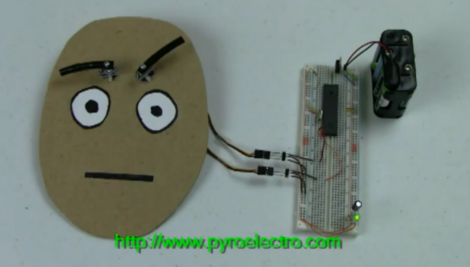
[Chris] writes in to let us know about his latest animatronics tutorial, this time on robotic eyebrows! The tutorial takes us through the process of using a fairly simple PIC  circuit to display various facial expressions. Since a wide array of facial expressions have unique and well understood eyebrow positions this simple hack can make even the most bland looking mask come to life . Animatronics is a subject near and dear to our hearts, but the simple actuation of servos can go much further than cardboard faces. This easy to follow tutorial can help you on your way to controlling all sorts of servo stuff like vent flaps or um…  fish, if you’d like. The software is not very deeply explained but it is commented and available for download from [Chris]’s site.

From here [Chris] plans to expand the project with more tutorials that can help further animate the face. We are particularly interested in the one and two eye systems he mentions, as well as more complicated eyebrow mechanics. Also check out [Chris]’s other servo based robotics tutorials like the Sharpie Spotifier and the Wooden Menace.

There is also a video of the eyebrows in action after the break.

Continue reading “Basic Animatronics Tutorial: PIC Based Servo Eyebrows”

Making The Case For In-circuit Debugging Tools

in_circuit_debugging_of_pic_microcontrollers

If you are in the market for a PIC microcontroller programmer, you may want to consider a model with an In-Circuit Debugger (ICD). [Rajendra] put together a great tutorial on using an ICD when debugging PIC firmware, which makes a pretty convincing argument for owning one.

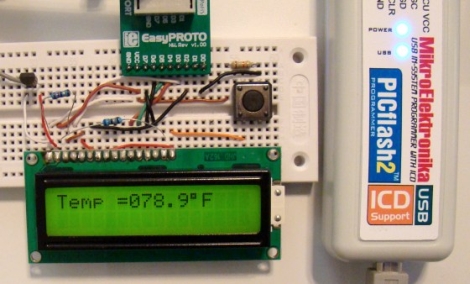
In his tutorial, he happens to be using a MikroElektronika PICflash2, but he says that there are plenty of other ICDs out there if you are not keen on this particular model. The PICflash2 not only acts as an ICD, but as the name suggests it works as an ICSP as well.

[Rajendra] walks us through a short debugging session using some simple code that reads data from an LM34DZ temperature sensor, displaying the results on an LCD screen. While he isn’t actually hunting for bugs, he does show how easy it is to step through the PIC’s code one statement at a time, evaluating variables and registers along the way.

[Rajendra] does point out that using an ICD does occupy a few I/O pins while running, limiting your resources just a bit. We think that being able to debug code as it runs is pretty reasonable tradeoff if you don’t necessarily need each and every pin available for use.

Fonera-based Quadcopter Can Be Controlled From A Web Browser

fonera_html_controlled_quadcopter

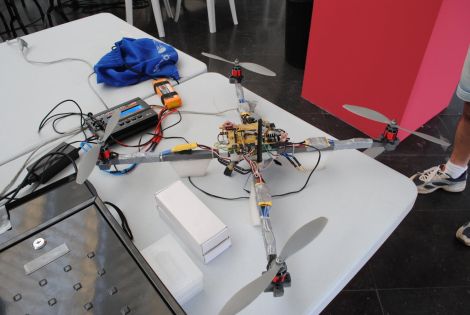
[Tiakson] just wrapped up the construction of a quadcopter which piqued our interest due to the unexpected mix of hardware he used.

A good portion of the copter is made up of the essential bits we have come to expect from a quad rotor system. Instead of using an Xbee or hobby wireless controller however, [Tiakson] opted to use an old Fonera router running OpenWRT to control the system. He wrote special software that allows him to direct the quadcopter using an HTML 5 interface, adding a few kernel tweaks along the way that enabled him to emulate I2C ports over GPIO pins.

The Fonera takes in data from Wii nunchuck and Motion+ sensors, relaying commands to the on-board PIC 16F976 microcontroller. The PIC is used to manage the electronic speed controller modules using PWM, which the Fonera could not handle on its own.

This is a great use for a old router, and the cost is obviously far cheaper than buying off the shelf wireless control modules. We would love to hear how much extra weight the Fonera adds, as well as if there is any controller lag introduced by the web-based interface.

Continue reading to see a quick demo video of the quadcopter in action.

Continue reading “Fonera-based Quadcopter Can Be Controlled From A Web Browser”

Understanding Interrupts In PIC Microcontrollers

Interrupts are the name of the game for more functional microcontroller firmware. [Rajendra] just posted a tutorial covering all of the interrupt types for the PIC 16F688 microcontroller. He gives an overview of all of the major points: what an interrupt is, what causes interrupts, how to read the datasheet (often overlooked) to set up interrupts, and finally he applies it to a test platform and a bit of code.

We’ve been playing around with an Arduino again over the weekend and are a bit frustrated with the restricted access to interrupts. That issue deals with AVR interrupts, a topic with which we’re already well acquainted. But we work with PIC hardware much less often and it’s fun to explore how the other half does things, both in hardware and in code.