Python PIC Useful When Attached To A Computer

[Richard] sent in a link to the Python controlled microcontroller he’s been working on. Unlike the previous portable Python boards we’ve seen, [Richard] thinks his pyMCU isn’t best used autonomously. This board is meant to be used only when connected to a computer and to serve as a bridge between the digital world of computers and our analog world.

We’ve seen boards running lightweight Python interpreters, but we’re fairly intrigued by the idea of this board only being useful when plugged into a computer. The on-board PIC 16F chip has enough digital, analog and PWM pins to just about any task imaginable, and there’s also a 16-pin LCD display header if you’d like some output with your microcontrollers.

[Richard] says he’s been working with PICs for longer than the Arduino is around, but depending on the level of interest he’ll consider developing an Arduino version of the pyMCU. All we know is that the pyMCU would be awesome to teach electronics and programming to the younglings, and we could certainly find a few more uses for the board when they’re done with it.
Kicad Symbol Generating Script Shows Promise

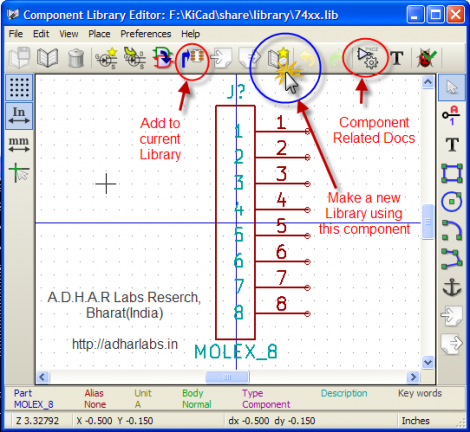
Kicad is a fantastic PCB layout tool. We think creating a part for use with Kicad is in many ways easier than in Eagle, but it never hurts to have a few shortcuts. Here’s a new way to quickly get your parts into the schematic editor. It’s a Python script that generates symbols from an XML input file. You create the XML file with a list of all the pins on your part and the function they will serve. The Python script will then format that as a library file which can be imported by Kicad.

It’s a little bit clunky due to the number of steps in the process. But it is possible to use a CSV file generated in a spreadsheet program to create the XML needed by the script. We’ve used the online component builder ourselves, and appreciate the possibility of mass pin assignments instead of the drop-box for every pin as used by the web interface. One time we were 20 pins into the naming process and accidentally refreshed the page… ugh!

The code is available in their git repository, with a description of the XML format, and a wiki tutorial outlining the component building process. After you give it a try we’d love to hear what you think in the comments.

Web Game Bot Coded With Python

We find the programming challenge of game-playing bots to be fascinating. Take a look at this Python bot which plays Burrito Bison all the way through (video after the break). This is a totally pedantic exercise which has no purpose, other than to hone your mastery of a certain programming problem. And to that we say Bravo!

We looked in on a similar project which used some C# code to dominate the game Bejeweled Blitz. We’re not fantastic at C# and that code was never made public. But [Audionatics] has released this code through Github, and it’s written in Python which is a language in which we’re well versed.

The script monitors pixel locations to use as an input, which [Audionautics] admits is very error-prone. But if everything is setup just right it works like a charm. He’s also using the PyWin package which we believe is what lets the script move the cursor and register button clicks. We think this is really fun, but it make us wonder about the black-hat possibilities. What are the chances this could be turned into a gambling bot? Scary thought, huh?

Continue reading “Web Game Bot Coded With Python”

Python Maps Mouse Movements On An LED Matrix

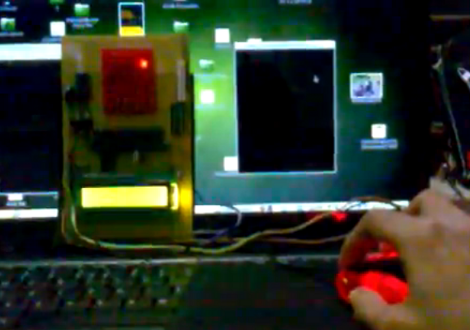
[Vinod Stanur] is working with a mouse input and a microcontroller driven LED matrix. The mouse cursor is tracked inside of a window by Python and the resulting coordinates on the LED grid are illuminated. He calls it an LED matrix “Paint Toy” because one of the features he’s included lets the user create pixel art like in MS Paint.

The 10×8 grid of lights is controlled by a PIC 16F877A. This display orientation is perfect for the 8-bit controller, which uses an array of ten bytes to keep track of the pixel data. A computer running his Python application (which uses the Pygame module to track the mouse movements) communicates with the display board via an RF connection. Five bytes plus a stop character make up the communication packet. The first two bytes contain the coordinates of the cursor, the other three bytes contain mouse button status.

As you can see in the demo after the break, the system is very responsive. The mouse can be moved quickly without latency issues, and if the cursor leaves the tracking window it gets picked up right away when it re-enters.

Continue reading “Python Maps Mouse Movements On An LED Matrix”

Computer-aided Paint Brush

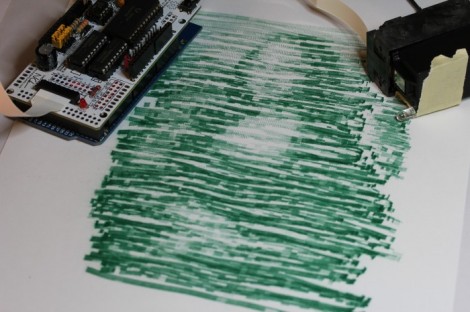
[Nirav] painted this masterpiece by hand… with a little help from a computer. He calls it the semi-automatic paintbrush because you do need to move it over the canvas by hand, but a computer decides when to dispense the ink.

He’s using a piece of hardware we looked at back in September called the InkShield that got a boost from Kickstarter. It’s an Arduino shield that drives an inkjet printer cartridge. The trick is how to know when the cartridge is in position for printing.

The system uses visual processing for that. [Nirav] added an IR led to the cartridge, and uses a camera to extrapolate its position. He actually reused a Python homography module which he had written for use with a projector. That setup was developed as a digital white board, but works just as well for this purpose.

He mentions that results like this won’t be featured in an art museum. But the look is unique, and we’d love to make a set of geeky thank-you notes using the technique.

An Exercise In Servo Voice Control With Android

voice-controlled-android-lock

[Shazin] had some free time on his hands, so he settled in to do something he had been meaning to for a while – learn Android programming. He went an indirect route, and ended up using the Scripting Layer for Android (SL4A), which gave him a head start on the process. Sitting in between the Android API and scripting languages such as Python, SL4A allowed him the ability to apply something he was already familiar with to the Android environment.

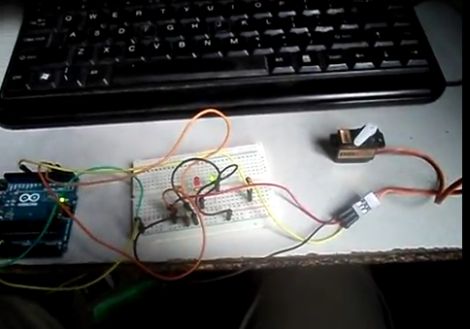
He thought it would be cool to try building a door entry system which relied on voice commands to lock and unlock. Using the Google Voice API for Android and an Arduino, he built a small Python application that allows him to toggle a servo simply by talking into his phone.

The application on his phone communicates with an Arduino over WiFi, once Google Voice has decoded the command [Shazin] is giving. The Arduino controls a servo, which in theory could control the locking mechanism on a door.

After a bit of tweaking and some added security, his proof of concept could definitely come in handy.

Check out the short video below to see [Shazin’s] voice-controlled servo in action.

Continue reading “An Exercise In Servo Voice Control With Android”

Python Powered Sprinkler System Wastes No Water

rain-gauge

One thing that annoyed [Jashua] to no end was hearing his automated sprinkler system kick on in the middle of the night, when it had rained earlier in the day. He wished that his sprinklers were a bit smarter, so he decided to give the system an upgrade.

Rather than pay hundreds of dollars for a more sophisticated automation system, he spent about $45 on supplies and scrounged together some items he had sitting around the house to make a rain-sensing module of his own.

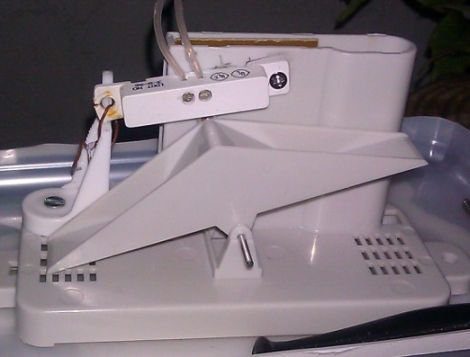
The resulting project, Pysprinklers, uses Python along with a handful of components to better manage his water usage. He got his hands on a cheap rain gauge, and modified it with a game controller and a set of magnetic surface contacts. If there has been a significant amount of rain in the last 24 hours, his system will prevent the sprinklers from turning on. Additionally, if there is rain in the forecast, the sprinklers will be delayed a bit to see if rain makes its way into the area.

We’re all for saving money (and water), so we think [Jashua’s] system looks great, especially because he ended up using a handful of things he already had on hand.