Putting The BBC In Seattle

radio

Among great British traditions, there’s tea, knowing how to lose an empire, tea, Parliament, big ben, tea, incalculable wit, Parliament, big ben, tea, and BBC radio. While Britons in foreign lands may not be able receive BBC radio over the airwaves, there is the remarkable BBC iPlayer that allows online streaming of all those awesome BBC radio stations. Unfortunately, moving away from the Prime Meridian means the BBC radio schedule deviates from the schedule ordained by divine right. In Seattle, for example, a Friday evening comedy would be broadcast in the middle of the afternoon. Basically, it’s like listening to  Prairie Home Companion on Saturday morning. It just feels wrong.

[Adam] came up with a clever solution to this problem. Yes, it’s really just a Raspberry Pi-powered web radio, but there’s a twist to this build: everything from BBC radio is buffered and time shifted. A program that airs at noon in London will now play on [Adam]’s radio at noon in Seattle.

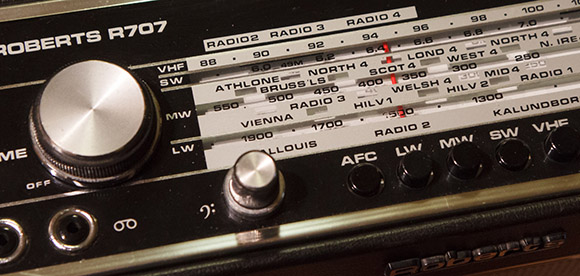
The hardware portion of the build is an exceedingly British radio which [Adam] deftly modified to include an auxiliary input. The software portion of the build uses ffmpeg, mplayer, and a PHP script to stream the iPlayer audio to a file, wait 8 hours (or whatever the offset from GMT is), and start playing the audio.

In the end, the time shifted BBC radio works perfectly, and even caught the attention of a few people at BBC Radio 4. [Adam] was interviewed about his project, and was even able to listen to his interview several hours later.

Portable Audio Rig That Turned Out Great

portable-audio-rig

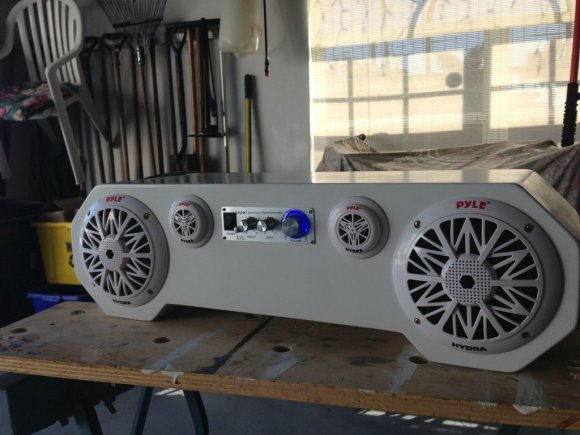
[Michael] wanted a stereo that he could use outside, be it at the beach, beside the pool, or while tailgating. He decided to build this boom box himself, and didn’t cut any corners when it came to a professional looking finish.

Because of the locale in which he plans to use the stereo he went with a set of marine speakers. They’ll have no problem standing up to water, and since they’re used in boats they should also be able to take a beating during transport. To feed it he uses a Lepai T amp which is seen above.

After cutting each piece of the case out of MDF he started working on the openings to receive the components. This involved quite a number of layout lines and some work with a compass to map out the circular openings. He built a recessed panel on the back to interface the power cord for charging. Inside is an 18 Ah battery. A set of switches lets him turn on the charger and choose between powering the amp from battery or from the power cord.

[via Reddit]

Internet Radio Occupies An 80-year-old Radio Case

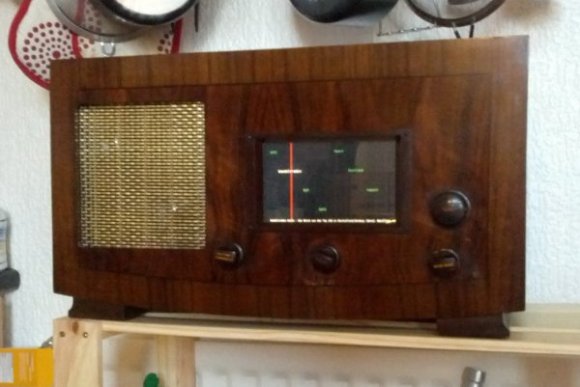
[Florian Amrhein] made use of some old hardware to build his own internet radio in a 1930’s radio case.

The original hardware is a tube-amplified radio which he picked up on eBay. There’s tons of room in there once he removed the original electronics and that’s a good thing because he crammed a lot of new parts into the build. The main one being an old laptop he had on hand. It’s got a 10″ screen which is too large for the opening, but that ended up being okay. He coded an interface with C and SDL which give him a visual representation of his favorite online streams. The knob to the right moves the red line when turned and causes the Debian box to change to the new stream using the Music Player Daemon. Two potentiometers control the tuning and volume, and there is also a rotary encoder which is not yet in use. All three are connected to the laptop via an Arduino.

Check out the finished product in the video after the break. It sounds quite good thanks to the small automotive speaker and amplifier also crammed into the old case.

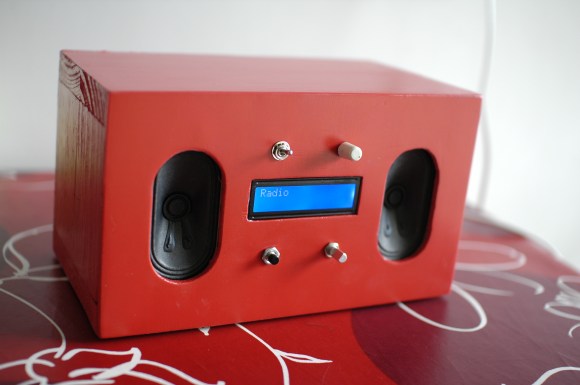
If you don’t have a laptop lying around to use in a project like this consider a microcontroller and character LCD based system.

Continue reading “Internet Radio Occupies An 80-year-old Radio Case”

How To Build Your Own Dedicated Pandora Radio

This mix of modern and retro acts as a standalone Pandora client. It’s certainly a radio upgrade, falling somewhere in between the passive listening of traditional broadcasts, and the complete control of music players that use playlists.

Inside the wooden case a BeagleBoard does most of the work. It’s running Ubuntu 12.04 on which pianobar, a command line interface package for Pandora is running. Those components alone would make a pretty nice listening experience, but since Pandora rolls different music into the mix it’s nice to be able to see what you’re listening to. The four-line LCD is wide enough to display plenty of information. It’s being controlled by a PIC24 microcontroller which also monitors the controls on the top. As you can see in the video after the break, the user interface offers almost everything you could want. It’s easy to switch stations, and you can still register your preferences on each track being played.

Continue reading “How To Build Your Own Dedicated Pandora Radio”

A Laser Audio Transmitter

Here’s a way of transmitting audio that makes it virtually impossible for someone else to listen in. Instead of sending radio waves bouncing all over creation, this uses the focused light of a laser to transmit audio. In the image above you can see the silver cylinder which houses the laser diode. It is focusing the beam on a light dependent resistor to the right which looks almost like a red LED due to the intensity of the light.

The simplicity of this circuit is fascinating. On the receiving end there is no more than the LDR, a 1.5V power source, and a headphone jack. The transmitter is not much more complicated than that. It includes an audio output transformer which boosts the resistance of the audio signal. This increase in resistance ensures that the laser diode modulates enough to affect the LDR on the receiving end. The transmitter uses a 3.3V supply. Check out the video after the break to hear the high quality of audio coming through the setup.

Once you’re done playing around with the transmitter you might try turning the laser into a remote control for your stereo.

Continue reading “A Laser Audio Transmitter”

More Small Radio Modules For Your Wireless Needs

In the never-ending pursuit of cheap wireless communication for your microcontroller projects, [kiu] came up with a small board that allows for serial communication via a 433MHz radio link.

[kiu]’s transceiver uses an RFM12 wireless module available online for just a few dollars. Alongside this module is an ATMega8 and a USB to serial FTDI chip. When [kiu] plugs this board into his computer, he’s able to run a terminal, connect to this board, and receive and transmit hex values at 115,200 bps from another one of these boards.

According to [kiu]’s BOM, 10 boards only cost him 180 Euros, or about $225 USD. Considering off-the-shelf solutions such as an XBee could easily cost twice as much, we’re thinking [kiu] did a very nice job here.

[kiu] put all the board files, schematics, and code up on his GitHub, ready for your perusal. A very cool build, and very useful for a high altitude balloon, rocket, or wireless sensor build.

Controlling A Quadcopter With A Homebrew Remote

When [Matt] started building his multirotor helicopter, he was far too involved with building his craft than worrying about small details like how to actually control his helicopter. Everything worked out in the end, though, thanks to his homebrew RC setup built out of a USB joystick and a few XBees.

After a few initial revisions and a lot of chatting on a multirotor IRC room, [Matt] stumbled across the idea of using pulse-position modulation for his radio control setup.

After a few more revisions, [Matt] settled on using an Arduino Pro Mini for his flight computer, paired with a WiFly module. By putting his multicopter into Ad-hoc mode, he can connect to the copter with his laptop via WiFi and send commands without the need for a second XBee.

Now, whenever [Matt] wants to fly his multicopter, he plugs the WiFly module into his MultiWii board, connects his laptop to the copter, and runs a small Python script. It may not be easier than buying a nice Futaba transmitter, but [Matt] can easily expand his setup as the capabilities of his copter fleet grows.

Video of [Matt]’s copter in flight after the break.

Continue reading “Controlling A Quadcopter With A Homebrew Remote”