A Simple Fix To Resurrect Your Broken Iclicker

simple_iclicker_battery_fix

If you are currently attending college, the odds are that you are familiar with iclicker classroom remotes. If you have one of these, you might also be aware that they tend to be flaky at times, particularly when it comes to powering on. [Todd] received a few “broken” iclickers lately and has found an easy to fix design issue that might possibly save yours (and others) from the trash heap.

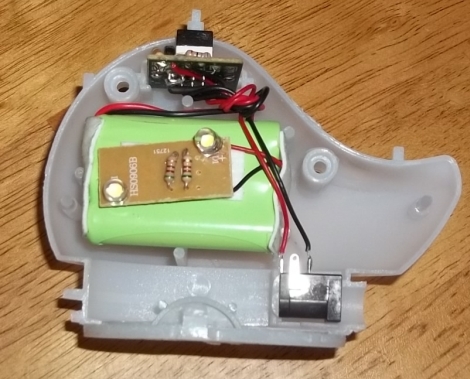
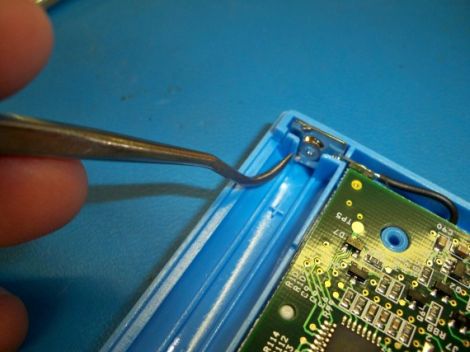
When he started pulling the units apart to diagnose them, he noticed that something with the battery contacts was not quite right. They are held in place by the device’s plastic shell which is pretty common, however in the iclicker, the portion of the plastic case that holds the positive battery contact is too big, preventing some batteries from making a complete circuit.

Now you might be thinking to yourself that AA batteries are all the same, but they are not necessarily created equal. Through a small bit of testing, [Todd] found that many different batteries experienced intermittent connectivity issues depending on the height of the positive terminal, and that due to their design, Duracell batteries flat out didn’t work. With the careful removal of a portion of the plastic surrounding the positive contact, [Todd] was able to fix each of his “broken” remotes.

He hopes that this information helps some people resurrect their non-functioning units, because a few minutes work sure beats buying another $30 iclicker.

Repairing An Old Pick And Place Machine

repairing_juki_placemat_360

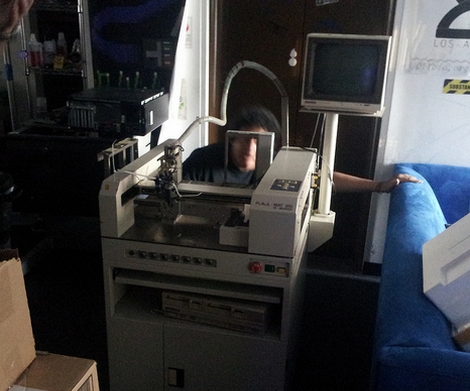
Professional-grade pick and place machines are quite pricey, so when the crew at Null Space Labs picked up an old Juki Placemat 360 for only $1,200, they were stoked. When they finally got it in-house however, they realized that the seller’s definition of “working” was a bit different than theirs. The machine’s compressor is busted, and there are all sorts of other bits that require some TLC before they can get things up and running again. They have put together a “build log” showing off their work as the machine is taken from an ancient, mostly-working relic to a lean, mean, picking and placing machine.

So far, they have torn the thing down and inspected the upgrades and damage the machine has been subjected to over the years. The crew started making a few small repairs, and have even replaced the unit’s laser with machine vision, which seems to be working well thus far during testing.

While you might not have any similar machinery in your workshop, it’s still fun to watch as they tear it down and revamp it, bit by bit.

Who Knew Thinkpad Batteries Require A Jump Start?

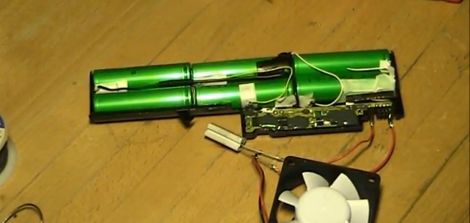
Lithium battery packs reaching the end of their life usually have a lot of kick left in them. That’s because they’re made up of multiple cells and it only takes the failure of one to bork the entire battery. One of the most interesting examples we’ve heard of this is in the Toyota Prius, but that’s a story for another time. In this case, [Mika] wanted to resurrect the battery from his IBM Thinkpad T40. He identified the offending cell and replaced it, but couldn’t get any juice out of the battery after the repair.

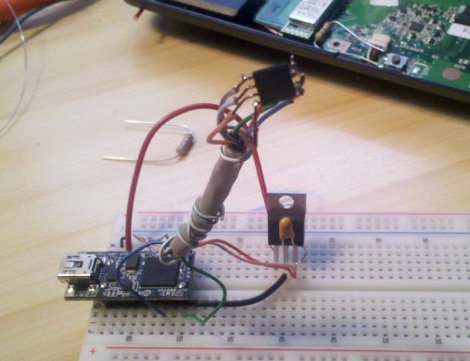
He was measuring 0V on the output, but could measure the cells instead of the control circuitry and was getting over 11V. Clearly, the control circuit wasn’t allowing an output. We completely understand the concept here (think about that really bad press about exploding laptop batteries). It seems there’s a lockout mechanism when the control circuit loses power. [Mika] managed to get past this by shorting voltage into the control circuit, a method he likes in the video after the break to jump starting a car.

We’ve seen similar cell replacement for power tools, like a Dremel or a Makita drill.

Continue reading “Who Knew Thinkpad Batteries Require A Jump Start?”

Power Tool Battery Charger Repair

drill_battery_charger_repair

[Webby] inherited a cordless drill from his dad and when he finally got around to using it, found that the charger was dead in the water. He disassembled it and narrowed the issue down to the charger’s primary transformer, but didn’t know where to go from there. A friend suggested that the coil’s thermal fuse might have blown, and upon further investigation, [Webby] discovered that his friend was right.

He removed the dead fuse and soldered in a piece of wire just for testing – not surprisingly the charger sprang to life. He picked up a new thermal fuse to replace the old one, but he wasn’t quite satisfied with the fix just yet. If the fuse burned out once already, there’s little to stop it from happening again, so he decided that installing a small cooling fan would be a good idea. He mounted the fan on the outside of the case after cutting some vent holes, leeching power from the charger itself.

While simply adding a fan to the charger might not be everyone’s idea of a perfect solution, it has worked out quite well for [Webby] in the past, so if it isn’t broken…

[via HackedGadgets]

Bypassing Manufacturer-imposed Battery Lockouts

sony_battery_cell_swapping

When [Barret] went to use his camera the other day it kept shutting down on him, and upon inspecting the battery, he found that it was a bit swollen. Knowing that he needed a replacement, he turned to an aftermarket battery he had sitting around, but grew pretty annoyed when his Sony Cybershot camera would not accept it.

Apparently a recent firmware update causes his camera to reject non-Sony batteries, a situation he describes as “battery DRM”. There was no way he was going to pony up another $50 to Sony instead of using the perfectly good $10 battery he already had, so he decided to rectify the issue himself.

He stripped both batteries of their plastic coatings, revealing the lithium cells and their charging circuits. He desoldered the PCB from his Sony battery, transplanting it to his aftermarket battery after a little bit of trimming. He wrapped everything up with some tape and gave his franken-battery a spin. It worked a treat, and he was so satisfied with it that he did a similar swap in his aging Logitech mouse.

As more and more companies lock competitors out of the user-replaceable consumables market, these sorts of hacks are certain to become more and more prevalent.

Bringing An IWallet Back To Life

iwallet_bluetooth_hack

The iWallet is a slick little device if you’ve got a big wad of cash burning a hole in your pocket. The $600 price tag was a little much for [cmw] to swallow, so he bought a water damaged iWallet on eBay with hopes of repairing it. Once took a close look, he knew that repairing it was a lost cause, so he decided to hack it instead.

He pulled out most of the wallet’s electronics save for the motor that opens the device, and replaced the damaged parts with his own. He installed an Arduino pro as well as a Bluetooth module, powering the pair with a small rechargeable LiPo battery. The iWallet’s fingerprint reader was then replaced with a series of LEDs that show the device’s Bluetooth connectivity status.

[cmw] can now connect his wallet to his phone, issuing unlock commands via Bluetooth. If you don’t want to fork out the cash, his version is nearly as good as the real thing.

Continue reading to see a quick video of [cmw’s] iWallet hack in action.

Continue reading “Bringing An IWallet Back To Life”

Replacing Non-standard USB Charging Ports

htc_charging_port_replacement

While many mobile phone manufacturers are moving towards the micro-USB interface as a standard, others such as Apple and HTC are still bucking the trend. Part of [arto’s] job includes repairing mobile phones, and last month he found himself faced with a pair of broken HTC handsets that needed their charging ports replaced.

Replacements for HTC’s proprietary connectors are apparently quite hard to find, and [arto] says he had to source them from an HTC repair center. With the proper parts in hand, he could finally get down to work.

The HTC Hermes handset he repaired was a breeze, as it had plenty of space available around the charging port. He said that this allowed him to replace the jack pretty easily, but the HTC Touch Dual was a mess in comparison. He started by removing the old adapter, which was done by cutting it out bit by bit. He says that he did it this way rather than desoldering, due to its proximity to other heat-sensitive components. After some careful soldering under a microscope, everything was back in working order.

While his repairs are not necessarily the things that hacks are made of, the information is still quite helpful. Broken charging ports are extremely common among smart phones, and with plenty of these older models still floating around, his pointers just might help someone save a few bucks on a replacement phone.