Knowing That It Is Possible

We like to think that we can do almost anything. Give me a broken piece of consumer electronics, and I’ll open it up and kick the capacitors. Give me an embedded Linux machine, and I’ll poke around for a serial port and see if it’s running uboot. But my confidence suddenly pales when you hand me a smartphone.

Now that’s not to say that I’ve never replaced a broken screen or a camera module with OEM parts. The modern smartphone is actually a miracle of modularity, with most sub-assemblies being swappable, at least in principle, and depending on your taste for applying heat to loosen up whatever glue holds the damn things together.

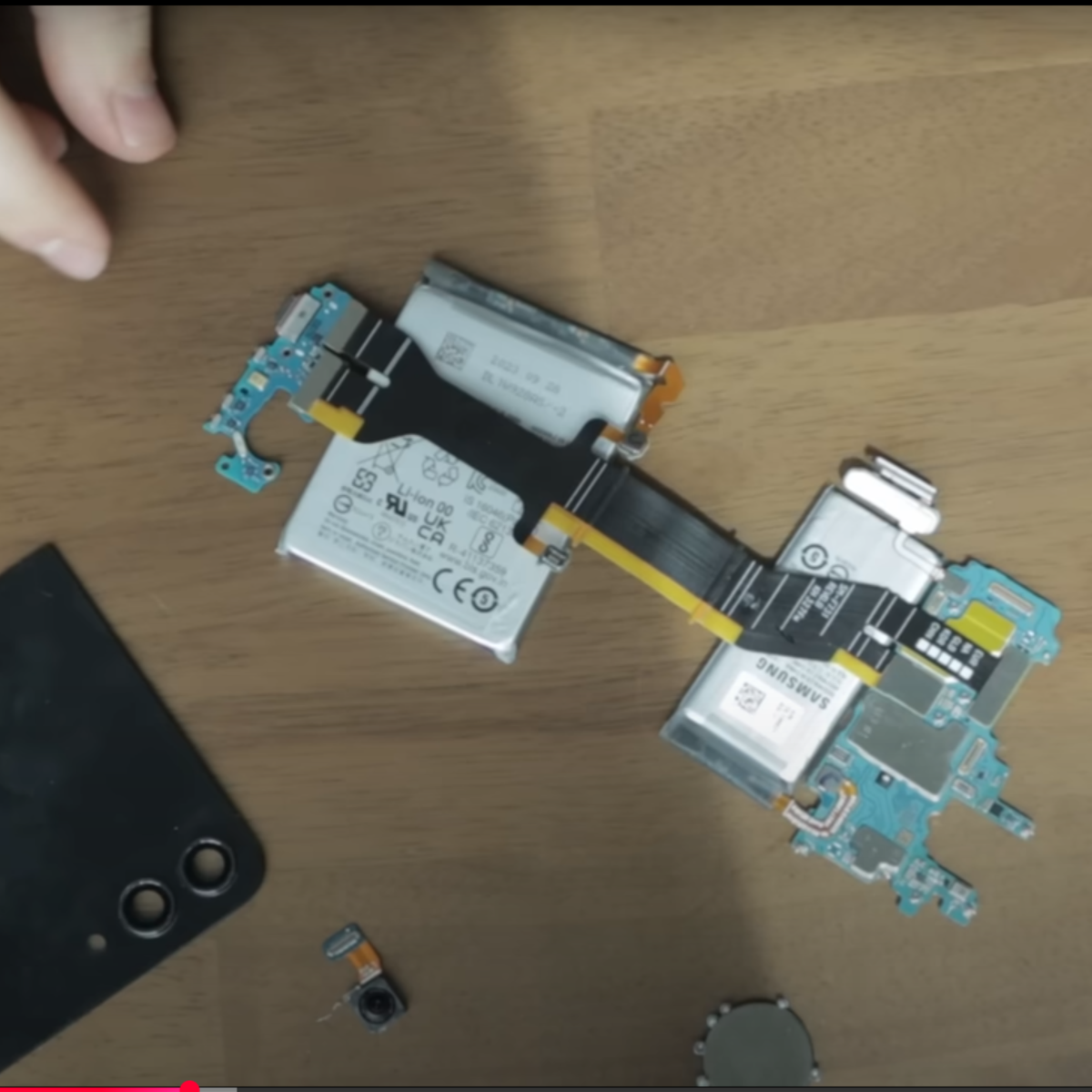
But actually doing hardware hacking on smartphones is still outside of my comfort zone, and that’s a shame. So I was pretty pleased to see [Marcin Plaza] attempt gutting a smartphone, repackaging it into a new form factor, and even adding a new keyboard to it. The best moment in that video for me comes around eight minutes in, when he has completely disassembled all of the modules and is laying them out on his desk to see how little he needs to make the thing work. And the answer is batteries, motherboard, USB-C, power button, and a screen. That starts to seem like a computer build, and that’s familiar turf.

That reminded me of [Scotty Allen]’s forays into cell-phone hackery that culminated in his building one completely from parts, and telling us all about it at Supercon ages ago. He told me that the turning point for him was realizing that if you have access to the tools to put it together and can get some of the impossibly small parts manufactured and/or assembled for you, that it’s just like putting a computer together.

So now I’ve seen two examples. [Scotty] put his together from parts, and [Marcin] actually got a new daughterboard made that interfaces with the USB to add a keyboard. Hardware hacking on a cellphone doesn’t sound entirely impossible. You’d probably want a cheap old used one, but the barrier to entry there isn’t that bad. You’ll probably have to buy some obscure connectors – they are tiny inside smartphones – and get some breakout boards made. But maybe it’s possible?

Anyone have more encouragement?

Self-Hosting A Cluster On Old Phones

The phones most of us carry around in our pockets every day hold a surprising amount of computing power. It’s somewhat taken for granted now that we can get broadband in our hands in most places; so much so that when one of these devices has reached the end of its life it’s often just tossed in a junk drawer even though its capabilities would have been miraculous only 20 years ago. But those old phones can still be put to good use though, and [Denys] puts a few of them back to work running a computing cluster.

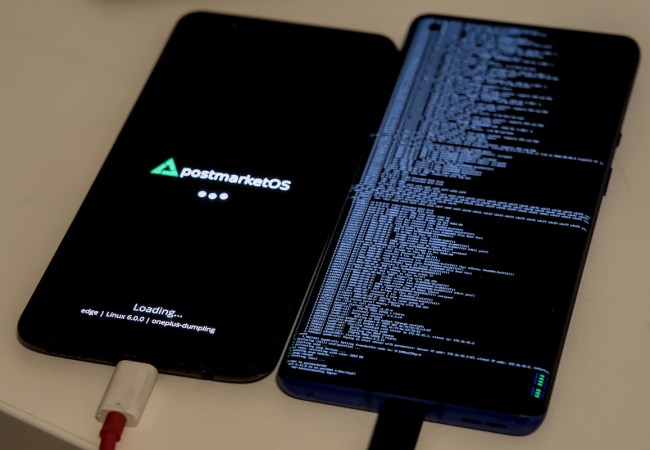
Perhaps the most significant flaw of smartphones, though, is that most of them are locked down so much by their manufacturers that it’s impossible to load new operating systems on them. For this project you’ll need to be lucky enough (or informed enough) to have a phone with an unlockable bootloader so that a smartphone-oriented Linux distribution called postmarketOS can be installed. With this nearly full-fledged Linux distribution to work from, the phones can be accessed by ssh and then used to run Kubernetes for the computing cluster. [Denys] has three phones in his cluster that run a few self-hosted services for him.

[Denys] also points out in his guide that having a phone that can run postmarketOS might save some money when compared to buying a Raspberry Pi to run the same service, and the phones themselves can often be more powerful as well. This is actually something that a few others have noted in the past as well. He’s gone into a considerable amount of detail on how to set this up, so if you have a few old smartphones gathering dust, or even those with broken screens or other physical problems where the underlying computing resources are still usable, it’s a great way to put these machines back to work.

Thanks to [mastro Gippo] for the tip!

Metal Detector Built With Smartphone Interface

If you think of a metal detector, you’re probably thinking of a fairly simple device with a big coil and a piercing whine coming from a tinny speaker. [mircemk] has built a more modern adaptation. It’s a metal detector you can use with your smartphone instead.

The metal detector part of the project is fairly straightforward as far as these things go. It uses the pulse induction technique, where short pulses are fired through a coil to generate a magnetic field. Once the pulse ends, the coil is used to detect the decaying field as it spreads out. The field normally fades away in a set period of time. However, if there is metal in the vicinity, the time to decay changes, and by measuring this, it’s possible to detect the presence of metal.

In this build, an ESP32 is in charge of the show, generating the necessary pulses and detecting the resulting field. It’s paired with the usual support circuitry—an op-amp and a few transistors to drive the coil appropriately, and the usual smattering of passives. The ESP32 then picks up the signal from the coil and processes it, passing the results to a smartphone via Bluetooth.

The build is actually based on a design by [Neco Desarrollo], who presents more background and other variants for the curious. We’ve featured plenty of [mircemk]’s projects before, like this neat proximity sensor build. Continue reading “Metal Detector Built With Smartphone Interface”

Measuring A Well With Just A Hammer And A Smartphone

What’s the best way to measure the depth of a well using a smartphone? If you’re fed up with social media, you might kill two birds with one stone and drop the thing down the well and listen for the splash. But if you’re looking for a less intrusive — not to mention less expensive — method, you could also use your phone to get the depth acoustically.

This is a quick hack that [Practical Engineering Solutions] came up with to measure the distance to the surface of the water in a residential well, which we were skeptical would work with any precision due to its deceptive simplicity. All you need to do is start a sound recorder app and place the phone on the well cover. A few taps on the casing of the well with a hammer send sound impulses down the well; the reflections from the water show up in the recording, which can be analyzed in Audacity or some similar sound editing program. From there it’s easy to measure how long it took for the echo to return and calculate the distance to the water. In the video below, he was able to get within 3% of the physically measured depth — pretty impressive.

Of course, a few caveats apply. It’s important to use a dead-blow hammer to avoid ringing the steel well casing, which would muddle the return signal. You also might want to physically couple the phone to the well cap so it doesn’t bounce around too much; in the video it’s suggested a few bags filled with sand as ballast could be used to keep the phone in place. You also might get unwanted reflections from down-hole equipment such as the drop pipe or wires leading to the submersible pump.

Sources of error aside, this is a clever idea for a quick measurement that has the benefit of not needing to open the well. It’s also another clever use of Audacity to use sound to see the world around us in a different way.

Continue reading “Measuring A Well With Just A Hammer And A Smartphone”

MikroPhone – Open, Secure, Simple Smartphone

Modern smartphones try and provide a number of useful features to their users, and yet, they’re not exactly designed with human needs in mind. A store-bought smartphone will force a number of paradigms and features onto you no matter whether you want them, and, to top it off, it will encroach on your privacy and sell your data. It’s why self-built and hacker-friendly smartphone projects keep popping up, and the MikroPhone project fills a new niche for sure, with its LTE connectivity making it a promising option for all hackers frustrated with the utter state of smartphones today.

MikroPhone is open-source in every single aspect possible, and it’s designed to be privacy-friendly and easy to understand. At its core is a SiFive Freedom E310, a powerful RISC-V microcontroller – allowing for a feature phone-like OS that is easy to audit and hard to get bogged down by. You’re not limited to a feature phone OS, however – on the PCB, you will find a slot for an NXP i.MX8M-based module that can run a Linux-based mobile OS of your choice. MikroPhone’s display and touchscreen are shared between the Linux module and the onboard MCU, a trick that reminds us of the MCH2022 badge – you get as much “smartphone” as you currently need, no more, no less.

The cool features at MikroPhone’s core don’t end here. The MikroPhone has support for end-to-end encrypted communications, kept to its feature-phone layer, making for a high bar of privacy protection – even when the higher-power module might run an OS that you don’t necessarily fully trust. Currently, MikroPhone is a development platform, resembling the PinePhone’s Project Don’t Be Evil board back when PinePhone was just starting out, and just like with PinePhone, it wouldn’t be hard to minify this platform into a pocket-friendly form-factor, either. The PinePhone has famously become a decent smartphone replacement option in the hacker world, even helping kick off a few mobile OS projects and resulting in a trove of hacks to grace our pages.

Digital Audio Workstation In A Box

Although it’s still possible to grab a couple of friends, guitars, and a set of drums and start making analog music like it’s 1992 and there are vacant garages everywhere yearning for the sounds of power chords, the music scene almost demands the use of a computer now. There are a lot of benefits, largely that it dramatically lowers the barrier to entry since it greatly reduces the need for expensive analog instruments. It’s possible to get by with an impressively small computer and only a handful of other components too, as [BAussems] demonstrates with this tiny digital audio workstation (DAW).

The DAW is housed inside a small wooden box and is centered around a Behringer JT-4000 which does most of the heavy lifting in this project. It’s a synthesizer designed to be as small as possible, but [BAussems] has a few other things to add to this build to round out its musical capabilities. A digital reverb effects pedal was disassembled to reduce size and added to the DAW beneath the synthesizer. At its most basic level this DAW can be used with nothing but these components and a pair of headphones, but it’s also possible to add a smartphone to act as a sequencer and a stereo as well.

For a portable on-the-go rig, this digital audio workstation checks a lot of the boxes needed including MIDI and integration with a computer. It’s excellent inspiration for anyone else who needs a setup like this but doesn’t have access, space, or funds for a more traditional laptop- or desktop-centered version. For some other small on-the-go musical instruments we recently saw a MIDI-enabled keyboard not much larger than a credit card.

Raspberry Pi Becomes Secure VPN Router

OpenWRT is a powerful piece of open-source software that can turn plenty of computers into highly configurable and capable routers. That amount of versatility comes at a cost, though; OpenWRT can be difficult to configure outside of the most generic use cases. [Paul] generally agrees with this sentiment and his latest project seeks to solve a single use case for routing network traffic, with a Raspberry Pi configured to act as a secure VPN-enabled router configurable with a smartphone.

The project is called PiFi and, while it’s a much more straightforward piece of software to configure, at its core it is still running OpenWRT. The smartphone app allows most users to abstract away most of the things about OpenWRT that can be tricky while power users can still get under the hood if they need to. There’s built-in support for Wireguard-based VPNs as well which will automatically route all traffic through your VPN of choice. And, since no Pi router is complete without some amount of ad blocking, this router can also take care of removing most ads as well in a similar way that the popular Pi-hole does. More details can be found on the project’s GitHub page.

This router has a few other tricks up its sleeve as well. There’s network-attached storage (NAS) built in , with the ability to use the free space on the Pi’s microSD card or a USB flash drive. It also has support for Ethernet and AC1300 wireless adapters which generally have much higher speeds than the built-in WiFi on a Raspberry Pi. It would be a great way to build a guest network, a secure WiFi hotspot when traveling, or possibly even as a home router provided that the home isn’t too big or the limited coverage problem can be solved in some other way. If you’re looking for something that packs a little more punch for your home, take a look at this guide to building a pfSense router from the ground up.