Finally, TI Is Producing Simple, Cheap WiFi Modules

Ever responsive to the hobbyist market, Texas Instruments is releasing a very inexpensive, very simple WiFi module specifically designed for that Internet of Things.

The TI SimpleLink TI CC3000 WiFi module is a single-chip solution to putting 802.11b/g WiFi in just about every project you can dream up. Just about everything needed to put the Internet in a microcontroller is included in this chip – there’s a TCP/IP stack included on the chip, along with all the security stuff needed to actually connect to a network.

The inexpensive micocontroller WiFi solutions we’ve seen – including the very cool Electric Imp – had difficult, or at least odd, means of putting WiFi credentials such as the SSID and password onto the device. TI is simplifying this with SmartConfig, an app running on a phone, tablet, or PC that automagically takes care of setting up a link in a wireless network.

Best of all, the CC3000 only costs $10 in quantities of 1000. Compare that to other Internet of Things WiFi solutions, and it looks like we might be seeing and easy and cheap way to connect a project to the internet this year.

Cheap Biquad Antenna Extends LAN Between Apartments

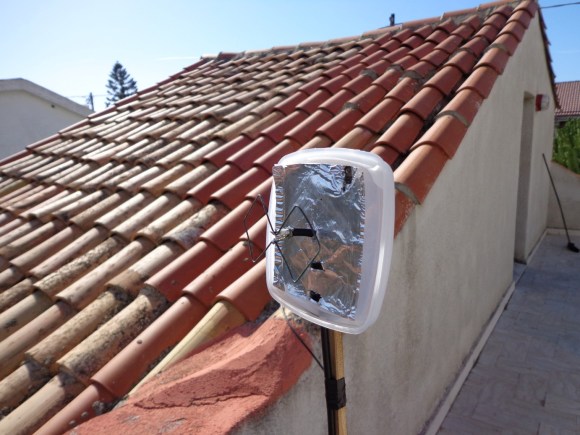
[Danilo Larizza] is sharing a network connection between a couple of apartments. They are not far apart, but they are also not right next to each other so a set of external antennas is necessary. He built this 2.4 GHz biquad antenna on the cheap (translated) just to test if it improved the signal before he tried to buy a proper antenna. It turns out to work well enough that this is all that he needs.

The antenna itself is about one meter of thick wire bent into two squares which are 31mm on each side. The coaxial cable going to the router connects to the center portion of this antenna. For a bit better directional reception he added some tin foil as a reflector. Since this is outdoors he used a food storage container for protection (the antenna is mounted to the lid, the body has been removed for this picture). The whole things is perched on a stake in a flower pot with proper line of sight to the other antenna.

We’ve seen a very similar design used for an NRF 24L01+ radio. If you need more details that [Danilo] posted that would be a good project to study.

Injecting Power Into A WiFi Dongle For The Raspberry Pi

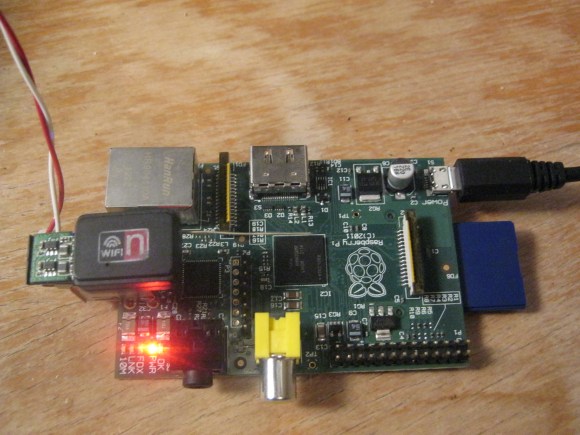
So the Raspberry Pi sometimes doesn’t have the juice needed to run power-hungry USB dongles. The most common issue is with WiFi adapters. The solution has long been to use a powered USB hub, but [Mike Worth] didn’t want to take up that much extra space. The solution he worked out injects power directly into the dongle itself.

The red and white wires coming out of the side provide the 5V source. This is coming from the same USB mains power adapter that supplies the RPi board itself. To connect the wires to the dongle he made an adapter out of some strip board and the shielding from the dongle. The end of the strip board pokes out of the shielding far enough for him to solder on some wire, which is then soldered to the traces on the dongle’s PCB.

You can just plug this in and get down to business. But while he was at it [Mike] added an improvised antenna for better reception. It’s the same type of hack we saw him use for a Bluetooth dongle in this links post.


Outlet Charging Station Retrofitted With The Guts Of A WiFi Router

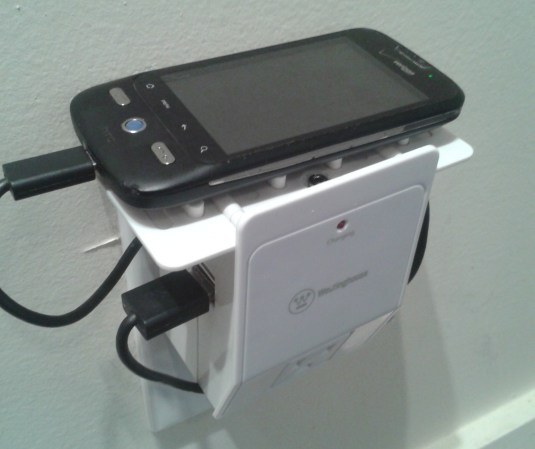
While wandering around the aisles of his local electronics store this Westinghouse USB charging station caught [James’] eye. He sized it up and realized it would make the perfect enclosure for a small WiFi router. And so began his project to turn a TP-Link TL-WR703N into a DIY Pwn Plug.

The basic idea is to include hidden capabilities in an otherwise normal-looking device. For instance, take a look at this ridiculously overpriced power strip that also happens to spy on your activities. It doesn’t sound like [James] has any black hat activities planned, but just wanted an interesting application for the router.

He removed the original circuit board from the charging station to make room for his own internals. He inserted a cellphone charger to power the router, then desoldered the USB ports and RJ-45 connector for the circuit board to be positioned in the openings of the case. He even included a headphone jack that breaks out the serial port. There’s a lot of new stuff packed into there, but all of the original features of the charging station remain intact.

An Umbrella Stand That Tells You The Weather Forecast

This project takes an umbrella stand and gives it the ability to let you know if you need to take an umbrella when you leave the house. The image above is a concept drawing, but a first prototype was built and seems to work quite well. See for yourself in the video after the break.

The project was put together by openPicus. They sell a prototyping module called the Flyport which provides a WiFi connection to your projects. This board connects to a set of LEDs which are used to illuminate the translucent plastic umbrella stand. But you might not notice the color change if the LEDs were always on. Also designed into the system is a PIR motion sensor. When you walk toward the door to leave for the day it switches on the appropriate color — green for clear, blue for raining, and red for storming — catching your attention in time to grab an umbrella as you pass by.

You don’t need to spend a bundle to pull off a hack like this. You can scavenge for a PIR sensor, use one color of LEDs just to tell you when rain or storms are forecast, and an ENC28J60 is a cheap and easy Ethernet alternative to using WiFi.

Continue reading “An Umbrella Stand That Tells You The Weather Forecast”

Nikon WU-1a WiFi Dongle Hacking

Here’s a pretty tricky piece of consumer electronics reverse engineering. [Joe Fitz] came across the Nikon WU-1a. It’s a dongle that plugs into a Nikon D3200 camera, producing a WiFi connection which can be picked up and controlled from a smart phone. The app shows you the current image from the viewfinder, allows you to snap the picture, then pulls down the picture afterwards. The problem is that the same functionality for his D800 camera will cost him $1200, when this dongle can be had for $60. That’s a powerful incentive to find a way to use the WU-1a with his camera model. This is more than just rerouting some wires. It involves sniffing the USB traffic and drilling down in the datasheets for the chips used in the hardware. We’re not certain, but he may have even rolled new firmware for the dongle.

Details are a bit scarce right now. Your best bet is to watch the video embedded after the break. There is also a set of slides which [Joe] put together for a talk at this weekend’s BsidesPDX. It will give you a general overview of the process he went through. But he also started a forum thread and we hope to learn much more from that as the conversation gets going.

Continue reading “Nikon WU-1a WiFi Dongle Hacking”

Android Hack: Cracking WiFi Passwords With Your Phone

The WiFi adapter in your laptop has a special mode – monitor mode – that can be used to listen in on WiFi traffic and, with a little patience, can be used to crack a WEP password. Surprisingly, this monitor mode can’t be found on any Android device due in part to the limitations of the hardware. A group of three researchers, [Ruby], [Yuval], and [Omri], decided to spend their vacation adding monitor mode to their Android smartphones, allowing for a much more portable version of WiFi pwnage tools.

The phones used by the researchers – the Nexus One and Galaxy S II – used Broadcom chipsets that didn’t support monitor mode. To get around this limitation and allow the OS to see full 802.11 frames the team needed to reverse engineer the firmware of this Broadcom radio chip.

The team has released a firmware update for the bcm4329 and bcm4330 chipsets found in the Nexus One and Galaxy S II. The update may work for other phones with the same chipset, but don’t take our word on that.

There’s still a lot of work [Ruby], [Yuval], and [Omri] need to do. They’d like to add packet injection to their firmware hack, and of course create an APK to get this into the wild more easily.

If you have experience with kernel development and would like to help out, send the team an email. The source can be found at google code  if you’d like to play around with it.