Android Talks Pulsewave

Serial communications are a mainstay of digital computing. They don’t require much physical infrastructure and they exist in variations to fit almost any application. The behaviour of serial communications lines, varying from high to low voltage in a timed pattern, is analogous to a 1-bit DAC. Using a whole DAC for serial communication would be a waste in most cases, but the [RobotsEverywhere] team found an exception which you may have encountered already.

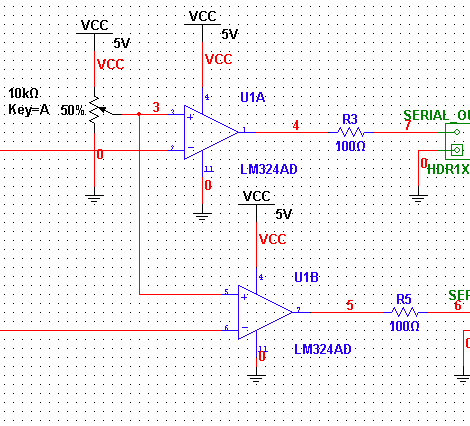
Since the audio output of the Android is accessible and addressable, [RobotsEverywhere] wrote source code to use the left and right channels as separate serial communication lines. This circumvents the need to bust into the device and muck about with the hardware which is great if you want a no-risk hack that allows communications to an RS232 port. Any hardware on which you can write to the DAC (and control the sampling rate) is a potential target.

There are some external electronics required to convert the audio signal to TTL, but it’s not very complicated–a couple of comparators and change. You can see it in action after the break.

As a bonus, when you’re done for the day you can plug in your headphones and listen to the soothing poetry of pulse waves all night long.
Continue reading “Android Talks Pulsewave”

Beginner Concepts: LEDs And Laws

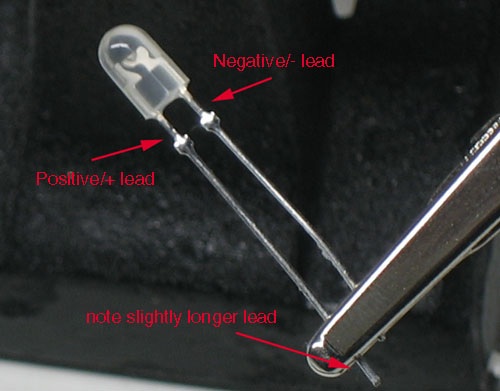
Adafruit has a new LED tutorial for people wanting to get started with electronics. It is full of useful diagrams, pictures, and quizzes to help make sure you are understanding the concepts. This is the real basic stuff here: LEDs, resistors, and the laws from Kirchhoff, and Ohm. It starts out explaining the parts of an LED. Then variations of LEDs: illumination versus indication, clear versus diffused, brightness, color, and size. The mass of the tutorial covers how and why an LED’s brightness can be changed by a resistor and why a resistor is needed to keep an LED from burning out. Such as how Kirchhoff’s Voltage Law works with Ohm’s Law to help you determine the proper resistor for an LED. If you found useful the other beginner concepts posts about Analog Circuits and Electronics basics from the Giz, you should find this tutorial to be useful.

Propeller And Machine Gun Timing

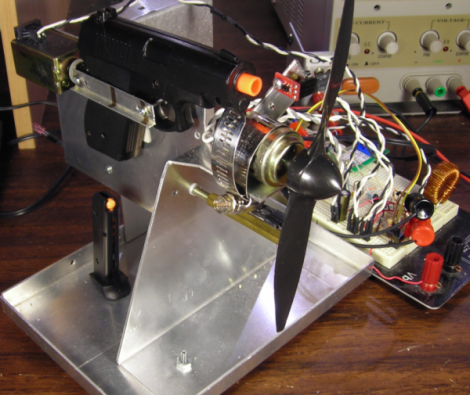
[Matt] was looking for a challenge. Inspired by the machine gun setups on World War I planes he wanted to make a gun that can shoot between the blades of a spinning propeller. The original guns used an interrupter gear that synchronized machine gun firing with the engine mechanically. [Matt] set out to do this using a microcontroller.

To make this work there are two important pieces of information; how fast is the propeller spinning right now, and how long does it take for the pellet to pass the blade? [Matt] used an oscilloscope and some infrared sensors to establish the firing delay at about 20-22ms. Another sensor shows the propeller is spinning at 500 RPMs, with some simple calculations showing that there is indeed a big enough window of time to fire between the blades. After testing with a visible LED and then building out the rest of the circuitry he accomplished his goal. He even added a test function that purposely hits the blades just to see how accurate the system was. We hope this shows up in a Red Baron RC replica, or other flying arsenal.

[via Hacked Gadgets]

Solderless Drawdio Terminally Implemented

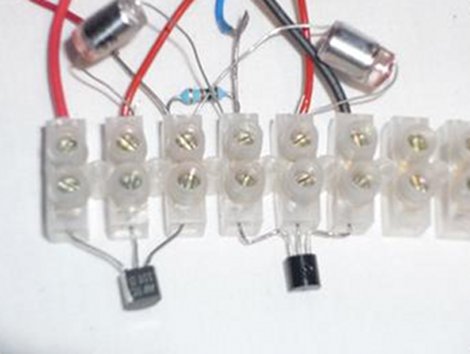
So you’re stuck in a boring class and you can’t fight off the urge to hack something, even your pencil, to pass the time. Maybe you are performing a live electronics show and you drop your synth down a flight of stairs and all that you are left with is a handful of components, a screw terminal block and a pencil. There are thousands, perhaps millions of these kinds of situations and for each one the answer is the solderless drawdio clone by [Martin].

You may have seen the original Drawdio here before, a fun piece of technology that is simple enough to recreate. This latest approach would make an excellent introductory project for a hacking workshop seeing as the guide is straightforward and the lack of soldering would make logistics so much easier. The results are very similar to the original–check the video after the break. Continue reading “Solderless Drawdio Terminally Implemented”

ROS Turns Three

Turtles!

Since its first debut three years ago, ROS has been gaining some popularity with the robotics folks.  It’s behind the scenes of those impressive quadcopters you may remember from a while back.  ROS helps abstract the lower level functions of a robot by supplying lots of code for commonly used components (wiimote for example). Being an “operating system”  it comes with lots of nice features you would expect, like a package manager.  It’s open source and many of their projects are well documented making it easy get started.

Check out the video after the break to see it in action Continue reading “ROS Turns Three”

Debounce Code – One Post To Rule Them All

Last month we asked you to send in your debounce code. You didn’t disappoint and it’s time to share the code received. There were some guideline for sending in code so if you don’t see yours here, it probably didn’t follow the rules, sorry. We also tried to weed out code that using delay loops for debounce. These tend to be a poor way to handle inputs because they monopolize the processor.

We wanted to add upvote/downvote buttons to each set of code to give some idea of a group consensus on code quality but there’s no good system available for multiple up/down vote widgets on one wordpress page. This results in a huge code dump for any one person to go through. If you’ve got any ideas on how to better organize this let us know: debounce@hackaday.com.

We make no guarantees that this code is safe to use, or that it even works. Test it carefully before using for important tasks.

Join us after the break for a whirlwind of code examples.

Continue reading “Debounce Code – One Post To Rule Them All”

Android On IPhone: New Treats

It seems that the iPhone 2g and 3g are the newest phones to get Android 2.2, codenamed Froyo. The process for installing Froyo if you have a jailbroken device seems to get even easier every time, with this revision being as simple as adding a repository, downloading Froyo, and pressing go. Follow the link for a wonderful step by step guide, complete with screenshots to take out all of the guess work. Android on iPhone sure has come a long way since the first time we covered it.

[via reddit]