Building A Quiz-show Style Buzzer System

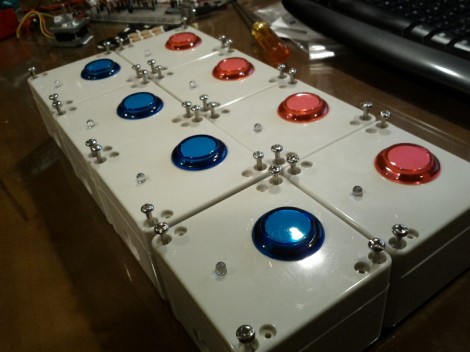
Theses are the team buzzer boxes which [Philippe Chrétien] built for his mother. She’s a big fan of quiz shows (we’re thinking Jeopardy and the like) and he thought she’d enjoy a proper setup for home gaming.

Each unit consists of an arcade button and one LED, both housed in a project box. He uses telephone wire to connect each buzzer to the base unit. We like that idea since we’ve got a lot of old telephone cable lying around and our RJ-45 crimp includes an RJ-11 slot. This is perfect for making our own cables.

The base unit houses an Arduino board which polls the buttons to see which is pressed first. The LED on the appropriate buzzer box is illuminated so the players know who got in first. One special feature of this setup is the ability to choose from 30 different buzzer sounds.

There are several other quiz buzzer projects kicking around Hackaday if you’re interested. One of our favorites is this system which uses plastic bowls as the buttons.

[via Adafruit]
Scratch-build Garden Nursery Uses Arduino Monitoring

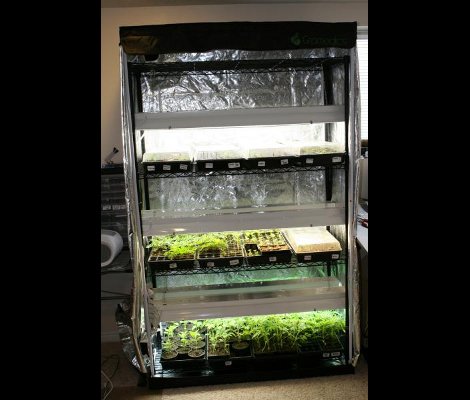
Starting your garden indoors helps to ensure large yields. This is because the plants get a head start before it’s warm enough for them to be put in the ground. But the process involves a fair amount of labor, ensuring that the lights are turned on and off at the right times each day, and that the temperature for germination and growth, as well as humidity, hit a certain target. It’s obvious that a bit of automation would be nice, and this Arduino-based garden nursery does just that. One of the things that sets this project apart is that it shows you how to go from an empty room to the bounty of plant starters seen here.

For the most part the equipment is what you’d expect, seed trays and covers, tray warming mats, and fluorescent light fixtures. the whole thing is given a small footprint thanks to an adjustable shelving unit. The Arduino is used in conjunction with a Sprout Board to add connectivity for switching the lights and warming mats. This is just a matter of driving a relay to switch mains voltage and can take any number of forms, including this home automation project we saw the other day.

[Thanks Tom]

Making Color Matched Perler Bead Art

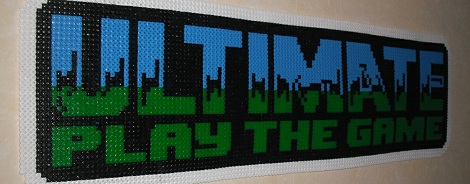
You may remember Perler beads from first or second grade; these small plastic beads are placed into a peg board and then ironed to produce a solid multicolored piece of plastic. Recently, Perler beads have seen somewhat of a revival due to a few people creating 8 and 16-bit video game sprites in plastic, but there’s still the enormous effort of color matching beads to make a passable Sonic or Mega Man.

[Jon Wilson] sent in an awesome bead pattern generator that takes those color images of video game sprites – and just about any other picture –  and translates them into Perler bead patterns. One awesome feature is color matching; [Jon] found the RGB values of every color of Perler beads and his program chooses the closest match from the original image.

[Jon] started on a GUI app for his bead pattern generator, but because his kids aren’t into beads anymore the GUI is still unfinished. There is a command line Python script that takes an image and shoots out a PDF of the bead pattern, which should be more than enough for all but the most complicated design.

NES Controllers For Any Bluetooth Application

[Dustin Evans] wanted to used his original NES controllers to play emulated games. The problem is he didn’t want to alter the classic hardware. His solution was to use the connectors and enclosure from a dead NES to build a Bluetooth translator that works with any NES controller.

Here he’s showing the gutted half of an original NES. Although the motherboard is missing, the connectors for the controllers are still there. They’ve been rewired to an Arduino board which has a BlueSMiRF modem. The controller commands are harvested by the Arduino and sent to whatever is listening on the other end of the Bluetooth connection. He also has plans to add a couple of SNES ports to the enclosure so that those unaltered controllers may also be used.

In the video after the break [Dustin] walks us through the hardware setup. He then demonstrates pairing the device with an Android phone and playing some emulators with the pictured controllers.

Continue reading “NES Controllers For Any Bluetooth Application”

Electronic Bracer Wraps A Lot Of Features Around Your Arm

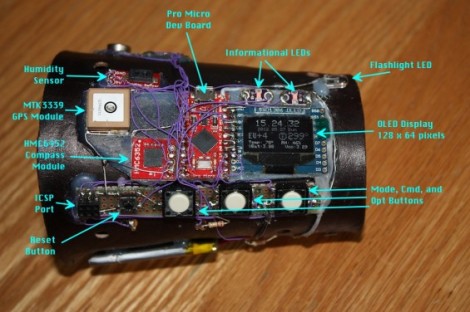
[Stephanie] just finished up her wearable project which puts a lot of information where a wristwatch would normally be found. She calls it the Integrated Sensors Electronic Bracer. We had to look up what a bracer is; the name originates with archers and it was a leather wrap used to protect the wrist. This does that, but we don’t think you’ll want the bowstring frequently hitting the electronic components hidden within.

There is a nice finished leather cover which wraps around the unit, leaving just a few holes for key components. Above you can see the parts undressed, with an Arduino compatible board in the middle. It provides a user interface with the OLED display and three input buttons. The array of sensors found on the device include a GPS module to display position data, humidity sensor, magnetometer, luminance sensor, and galvanic skin response.

The opposite side of the bracer has an opening secured by a couple of elastic cords. [Stephanie] mentions that this works, but she’s not happy with the look of it and hopes to make some leather-based improvements.

[via Adafruit]

Adding Voice Labels To Real Life Objects For The Visually Impaired

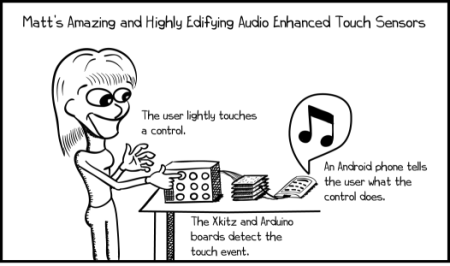
[Matt Oppenheim] wrote in to share his work with us. He has been modifying the interfaces of electronics for the visually impaired. It started off with cassette decks. As [Matt] points out, many people who are visually impaired use cassettes for their audio books and newspapers. [Matt] added some touch sensors to the buttons so that he could have something announce what each button was as the user felt them. This allowed them to quickly learn the layout of the device.

After finding that the simple interface on the cassette player was learned very quickly, thereby making his addition no longer needed, he decided to go after something a little more complex. [Matt] set out to modify a digital radio with many more buttons that are less touch friendly. As you can see in the video after the break, he was able to pull this off quite nicely.

Continue reading “Adding Voice Labels To Real Life Objects For The Visually Impaired”

BrainTap, Gaming With Arthritis In Mind

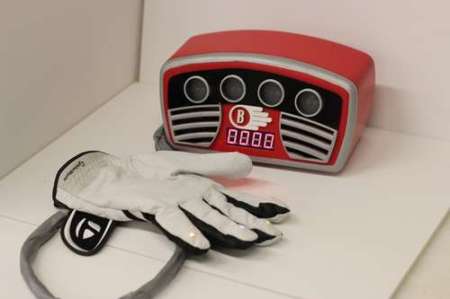
As a final project in their 3rd year of the University of Technology Sydney, [James] and a few classmates put together this interesting game. Called BrainTap, it is described as a game targeted at the baby boomers focusing on fine motor skills and memory.

The game plays similar to the common game “simon”. The box lights up a series of LEDs in a pattern, then you have to repeat the pattern back with the corresponding buttons in the glove. There is vibration feedback in the glove as well as the lights and sounds you see in the video. Though they do mention arthritis in their title, we don’t think our grandmas with arthritis would enjoy those hand motions much. We, however, might spend hours doing this instead of more important things.

We particularly like the visual construction of the game box. The case was designed in CAD, 3d printed, then sanded smooth and painted with automotive paint to get that perfect finish. Great job guys.

Continue reading “BrainTap, Gaming With Arthritis In Mind”