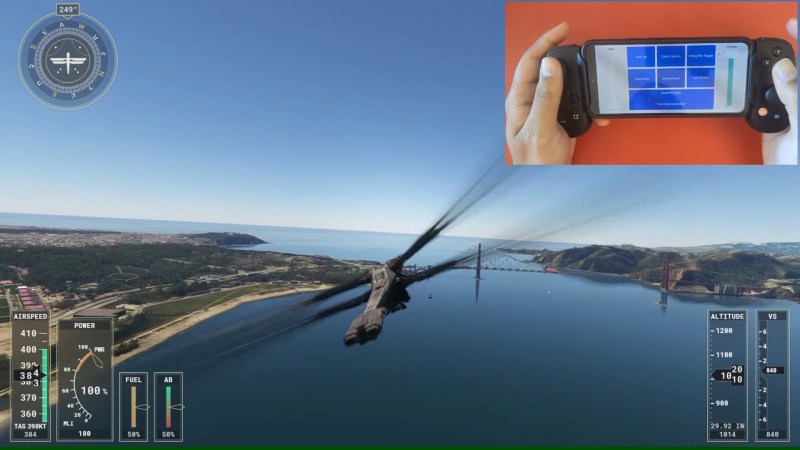
Screenshot of Microsoft Flight Simulator with the Dune expansion, and in the top right corner, the mod's author is shown using their phone with an attached gamepad for controlling a Dune ornithopter.

Take Control Of MS Flight Sim With Your Smartphone

Anyone with more than a passing interest in flight simulators will eventually want to upgrade their experience with a HOTAS (Hands On Throttle-And-Stick) setup that has buttons and switches for controlling your virtual aircraft’s assorted systems, which are well supported by games such as Microsoft Flight Simulator (MSFS). But a traditional HOTAS system can be a bit of an investment, so you might want to thank [Vaibhav Sharma] for the virtualHOTAS project that brings a configurable HOTAS interface to your phone — just in time to try out that Dune expansion for MSFS.

The phone’s orientation sensors are used as a joystick, and on the screen, there’s both sliders and buttons you can use as in-game controls. On the back-end there’s a Python program on the computer which exposes a webserver that the phone connects to, translating sensor and press data without the need for an app. This works wonderfully in MSFS, as [Vaibhav] shows us in the video below. What’s more, if you get tired of the touchscreen-and-accelerometer controls, you can even connect a generic smartphone-designed game controller platform, to have its commands and movements be translated to your PC too!

All the code is open source, and with the way this project operates, it will likely work as a general-purpose interface for other projects of yours. Whether you might want to build an accessibility controller from its codebase, use it for your robot platform, maybe simply repurpose this project for any other game, [Vaibhav]’s creation is yet another reminder that we’re carrying a sensor-packed platform, and it might just help you build a peripheral you didn’t know you needed.

Don’t have a phone handy? Perhaps an Xbox controller could work with just a few 3D printed upgrades, or you could stock up on buttons and build your own joystick from scratch. Oh, and keeping HOTAS principles in mind can be pretty helpful — you might get to redesign the venerable computer mouse, for instance!

Continue reading “Take Control Of MS Flight Sim With Your Smartphone”

Sometimes It’s Not The Solution

Watching a video about a scratch-built ultra-precise switch for metrology last week reminded me that it’s not always the projects that are the most elegant solutions that I enjoy reading about the most. Sometimes I like reading about hackers’ projects more for the description of the problem they’re facing.

A good problem invites you to brainstorm along. In the case of [Marco Reps]’s switches, for instance, they need to be extraordinarily temperature stable, which means being made out of a single type of metal to avoid unintentional thermocouple joints. And ideally, they should be as cheap as possible. Once you see one good solution, you can’t help but think of others – just reading the comments on that article shows you how inspiring a good problem can be. I’m not worried about these issues in any of my work, but it would be cool to have to.

Similarly, this week, I really liked [Michael Prasthofer]’s deep dive into converting a normal camera into a spectrometer. His solutions were all very elegant, but what was most interesting were the various problems he faced along the way. Things that you just wouldn’t expect end up mattering, like diffraction gratings being differently sensitive across the spectrum when light comes in from different angles. You can learn a lot from other people’s problems.

So, hackers everywhere, please share your problems with us! You think that your application is “too niche” to be of general interest? Maybe it’s another example of a problem that’s unique enough to be interesting just on its own. Let’s see what your up against. A cool problem is at least as interesting as a clever solution.

Inside A Mystery Aerospace Computer With [Ken Shirriff]

When life hands you a mysterious bit of vintage avionics, your best bet to identifying it might just be to get it in front of the biggest bunch of hardware hounds on the planet. After doing a teardown and some of your own investigation first, of course.

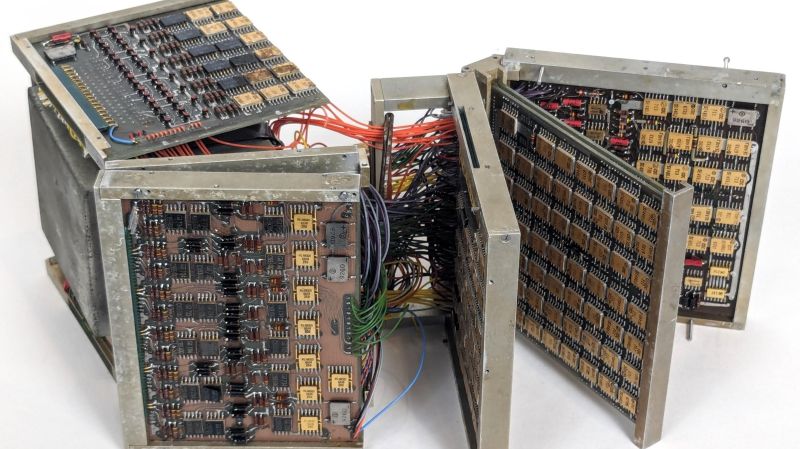
The literal black box in question came into [Ken Shirriff]’s custody courtesy of [David] from Usagi Electric, better known for his vacuum tube computer builds and his loving restoration of a Centurion minicomputer. The unit bears little in the way of identifying markings, but [Ken] was able to glean a little by inspecting the exterior. The keypad is a big giveaway; its chunky buttons seem optimized for use with the gloved hands of a pressure suit, and the ordinal compass points hint at a navigational function. The layout of the keypad is similar to the Apollo DSKY, which might make it a NASA artifact. Possibly contradicting all of that is the oddball but very cool electromechanical display, which uses reels of digits and a stepper-like motor to drive them.

Inside, more mysteries — and more clues — await. Unlike a recent flight computer [Ken] looked at, most of the guts are strictly electronic. The instrument is absolutely stuffed with PCBs, most of which are four-layer boards. Date codes on the hundreds of chips all seem to be in the 1967 range, dating the unit to the late 60s or early 70s. The weirdest bit is the core memory buried deep inside the stacks of logic and analog boards. [Ken] found 20 planes with the core, hinting at a 20-bit processor.

In the end, [Ken] was unable to come to any firm conclusion as to what this thing is, who made it, or what its purpose was. We doubt that his analysis will end there, though, and we look forward to the reverse engineering effort on this piece of retro magic.

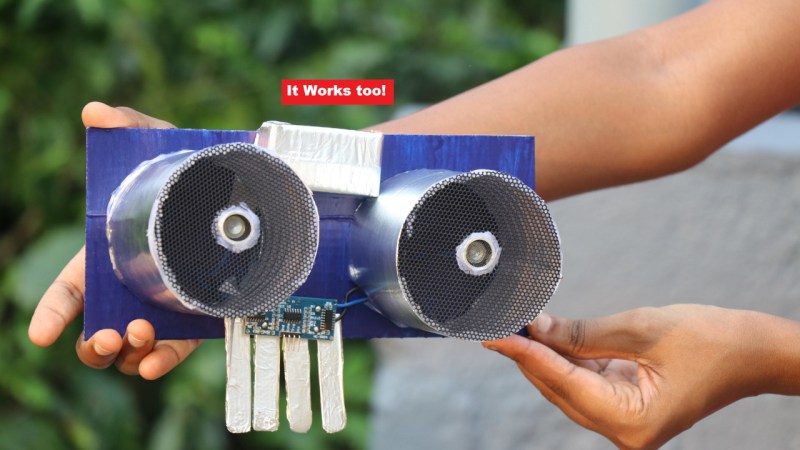
The end result of the build, a supersized ultrasonic sensor, held in a person's hands

A Super-Size Functional Tribute To An Ultrasonic Sensor

Sometimes, it’s time to shut down the oscilloscope, and break out the cardboard and paints. If you’re wondering what for, well, here’s a reminder of an Instructable from [CrazyScience], that brings us back to cardboard crafts days. They rebuild one of the most iconic components for an electronics tinkering beginner — an ultrasonic distance sensor, and what’s fun is, it stays fully functional after the rebuild!

This project is as straightforward as it gets, describing all the steps in great detail, and you can complete it with just a hot glue gun and soldering iron. With materials being simple cardboard, aluminum foil, popsicle sticks, some mesh, and a single ultrasonic sensor for harvesting the transmitter and receiver out of, this is the kind of project you could easily complete with your kids on a rainy day.

Now, the venerable ultrasonic sensor joins the gallery of classics given a size change treatment, like the 555 timer we’ve seen two different takes on, or perhaps that one Arduino Uno. Unlike these three, this project’s cardboard skeleton means it’s all that simpler to build your own, what’s with all the shipping boxes we accumulate.

Continue reading “A Super-Size Functional Tribute To An Ultrasonic Sensor”