An Oven Controlled Crystal Oscillator Replacement

The HP 5328 Universal Counter is all the counter you’ll ever need. It’s rugged, does its job well, and like all old HP gear, keeps on going. When it breaks, though, that’s a problem.

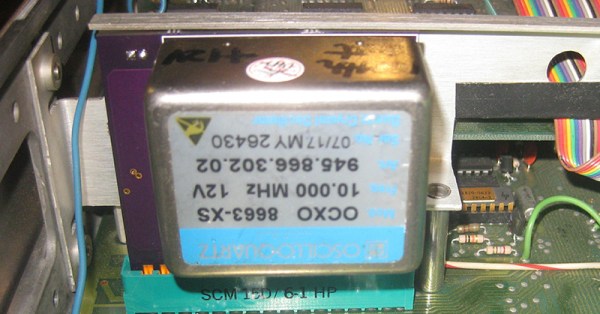
[Tom] had an 5328 Universal Counter with a broken Oven Controlled Crystal Oscillator. This is the HP 10544 OCXO and replacements are pretty spendy. Instead of buying a vintage unit, [Tom] decided to make a replacement.

The OXCO in the HP 5328 is just an option. If the frequency counter has this option installed, a 30-pin edge connector in the counter is stuffed with a little PCB. Like all HP gear, the schematics are readily available, and the original OXCO can be quickly reverse engineered.

The design of the replacement is fairly straightforward. A 10MHz OXCO from Oscilloquartz is used, powered from the 28V rail in the 5328 with a simple switching regulator. Apart from that, it’s just an inverter to get the logic levels correct, and a small, multi-turn pot to calibrate the new OXCO. The completed unit is much smaller than the original OXCO option, so it can be plugged directly into the 30-pin card edge slot, leaving the gigantic standoff inside the frequency counter as a reminder of days gone by.
Hacking An Android Laptop To Run Linux

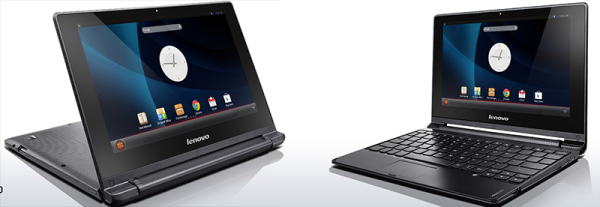
A few years ago, someone at Lenovo realized they could take an Android tablet, add a keyboard, and sell a cheap netbook that’s slightly more useful than a YouTube and Facebook machine. Since then, Lenovo has stopped making the A10 notebook and has moved on to manufacturing Chromebooks. That doesn’t mean this little Laptop doesn’t have some life left in it: it still has a Cortex A9 Quad core CPU, is reasonably priced on the ‘defective’ market, and can now run a full-blown Linux.

When the A10 notebook was released, there was a statement going around saying it was impossible to install Linux on it. For [Steffen] that was a challenge. He cracked open this netbook and took a look around the Flash chips. There were two tiny pads that could be shorted to put the device in recovery mode, and the entire thing can be booted from a USB stick.

[Steffen] ran into a problem while putting a new kernel on the netbook: there was a null pointer reference in some device during boot. The usual way of diagnosing this problem is to look at the console to see what device failed. This netbook doesn’t have a UART, though, and [Steffen] had to use an FTDI chip and set the console to USB to see why this device failed.

Just about everything on this tiny laptop works right now, with a few problems with WiFi, webcam, and standby mode – all normal stuff for a putting Linux on a random machine. It’s worth it, though: the quad-core ARM is a very good chip, and [Steffen] is running x86 apps with qemu. Not bad for something that can be found very, very cheap.

Hackaday Prize Entry: A Two Component Temperature Sensor

Here’s a design challenge for you: make a temperature sensor for any computer. If you’re an exceptionally clever smart ass, you’ll probably write some code to report the CPU temps. Others who take the exercise seriously will probably build something with a 1-wire temp sensor, a microcontroller, and all the hardware required to do that.

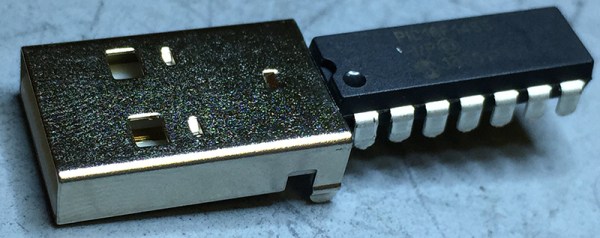
[Michael] had a better idea. He did it with just two components. One of those components is a USB connector.

The only reason is project could be created is a rather new part from Microchip, the PIC16F1455. This microcontroller doesn’t require a crystal, can do USB without any additional parts, and has an integrated temperature sensor. [Michael] whipped up a project to set up a USB CDC serial device, read the temperature with the ADC (thanks to a very helpful app note), and sends the temperature to a computer once a second.

Despite being built out of only two components, this could actually be a useful device. The PIC is a USB serial device, and this can be used with any computer made in the past 15 or so years. It would hardly take any code at all to read the temperature with another program, and it’s a very inexpensive build. We have to give style points for soldering a microcontroller directly to a USB connector, too.


The 2015 Hackaday Prize is sponsored by:

Stuff The Ballot Boxes For The Best Hackaday Prize Entry

Last week we started the first round of community voting for The Hackaday Prize, where everyone on Hackaday.io has a voice in choosing the best project for the current theme of the week. To encourage people to vote, we’re giving away a $1000 gift card to The Hackaday Store to one person on hackaday.io if they have voted in the latest round of community voting. How are we doing that? A very, very large die and SQL queries:

https://www.youtube.com/watch?v=j6kbwU76wwA

No, no one won this week. That’s okay, because we’re giving t-shirts away to three random people who did vote. This week, [cgapeart], [Jeff], and [devonelliott] are getting t-shirts from the Hackaday Store, just because they were cool enough to vote.

We’re going to keep this round of community voting going for another week. Everyone registered on Hackaday.io gets 50 votes for each round of voting, and every Friday (around 20:00 UTC), we’ll randomly select one person registered on Hackaday.io. If that person has voted, they get a $1000 gift card for The Hackaday Store. If they haven’t voted — a t-shirt. They’re nice t-shirts, but I’d rather have the gift card.

All you have to do for a chance to win a $1000 gift card is head over to the Community Voting Page and pick which project is most likely to be widely used. There’s no wrong answer; all you have to do is decide between two projects. If you only use up one vote, you’re in the running for a $1000 gift card.

I’ll be doing another round of random, fair die rolls and SQL queries next Friday. Until then, VOTE!

Retro Edition: The LAN Before Time

Ethernet has been around since the mid-70s, but if you think it was always Cat5 and 10BaseT, you’d be sorely mistaken. The first ethernet was built with coaxial cable, vampire taps, AUI adapters, and a whole bunch of other network hardware that will make wizened networking veterans cringe. [Matt] had heard about these weird physical layers back when he started building networks in 1997, but he had never seen one. Now it’s an ancient and forgotten footnote in the history of computer networking. Is it possible to build a Thicknet in this modern era? It turns out, yes, it’s possible. It’s not easy, though.

The network [Matt] is building is a true 10Base5, or Thicknet, network. The backbone of this network is a coaxial cable 9.5mm in diameter. [Matt] discovered that while the common belief that Thicknet used RG-8/U cable. This appears to be incorrect, as the connectors for this cable – vampire taps that pierced the insulation and shield of the cable – are designed for cable manufactured by Belden, part number 9880.

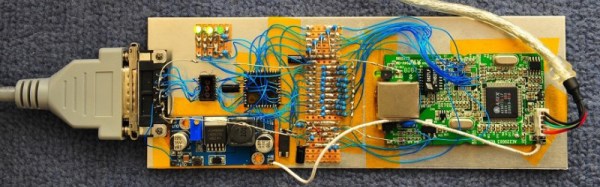
[Matt] assembled the cable, vampire taps, AUI cables, and even found a few ISA NICs that would still work with a reasonably modern computer. He even went so far as to build a USB Ethernet adapter with an AUI interface. This impossibly retro device uses a standard USB to 10BaseT Ethernet adapter, with a chip designed to convert 10BaseT to AUI hacked onto a circuit board. That in itself is an incredible piece of engineering, with a handful of power supplies to get the correct 2.5, 3.3, 5, and 12 Volts to the right places.

As far as exercises in computing history go, [Matt] is at the top of his game. In the process of building it, he also figured out why no one uses Thicknet anymore; once it’s in place, you can’t change it, the cable is big, bulky, and the connectors are terrible. Still, it’s an amazing example of how far we’ve come.

Hackaday Prize Entry: Flex Modules

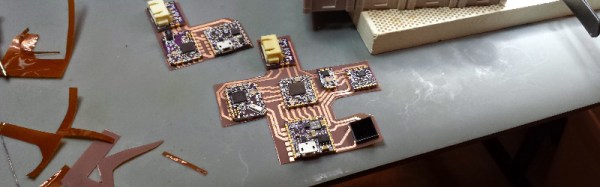
One of [Chris Hamilton]’s entries for The Hackaday Prize deals directly with his job. He works at Fyber Labs designing wearable and flexible electronics. While anyone can go out and buy some flex sensors and every large board house can make flex PCBs, there aren’t many people building flexible products, and even fewer are creating the tools to build these wearable electronics. To solve this problem, [Chris] is building Flex Modules, circuit boards that combine the ease of use of breadboard-compatible modules with something that can be placed on a flexible PCB.

This is a toolkit for [Chris] and he already has a ton of modules that are either completed or in the works. The Flex Sensor ADC Buffer and Filter is meant to read flexible sensors, the STM32F401 module puts an incredibly powerful microcontroller in these projects, and the 12axis module gives these projects pressure, humidity, gyro, and temperature sensors. There are over two dozen modules [Chris] is working on, and each of them work with his system for flexible electronics.

If you’d like to see an example of what these modules can do, check out the Dance Kit [Chris] built. It’s a wearable LED strip with motion feedback and bioelectric monitoring. Without being flexible, this project would be a huge unwieldly mass of circuit boards. With these modules, it was easy to create a wearable solution to the problem.


The 2015 Hackaday Prize is sponsored by:

Portabilizing The Kinect

Way back when the Kinect was first released, there was a realization that this device would be the future of everything 3D. It was augmented reality, it was a new computer interface, it was a cool sensor for robotics applications, and it was a 3D scanner. When the first open source driver for the Kinect was released, we were assured that this is how we would get 3D data from real objects into a computer.

Since then, not much happened. We’re not using the Kinect for a UI, potato gamers were horrified they would be forced to buy the Kinect 2 with the new Xbox, and you’d be hard pressed to find a Kinect in a robot. 3D scanning is the only field where the Kinect hasn’t been over hyped, and even there it’s still a relatively complex setup.

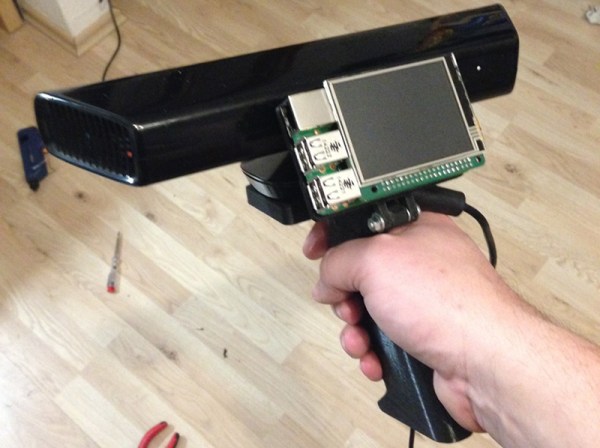
This doesn’t mean a Kinect 3D scanner isn’t an object of desire for some people, or that it’s impossible to build a portabilzed version. [Mario]’s girlfriend works as an archaeologist, and having a tool to scan objects and places in 3D would be great for her. Because of this, [Mario] is building a handheld 3D scanner with a Raspberry Pi 2 and a Kinect.

This isn’t the first time we’ve seen a portablized Kinect. Way back in 2012, the Kinect was made handheld with the help of a Gumstix board. Since then, a million tiny ARM single board computers have popped up, and battery packs are readily available. It was only a matter of time until someone stepped up to the plate, and [Mario] was the guy.

The problem facing [Mario] isn’t hardware. Anyone can pick up a Kinect at Gamestop, the Raspberry Pi 2 should be more than capable of reading the depth sensor on the Kinect, and these parts can be tied together with 3D printed parts. The real problem is the software, and so far [Mario] has Libfreenect compiling without a problem on the Pi2. The project still requires a lot of additional libraries including some OpenCV stuff, but so far [Mario] has everything working.

You can check out his video of the proof of concept below.

Continue reading “Portabilizing The Kinect”