Olimex Claims The World’s First $9 Computer Costs $39

The C.H.I.P. from Next Thing Co. bills itself as the world’s first nine dollar computer. That’s not a lie; their Kickstarter took in over two million dollars for a tiny single board computer with composite Video, WiFi, Bluetooth 512MB of RAM, 4GB of storage, and a 1GHz CPU. That’s a complete computer, sans keyboard, mouse, and monitor. You won’t get that with the $35 Raspberry Pi – you’ll need to add a WiFi adapter and an SD card for the same functionality – and you won’t get that with any other single board computer.

Understandably, the C.H.I.P. is already extremely successful. The company behind it has about 50,000 pre-orders, and people lined up to wait until well into next year for this computer. Exactly how Next Thing Co. managed to build a single board computer and send it out the door for nine dollars is a question that has yet to be answered, and is leaving more than a few people puzzled.

The Olimex blog has given their opinion of the C.H.I.P, and if that’s to be believed, the news isn’t good. The guys at Olimex know their stuff when it comes to making cheap single board computers; they have more than a few for sale, and they know what the Flash and DRAM market is like. To them, it’s impossible to sell a computer like the C.H.I.P. at $9. A quote from Allwinner for a similar module is $16 at the quantity Next Thing Co. would be looking at. That’s just the module with RAM and Flash – no Wifi, no board, no connectors. How could it be possible to sell this computer for only $9?

Continue reading “Olimex Claims The World’s First $9 Computer Costs $39”

Hackerspace Happeninging: A Booc For C-Base

In the annals of hackerspace history, there’s one space that stands above the rest. It’s c-base, the crashed spaceship below Berlin that’s also one of the first hackerspaces in the world. Before NYC Resistor, Noisebridge, and every other building filled with tools and cool people, there was c-base.

Although the Hackerspace movement has only been around for a little less than a decade now, c-base itself is much, much older. It was founded way back in 1995, marking this year as the second decade of c-base’s existence. A few of the members of c-base are celebrating this occasion by publishing a book on the vast and storied history of their hackerspace.

The mythology of c-base includes a space station crashing in the middle of Berlin, with the giant, famous disco ball in Berlin being the station’s antenna. Yes, it’s weird, but all good hackerspaces have some sort of irreverent mythos surrounding them. The c-booc will document the twenty year long excavation of the space station, chronicling how this hackerspace came to be.

The booc is a Kickstarter project, and if funded, will be available for pickup at the Chaos Communication Camp this August

Hackaday Prize Entry: Teaching OpAmps

TI makes some great chips, and to sell those chips, they’re more than willing to put together some awesome tutorials, examples, and online classes to get engineers up and running. This isn’t limited to $5 Launchpads; TI has a great video and lab series for their precision OpAmps. These tutorials come with an evaluation module that costs about $200. Yes, that’s two Benjamins for a few OpAmps and a PCB. Of course no engineer would ever pay this; their job would. But what about someone who wants to learn at home?

That’s where [SUF]’s project for The Hackaday Prize comes in. He’s building a replica of a $200 lab board, and even without researching the cheapest solution for each individual component, [SUF] reckons he can build this kit for about $50. Like I said, the TI board is a business purchase.

The complete lab and tutorial TI offers uses NI’s virtual lab. This, again, isn’t something a random electron hacker could afford, but anyone who wants to go through this teaching module would probably use their own tools anyway.

As far as projects to teach electronics go, [SUF] has knocked it out of the park. He’s already relying on excellent tutorials, but bringing the price down to something a little more sane and amenable to checkbooks that aren’t tied to the corporate account.


The 2015 Hackaday Prize is sponsored by:

Quadrotor Control Systems And Kerbal Harriers

Kerbal Space Program, the game that teaches engineers at JPL and SpaceX the basics of rocket design and orbital mechanics, recently had a giant update. There are now science contracts that require you to fly Kerbals all over their tiny globe, collect data, and transmit it back to the Kerbal Space Center. As would be expected, this is a grind for XP, and the contracts sometimes don’t make sense – you need to collect data from cliff faces and mountain tops. Landing a Kerbal jet at these places is hard.

[Matt Thiffault] wanted to do these science contracts more efficiently. The best way to get to a remote location without a landing strip would be a helicopter, but a harrier jump jet would do just as well. This isn’t supported in the stock game, so [Matt] wrote a complete control system for four engines to control a hovering Kerbal jet.

[Matt]’s work is built on kOS, a scriptable autopilot mod for Kerbal that was originally intended to be something like the Apollo Guidance Computer. People have been using it to make computerized skycranes and automated rendezvous and docking programs, but these are actually relatively simple examples; there’s far more math involved in flying a quadcopter than there is getting into orbit.

To build his automated hovering harrier, [Matt] needed an aircraft. His Kerrier has parts from the Kerbal Aircraft Expansion, B9, and Infernal Robotics mods for KSP, but this is only half the problem. Anyone can put four tilt jets on an airplane, and it takes a real wizard to force a control system to hover. Hover control of the Kerbal harrier is accomplished with a complete control system for a four-engined aircraft, with proper PID control loops and code updating at 20Hz.

With kOS, the proper plane, and the right software running on this emulated guidance computer, [Matt] is able to park his plane in mid-air, have a Kerbal descend the ladder, perform some science, and return to base. It’s an impressive amount of work for a video game. A good thing, too: [Matt] is looking to get into controls engineering professionally. Whether this will go on his resume is another question entirely.

Hackaday Prize Entry: A Bit Dingus

There was a time when just about every computer – even laptops – came with a parallel port. That’s 25 pins of bit-banging goodness, accessible from every programming environment, that could control any random pile of electronics sitting on a desk. The days of parallel ports are behind us now, and if you want to blink a pin with a computer, you’re looking at controlling a microcontroller over USB or something.

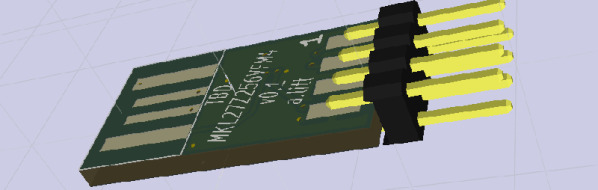
[ajlitt]’s Tiny Bit Dingus is just that: a microcontroller stuffed into a USB plug with a few pin headers. With the right app, you can control these pin headers over USB. It’s the closest you’re going to get to a parallel port with modern hardware.

This bit dingus isn’t meant to replace the Bus Pirate, an Arduino, or anything else; it’s meant to be a small and simple way to connect random electronics to a computer with as few parts as possible. If you’re looking for a part to add to your electronic tinkerer everyday carry rig, this would be it.

There’s a few bits of interesting hardware inside the Bit Dingus. A while back, [ajltt] ran into the Freescale KL27, a Cortex M0+ that does USB without a crystal, has a USB bootloader, and doesn’t require many additional components at all. It’s the perfect size for the project at 5x5mm, and is unbrickable while still being flashable over USB.


The 2015 Hackaday Prize is sponsored by:

Hackaday Prize Entry: Useful Code For Useful Things

The Hackaday Prize isn’t exclusively about building things that will help the planet; you can also build things that will enable others to build things to save the planet. [Eric] isn’t saving the world with his commonCode library, but it will make it vastly easier for other people to build the next great Thing.

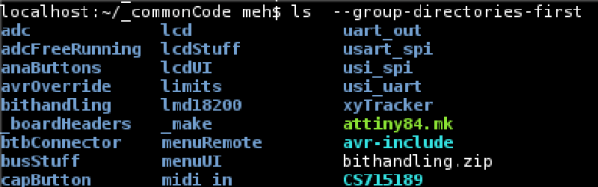
The idea behind commonCode is the same as shared libraries you’ll find in any desktop application of reasonable size; it provides a common library for AVR microcontrollers to build just about anything. Bit manipulation, an interface for timers, math functions, graphics, I/O, and peripheral drivers are all available in the commonCode library. This makes it easy for the developmentally challenged among us to create whatever project they want.

The commonCode library wasn’t created just for The Hackaday Prize. [Eric] has been tinkering around with AVRs since well before the Arduino existed, and he has dozens of projects in permanent installations. It’s a great way to give back to the community, and the perfect way to allow people to develop their own things to solve whatever problem they have in mind.


The 2015 Hackaday Prize is sponsored by:

Hackaday Prize Entry: A Light Electric Utility Vehicle

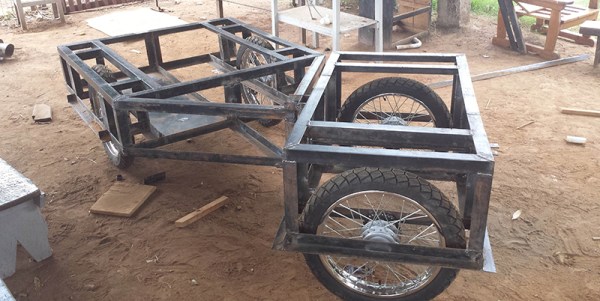
[Chris] lives in South Sudan, where there are a lot of poor areas with terrible infrastructure. One of the bigger challenges for this area is getting people and materials over roads that are either bad or don’t exist. Normal vehicles aren’t built for the task, and a Hilux or Land Cruiser is much to expensive. For his Hackaday Prize entry, [Chris] is building a rugged low-cost utility vehicle platform for the developing world.

This battery-powered, four-wheel cart is made out of what [Chris] could find. The frame is made out of 50x50mm angle iron that’s welded together, with the body panels fabricated out of 1200x2400x1.2mm sheet that’s sourced locally. While [Chris] would like better wheels, the cheap Chinese motorcycle wheels are everywhere and cheap – $65, which includes the bearings, breaks, and sprockets. It even has higher ground clearance than the Land Cruiser.

[Chris] already has a prototype of his project built and it’s rolling around. You can check out a video of that below.


The 2015 Hackaday Prize is sponsored by:

Continue reading “Hackaday Prize Entry: A Light Electric Utility Vehicle”