Makerbot, Occupy Thingiverse, And The Reality Of Selling Open Hardware

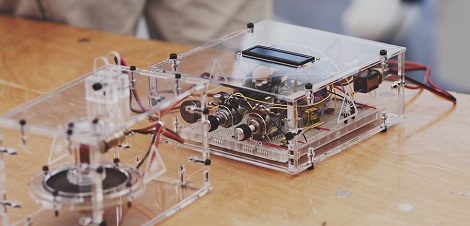
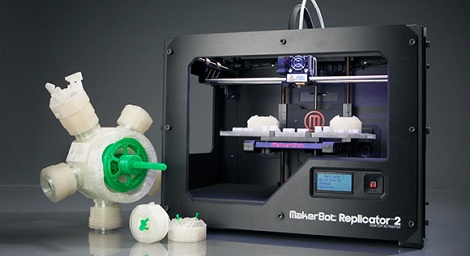
Yesterday, Makerbot Industries introduced the Replicator 2, a very good-looking 3D printer that will is probably the closest thing we’ll see to a proper ‘consumer’ 3D printer for a year or so. There’s only one problem. The new Replicator 2 is rumored to be closed source. If that’s not enough, [Bre Pettis], co-founder and CEO of Makerbot Industries will be speaking at the Open Source Hardware Association conference next week with the suitably titled talk, “Challenges of Open Source Consumer Products.”

Of course, the Replicator 2 being closed source is hearesay, and we can’t blame them for closing up parts their product; they have investors to worry about and people are blatantly copying their work. There was another change in Makerbot’s operation at the press conference yesterday: Makerbot now owns everything you’ve put up on Thingiverse.

This news comes from [Josef Prusa], creator of what is probably the most widely used 3D printer in the world.

[Prusa] begins his rant with the history of the RepRap. The project began with a team of core developers headed by [Adrian Bowyer], and supported by [Zach Smith], [Adam Mayer], and [Bre Pettis]. [Boyer] gave the guys a bit of money to start Makerbot, and it’s something the guys at Makerbot have never been ashamed of. Makerbot went on to create Thingiverse, became the darlings of the Open Hardware movement, and acquired $10 million from investors.

All things change, of course, and Makerbot is no exception. Along with the (again, rumored) closed-source Replicator 2, [Prusa] pointed out the Terms of Use for Thingiverse say that Thingiverse – and thus Makerbot Industries – owns everything submitted by Thingiverse users. [Prusa] started an Occupy Thingiverse movement in response to this discovery.

Honestly, we hope [Josef Prusa] is wrong on this one. We hope the specific clauses in Thingiverse’s Terms of Use granting itself a license to do whatever it wants with uploaded Things is just a bunch of legal mumbo jumbo added in by lawyers to protect Thingiverse from being sued by crazy people. Still, if rumors are true, it may be a portent of things to come.

In any event, [Prusa] will be taking his Thingiverse things down. He plans on posting his stuff on GitHub, probably the most Open Source-friendly community in existence. You can do the same with this GitHub template for 3D printed objects.

So, learned reader of Hackaday, what do you make of this? Is Makerbot right to close up their projects? Are we finally becoming disillusioned with Open Hardware? What say you?
Reading Bare NAND Flash Chips With A Microcontroller

NAND flash, the same memory chips found in everything from USB thumb drives to very expensive solid state disk drives, are increasingly common. As they (partially) serve as the storage for cellphones, Wiis, routers and just about every piece of consumer electronic devices, you’re probably surrounded by dozens of NAND chips at any one time.

[Sprite_tm], hacker extraordinaire, put up a build a few years ago where he was able to read the contents of NAND Flash chips using a PC parallel port. It’s getting rather hard to find a parallel port on a PC anymore, so he updated his build to read Flash chips off of a USB port.

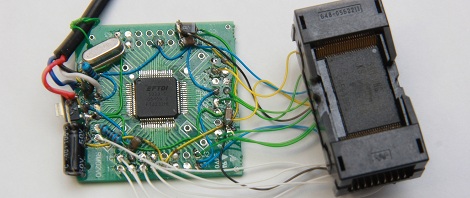
There are two main components of [Sprite_tm]’s build. First, to read the Flash chip, he needed a way to break out the pins on the very tiny TSOP48 package. [Sprite] found a neat little socket for these chips on eBay for about 10 Euros.

Communicating with the Flash chip via USB was a little harder. [Sprite] knew he needed USB 2.0, but not many microcontrollers have that implemented. Luckily, the FTDI FT2232H has USB 2.0, along with the very nice feature of being able to read data and address pins directly from the Flash chip. After a bit of soldering, [Sprite_tm] was left with the device seen above.

[Sprite_tm] found a nice library to bitbang the pins on the FTDI chip and request one page of memory from the Flash chip at a time. The device works as advertised, but it’s still a bit slow at 250 kBps. [Sprite] figures he can increase the speed of reading a Flash chip by requesting multiple pages at a time, but it’s still orders of magnitude faster than the old parallel port solution.

There’s a good bit of software [Sprite] posted to help him (and possibly others) read bare NAND flash chips via USB. This means if you have a broken USB Flash drive or SD card, it’s possible to desolder the chip and read it with your own controller. Interpreting the blocks of data recovered from a Flash drive as a file system is another story, but it’s still a fairly remarkable build.

Introducing The Makerbot Replicator 2

A few short hours ago at press conference, Makerbot announced the release of their Replicator 2 3D printer.

The original Makerbot Replicator was released earlier this year at CES and regaled by the press as a quantum leap in home manufacturing (a quanta is actually very small, guys) with and option for dual extruders and a rather large build volume. The Replicator 2 takes the same formula and adds a powder coated steel frame, larger build volume (11.2″ x 6.0″ x 6.1″ or 28.5 x 15.3 x 15.5 cm) and a resolution so fine as to approach the realm of uber expensive 3D printers (100 microns or 0.004 inches).

Base price is $2200 USD for the single extruder model with no Makercare service plan. A dual-extruder Replicator 2X is slated to be released after the beginning of next year. This model will also handle ABS filament, although we can’t find anything that says the single-extruder Replicator 2 is only able to use PLA.

Even though the new Replicator 2 is rumored to be closed source, we’d really struggle to come up with a better 3D printer for a high school shop class, college CS and/or engineering department, or even a hackerspace.

Variable Frequency Laser Using Shaken Ball Bearings

Lasers normally emit only one color, or frequency of light. This is true for laser pointers or the laser diodes in a DVD player. [Kevin] caught wind of state-of-the-art research into making variable wavelength lasers using shaken grains of metal and decided to build his own.

When [Kevin] read a NewScientist blog post on building variable frequency lasers built with shaken metallic grains, he knew he had to build on. He dug up the arxiv article and realized the experimental setup was fairly simple and easily achievable with a bit of home engineering.

[Kevin]’s device works by taking thousands of small ball bearings and putting them in a small vial with Rodamine B laser dye. To vibrate the particles in the dye, [Kevin] mounted his container of dye and bearings on an audio speaker and used a frequency generator to shake the ball bearings.

When a small 30mW green laser shines through the vial of ball bearings and dye, the laser changes color to a very bright yellow. By vibrating the vial at 35 to 45 Hz, [Kevin] can change the frequency, or color of the laser.

[Kevin] can only alter the frequency of the laser by about 30 nm, or about the same color change as a reddish-orange and an orangish-yellow. Still, it’s pretty amazing that [Kevin] was able to do state-of-the-art physics research at home.

Sadly, we couldn’t find any videos of [Kevin]’s variable frequency laser. If you can find one send it in to the tip line and we’ll update this post.

Using An Undocumented Display With An FPGA

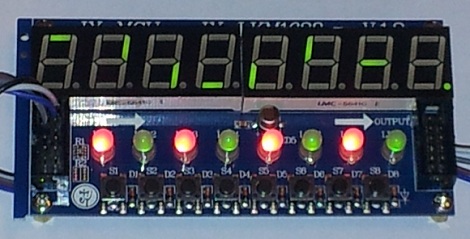
When [Mike] ran across a display on Deal Extreme with 8 seven-segment displays, 8 red/green LEDs, and 8 buttons, he knew it would find a good home in a future project. There was only one problem, though: except for an Arduino library, there was absolutely no documentation available for this display. Wanting to use this display with an FPGA board, [Mike] decided against bit-banging a protocol and ported the C++ code into a hardware implementation.

This Deal Extreme display, the TM1638, features enough seven-segment displays, LEDs and buttons to build something really cool, and surprisingly isn’t terribly hard to interface with a microcontroller. The TM1638 library communicates with the outside world via only three pins and a simple serial connection.

After figuring out what commands are sent to make the display turn LEDs on or off, [Mike] wrote a hardware implementation for his Digilent Nexys2 and Digilent Basys2. Now the display operates on an FPGA just like it does with an Arduino, and is a great tool for debugging HDL code for [Mike]’s FPGA.

Popinator Fires Popcorn Into Your Mouth, Is Probably A PR Stunt

[youtube=http://www.youtube.com/watch?v=b1cz8IasV4w&w=470]

Popcorn Indiana, the same company that manufactures the bags of kettle corn you might find in a convenience store, posted a project on their website called The Popinator. It’s a device you fill with popcorn, turn on, and responds to the word, ‘pop’ by firing a piece of popcorn into your mouth. Details on this build are scant, most likely because The Popinator doesn’t operate exactly as described in the video demo for the Popinator project.

We’re going to call this build a figment of the imagination of one of Popcorn Indiana marketing drones, but the idea behind the project is actually fairly interesting. The idea of using voice recognition to determine when the word ‘pop’ is said to turn on the machine is very cool. Using time of flight to calculate where someone’s head is puts this build into a category of awesome we’ve rarely seen before.

Despite all that coolness, we can’t help but think this project is simply an attempt to “go viral” and get a ton of publicity from random tech blogs using only a video camera and a few hours in Final Cut Pro. You’re welcome, Popcorn Indiana.

Surely there will be a ton of comments for this post arguing the merits of this build. You can check out those comments after the break, along with the official Popinator video.

Continue reading “Popinator Fires Popcorn Into Your Mouth, Is Probably A PR Stunt”

Turning Video Game Sprites Into 3D Objects

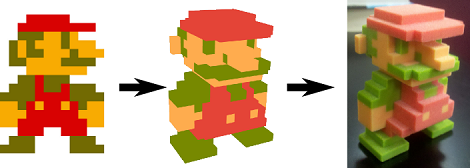
Anyone who has played Minecraftfor a good amount of time should have a good grasp on making 3D objects by placing voxels block by block. A giant voxel art dragon behind your base is cool, but what about the math behind your block based artwork? [mikolalysenko] put together a tutorial for making 3D objects out of video game sprites and covers a lot of the math involved in turning pixels into voxels.

The process of modeling a 3D object from a series of 2D images is a very well-studied computer vision problem called multiview stereo reconstruction. This process has been used to build 3D models of random objects with devices such as the Stanford spherical gantry. Unfortunately the math for this algorithm is a mess, but there is another way: using photo hulls (PDF warning) to find the largest possible object from a series of images showing the top, bottom, left, right, front, and back views.

[mikolaly] put together an algorithm to produce 3D images from a series of images and even went so far as to build a web-based shape carving editor. With this web app, it’s possible to make 3D objects simply by inputting a bunch of colored pixels onto six 2D grids.

Once the models were complete, [mikolaly] sent some of the 3D models off to Shapeways for 3D printing. He’s completed Meat boy, Mario, and Link 3D sprites, all available for sale.

Now the only thing left to do is build a script to turn these objects into Minecraft object schematics.