Speech Recognition On An Arduino

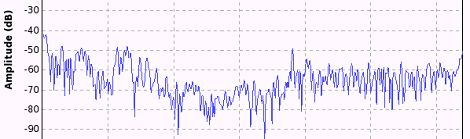
Speech recognition is usually the purview of fairly high-powered computers chugging along at hundreds of Megahertz with megabytes of RAM. Bringing speech recognition to the low-power microcontroller you’d find in an Arduino sounds like the work of a mad scientist or Ph.D. candidate, but that’s exactly what [Arjo Chakravarty] did. He developed the μSpeech library for the Arduino to allow for speech recognition for a limited set of voice commands.

Where most speech recognition systems use FFT and very fancy math to determine what phonemes a user is saying, [Arjo]’s system does away with this unnecessary complexity in favor of using very, very basic integral and differential calculus.

From [Arjo]’s user guide for μSpeech (PDF warning) we can see it’s possible to connect a small microphone to the analog input of an Arduino and accept voice commands such as ‘left’, ‘right’, and ‘stop’. The accuracy is pretty good, as well – 80% if μSpeech is trying to recognize words, and 30-40% if μSpeech is programmed to recognize single phonemes.

Sadly we couldn’t find a demo video of μSpeech in action, but you’re more than welcome to grab it via github for your own project. Send us a video of μSpeech in action and we’ll put it up.

Communicating With A Beam Of Light

Last weekend, ARRL, the national association of amateur radio, held a contest called, “10 GHz and up” with the goal of communicating via radio or microwaves over long distances. [KA7OEI] and a few friends decided to capitalize on the “and up” portion of the ’10 GHz and up” contest by setting up a full-duplex voice link over a distance of 95 miles. They used the 478 THz band, also known as red LEDs and laser pointers.

With [Ka7OEI]’s friends [Ron] and [Elaine] perched atop a 5700 foot-high mountain near Park City, Utah, [Gordon], [Gary] and [KA7OEI] trudged up a hill about 10 miles north of Salt Lake City. With the help of a pair of 500,000 candlepower spotlights, the two teams found each other and began pointing increasingly higher power LEDs at each other.

The teams started off with 3 Watt red LEDs before moving up to 30 Watt LEDs and a photodetector at each end. Even though the teams weren’t working with a true line-of-sight – refraction of the atmosphere allowed them to transmit this far – they were able to transmit tone-modulated Morse and even full-duplex voice.

Not bad for a transmission that bends the FCC’s “275 GHz and up” amateur band to its breaking point.

Hackaday Links: September 21, 2012

And then Obi-wan said, “you were supposed to be the chosen one!”

Yesterday, a little bird told us Makerbot will be moving to a closed source model for their newest printer. This was confirmed, and now [Zach Smith] a.k.a. [Hoeken] – creator of the RepRap Research Foundation and co-founder of Makerboth Industries is weighing in with his take on the situation.

Hey! Free stuff!

Remember that DIP28 ARM chip with BASIC? Remember how I told you Coridium will be giving a few hundred away as samples? Yeah, that’s happening now.

Replacing a scroll wheel with titanium

[Rhett] has been using a Logitech mouse for a few years now. Recently the scroll wheel became corroded, so [Rhett] replaced it with a titanium version. The perfect match for the trusty battle axe, theIBM Model M keyboard.

Web-based IDE for the Raspi

[Phil Torrone] sent in a video of something he and [ladyada] are working on. It’s a web-based IDE for the Raspberry Pi. We’ll do a full review of this when it’s released.

Intro to software defined radio

So you have one of those TV tuner dongles and want to get in to software defined radio. Where do you start? [Al Williams] over at Dr. Dobbs has a great introduction to SDR, and gives a few pointers that should help you get that cool looking waterfall plot very quickly. Thanks for sending this in, [Chris].

3d Printer Filament Made Of Wood

Believe it or not, you can now squeeze wood through the nozzle of your 3D printer.

This new addition to the maker’s palette of 3D printer filaments comes from the mind of [Kai Parthy]. The new filament – going by the name Laywood – is a mix of recycled wood fibers and polymer binders that can be melted and extruded just like any other 3D printer filament.

Parts printed with Laywood have about the same properties as parts printed with PLA filament. One interesting feature of this material is the ability to add ‘tree rings,’ or a subtle gradation in color from a rich brown to a very nice beige. The color can be changed on the fly by setting the temperature of your printer’s hot end to 180° C for a light color, and 230° C for a darker color.

Judging from the ‘in action’ video of Laywood filament being pushed through a printer, the new wood-based filament works just the same as any other PLA or ABS plastic.

Outside eBay, there appears to be only one place to buy this filament. It’s not cheap at about €16/$20 USD per half kilogram, but hopefully that price will come down when it becomes more popular.

Video after the break.

Continue reading “3d Printer Filament Made Of Wood”

Monetizing A Hackerspace With A 3D Printer Store

Starting a hackerspace is easy, but maintaining it is a pain in the rear. Not only do you need to pay the gas, water, and electric bills, but you’ll also need to have enough members to keep the whole operation afloat. Deezmaker might have a solution to this problem: have a hackerspace double up as a 3D printing store.

Deezmaker is the creator of the Bukobot 3D printer seen at Maker Faire San Francisco and successfully funded on Kickstarter. The new store/hackerspace will sell Bukobot 3D printers (as well as other brands if another company wishes), filaments, Kapton tape, electronic parts, and other random electronic paraphernalia to people on the street.

Alongside the 3D printer store, Deezmaker will also be running a hackerspace for anyone who needs something printed, a work table, or even just the use of a few tools. The grand opening will be this Sunday, Sept 23, in Pasadena, CA.

We’re really liking the idea of a store/hackerspace, if only because Deezmaker’s store will provide a wonderful case study for anyone with a similar business plan. It would be very nice to have a an independent hackerstore in every city, selling everything from 3D printers to batteries and LEDs. Yes, it’s sounds like a throwback to the RadioShack of the 70s, but that doesn’t mean the idea couldn’t succeed today.

Programming An ARM With BASIC

For those of us old enough to remember the beginnings of the microcomputer revolution, we can look back fondly on ‘the programming environment is the OS,’ a ton of BASIC programs, and typing in small programs found in the backs of computer magazines. It’s a whole new world now with cell phones and Linux computers the size of credit cards, but some companies still remember the beginning.

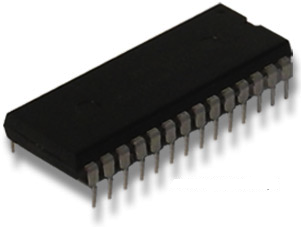
Coridium is releasing an ARM microcontroller in the vein of old fashioned microcomputers updated for the 21st century. Based on the LPC1114 Cortex M0 ARM microcontroller stuffed into a DIP28 package, the Coridium ARM BASIC provides a programming environment in the firmware.

The ARM BASIC is a complete system on a chip, with Rx and Tx connections to connect to a serial terminal. To get this BASIC microcontroller up and running, all you’ll have to do is connect 3.3 Volts of power. Then, it’s a simple matter of plugging in an FTDI cable and pretending it’s 1989.

Coridium is planning on giving away a few hundred of these ARM BASIC chips to makers in a few days. I’ll put up the announcement of free microcontrollers up in a few days, but [Bruce] at Coridium is sending me one very shortly. Hopefully I’ll be able to do a demo before the stock of free chips is completely depleted.

Homebrew FPGAs

Homebrew CPUs made out of logic chips are nothing new, but a homebrew FPGA is another matter entirely. [Joshua] sent in a project he whipped up where he made a single logic cell FPGA.

Despite how complicated and intimidating they are in practice, FPGAs are really very simple. They’re made of thousands of logic blocks capable of transmuting into AND, OR, NAND, and XOR logic gates. These logic blocks are all tied together, and with a somewhat complex hardware design language are capable of becoming a CPU, a micocontroller, or even a video card. Basically, programming a microcontroller tells a chip what to do, while programming an FPGA tells the chip what to be.

To build his single logic block FPGA, [Joshua] used a four-bit multiplexer to hard wire a truth table out of a 74HC174 D-type flip-flop. A bit of Arduino code changes the state of the pins connected to the multiplexer allows for any combination of TRUE and FALSE to be calculated for AND, NAND or XOR logic functions.

Yes, it’s only a single logic block for an FPGA, and if this build were expanded to even a few hundred cells it would be gargantuan. Still, there’s no better way to learn the ins and outs of abstract hardware, so we’ll gladly tip our hat to [Joshua] and his homebrew FPGA.