Android Hack: Cracking WiFi Passwords With Your Phone

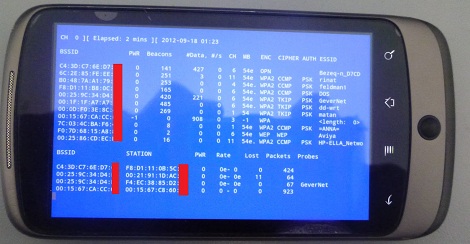
The WiFi adapter in your laptop has a special mode – monitor mode – that can be used to listen in on WiFi traffic and, with a little patience, can be used to crack a WEP password. Surprisingly, this monitor mode can’t be found on any Android device due in part to the limitations of the hardware. A group of three researchers, [Ruby], [Yuval], and [Omri], decided to spend their vacation adding monitor mode to their Android smartphones, allowing for a much more portable version of WiFi pwnage tools.

The phones used by the researchers – the Nexus One and Galaxy S II – used Broadcom chipsets that didn’t support monitor mode. To get around this limitation and allow the OS to see full 802.11 frames the team needed to reverse engineer the firmware of this Broadcom radio chip.

The team has released a firmware update for the bcm4329 and bcm4330 chipsets found in the Nexus One and Galaxy S II. The update may work for other phones with the same chipset, but don’t take our word on that.

There’s still a lot of work [Ruby], [Yuval], and [Omri] need to do. They’d like to add packet injection to their firmware hack, and of course create an APK to get this into the wild more easily.

If you have experience with kernel development and would like to help out, send the team an email. The source can be found at google code  if you’d like to play around with it.
Scrolling Tweets With A WiFi LED Matrix

For his most ambitious build to date, [Param] thought it would be a cool idea to have a LED matrix display spitting tweets out via a WiFi connection. The build is now done, and we’ve got to hand it to him for a very nice build.

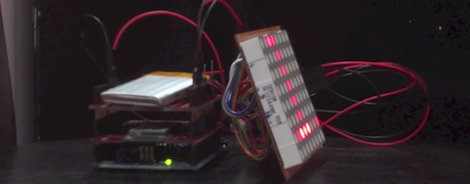
The build is based on an Arduino with a Sparkfun WiFi shield providing the network connection. The Arduino pings a Javascript app that pulls down tweets from The Verge and displays them on an 8×8 LED matrix display.

What makes [Param]’s build so cool is its portable nature; the entire device is completely wireless, getting its power from a Sparkfun LiPower shield  and an apparently extremely capacious LiPoly battery.

With a rat’s nest of wires hanging out the back of the LED display, [Param]’s build is crying out for a proper enclosure, but even given that it remains a quality project. You can see a video of the WiFi’d Twitter display after the break.

Continue reading “Scrolling Tweets With A WiFi LED Matrix”

Turning A Kindle Into A Weather Display

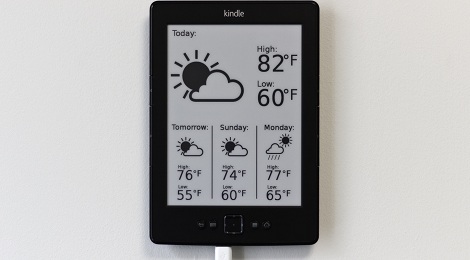
Since the first time [Matt] saw an e-paper display, the idea of using it as a regularly updated, non real-time display consumed him. It really is the perfect platform for very readable calendars, agendas or, as [Matt] found out, a weather display.

[Matt]’s build uses a server to fetch and parse weather data and forecasts from NOAA. This data is then inserted into an SVG file, rendered, converted into a PNG, and finally converted into a grayscale, no transparency image required by the Kindle.

After the image is crafted by [Matt]’s server, a small script running on the Kindle fetches the image, clears the screen, and displays the image. This entire process happens twice a day, often enough for [Matt] to get a good idea of the weather outside without having to look out a window.

The really striking feature of [Matt]’s build is how good his weather display looks. The wonderful iconography of this weather display comes partly from graphics found on The Noun Project, with a few weather conditions drawn by [Matt] himself. It looks great, and is an awesome example of an excellent use of e-paper.

Help Create A Universal ARM Programmer

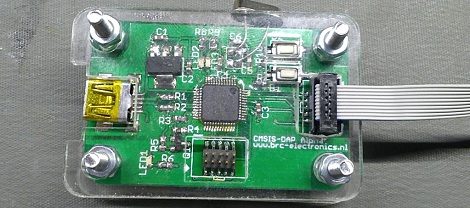
The new crop of ARM Cortex M0/M3/M4 microcontrollers have a lot of interesting features for developers. In addition to supporting drag and drop programming via USB, the same hardware can also be used as a debugger. Setting breakpoints and inspecting memory at any point in the code is a wonderful feature, but not all the new ARM dev boards we’ve seen support this feature.

The folks over on SimpleCortex have a solution to this problem, but they need your help. To get their CMSIS-DAP hardware working with Open Source tools, they’re looking for a few good programmers and hardware developers to build a toolchain.

Right now, the hardware only works with Keil development tools. A closed source development environment is no good to anyone, so if you have some experience writing drivers and such, send the guys at SimpleCortex an email. They’ll give you a free board in return for a contribution to building an open source ARM toolchain.

Common sense requires us to mention that you should probably only send these guys an email if you actually plan on working on this problem. Still, it’s a great opportunity to contribute to open hardware.

Building A Bigger Shapeoko Router

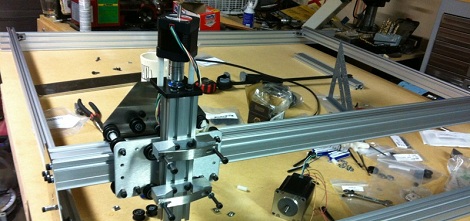
Hackaday alumni [Will O’Brien] sent in a few projects he’s been working on lately while he’s in the process of upgrading his workspace. He’s building a 1200 x 1200 mm CNC router based on the Shapeoko router, and it sure looks like he’s having fun doing it.

The Shapeoko router is based on the Makerslide open source linear bearing system. This system uses common aluminum extrusions as the frame of a very simple, very inexpensive CNC router. The Makerslide system is designed to be expandable; if you want a larger axis, just bolt in a longer piece of aluminum extrusion. We haven’t seen many Makerslide builds take advantage of this fact, a shame as the stock Shapeoko only has a build area of 200 mm square.

[Will] is expanding this build area to 1200 mm square, but of course this means beefing up some parts of the build. He’s already moved up to very hefty 250 oz/in Nema 23 stepper motors (up from the Nema 17s for a standard Shapeoko), as well as beefing up the motor mount a great deal.

[Will] also sourced a few lengths of cable drag chain (yes, that’s what it’s called) to keep all the wires for his huge CNC routers out of the path of a moving gantry and spinning motors. It looks like he’s got a very nice build shaping up, and we can’t wait to see it in action.

An Ice Tube Clock For The TI Launchpad

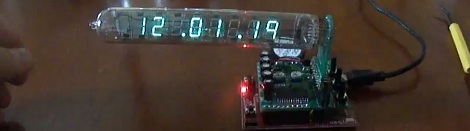
Because Nixies, Decatrons, and VFD tubes really are that cool, [cubeberg] over on the 43oh forums designed an IV-18 clock for the TI Launchpad.

Like adafruit’s Ice Tube clock, [cubeberg]’s project uses a surplus Russian IV-18 VFD tube conveniently sourced on eBay. On the board, there are three buttons for changing the time and setting the alarm along with a MAX6921 VFD tube driver and a small switching regulator to boost the 5 Volts on the Launchpad to the 50 V the tube requires.

There was a little bit of space left on [cubeberg]’s PCB design, and he filled that space with a header for a buzzer and a temperature sensor. Right now, the code doesn’t support an alarm function and he’s still waiting on a few components to finish off the thermometer portion of the board, but it’s still the makings of a very nice clock.

If you’d like to grab your own Launchpad ice tube clock, [bluehash] is organizing a group buy for 430h forum members. If they can get 15 pieces built, the clock will cost less than $5/unit. Very cool, and very cheap when you consider TI is practically giving Launchpads away.

GameGun Makes Call Of Duty More Immersive

In an effort to improve his Call of Duty gaming experience, Reddit user [Harbingerx81] built a custom controller out of an Airsoft gun. Not only does this gun feature all the buttons and joysticks normally found on a stock xbox controller, it’s also loaded up with accelerometers and gyros so his on-screen character points his gun wherever [Harbingerx] points his gun.

From the imgur album, we can see that [Harbingerx] modded an Airsoft gun with a few buttons, d-pads, and switches optimized for Call of Duty. What really gets us is the clever use of accelerometers and a gun-mounted HDMI display (with a wireless HDMI adapter) to provide a home-made virtual reality setup for one of the most popular games.

Building this controller/display wasn’t cheap – it cost [Harbingerx] upwards of $600. A good price, we’re thinking, since the Oculus Rift will be north of $300 along with the added cost of a gun-shaped xbox controller.