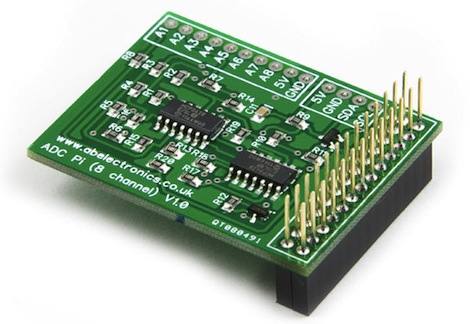
A Truly Professional Raspi Analog Input

Much to the chagrin of hardware tinkerers, the Raspberry Pi doesn’t have analog inputs on its GPIO pins. Sure, you can blink a LED with just a few console commands, but reading sensors with a bone-stock Raspi requires a little additional hardware. [Brian Dorey] just released a board that allows for 8 analog inputs on the Raspberry Pi with a 16-bit resolution that is much higher than any Arduino-based build.

[Brian]’s build is based on an earlier, similar iteration of a Raspi analog board we saw last July. Like the previous version, the new professionally made PCBs use a pair of Microchip MCP3428 analog to digital converter. These ADCs are able to sample four channels at a resolution of 16 bits; a vast improvement over the 8-bit ADCs included on every Arduino.

The boards communicate with the Raspberry Pi over an I2C serial bus using a neat stackable header. In theory, it should be possible to use several of these boards and measure dozens of analog channels, but we’ll leave a demonstration of that up to [Brian].


Testing 30 Brands Of Batteries

Batteries come packaged in bright blister packs emblazoned with vague guarantees such as “45% more pictures” and “five times longer lasting.” During his internship at BitBox this summer, [Thomas] decided to put those statements to the test. He tested thirty brands of batteries on a homebrew rig to find the batteries with the most power and the most bang for your buck.

The hardware [Thomas] used an STM32 microcontroller to perform two different tests: a high drain and a low drain condition. For the high drain, 1000 mA were sucked out of the batteries until the voltage reached 0.8 V. For the low drain, 200 mA were used. Data including milliwatt-hours, milliamp-hours, joules, voltage, current, power, and effective load resistance were all logged for both conditions for all 30 batteries.

Generalizing the results for both low and high drain conditions, lithium batteries were better than alkaline, which were both better than zinc AA cells. Perhaps unsurprisingly, batteries marketed as ‘long life’ and ‘extended power’ were the worst batteries for the money, but a brand-name battery – the Kodak Xtralife cells – were actually the best value for the money.

Checking Out Mount Olympus From 38 Km

The image above shows Mount Olympus in the center, with a tiny bit of the western suburbs of Thessaloniki, the second largest city in Greece, in the lower right hand corner. These two points are 70 kilometers apart, but we’re not seeing a picture taken from the International Space Station. This is a picture from the SlaRos project, a high altitude balloon launched last summer that ascended to 38 kilometers above Greece.

On SlaRos’ project page (Facebook warning), the team covers the hardware that went in to lofting a camera high above the cruising altitude of commercial airplanes. A GPS module tracked the balloon in real time and relayed this to a GSM module to the mobile command and tracking team.

There are a ton of high altitude pictures of Greece over on the project’s Facebook page as well as a time lapse video of the Grecian wilderness after the SlaRos payload landed. The payload spent a full night in a field before it was recovered, but we’re very glad the team was able to recover these awesome pictures.

Making Plastic Filament At Home

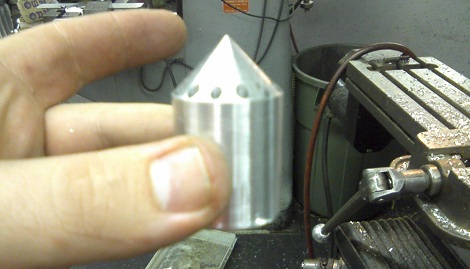
There’s one problem with the popularity of plastic-extruding 3D printers such as the RepRap and Makerbot; since they’ve become so popular, the price of plastic filament has skyrocketed over the past few years. Without a way to produce filament at a hackerspace or home lab, the price of 3D printed objects will remain fairly high. Project Spaghetti hopes to rectify that by building a machine to make plastic filament for 3D printers.

The folks behind Project Spaghetti – a loose amalgamation of makers going under the title of Open Source Printing, LLC – have successfully built a machine that is able to produce short lengths of plastic filament.

Early machines used a plunger to press small pellets of ABS plastic through a heated steel pipe to produce filament. There are a few problems with this approach, especially when the temperature is set to 480F, but the team was able to make a bit of filament with this design.

Although the team is using a piston to force melted plastic out of a nozzle, they do have a screw-drive ‘plan B’ in the works. This design should allow for continuous extrusion for theoretically endless reels of plastic filament, every RepRappers dream and a neat way to win 40 grand. Continue reading “Making Plastic Filament At Home”

3D Printer Control For The Raspi

Instead of dedicating his laptop to control his RepRap all night, [Walter] is using a Raspberry Pi as an Internet-enabled front end for his 3D printer.

Before [Walter] got his hands on a Raspberry Pi, he set up his laptop next to his RepRap and let the machine do its work for hours on end. Obviously, this tied up his laptop for a while so when his Raspi was delivered he was eager to offload the responsibilities of controlling a printer to his new Linux board.

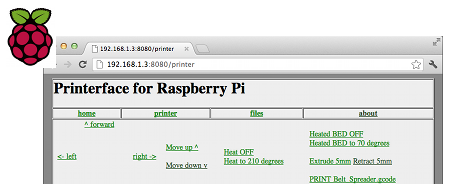
Right now, [Walter] has his Raspberry Pi set up as a web interface able to control his printer similar to Pronterface. We have to note that the Raspberry Pi isn’t driving servos or feeding filament onto the bed; those responsibilities are still handled by the RepRap electronics, but the ability to use a 3D printer over the web is still pretty cool.

[Walter] is putting the finishing touches on his 3D printer web interface, after which he’ll upload everything onto the git. Planned features for future updates include uploading gcode from the web and an option to connect a webcam for visual feedback when controlling a remote printer.

Video demo after the break.

Continue reading “3D Printer Control For The Raspi”

Measuring A Pulse With Infrared Light

The next time you’re unfortunate enough to make your way to a hospital, emergency room, or urgent care clinic, you’ll be asked to attach a small pulse monitor to your finger. The device the nurses clip on to one of your remaining digits is called a photoplethysmographic sensor, and basically it is able to read your pulse through reflected light. In the search to find out how these devices actually work, [Raj] sent in a great tutorial covering the theory behind photoplethysmographicy, and also built a simple device to detect a pulse without using a microcontroller.

These photoplethysmographic sensors operate by shining light into someone’s flesh – usually a finger or ear lobe – and recording the light reflected back to the source. The volume of blood in the finger will have an effect on the amount of light reflected back, and makes for a perfect way to automatically measure someone’s heart rate.

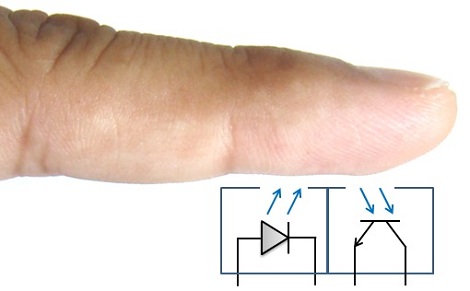
To build his device, [Raj] used a TCRT1000 reflective optical sensor. Inside this sensor is an infrared LED and a phototransistor. Of course with a finger over the sensor there is a ton of noise both from ambient light and the base rate of reflected light from a piece of flesh. [Raj] filtered this out, leaving only the small variations in the amount of reflected light, thus creating a very simple – and very inexpensive – electronic pulse meter.

Raspy Juice Gives You Serial Ports And Servo Control

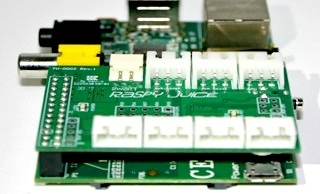
Up next on the continual march of expansion boards for the Raspberry Pi is the Raspy Juice, a board designed to break out the GPIO pins on the Raspberry Pi into servo, serial, and other miscellaneous connections.

The Raspy Juice features an ATMega168A microcontroller connected to the Raspberry Pi as an I2C slave device. Not only does the addition of a microcontroller add analog inputs to the Raspberry Pi, but also RS232 and RS485 serial connections, a real-time clock, and four JST plugs for hobby servos.

Because the Raspberry Pi can be powered from the GPIO header, the creator, [NTT] added a buck regulator so batteries or solar cells can be used to power the Raspberry Pi.

The Raspberry Pi is a terribly awesome robotics platform, but sadly limited by its capability to drive motors and servos natively. The Raspy Juice adds some much-needed capability to the Raspberry Pi, and we can’t wait to see a robot take its first steps with this expansion board.