Prototyping With Very, Very Small ICs

Gone are the days when all the cool chips are able to be thrown into a breadboard very easily. [starlino] was working with a circuit that uses an accelerometer, but unfortunately these chips come in hard to solder LGA-16 packages. [starlino] figured out a way to prototype with these packages that doesn’t require a custom breakout board or spending any time watching a reflow oven.

[starlino]’s LGA-16 adapter board began with a piece of perf board drilled out to form a space that perfectly fits his accelerometer. A piece of tape is placed over the pads of the chip and perf board, and the gap between the chip and board is filled in with a two-part plumbers putty.

Once the putty has cured, the leads on the acclerometer are connected to the pads on the board with a silver conductive pen. After putting a few header pins in the corners of the board, [starlino] soldered the pads to the pins and had a permanent breakout board for a very small accelerometer.

It’s not by any means a pretty build, but after [starlino] sealed the entire build in liquid electrical tape and installed it in a DIP socket, he had a completely functional accelerometer in an easy to prototype package. Not bad for a breakout board that can be built from stuff just lying around a workbench.

Buying Cheaper Electronics And Not Saving Money

As an engineer at Spectrum Design in Minneapolis, [Carl] works with clients to get their product out to the masses. When designing a new USB-powered device, one client thought it would be a great idea to include a USB car charger with the device. The client promptly ordered a few thousand car chargers from China and everything was going swimmingly.

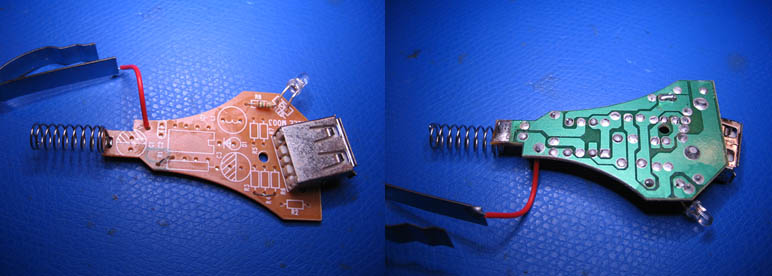
Everything was fine, of course, until [Carl] decided to test the Chinese car chargers with the client’s device. The USB PHY burnt out in short order, and the likely culprit was a shorted 12 volt regulator. This demanded a closer inspection, so after cracking open the charger [Carl] was amazed at what he found.

Yes, what you see on that circuit board is accurate. The manufacturer of these car chargers never even populated the switched mode regulator for this car USB charger.  Amazing, considering a single 10 cent 7805 DC regulator would have almost worked for this application.

If there was ever an example of being careful when purchasing the cheapest possible product to increase profit margins, this would be it.

Ever the engineer, [Carl] sent this into the tip line as a Word document. That’s available here, along with a slide show of the pictures [Carl] snapped.

Continue reading “Buying Cheaper Electronics And Not Saving Money”

Hackaday Links: August 15, 2012

An Octopart for RC equipment

When [Zach] started building a quadcopter he found it very difficult to source the required parts. Thus was born CompareRC, an aggregation of several online RC retailers. There’s over 150,000 parts in the database, all searchable and sortable by lowest price.

Segway iPad Skype teleconferencing robot

It’ll be a while until robots completely eliminate the need for any human interaction, but until then there’s Double. It’s a two-wheeled balancing robot with an iPad dock, controllable via a remote iPad.

Free electronic design

In case you weren’t aware, Fedora has an electronic design distro that includes just about everything needed to build electronic circuits called Fedora Electronic Lab. FEL has PCB designers, circuit simulators, editors for just about everything, and support for PICs, AVRs, and 8051 micros. Thanks for sending this in, [Simon].

Make your own Megadrive ROMs

Last month, [Lee] sent in a build where he connected an Arduino Mega to an old Sega Genesis/Megadrive cartridge. He’s figured out how to read the contents of the cartridge now, allowing you to preserve your 100% complete Sonic & Knuckles / Sonic 3 save for time immemorial.

A surprising amount of graphics tutorials

Khan Academy, every autodidacts best friend, is now teaching computer science. Right now, there is a heavy focus on drawing graphics, and everything is coded in the browser (using Javascript…), but at least it’s a start. The fundamentals of programming are platform and language agnostic, so this looks to be a great way to learn programming.

Here’s a blog post from the lead dev of the Khan CS project.

Turning A Keyboard Into A Computer With A Raspberry Pi

Only 80s kids will get this: remember when computers had built-in keyboards, like the Apple II line, or the Commodore 64? That’s a form factor duplicated by case modders many times over the years, but [preamp]’s project is the first time its been done using a Raspi (German, Google translation).

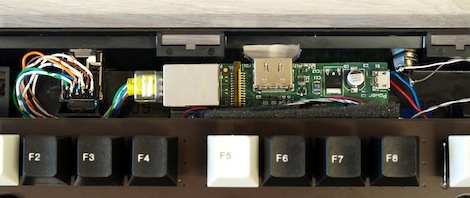
For his build, [preamp] used what he considers the best keyboard in the world, the Cherry G80-3000. Except for the HDMI port, just about every plug was moved to the back side of the keyboard with the help of an Ethernet jack, a USB hub, and RCA jack. Audio is missing, but for an extremely portable system [preamp]’s RaspCherry Pi is at the top of its class.

We were wondering when someone would shove a Raspi into a keyboard, and we couldn’t be happier that [preamp] chose a Cherry keyboard for his build; they’re wonderful input devices second only to the 8 pound behemeoth used to write this post.

Making Chiptunes With 32 Bytes Of RAM

Ah, chiptunes. One of the few remaining human endeavours where less RAM, less storage space, and fewer capabilities are actually considered an improvement. [dop3joe] over at the Stuttgart hackerspace Shackspace sent in a tiny chiptune playing circuit using the most bare-bones hardware we’ve ever seen.

The Noiseplug, as [dop3joe] calls it, is based on a very, very small 6 pin ATtiny9. With 1 kB of Flash memory and only 32 bytes of RAM [dop3joe] was able to create a small device inside an RCA jack that plays chiptunes whenever it is powered by a battery.

If you’d like to make your own noise plug, [dop3j0e] put all the code up in his Git. There are two relevant pieces of software for this build: a Windows app to create the chiptunes, and the ATtiny9 firmware itself. Of course to program the tiny, you’ll have to deal with the Atmel TPI, so here’s the application note (PDF).

Oh, [dop3joe] won third place at the Evoke demoscene party last weekend with the Noiseplug. Awesome.

Servo Controlled Wine Glass Plays The Music Of The Angels

[youtube=http://www.youtube.com/watch?v=tUNuTgNU-3c&w=470]

There’s a lot of cool stuff brewing on the Hackaday forums. [igor_b] posted a project he’s been working on that uses a servo, motor, wine glass, and a balloon to create a one-glass armonica.

A glass harmonica is a series of nested bowls turned on a spindle that is played by running your finger along the rims of the glasses. They’re very unique sounding instruments and something [igor] decided to emulate using only one glass.

Because the note produced from a wine glass varies with the volume of liquid, [igor]’s first thought was to use a pump to change the level of the water. He discarded this idea when he realized he could displace water by tying a balloon to a servo.

The rest of the build is a simple 555-based motor driver, a phone app written with GoOSC, and a Teensy dev board. To change the pitch of his instrument, [igor]’s phone sends a command via WiFi to his computer, which in turn controls the Teensy, servo, and ultimately the level of water in the glass.

It’s a very cool build, but there is a small change in timbre as the water balloon displaces more liquid in the glass. [igor] tried a few other objects – a peach and a plum – but using a balloon filled with water produced the clearest tone.

Now to make a few more of these and connect them to a MIDI keyboard…

Light Painting With The Raspi

The art of taking long exposure photographs with blinking RGB LEDs has improved greatly over the years, mostly due to the extremely easy to use Arduino and hundreds of tutorials on the web. If there’s one problem with light painting with a ‘duino, it’s that large, full color images take up a ton of storage space, much more than the flash memory on an Arduino can provide. Wanting fancier and more colorful light painted images, [Phil] over at Adafruit used a Raspberry Pi to make some very awesome light painted images.

Like any Adafruit tutorial that uses LEDs, the build begins with a digital RGB LED strip wired to the GPIO pins on the Raspi. After loading up the Adafruit educational Raspi Linux distro for hardware SPI support, the only thing left to do was writing a Python script to display images in the air.

[Phil] says vertical, hand-held LED bars are old hat, so he took a hula hoop and a few bits of PVC pipe, attached the LED strip, and put it on his bike. The results are really impressive – we’re loving the flames in the title pic – and considering the Raspi is a full-fledged computer, light paintings larger than what [Phil] made are very possible.