Reliving The BBS Days With A Propeller

Back before the world wide web, self-proclaimed geeks would get our compute on by dialing in to bulletin board systems. In their heyday, these BBSes were filled with interesting people and warez to fill the most capacious 10 Megabyte hard drive. In an attempt to relive the days of the Internet before the Eternal September, [Jeff Ledger] whipped up a tutorial for dialing up BBSes with an updated classic computer.

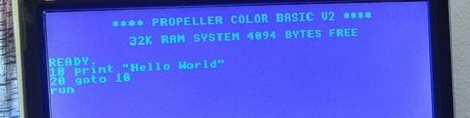
Instead of doing this tutorial with a C64 or an Apple II, [Jeff] used the Propeller powered Pocket Mini Computer he designed. This computer features 32Kb of RAM inside an eight-core Parallax Propeller along with a BASIC interpreter to run your own programs.

This Mini Computer can connect to BBS systems, but seeing as how acoustically coupled modems are rare as hen’s teeth these days, [Jeff] thought it would be a good idea to log in to the many Internet connected BBS servers using his desktop as a bridge between the Propeller and the Internet.

After [Jeff] got his Propeller computer up and running on a BBS, he was free to play Trade Wars or slay grues in one of the many MUDs still running. Not bad for a demonstration of the Internet of old, and made even better by the use of a Propeller.
Controlling A Spud Gun With An Arduino

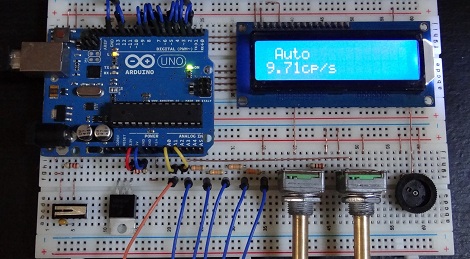
We’re a long way from the Aquanet-powered plastic pipe spud guns of our youth. [smirpab] over on the SpudFiles forum posted a work in progress of an amazing replica AS50 sniper rifle he’s building. This pneumatic cannon goes above and beyond any air-powered rifle we’ve seen with an Arduino that is able to switch between automatic, semi-automatic, and burst modes with an LCD display and a rate of fire control.

The mechanics of [smirpab]’s build are fairly normal for this level of pneumatic gun; it shoots 6mm plastic pellets from a smooth bore barrel with using air compressed to about 10 bar (145 psi). The electronics is where this project really shines, with an Arduino controlling the mode of fire (auto, semi-auto, and a 3-round burst), and the number of rounds per second adjustable with a pot.

A very cool project, and looking at the CAD renders of what [smirpab] completed project will look like, we can’t wait to see this build finished. As always, this build comes with the standard Hackaday “you’ll put your eye out, kid” warning. You can check out a video of [smirpab]’s piston after the break, along with a demo of the Arduino-powered control circuit going through all three firing modes.

Continue reading “Controlling A Spud Gun With An Arduino”

Programming The XMEGA With An ISP

Atmel’s XMEGA series of microcontrollers are neat little pieces of hardware; with a very fast clock, a ton of IO, USB, and up to 8 UART ports, these neat little chips serve as a nice bridge between AVRs and PICs and the very powerful ARM chips coming out on the market. Unfortunately, the XMEGAs don’t use the extremely common ISP programming header found on just about every AVR dev board making them a bear to program. [Szu] over in Poland came up with a very easy way to program these chips, all while using the programming hardware you already have on hand.

[Szu]’s build uses a few resistors and diodes to break out a USBASP connection to the XMEGA’s PDI interface. On the software side of things, [Szu] wrote an update to the USBASP firmware to allow it to program PDI devices, and also has a patch for AVRdude to allow uploading firmware from the command line.

A very cool build, and one that allows for very, very powerful devices that build on the AVR code you’ve already written.

Very Inexpensive RF Module Tutorial

Let’s say you need a way to make a project wireless, but don’t have the scratch for a ZigBee or its ilk. You could use IR, but that has a limited range and can only work within a line of sight of the receiver. [Camilo] sent in a project (Spanish, translation) to connect two devices via a wireless serial connection. As a small bonus, his wireless setup is cheap enough to create a wireless network of dozens of sensors.

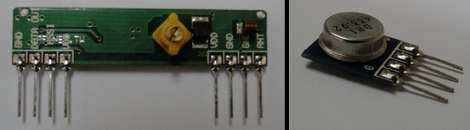
[Camilo] used the TLP434A transmitter/receiver combination to get his wireless project off the ground. These small devices only cost about $5, but being so inexpensive means the hardware designer needs to whip up their own communications protocol.

For a microcontroller, [Camilo] chose a Freescale MC9S08QC, a pleasant refrain from the AVR or PIC we normally see. After making a small board for his transmitter, [Camilo] had a very small remote control, able to send button presses or other data to a remote receiver.

After the break, you can see a short demo video [Camilo] posted of his wireless transmitter turning on an LED attached to his receiver. Unfortunately, this video was filmed with a potato, but all the schematics and code is on his web site for your perusal.

Continue reading “Very Inexpensive RF Module Tutorial”

Real Time GPS Decoding With Software Defined Radio

In case the Realtek RTL2832u-based USB TV tuner dongle isn’t useful enough, the folks behind a project to get a software defined GPS receiver off the ground successfully plotted GPS data in real-time with this very inexpensive radio.

Previously, we’ve seen these dongles grab data from GPS satellites – useful if you’re building a GPS-based clock – but this build required hours of data collection to plot your location on a map.

The folks working on the GNSS-SDR project used an RTL2832 USB TV tuner and a Garmin active GPS antenna to track up to four GPS satellites in real-time and plot a location accurate to about 200 meters.

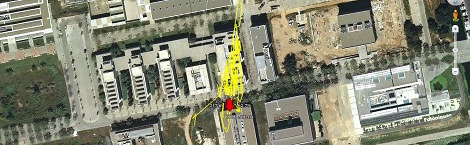
The Google Earth plot for this post shows the data collected by the GNSS-SDR team; the antenna was fixed at the red arrow for the entirety of the test, and the  yellow lines represent a change in the calculated location every 10 seconds. Amazing work, and only goes to show what this remarkable piece of hardware is capable of.

An Adafruit Raspberry Pi Extravaganza

The folks at Adafruit are busy as a bee working on bringing some of their really cool boards to the Raspberry Pi platform. Here’s a few that came in over the last few days:

16 servos is almost too many

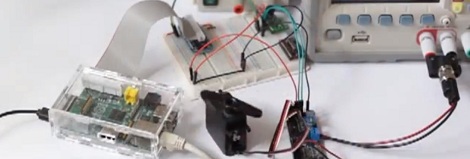
Servos require a PWM output but the Raspi only has hardware support for PWM on a single GPIO pin; certainly not enough to build a gigantic, city-leveling robot. [Kevin] over at Adafruit put together a tutorial for using this 16 channel servo driver with the Raspi.

12 bit DAC

With only one PWM pin and no analog out, it was only a matter of time before someone hooked up the Adafruit 12 bit DAC to the Raspberry Pi.

16×2 LCD displays

Both the servo and DAC builds use the Adafruit I2C library and a bit of Python. Of course it’s possible to treat the GPIO pins on the Raspberry Pi as digital outs, just as [Mikey] did with his Raspi LCD display tutorial.

So, what distro are you using?

Of course all these builds use Adafruit’s Occidentalis distro, a maker-friendly Linux distro we’ve posted about before. It’s too useful to languish as a single Hackaday post, so here it is again.

Turning [M. C. Escher] Prints Into Real Objects

September is coming, and soon college freshmen the world over will be decorating their dorm room walls with Dark Side of the Moon posters and [M.C. Escher] prints. Anyone can go out and simply buy a prism, but what if you wanted a real-life version of objects and buildings from [Escher]’s universe? Professor [Gershon Elber] at the Technion at the Israel Institute of Technology decided to turn [Escher]’s prints into reality.

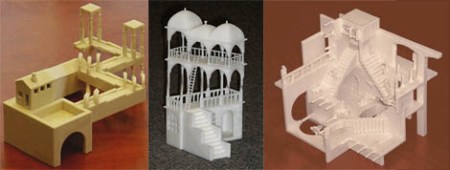
First beginning with simple shapes such as a Penrose Triangle and a Necker Cube, [Elber] decided to branch out into much more impossible shapes such as [Escher]’s Waterfall, Belvedere, and Relativity. These buildings are extremely hard to visualize in any traditional computer design program, so [Elber] wrote a plugin for his IRIT computer modeling program to design the buildings before committing them to a 3D printer.

In the video after the break, you can see a few rotating views of the resulting [Escher] buildings. Of course they only work from exactly one point of view – and even then, only with one eye closed – but it’s amazing to see these famous architectural studies brought into the real world.

Continue reading “Turning [M. C. Escher] Prints Into Real Objects”