Playing Pong With Your Mind

It seems [Charles Moyes] and [Mengxiang Jiang] won’t suffer from the sore wrists and thumbs from an Atari controller any longer. They built a version of Pong played by concentrating and relaxing while wearing an EEG headset.

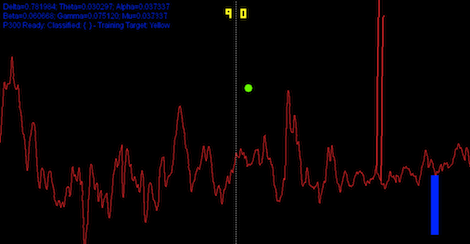
Right now, there’s only enough hardware for one player; when the player operating the red paddle concentrates the paddle moves up – relax, it goes down.

The hardware portion of the build is fairly tricky business. [Chuck] and [Mengxiang] built a circuit to amplify the tiny voltages between their ears into something a microcontroller can read. The circuit is loosely based on this Arduino EEG build, but highly refined as the elegance of an ATMega644 requires.

The EEG amplifier has a cutoff of under 50 Hz, perfect for reading the Alpha waves correlated with concentration. The oscillations from the skull-cap are sent through the ATMega to MATLAB where after a pass through an FFT the brain waves are converted to mouse scroll wheel output.

There’s a demo video available where you can see spectators screaming at the poor test subject telling him to relax and concentrate on command. You can check that out after the break.

Continue reading “Playing Pong With Your Mind”

Keyboard Composes Its Own Music

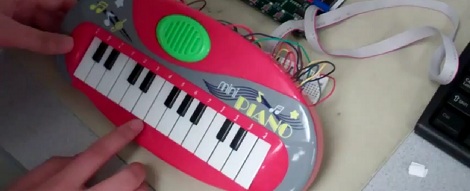
Summer is right around the corner and all the final projects from electronic design classes are rolling into the tip line. This time, we’ve got [Chaorong] and [Siyu]’s auto-composing keyboard from their time in ECE4760 at Cornell.

The keyboard has two modes: a ‘happy’ mode and a ‘tender’ mode, the difference being the tender mode is slower and sounds a little like a lullaby. After two keys are pressed, the ATMega644 figures out what key it should play in and starts generating a random-ish sounding song using a Markov probability matrix.

There’s a third option for the keyboard as well: play a short melody and the software will loop through a few permutations of the melody. After the break, you can see [Siyu] play Ode to Joy and have the autocomposer improvise around the tune. Very, very nice work and we can’t wait to see more senior design projects hit the tip line.

Continue reading “Keyboard Composes Its Own Music”

Tindie: An Etsy For Electronics

If you have a finished project you’re now bored with, here’s Tindie. It’s a one-man operation headed b [emile] that hopes to connect makers with people who think DIY projects are really cool and have money.

There are already a few websites that cater to the builder who wants to sell projects: Kickstarter for one, but this is based on the concept of campaigns. Tindie aims to be a techie etsy, according to [emile]’s market research post on reddit;  a places for makers with a soldering iron to sell stuff, but who are baffled by the concept of knitting.

Right now there’s nothing to buy on Tindie – [emile] is looking for hackers to sell their projects so the store doesn’t launch with an empty stockroom. If you’ve got an old project sitting on your shelf that you’d like to sell, put it up. [emile] is only taking 5% of the sales – just enough to pay for the hosting. Hopefully it will be popular enough for the eventual Tindie/regretsy blog.

Watch A Rocket Engine Test Live This Afternoon

If you want to see something awesome this afternoon, watch SpaceX’s live broadcast of an engine test today at 3:00 pm EDT/12:00 pm PDT/7:00 pm GMT. You’ll see nine Merlin rocket engines power up to full thrust during a test for the upcoming launch of a Dragon space capsule to the ISS.

This is just a static test – hopefully the nine Merlin engines won’t go anywhere. To get an idea of the power behind these engines this is a test of just  Merlin engine being fired at the SpaceX open house in Texas a year or so ago. Today, nine engines will be fired at once.

Check out the videos after the break to see just how awesome the Falcon 9 is going to be.

via boingboing

Continue reading “Watch A Rocket Engine Test Live This Afternoon”

Adding A Remote Shutter To A Cheap Digital Camera

[Luo] sent in a very easy way to add a remote shutter to just about any Canon Powershot. Even though it’s just a button, battery, and USB cable, we’re sure this would be a great project to teach the younglings about the power of soldering.

Some Canon Powershot digicams are impressive beasts with the ability to take time-lapse, long exposure, and high-speed photos. These cameras are generally crippled by their firmware, but by installing CHDK these features can be enabled.

[Luo] read the CHDK wiki and found the firmware has the ability to snap a picture whenever a button is pressed. All he had to do is send 5V down a USB cable. After whipping up shutter button housed in a tin of Eclipse gum and attaching a cable, [Luo] had a functional shutter.

With the CHDK firmware, you can do a lot of really interesting stuff with the old Canon camera sitting on your shelf: we’ve seen a lot of intervalometers and even a few book scanners that use a similar setup. Nice work, [Luo].

Getting A Textured 3D Scan From Just A Webcam

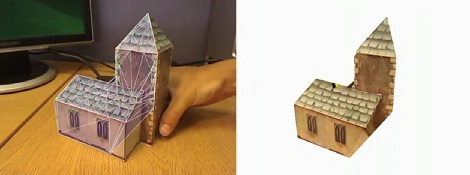
Here’s an oldie but a goodie that passed us up the first time it went around the Internet. [Qi Pan], (former) PhD student at Cambridge, made a 3D modeling program using only a simple webcam. Not only does this make very fast work of building 3D models, the real texture is also rendered on the virtual object.

The project is called ProFORMA, and to get some idea of exactly how fast it is, the model of a church seen above was captured and rendered in a little over a minute. To get the incredible speed of ProFORMA, [Qi] had his webcam take a series of keyframes. When the model is rotated about 10°, another keyframe is taken and the corners are triangulated with some very fancy math.

Even though [Qi]’s project is from 2009, it seems like it would be better than the ReconstructMe, the Kinect-able 3D scanning we saw a while ago. There’s a great video of [Qi] modeling a papercraft church after the break, but check out the actual paper for a better idea of how ProFORMA works.

Continue reading “Getting A Textured 3D Scan From Just A Webcam”

Multitouch Table Uses A Kinect For A 3D Display

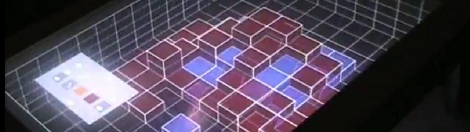
[Bastian] sent in a coffee table he built. This isn’t a place to set your drinks and copies of Make, though: it’s a multitouch table with a 3D display. Since no description can do this table justice, take a look at the video.

The build was inspired by the subject of this Hackaday post where [programming4fun] was able to build a ‘holographic display’ using a regular 2D projector and a Kinect. Both builds work on the principle of redrawing the 3D space in relation to the user’s head – as [Bastian] moves his head around the coffee table, the Kinect tracks his location and moves the 3 dimensional grid of boxes in the opposite direction. It’s extremely clever, and looks to be a promising user interface.

In addition to a Kinect, the coffee table uses a Microsoft Surface-like display; four infrared lasers are placed at the corner and detected with a camera next to the projector in the base.

After the break you can see the demo video and a gallery of the images [Bastion] put up on the NUI group forum.

Continue reading “Multitouch Table Uses A Kinect For A 3D Display”