Baby’s First Star Light Projector And A Foil Slip Ring

For a newborn, everything is magical; a lack of object permanence means everything is new, wonderful, and novel. What then, could be better than a projected star field circling an infant’s room, gently sending them to sleep?

[Pete] was inspired by this earlier starlight projector that projects a rotating star field onto the walls and ceiling of a nursery. Instead of a rather loud servo, [Pete] used a quiet 12 Volt gear motor that spins the star field at 5 RPM. Like the previous build, a LED was used but [Pete] found a color-changing RGB LED that automatically shifts colors.

The shaft of [Pete]’s gear motor is tiny, and unlike the servo, there’s constant rotation. This meant a slip ring was needed to pass electricity into the spinning sphere. A piece of copper foil and a pair of improvised brushes served just fine. While [Pete]’s project, like its predecessor, doesn’t seem to have any recognized constellations drilled into the sphere, the foil slip ring opens up the possibility for a small microcontroller being fitted inside the globe with blinking lights.

Check out the video of [Pete]’s build in action after the break.
Continue reading “Baby’s First Star Light Projector And A Foil Slip Ring”


Adding New Features And Controlling A Kinect From A Couch

Upon the release of the Kinect, Microsoft showed off its golden child as the beginnings of a revolution in user interface technology. The skeleton and motion detection promised a futuristic, hand-waving “Minority Report-style” interface where your entire body controls a computer. The expectations haven’t exactly lived up reality, but [Steve], along with his coworkers at Amulet Devices have vastly improved the Kinect’s skeleton recognition so people can use a Kinect sitting down.

One huge drawback for using the Kinect for a Minority Report UI in a home theater is the fact that the Microsoft Skeleton recognition doesn’t work well when sitting down. Instead of relying on the built-in skeleton recognition that comes with the Kinect, [Steve] rolled his own skeleton detection using Harr classifiers.

Detecting Harr-like features has been used in many applications of computer vision technology; it’s a great, not-very-computationally-intensive way to detect faces and body positions with a simple camera. Training is required for the software, and [Steve]’s app spent several days programming itself. The results were worth it, though: the Kinect now recognizes [Steve] waving his arm while he is lying down on the couch.

Not to outdo himself, [Steve] also threw in voice recognition to his Kinect home theater controller; a fitting  addition as his employer makes a voice recognition remote control. The recognition software seems to work very well, even with the wistful Scottish accent [Steve] has honed over a lifetime.

[Steve]’s employer is giving away their improved Kinect software that works for both the Xbox and Windows Kinects. If you’re ever going to do something with a Kinect that isn’t provided with the SDKs and APIs we covered earlier today, this will surely be an invaluable resource.

You can check out [Steve]’s demo of the new Kinect software after the break.

Continue reading “Adding New Features And Controlling A Kinect From A Couch”

The First Raspberry Pi Build Is A MAME Machine

The Raspberry Pi was launched nearly a month ago, but these wonderful cheap single-board computers are still on their way from China to the workbenches of hackers and builders around the globe. Although they haven’t shipped yet, plenty of people are chomping at the bit to do something useful with the Raspi. [Nicholas] figured he should hit the ground running, so he emulated a Raspberry Pi to get everything ready for the MAME machine he’ll build when his new toy arrives.

[Nick] found a Raspi VirtualBox image on the official Raspberry Pi forums. After getting a web browser up and running with a few console keystrokes, he turned his attention to a MAME emulator. It’s a relatively simple install (although it did take six hours to compile), but we’re sure the Raspi will be featured in quite a few MAME builds so it was time well spent.

Sure, the Raspberry Pi you ordered a month ago is probably on a container ship in the middle of the ocean right now, but that doesn’t mean you can’t start planning your build. Just load up a VirtualBox image, check out a few of the tutorials, and you’re ready to go.

Kinect For Windows Resources

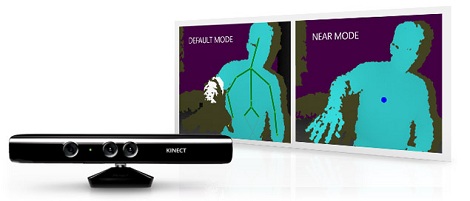
Despite having been out for nearly two months, the world has yet to see a decent guide to the Kinect for Windows. While the Xbox and Windows  versions of the Kinect use basically the same hardware, there are subtle but important differences. Thanks to [Matthew Leone] and his awesome summary of developer resources, getting your Kinect project up and running is now a lot easier.

After getting the SDK from the Microsoft Kinect for Windows site, you might want to check out the Microsoft Programming Guide. The Windows Kinect can only be used with Visual Studio, but with that inflexibility comes a few added features. Both versions of the Kinect have a microphone array that allows for determining the direction of a sound source. The Open Source driver has very little support for audio input, but the official Microsoft version has all the APIs for audio capture, source localization, and speech recognition ready to go.

At $250, the Kinect for Windows is a fairly hefty investment. A used Xbox Kinect can be had for around $80, so we’re pretty certain the hacker community is going to steer itself away from the Windows version. Still, if you’re ever paid to develop something for the Kinect you might want the friendly APIs and features not found in the XBox version.

Hackaday Links: March 21, 2012

Don’t get your dirty fingers on the glass

[Poke] sent in a video of him using Android devices with a wiimote and PS3 controller. The build uses the Joystick2Touch and the USB Joystick Center app. Root is required, but this will be very useful when tv-sized Android devices start showing up.

Wonderful restoration work

[John] sent in an Instructable on restoring an ancient typewriter. It’s almost beautiful seeing all those delicate metal parts so finely cleaned and reassembled.

Proof of the Big Bang is in one of these articles

[Paleotechnoligist] has been reading the technical journals from Bell Labs. These people were the Google of the 20th century and did some amazing stuff. Here’s the math for getting to the moon and a thing about “cellular telephony.”

Oooohhh extruded aluminum

[Richard Sum] sent us a pic of his new 3D printer kit he’ll be offering soon. Very professional looking.

Flying like a three dollar bill

[Yannick] and [SaakNeMah] sent in this video of a guy strapping on bird wings, running down a field, and then flying for about 100 meters. The project is Human Birdwings and it’s gotten an amazing amount of press coverage. We’re calling fake on this for three reasons: the wings didn’t produce lift, the camera angles are all wrong (only applicable if there was a single flight), and this guy would be a gazillionaire if his wings actually worked. Argue amongst yourself in the comments; we’d love to be proven wrong.

Software Defined Radio From A USB TV Capture Card

With a simple digital TV USB capture card, you can build your own software defined radio or spectrum analyzer. While it may not be as cool as [Jeri Ellsworth]’s SDR, it’s still very useful and only requires $20 in hardware.

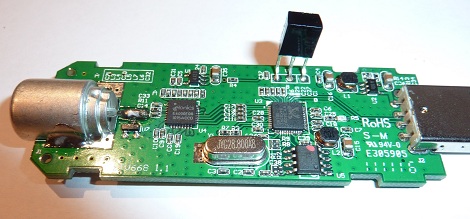
The only piece of hardware required for this build is a USB FM/DTV capture device with the Realtek RTL2832U chipset. So far, two USB sticks have been tested and the unit with the largest frequency range (64 – 1700 MHz) is available direct from China for $20.

Turning these cheap capture cards into software defined radios and spectrum analyzers was discovered by [Antti Palosaari] after sniffing the device. These cards demodulate the frequency and send all the data to the computer and is decoded via software. If you have one of these capture cards lying around, you can grab the software and load it up on your *nix box. Right now, the software only writes directly to a file, and may drop a few samples if writing to a hard disk instead of ram. Small problems, but we’re sure this project will pick up steam in the very near future.

via reddit

Humanoid Robot Will Eventually Take Over The World

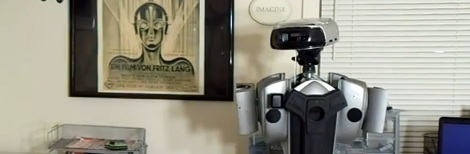
Over the last two years, [Mark] at the Harford (and Baltimore) Hackerspace has been building 401k, a humanoid robot that will soon be able to walk on two legs, detect objects, and fight along with its comrades in the robot insurrection that leads to the extinction of man.

To get an idea of how complicated a humanoid robot is, realize the Honda ASIMO has been an ongoing project for over a decade now and can be easily defeated by stairs. [Mark] doesn’t have the benefit of millions of dollars in funding or dozens of lab assistants – in one video, [Mark] shows us the foot pads made out of [George Foreman] grill lids and hip joints made out of DVD players. Even though he’s using “unconventional” parts, 401k still has a very advanced pair of legs that model their human analog very well.

Even though it’s still a work in progress, there’s an incredible amount of work and expertise that is going into this build. [Mark] is wants to take 401k to this year’s RoboGames next month. We hope he gets his build walking in time, even for a few baby steps.

You can check out more of the 401k build vlog on [Mark]’s YouTube channel.