Unique Pomodoro Timer Displays Quotes While You Work

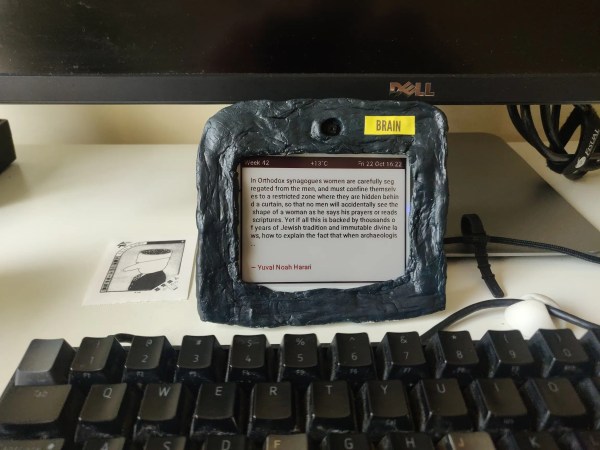
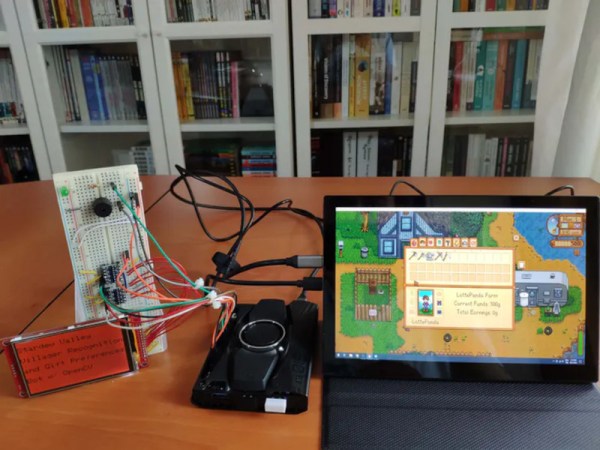
[zorbash] came up with a great side project while designing a way to read notes and highlighted sections from e-books without having to use Good Reads or the Amazon tool: build a gadget to display a parade of quotes from favorite authors and their books. The project is called Brain because it’s built on an IoT platform called Nerves.

As a bonus, the gadget functions as a Pomodoro timer of sorts — that’s the time management method where you work for 25-minute periods and take 5-minute breaks in between, with a longer break every four Pomodoros. Brain displays a quote for 25 minutes and then flashes the screen to draw [zorbash]’s attention to the fact that time is up. We think this is a nice, unobtrusive way to do things. There are no breaks built in, but that’s just how [zorbash] rolls.

The quotes are fetched using Bookworm, a script [zorbash] wrote that’s available on GitHub. It uses a Raspberry Pi 2 B, an SD card to store the JSON’d quotes, and a Wi-Fi dongle to allow the fetching. If you’re wondering about the enclosure, it’s made of clay.

If you like your Pomodoro timers a little more physical, here’s one that starts as soon as you plug it in to a USB port.

Pulp-Molding: A Use For Cardboard Confetti

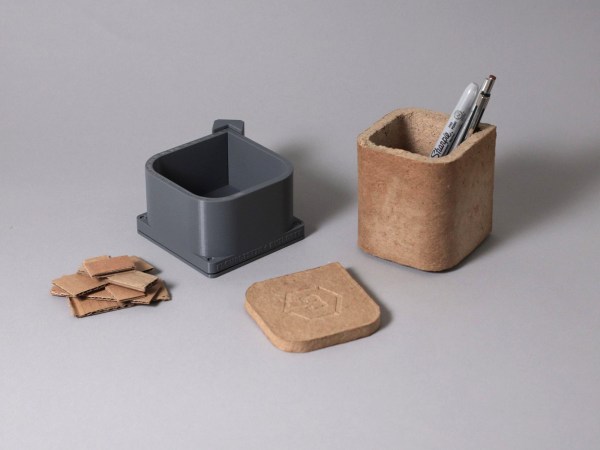
We’re pretty sure that we don’t have to tell you how great cardboard is. You probably sing the praises yourself and use it for everything from a work surface protective layer to a prototype of your next amazing build. But if you still find yourself flush with cardboard even after all that, here’s one thing you can do with all those pieces that are too small to use for anything else– chuck them in an old blender, whip up some cardboard pulp, and press that gunk into some 3D-printed molds.

In addition to a step-by-step of the process, [flowalistik] offers a mold set of STL files for various useful items like a pencil holder, a box with a lid, a tray, and a coaster, as well as the Fusion 360 files in case you want to change them around. You might want to seal the coaster with something protective so that it doesn’t mold/disintegrate/bloom from condensation.

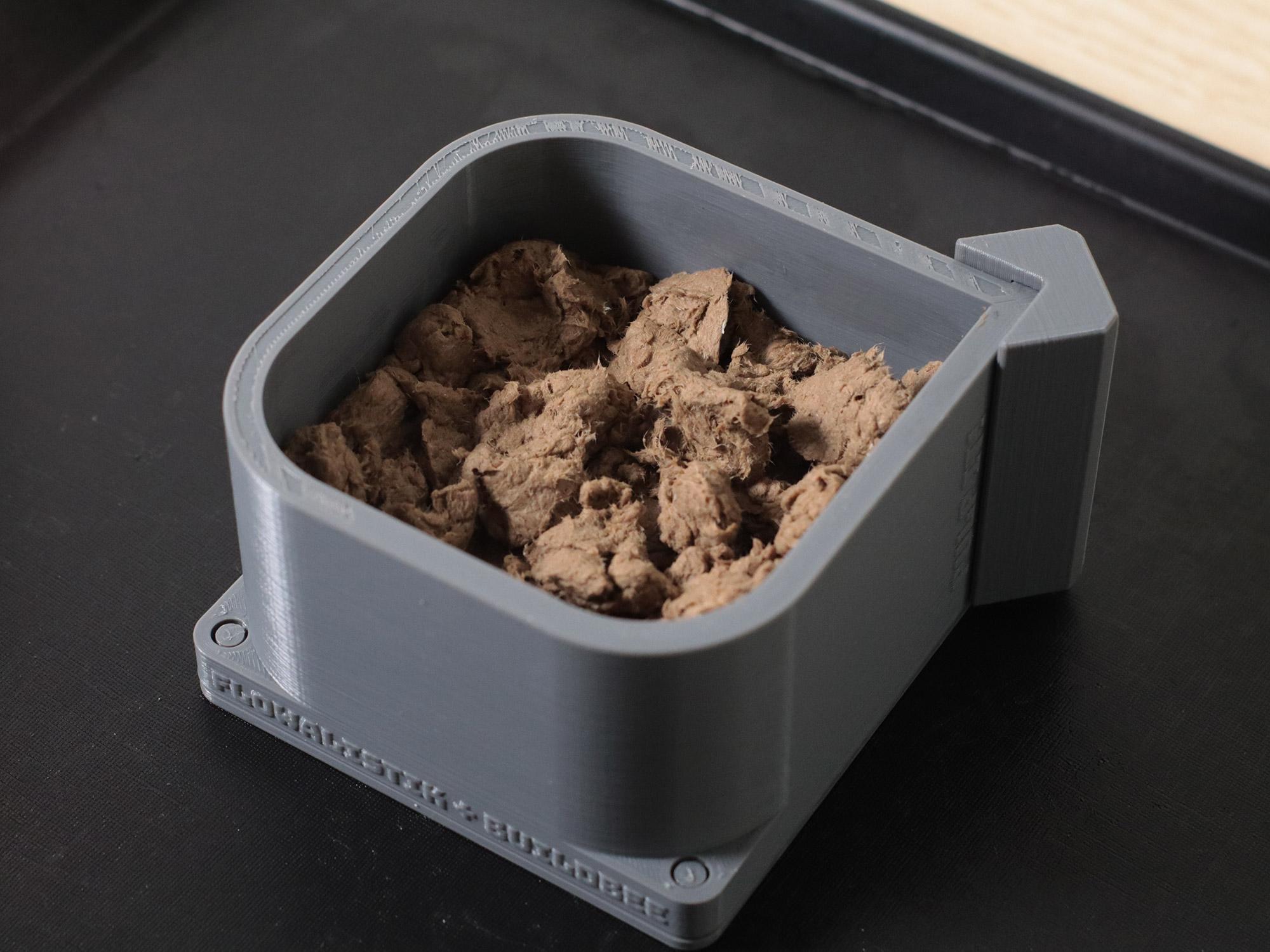
Each part consists of the walls, the wall clip that keeps them closed, but allows for de-molding and reuse, the bottom lid, and the top lid. All these prints need to be pretty high-res so that they can withstand the pressure of the clamp holding it all together. [flowalistik] recommends a layer height no larger than .03mm and a 20% infill.

The process of making the pulp itself is fairly simple, and the recipe only calls for water and some kind of binder. To start, remove all tape, coatings, staples, and anything else non-soluble from the cardboard. Cut it into bite-sized pieces your blender will enjoy, and add water and PVA glue or rice paste. Mix it up, remove the excess water by squeezing your pulp inside of a piece of cloth, and then use it to fill up your mold. You’ll want to press out the water as you go and fill it further, then finally apply the clamp. You can start de-molding parts on a schedule, starting with the clamp after about six hours. Once it’s fully dried in about two days, you can treat it like MDF and sand, cut, or even drill it. We think some of these would look pretty good with a coat of paint.

Need your objects to be more sturdy? Keep that printer warmed up — you can use prints to cast concrete, too.

The Metabolizer Is Turning Trash Into Treasure Even Faster Now

Do you remember [Sam Smith]’s Metabolizer from a few years back? In case you’ve forgotten, this baby takes trash and turns it into printed plastic objects, and it’s solar-powered to boot. Although the Metabolizer didn’t win the 2018 Hackaday Prize, [Sam] and his machine won many achievements that year, including the Open Hardware Challenge. It’s fantastic to see the project still improving.

To recap, the sun hits the solar panels and charge up the battery bank. Once there’s enough power to start the reaction, it gets dumped into a heating element that turns biomass into biochar. This smoke is cooled, collected, refined, and fed into a small gas generator, which produces DC power to run a 3/4-horsepower shredder and the trash printer.

[Sam] likens this beast to a Rube Goldberg machine in that it performs an overly-complicated chain reaction to do a simple task. We certainly see his point, but we think that this machine is worth so much more than those classic machines, which tend to do nothing useful at all and tend to consume many resources in the process.  On the contrary, the Metabolizer’s chain reaction starts with sunshine and ends with useful objects that keep plastic out of landfills. Honestly, it’s more akin to a compost heap with a PhD in Biology and a handful of steroids and a 3D printer attached.

Unfortunately, [Sam] couldn’t get a prototype working in time for the Prize, and he turned to Patreon to gain support after the $1,000 ran out. Three years and a ton of improvements later, [Sam] has a working prototype that’s cheaper, more efficient, and easier to build. But can it be built relatively easily by someone other than [Sam]? Consider the gauntlet thrown down.

Not happy with your standard-style compost pile? You need a DIY trommel to sift out the bad stuff.

A monoblock split keyboard with the all-important num pad.

Back-to-the-Office Ergo Brings A Bit Of Home Sweet Home

We sure do love a good one-piece split keyboard, and it’s not just because you never have to worry about the halves drifting too far apart throughout the day, though that’s a big plus. For one thing, the angles are always just right without having to mess with anything, so muscle memory gets you back to the home row every time. Usually, the only thing missing from these mono-block splits is the num pad. Well, not on the SuperLyra.

This is [Malevolti]’s back-to-the-office build, and it’s sure to start a few conversations. While we don’t have a lot of details, there will be plenty forthcoming on the Black Cat Plasticworks website. As soon as next year, [Malevolti] plans to sell fully-assembled SuperLyras, kits, and bare-bones PCBs. We really appreciate that it allows for either MX-type switches or Chocs, depending on the hot swap sockets installed.

As much as we love the Maltron-esque num pad in the middle, we imagine that it would be more comfortable to use if it were canted at 45° angle relative to the user’s dominant hand. Fortunately, some enterprising redditor had the same idea. They’ve already mocked this up in Photoshop and are inviting comments on another thread.

Want to go split, but don’t know which is right for you? Check out this Split Keyboard Finder.

A 3D-printed maypole braider can produce woven tubes of rope, yarn, or whatever you've got. Al dente spaghetti strands, maybe.

3D-Printed Braiding Machine Will Show You The Ropes

A maypole braider, aka a circular braider, is a type of horn gear braider that makes braided tubes, like one of those woven finger traps or that lovely bit of gutted paracord that’s jazzing up your otherwise boring DIY USB cable. They are called so because the action mimics the motion of a group of maypole dancers bobbing and weaving around each other in an intricate choreography that results in an equally intricate pole decoration job.

A 3D-printed model showing the motion of a maypole braider. Maypole braiders like [kmatch98]’s are responsible for all kinds of ropes, cords, and other braided goods like fly-fishing lines. They use three or more bobbins, each loaded up with a single strand of yarn.

One of the most important parts of braiding anything, including hair, is maintaining tension on the braid as you go. Here, each bobbin rides inside a bobbin carrier, which performs a number of tasks — it holds the bobbin in place, releases yarn when it’s supposed to, and maintains tension on the yarn while skating a figure eight around the track.

This mesmerizing machine consists of spur gears, a frame with a figure 8 track, a pair of horn gears, and a foot — a guide on the bottom of the bobbin that rides along in the track. Early on, [kmatch98] made a fidget spinner version to visualize the basic function. He studied pictures of commercial bobbin carriers and managed to not only reverse engineer them, but improve the design by eliminating one of the two springs and replacing it with gravity. The remaining spring is used for the bobbin release.

Surprisingly, this isn’t the first plastic braiding machine we’ve featured. Here’s one made of freakin’ LEGO.

Three More Remoticon Speakers Complete The Lineup

You know, it’s hard to believe, but Hackaday Remoticon 2021 is just two weeks away. Every year, we work hard to make the ‘con a little better and brighter than the one before it, and this year is no exception. We’ve already got a star-studded list of keynote speakers, and our list of inspiring talks seems to get longer and more exciting every week. With todays announcement of three more speakers, that list is complete and available along with their scheduled times on the official Remoticon website.

Come and see what we’ve got in store for you on Friday, November 19th and Saturday, November 20th. Remoticon admission is absolutely free this year, unless you want a t-shirt to commemorate the event for a paltry $25. Tickets are still available — in fact, they’ll be available right up until Remoticon Day One on the 19th, but if you want a shirt you’ll need to grab one of those tickets by a week from today. Go get yours now!

Okay, let’s get on to today’s announcement of the speakers!

Continue reading “Three More Remoticon Speakers Complete The Lineup”

Spooky Winners Of The Halloween Hackfest Contest

It was a tight race, but the results of the Halloween Hackfest contest are in. We asked you to scare up a terrifying build in one of three categories, and as usual, you didn’t disappoint! These three hackers have each won a $150 shopping spree at Digi-Key to fund their future frights.

Best Undead Tech: 3-Axis Skull Mod for a 12-Foot Skeleton

Nelson Bairos

Skelly the 12-ft Home Depot skeleton comes alive with servos.[Nelson] has been in the Halloween-based animatronics business for more than a decade, but always gets beaten to the punch when it comes to doing the really fun stuff like making things move and speak. Once [Nelson] got their hands on a 12-foot skeleton from the big box hardware store, it was time for the gloves to come off and the fun to begin.

The three axes of movement come from a rotation servo, a tilt servo, and a nod servo, all of which are connected to each other and the skeleton with 3D-printed supports. Lucky for us, [Nelson] documented this first build quite nicely and provided the 3D models, should you suddenly get the urge to go see if they have any of these magnificent skeletons left on clearance.

Best Haunted Smart House: Safety Coffin Grave Bell

Glen Atkins

What’s scarier than the undead? How about people who were buried alive, whether accidentally or not. Can you imagine hanging around in a graveyard, innocently doing tombstone rubbings or some ritualistic sacrifice when suddenly you hear someone ringing a bell and/or a terrified, muddled voice screaming for help?

[Glen Atkins]’ Safety Coffin Grave Bell build forgoes the body part, but in the dark, it’s easy to let your imagination run wild. It looks like a bell on a post, but pass too close and the ultrasonic rangefinder detects unsuspecting trick-or-treaters and gives them a scare by frantically ringing the bell with a big servo hidden inside. We hope they brought spare underwear.

Best Crazy Costume: Computer Head

Skye Rutan-bedard

Holloween costume with an old computer screen for the head[Skye] won a lot of people over last year with their computer head costume that featured a lone blinking eye and a voice. What those people didn’t know was that it suffered from three big problems: it had poor ergonomics from a heavy monitor shell, the blinkenlights matrix used to display emotions was underutilized, and using a keyboard proved to be an inconvenient UI for running the voice. This year, [Skye] set out to fix all the problems and make the costume even more awesome and comfortable to wear.

The brain of this computer head costume is a Raspberry Pi 4. As for [Skye]’s actual head, it is safely enclosed inside a hard hat that’s epoxied to the inside of the case. A wide range of emotions dance across the 16×16 RGB LED matrix that looks great behind some mirrored film, and they go great with the new voice method — [Skye] speaks softly into a small microphone, and the Raspi uses Mozilla’s DeepSpeech to repeat whatever they say in a robotic British accent.

Hack-y Halloween

Congratulations to all the winners, and a big thank you to all 45 entrants for your hair-raising hacks. Thank you also to Adafruit and Digi-Key for sponsoring this contest. We hope you had a great Halloween!