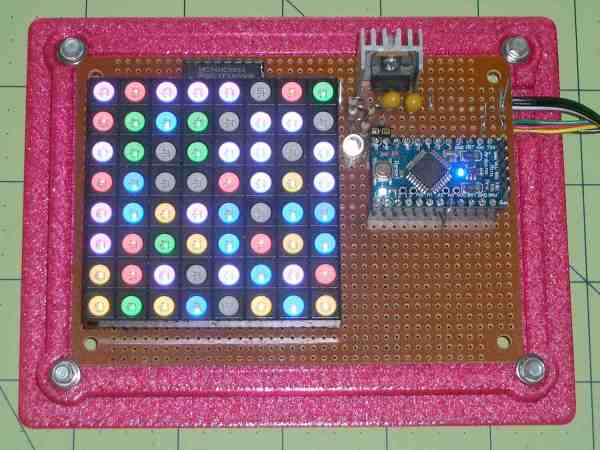
LED Matrix Plus Geiger Counter

A lot of projects get made because someone just has the parts lying around. In this case, [Ed Nisley] got given a nice 8×8 RGB LED matrix, and needed something to display. [Ed] details the transformation of stuff-lying-on-the-desk into a unique matrix display for a Geiger counter (which he also presumably had sitting around somewhere). The result is a lightshow that’s as random as radioactive decay, and that’s pretty darn random.

img_5583-random-led-dots-circuit-layout-rb-smd-resistorsThe first post covers the hardware layout. It’s build on protoboard, but ends up looking a lot nicer than our projects because [Ed] spent some time hiding the shift-register ICs and row-driver transistors underneath the matrix itself, which was nicely socketed above. A sweet touch is the use of SMT resistors soldered upright underneath the board to save space. Cute.

The second post covers the circuit design, and is worth a look if you’re new to driving many LEDs from a minimum number of microcontroller pins. There are eight rows, and three colors each for eight LEDs per row. Without using shift registers, this would require 8*8*8*8 = way too many pins to control. If you want a worked example of how to do this with just four microcontroller pins, have a look. (Spoiler: cascaded shift registers driven by the AVR’s hardware SPI peripheral.)

The third post starts to flesh out the software. [Ed] settled on seven colors (and off) for the display, so the matrix’s total state can be crammed into just 32 bytes, which fits nicely in even a tiny microcontroller, much less the gargantuan ATmega328. Wrapping this all up in an array of structs and providing a couple of helper functions makes quick work of the software side. The addition of a sync pulse to trigger an oscilloscope at the end of a row is a nice touch.
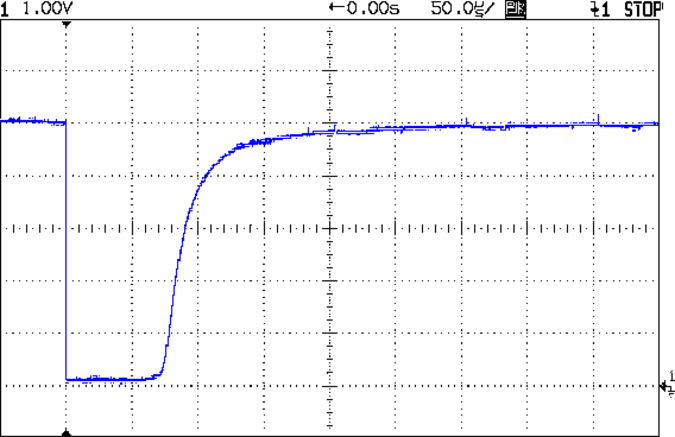
aware-rm-60-geiger-pulseNext up is the Geiger counter interface software post. When a radioactive decay event is detected, the code reads out the time in milliseconds and uses that as the source of randomness. To whiten the noise, the times are run through a simple hash function: the Jenkins hash (link). This hash function was new to us and seems pretty useful for quick-and-dirty microcontroller applications.

The last post details pre-loading the matrix on startup and running a test sequence that blinks each LED to make sure they’re all working. Using a single random value to seed a software pseudo-random number generator ensures that it will (almost) never start off with the same display twice.

Phswew! That’s a lot of well-documented writeup of a well-polished project! Hope it inspires you to dig out something cool from your junk drawer and build.


Robot Camel Jockeys

You might think we’re sinking to lowest-common-denominator, click-bait headlines like the rest of the online press. We’re not. The New York Times Video Notebook series has a story on camel racing that you’ve just got to see in the video after the break.

robotPreviously, the camel races in Abu Dhabi had used small children as jockeys because they’re lightweight. Unfortunately, this lead to illegal trafficking of small children, mostly orphans. That won’t do. So they came up with a technological solution.

Strap a cordless drill with a purpose-built whip in the chuck onto the back of your camel. Add a car-remote keyfob to activate, and a two-way radio so that you can shout encouragement into your animal’s ear at just the right times. Now just chase the racers down the highway in an SUV and it’s like you’re there on the camel’s back!

talkingWe love the little silk suits that the drillbot-jockeys get to wear, but we’re not sure that cordless drills with walkie-talkies and remote controls count as “robots” really, because they don’t do anything autonomous. We think they’re more accurately described as “telepresence agents”.

Continue reading “Robot Camel Jockeys”

Absolute Overkill IKEA Lampan Lamp Hack

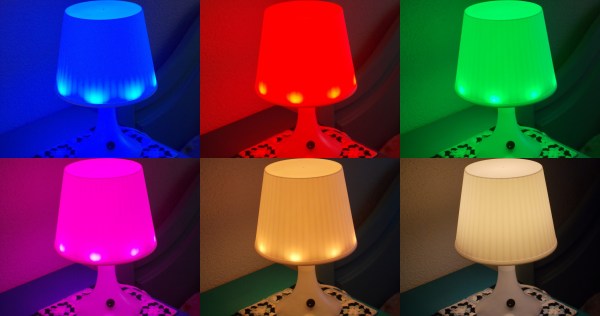
Sometimes too much overkill isn’t enough. [Jesus Echavarria] hacked an IKEA Lampan light for his daughter to add color LEDs, a timer, Bluetooth control over the hue, and a local override knob. The result: a $5 lamp with at least $50 of added awesomeness. Let’s have a look at the latter.

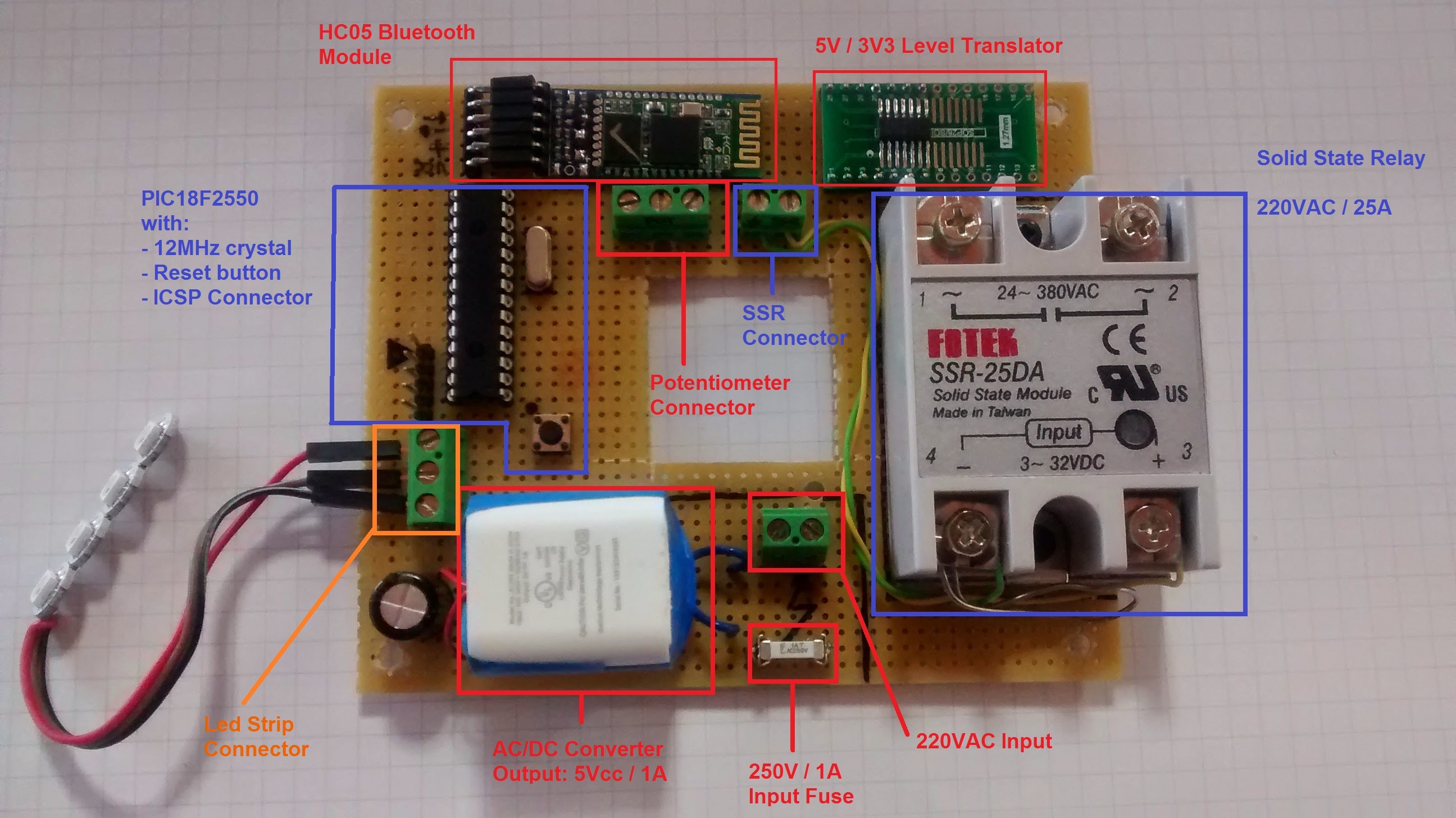
The whole lamp system is based around a PIC microcontroller and WS2811 LEDs for the color light show. Since the lamp was already built to run a 40W lightbulb, and [Jesus] wanted to retain that functionality, he added an SSR to the build. Yeah, it’s rated for 5,000W, but it’s what he had on hand.

Top-ElementsNext comes the low-voltage power supply. [Jesus] needed 5V for the PIC, and used the guts from a cheap USB charger as a quick and dirty 5V converter — a nice hack. To power the HC-05 Bluetooth module, which requires 3.3V, he wired up a low-dropout voltage regulator to the 5V line. A level-converter IC (74LVC07) gets the logic voltage levels straight between the two.

A fuse for the high-voltage power line, screw-terminal connectors all around, and a potentiometer for manual override round out the hardware build.

On the software side, [Jesus] set up the knob to turn on and off the built-in lamp as well as control the colors of the LED ring. That’s a nice touch for when his daughter wants to change the lamp’s color, but doesn’t want to go find her cellphone. But when she does, the SPP Pro app sets the colors by sending pre-programmed serial commands over Bluetooth to the PIC in the lamp.

All in all, a nice build, well-documented, and with enough rough edges that none of you out there can say it’s not a hack. Nice job [Jesus]! We can’t wait to see what he does next… robot lamp anyone?

Arduino Vs Arduino: These Are Not The Droids…

We’ve been trying to not pick favorites in the Arduino controversy, or at least remain open-minded to both sides of the story. Some businesses, on the other hand, are clearly aligning themselves.  (Full text of e-mail below.)

Reader [Francisco Zabala], from cool robot-supplies store Acrobotic, got this e-mail from an Amazon distributor where he purchased some Arduinos “ages ago” and was angered enough at the brazen tone to drop us a line.


Thank you for our Arduino purchase from our Amazon.com store. We truly appreciate your business.

We are writing to let you know about an important change in Arduino products. The new website for Arduino is now officially Arduino.org. The old website (arduino.cc) should no longer be used.

All new Arduino hardware will be transitioned from the old Arduino.cc badging to the new Arduino.org badging. Please be aware that during this transition, you may receive Arduino hardware with either Arduino.cc or Arduino.org. Both are authentic Arduino-brand hardware.

If you use Arduino.org branded hardware on the old site, you may be presented with an error. Please use the new Arduino.org site.


We know for sure that Arduino SRL sent out a letter to distributors claiming that they were the real Arduino because they’ve been manufacturing the boards. Seeing a distributor recommend against the software at arduino.cc in such stark terms makes us wonder if there have been similar letters sent out concerning the IDE fork. Anyone have anything? Send us a tip if you do.

We find it a little ironic that when arduino.cc added the now-retracted popup that specifically targeted boards made by Smart Projects / Arduino SRL,  that they opened themselves up to this sort of counter-attack: if you see an error popup, just switch over to the “new official” IDE. Oops. Good that it’s gone now.

Finally, we’ve got to say that “the old website should no longer be used” is pretty rich: we’re hackers, we use whatever software / IDE we like, thank you very much! No matter how the legal battles end up, and no matter who tells you to use what codebase, the beauty of open source is that it’s up to you, and not them. Hack on, y’all!

Thanks, [Francisco] for the tip.

Adafruit And The Arduinos At Maker Faire

The apparent lull on the Arduino front the last few weeks was just the calm before the storm that is the Bay Area Maker Faire (BAMF). Both companies claiming the Arduino name were there over the weekend, with news and new products in tow. Ironically, you could see from one booth straight over to the other. Small world.

Perhaps the biggest news from Arduino LLC is that hacker-friendly Adafruit is now going to be making officially-licensed boards in the US. Competing with this news, Arduino SRL brought its new boards, including the Yun Mini and ARM-powered Arduino M0. And [Massimo Banzi] and Arduino LLC seem to be taking an end-run around the Arduino SRL trademark by announcing the “Genuino” brand for European production. For all the details, read on!

Continue reading “Adafruit And The Arduinos At Maker Faire”

Arduino IDE Becomes More Open, Less Snarky

Version 1.6.4 of the Arduino IDE has been out for a little while now, and it has a couple of notable changes. To our eyes, the most interesting change makes adding support for non-standard boards and their configurations within the Arduino IDE a lot simpler. We’ll get into details below.

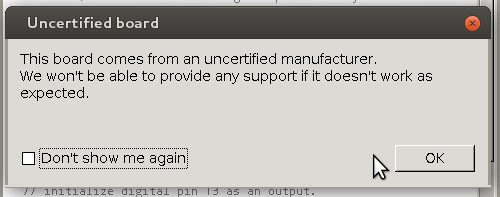
unnamedBut before that, it’s time to bid farewell to the cheeky little popup window that would deliver a warning message when using a board bearing the USB IDs of their former-partner-turned-competitor. We absolutely agree with [Massimo] that the issues between Arduino SRL / Smart Projects and Arduino LLC are well-enough known in the community, and that it’s time for the popup to fade away.

Now on to the meat of this post. The new “Board Manager” functionality makes it significantly easier for other non-Arduino products to be programmed within the Arduino IDE. Adafruit has a tutorial on using the Board Manager functionality with their products, and it basically boils down to “enter the right URL, click on the boards you want, download, restart Arduino, bam!”

The list of unofficially supported third-party boards is still a bit short, but it includes some stellar entries. For instance, Adafruit has provided the files needed for the ESP8266, which recently received the Arduino treatment. This means that you can simply point your IDE at Adafruit’s URL, and it’ll set you up with everything needed to develop for the ESP8266 from within the comfy Arduino IDE.

Continue reading “Arduino IDE Becomes More Open, Less Snarky”

Logic Noise: Taming The Wild Shift Register

One of the best things about DIY synth building is that you can create devices that just don’t exist in the commercial marketplace. In this session, we’ll build a looper / sequencer the likes of which you may have never seen. And it’s groovy. Today we’ll also get back a little closer to the soul of the series. In this session, nothing is analog — this is pure Logic Noise.

The shift register is the centerpiece chip this session, and a great device in its own right. We’ve got a lot of ground to cover, so watch the teaser video and then let’s get going.

Continue reading “Logic Noise: Taming The Wild Shift Register”