2023 Hackaday Supercon: The Rest Of The Talks

The 2023 Hackaday Superconference is only two weeks away, and we’re happy to announce the second half of the slate. As always, this is a great mix of well-known Hackaday faces, and folks we haven’t yet met. Whether they’re fixing up the Apollo Guidance Computer, building their own airplanes, trapping rubidium atoms, or teaching robots to sail, this is another super interesting round of talks.

Tickets are sold out, the badges are almost done, and we’re in the home stretch! We can smell the tacos from here. If you’re joining us, we hope you’re excited. If you’re not able to, we’ll stream as much as we can.

All that remains is the mystery of the keynote speaker.  Stay tuned! Continue reading “2023 Hackaday Supercon: The Rest Of The Talks”

2023 Hackaday Supercon Badge: Welcome To The Vectorscope

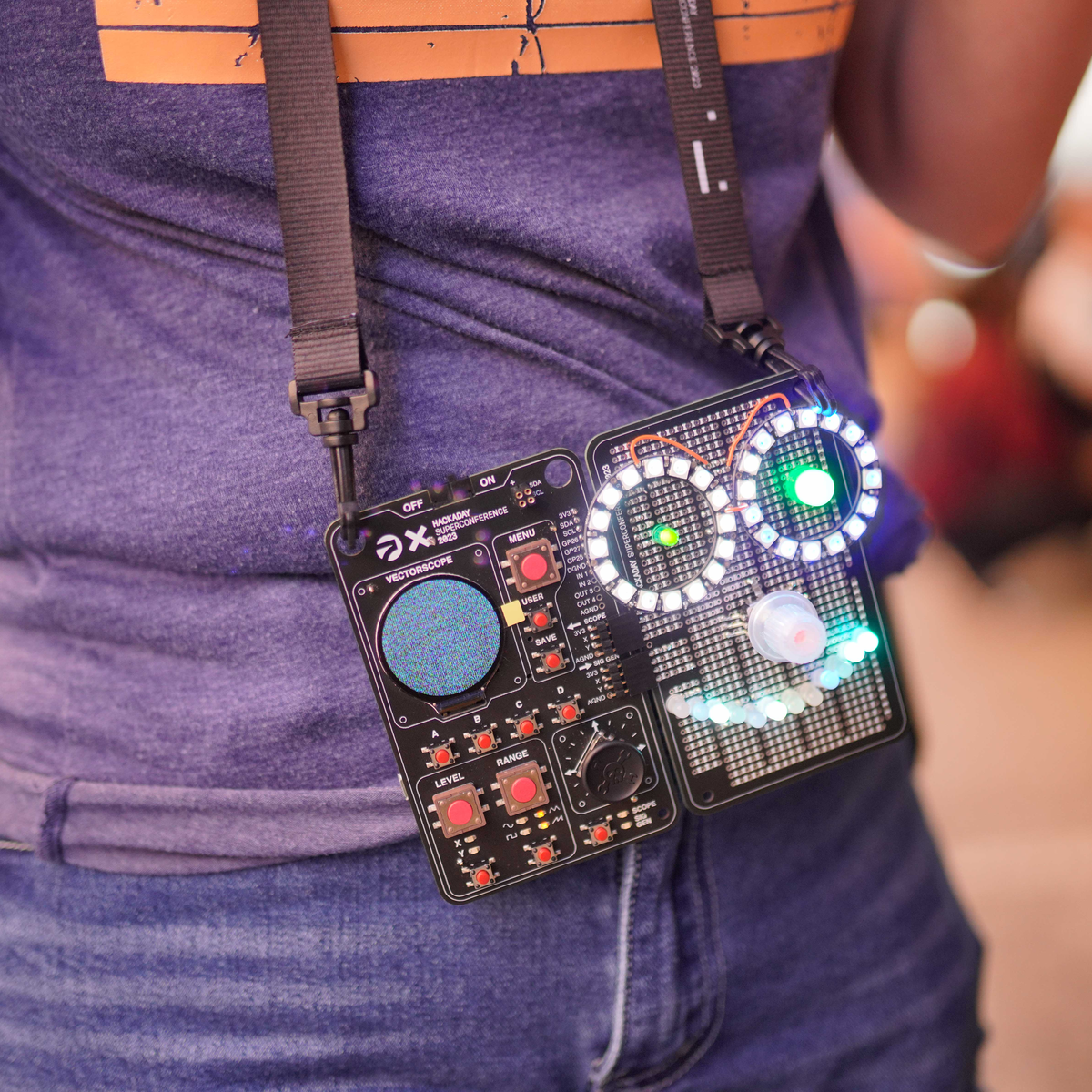
This year, the Supercon badge goes analog! (Or at least fakes it pretty convincingly.) Taking inspiration from the phosphor scopes of yesteryear, the 2023 Vectorscope badge is part analog audio playground, part art project, and all about prototyping. Who doesn’t like the warm glow and lovely green fade of an old Tektronix tube scope? That’s what we’re after.

Conceptually, the badge is two separate devices in one. Most obvious is the vectorscope, which takes in voltages in the 0 V – 3 V range and plots them out in X-Y mode in glorious fake-phosphor effect on the lovely round IPS screen. We’ve also tied an audio amplifier to the Y input that plays whatever waveform you’re watching.

But you don’t have to bring your own waveforms with you – the other half of the badge is an arbitrary programmable waveform generator that drives two channels. Off the bat, it’s configurable with the front panel controls, so you’re obviously invited to make Lissajous figures and store them in the program memories.

Combining the two halves lets you draw in voltages and time, but not until you connect them together, naturally. You see, this isn’t an analog simulation – it’s the programmable equivalent of the real deal, courtesy of the AK4619 ADC/DAC. Voltages go out on one set of pins and come back in on the other.

And you get to play around with these voltages in through-hole space too, because we’ve included a very generous prototyping board for your analog explorations. Does this instantly suggest a curve tracer to you? Be our guest! Other forms of analog video-mangling? We want to see what you come up with. Make an audio filter and watch it work on the screen in front of your very eyes.

Of course we’re not leaving you code monkeys out in the cold. MicroPython puts the “programming” in the programmable waveform generator. If you’re not content with the four stock waveforms, you’re invited to write your own. And this is where it gets artsy.

You can upload your own repetitive waveforms to the onboard direct digital synth routine, but why stop there? We’ve left most of the processing power of the underlying RP2040 untouched, for you to use. And four buttons on the front panel let you store and play back your code, so you have space to stash your demos, and a sweet joystick with a custom keycap gives you control.

Continue reading “2023 Hackaday Supercon Badge: Welcome To The Vectorscope”

Close To The Metal

Firmware is caught between hardware and software. What do I mean? Microcontroller designers compete on how many interesting and useful hardware peripherals they can add to the chips, and they are all different on purpose. Meanwhile, software designers want to abstract away from the intricacies and idiosyncrasies of the hardware peripherals, because code wants to be generic and portable. Software and hardware designers are Montagues and Capulets, and we’re caught in the crossfire.

I’m in the middle of a design that takes advantage of perhaps one of the most idiosyncratic microcontroller peripherals out there – the RP2040’s PIOs. Combining these with the chip’s direct memory access (DMA) controllers allows some fairly high-bandwidth processing, without bogging down the CPUs. But because I want this code to be usable and extensible by a wide audience, I’m also trying to write it in MicroPython. And configuring DMA controllers is just too idiosyncratic for MicroPython.

But there’s an escape hatch. In my case, it’s courtesy of the machine.mem32 function, which lets you read and write directly into the chip’s memory, including all of the memory-mapped configuration registers. Sure, it’s absurdly low-level, but it means that anything you read about in the chip’s datasheet, you can do right away, and from within the relative comfort of a Micropython program. Other languages have their PEEK and POKE equivalents as well, or allow inline assembler, or otherwise furnish you the tools to get closer to the metal without having to write all the rest of your code low level.

I’m honestly usually a straight-C or even Forth programmer, but this experience of using a higher-level language and simultaneously being able to dive down to the lowest levels of bit-twiddling at the same time has been a revelation. If you’re just using Micropython, open up your chip’s datasheet and see what it can offer you. Or if you’re programming at the configure-this-register level, check out the extra benefits you can get from a higher-level language. You can have your cake and eat it too!

Hackaday Superconference 2023: Workshops Announced, Get Tickets Now!

Last week, we announced just half of our fantastic slate of talks for Supercon. This week, we’re opening up the workshops. The workshops are small, hands-on opportunities to build something or learn something, lead by an expert in the field. Workshops sell out fast, so register now if you’re interested.

And stay tuned for the next round of talk reveals next week! And maybe even the badge reveal?

Andy Geppert
Weave Your Own Core Memory – Core16!

This workshop provides you with the opportunity to weave your own core memory! Using 16 authentic ferrite core bits and 16 RGB LEDs, you can play tic-tac-toe, paint with a magnetic stylus, and create your own interactive experiences. Andy Geppert will guide you through the assembly of Core16. The Core16 kit is the little brother of the Core64 kit. The smaller Core16 kit reduces assembly time/cost, enabling more people to experience the challenge and satisfaction of creating their own core memory.

Travis Foss
Presented by DigiKey: Introduction and expansion of the XRP Robotics Platform

In this workshop you will be able to get your hands on the new XRP (Experiential Robotics Platform) and take the basics a step further with a few additional parts. Along with the base kit, participants will have the opportunity to install a RGB twist encoder, a LCD screen, and a buzzer to create a setup that will allow the user to choose a program onboard without being tethered to a computer.

Becky Button
How to Make a Custom Guitar Pedal

Musical effects are for everybody! Join this workshop and get hands-on experience assembling and programming your musical effects pedals. Walk away from this workshop with the capability of integrating multiple musical effects into 1 device and reprogramming the pedal with any effects you want!

Daniel Lindmark
From Zero to Git: 1 Hour Hardware Git Bootcamp

In this workshop, you will learn all about basic git operations, including how to download and install the client, setting up a repo, synching changes, and much more. Learn how to navigate common issues and take advantage of a live FAQ during the workshop.

Jazmin Hernandez
Solder and Learn How to Use Your Own Anti-Skimmer (HunterCat)

Have you ever been vulnerable to data theft? Do you fear using your bank card in ATMs or even in a restaurant? Protect your information from potential skimmers in this workshop while you learn to solder some components of your anti-skimmer/magnetic stripe clone detectors. By the end of the workshop, you’ll have a device to insert before using your bank card to check for potential issues.

Matt Venn
Tiny Tapeout – Demystifying Microchip Design and Manufacture

In this workshop, you can design and manufacture your own chip on an ASIC. You will learn the basics of digital logic, how semiconductors are made, the skills needed to use an online digital design tool for simulation, and how to create the GDS file for manufacturing. Participants will also have the option to submit their designs to be manufactured as part of the Tiny Tapeout project.

You can’t attend the workshops without attending Supercon, so get your tickets!  (As we write, there are only ten more…)


Try It Out

It’s like Star Wars versus Star Trek at a SciFi convention, or asking creamy or chunky at the National Peanut Butter Appreciation Festival. (OK, we made that one up.) When Jenny reviewed the 1.0 version of LibrePCB, it opened the floodgates. Only on Hackaday!

Of course it makes sense that in a community of hardware hackers, folks who are not unfamiliar with the fine art and engineering of designing their own PCBs, have their favorite tools. Let’s face it, all PCB design software is idiosyncratic, and takes some learning. But the more fluent you are with your tool of choice, the more effort you have invested in mastering it, leading to something like the sunk-cost phenomenon: because you’ve put so much into it, you can’t think of leaving it.

The beauty of open-source software tools is that there’s almost nothing, aside from your own psychology, stopping you from picking up another PCB program, kicking the proverbial tires with a simple design, and seeing how it works for you. That’s what Jenny did here, and what she’s encouraged me to do. Whether it’s beginner-friendly Fritzing (also recently in version 1.0), upstarts LibrePCB or Horizon EDA, heavyweight champion KiCAD, or the loose-knit conglomeration of tools in coralEDA, you have enough choices that something is going to fit your PCB hand like a glove.

I certainly wouldn’t risk a swap up to a new tool on something super complicated, or something with a tight deadline, but why not start up a fun project to test it out? Maybe follow Tom Nardi’s lead and make a Simple Add-on, for a badge or just as a blinky to put on your desk? Don’t be afraid to try something new!

Hackaday Superconference 2023: First Round Of Speakers Announced!

Hackaday Supercon 2023 is almost upon us, and looking over the roster of fantastic talks gets us in the mood already.  We hope that it has the same effect on you too.

Supercon is the Ultimate Hardware Conference and you need to be there! We’ll announce the rest of the speakers, the workshops, and give you a peek at the badge over the next couple weeks. Supercon will sell out so get your tickets now before it’s too late. And stay tuned for the next round of reveals on Tuesday! Continue reading “Hackaday Superconference 2023: First Round Of Speakers Announced!”

Horrendous Mess Of Wires

When do you post your projects? When they’re done? When they’re to the basic prototype stage? Or all along the way, from their very conception? All of these have their merits, and their champions.

In the post-all-along-the-way corner, we have Hackaday’s own [Arya Voronova], who outlines the many ways that you can start documenting your project before it’s even a fully fledged project. She calls these tidbits “breadcrumbs”, and it strikes me as being a lot like keeping a logbook, but doing it in public. The advantages? Instead of just you, everyone on the Internet can see what you’re up to. This means they can offer help, give you parts recommendations, and find that incorrect pinout that one pair of eyes would have missed. It takes a lot of courage to post your unfinished business for all to see, but ironically, that’s the stage of the project where you stand to gain the most from the exposure.

On the opposite end of the spectrum are the folks who document their projects at the very end. We see a ton of these on Hackaday.io and in people’s personal blogs. It’s a great service to the community, frankly, because at that point, you’re already done with the project. This is the point where the reward, for you, is at its minimum, but it’s also the point where you feel least inhibited about sharing if you’re one of those people who are afraid of showing your work off half-done. The risk here, if you’re like me, is that you’re already on to the next project when one is “done”, and going back over it to make notes seems superfluous. Those of you who do it regardless, we salute you!

And then there’s the middle ground. When you’re about one third of the way done, you realize that you might have something half workable, and you start taking a photo or two, or maybe even typing words into a computer. Your git logs start to contain more than just “fixed more stuff” for each check-in, because what if someone else actually reads this? Maybe you’re to the point where you’ve just made the nice box to put it in, and you’re not sure if you’ll ever go back and untangle that rat’s nest, so you take a couple of pictures of the innards before you hot glue it down.

I’m a little ashamed I’m probably on the “post only when it’s done” end of things than is healthy, mostly because I don’t have the aforementioned strength of will to go back. What about you?