It’s easy to spot recent parents, they are the people who look as though they haven’t slept in months. Sometimes the little bundle of joy responsible isn’t even a babe in arms but a toddler; old enough to wake up and find their parents for some solace but not old enough to understand that not everyone is up for being woken at 3 am. [Eyal] approached this problem in some style, by modifying a rabbit night light to indicate the time by changing colour, reminding the youngster when it’s a bit early to be rousing the grown-ups.
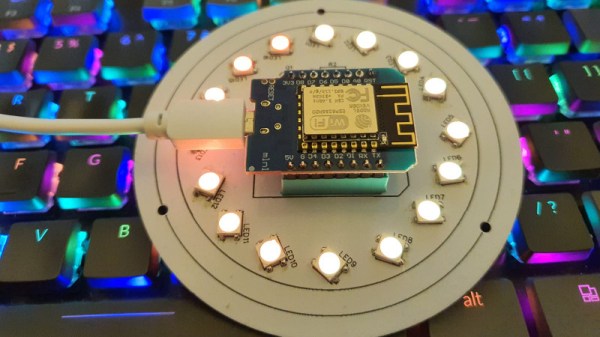
The bunny in question is a plastic moulding, sold with a white LED providing illumination, This was removed, and replaced with a rather nice custom PCB sporting a ring of addressable LEDs surrounding a Wemos ESP8266 board. In the darkest hours of the night, it is lit as a soft red to indicate sleep time. When an appropriate wake-up point is reached it bursts into a vibrant light show of many colours. Thus the recalcitrant early-riser can be taught to give Mum & Dad a little rest through the medium of light and colour.
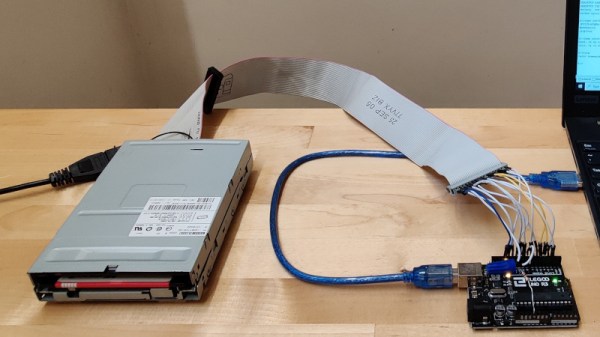
For many of us the passing of the floppy disk is unlamented, but there remains a corps of experimenters for whom the classic removable storage format still holds some fascination. The interface for a floppy drive might have required some complexity back in the days of 8-bit microcomputers, but even for today’s less accomplished microcontrollers it’s a surprisingly straightforward hardware prospect. [David Hansel] shows us this in style, with a floppy interface, software library, and even a rudimentary DOS, for the humble Arduino Uno.
The library provides functions to allow low level work with floppy disks, to read them sector by sector. In addition it incorporates the FatFS library for MS-DOS FAT file-level access, and finally the ArduDOS environment which allows browsing of files on a floppy. The pictures show a 3.5″ drive, but it also supports 5.25″ units and both DD and HD drives. We can see that it will be extremely useful to anyone working with retrocomputer software who is trying to retrieve old disks, and we look forward to seeing it incorporated in some retrocomputer projects.
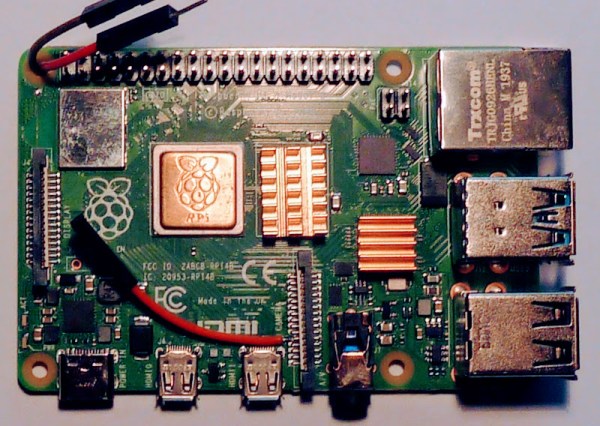
When the first Raspberry Pi rolled off the production line back in 2012 it sported a 26-pin expansion header that seemed to conceal endless possibilities. A later upgrade to the 40-pin header we have today unleashed a few more precious interfaces, but even then it’s still possible to run out. This was the problem faced by [woj], who needed a PWM line to drive a cooling fan but whose other work had used everything on the header. The solution? Dive into the other connectors on board looking for an unused GPIO.
Every full-sized Pi has a connector for the camera and the LCD screen, and to operate some of the functions of those peripherals they contain a few extra GPIOs that aren’t normally used by end users. If the camera or LCD is not being used then these lines are potentially up for grabs. In particular there’s a GPIO that turns the camera on or off that’s relatively easy to solder a wire to, and it was this one that fed the PWM line.
There are of course a few other ways to find some more lines on a Pi and indeed almost any microcontroller, with one of the many types of GPIO expansion chips. This trick is a particularly simple one though. and perhaps unsurprisingly it has surfaced here before.
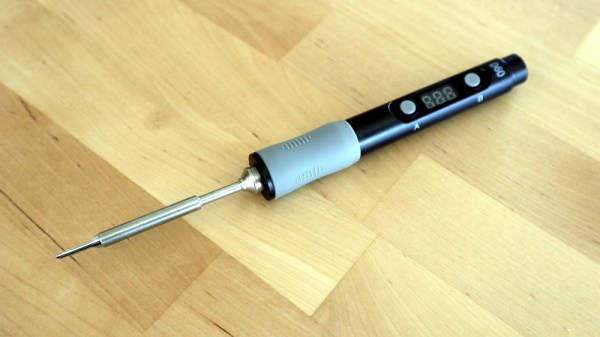
Over the past few years a new class of soldering iron has arisen: a temperature controlled iron no longer tied to a bulky mains-powered base station, but using low-voltage DC power and with all electronics concealed in a svelte handle. First came the Miniware TS100, and then many more, with slightly different feature sets and at varying price points. We’ve reviewed a few of them over the years, and today we have the most recent contender in the Sequre SQ-D60. It follows the formula closely, but costs only £20 (about $26). This price puts it in an attractive budget category, and its USB-C power option makes it forward-looking over models with barrel jacks. Description over, it’s time to plug it in and put it through its paces.
What’s In The Box?
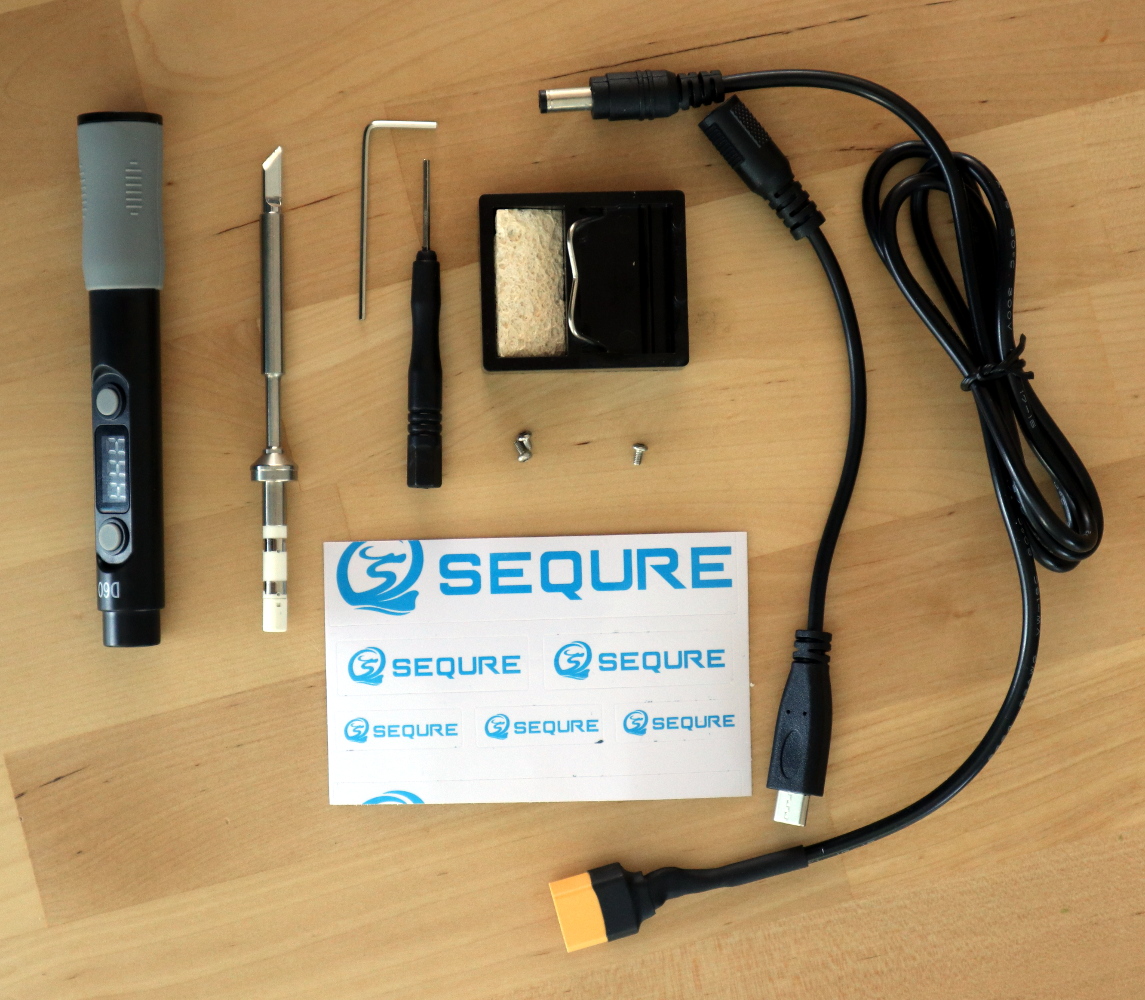
That’s a lot of extra bits for a budget iron!
In the box, aside from the handle containing the electronics, were a surprisingly comprehensive array of parts and accessories. The handle itself is similarly-sized to its competitors, being only slightly longer than that of Pine64’s Pinecil. The tip supplied was unexpectedly a slanted chisel, so I may have managed to order incorrectly, though since it shares the same tip design as both the TS100 and the Pinecil I have plenty of alternative tips should I need one. Otherwise there was a little bag of hex screws along with a key and a driver for them, a little stand with a sponge, a set of Sequre stickers, a USB-C to barrel jack cable, and a barrel jack-to-XT60 connector for use with LiPo battery packs. These last two cables are a particularly useful addition.
At first sight the tip doesn’t seem to have any means of being fixed into its socket, but a closer inspection reveals that there is a hex screw hiding underneath a silicone finger sleeve that holds it securely when tightened. The handle has a simple enough interface, with just two buttons and a 3-digit, 7-segment display. Powering it up from a 45 W USB-PD power supply, and it heats up to 300 °C in around ten seconds after pressing one of the buttons. My usual soldering temperature is 360 °C, and it has an interface involving long presses of one of the buttons before they become up and down buttons to select the temperature. In prolonged use the handle doesn’t become noticeably warm, and aside from a slight new-electronics-getting-hot smell there was no immediate concern that it might release magic smoke. Continue reading “Review: Sequre SQ-D60 Temperature Controlled Soldering Iron”→
We’ve all spent the last year or more under the shadow of the COVID-19 pandemic, and though some of us may have been vaccinated or come through its various waves it remains far from over. One of the hardest-hit parts of the world at the moment is in India, where health services are struggling to maintain adequate oxygen supply such is the demand for it from sick patients.
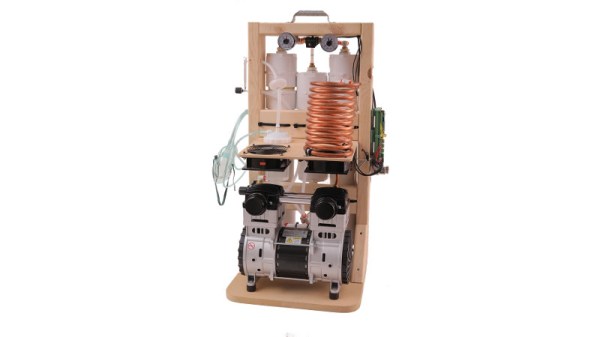
The oxygen concentrator project builds on Makers Asylum’s experience last year as part of an extremely successful network of makerspaces producing PPE, which demonstrates that they have the resources, logistics, and ability to take on a project of this size. The OxiKit is no hare-brained contraption but an established and successful design that is already at work, so we believe that this project has a good chance of success. It’s close to home for Hackaday too, and one of the people involved with it is our colleague [Anool Mahidharia].
In a global pandemic only a global response can overcome the incredible challenges before us. For that reason we’d like to urge you to take a look at the Makers Asylum page wherever you are, and if you can, support it.
We have so many options through which to communicate with our friends and relatives during the lockdown, thanks to our smartphones and the number of apps that serve all possible needs. Impressive as they are though, a smartphone is not suitable for everyone. In particular older people can find them less easy to use, and the consequent loss of communication ability is addressed by [Manu] with the Yayagram, described in a thread of Spanish-language Tweets and later the thread was translated into English.
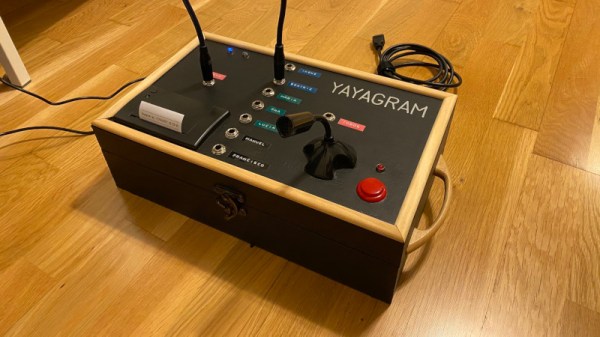
On the top of the box is a microphone with push-to-talk switch, a small thermal printer, and a set of 1/4″ jack sockets with associated jump lead. Each socket corresponds to a relative, and an audio message to that relative can be posted via Telegram simply by speaking into the microphone with the button pressed. Replies are then printed through the thermal printer. Meanwhile behind the scenes is a Raspberry Pi holding it all together.
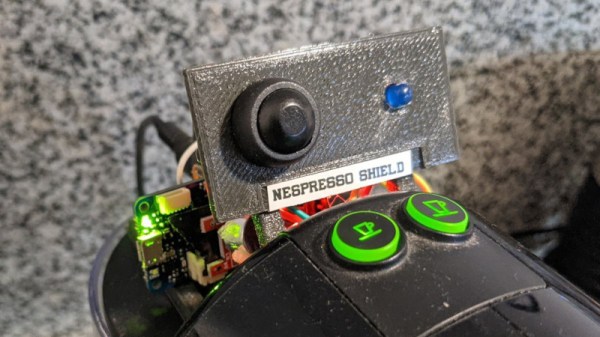
Monitoring an appliance with a microcontroller usually follows a well-worn path of diving inside and finding somewhere in the electrical circuitry that can be connected through some kind of interface to a microcontroller. For his Nespresso pod coffee machine, [Steadman] eschewed tearing into the device, and instead chose to monitor the sound it makes. A commodity sound threshold sensor board is hooked up to an Arduino MKR Zero, and this set-up logs coffee consumption. It’s important to note how this generation of Arduino is no longer one of the simple boards of old, instead it sports an RTC and SD card alongside its SAMD21 Cortex-M0+ processor so it is perfect for just such a datalogging project. The coffee data can be saved into a CSV file viewable by a spreadsheet, for which code is provided.
We like this project for its non-invasive simplicity, and we can see that there could be plenty of other similar machines that could benefit from an analagous technique for non-invasive monitoring. While the pages of Hackaday are full of coffee machine projects we see surprisingly few pod coffeemakers, perhaps because our readers are a canny bunch who balk at paying a premium for their caffeine. If you do happen to have a Nespresso machine though, perhaps you’d like some help identifying the capsules.