The First Microcomputer: The Q1

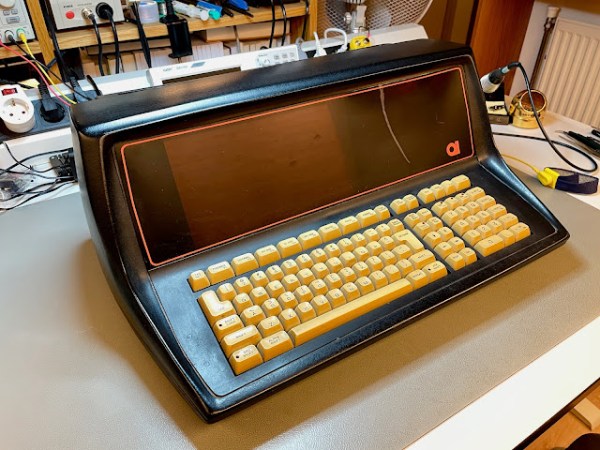
Quiz time, what was the first commercially available microcomputer? The Altair 8800? Something obscure like the SCELBI? The Mark-8 kit? According to [The Byte Attic], it was actually the Q1, based on the Intel 8008 processor. The first Q1 microcomputer was delivered in December of 1972, making it the first, as far as he can tell. Later revisions used the Z80 processor, which is the model pictured above that [The Byte Attic] has in his possession. It’s a beautiful little machine, with a striking orange plasma display.

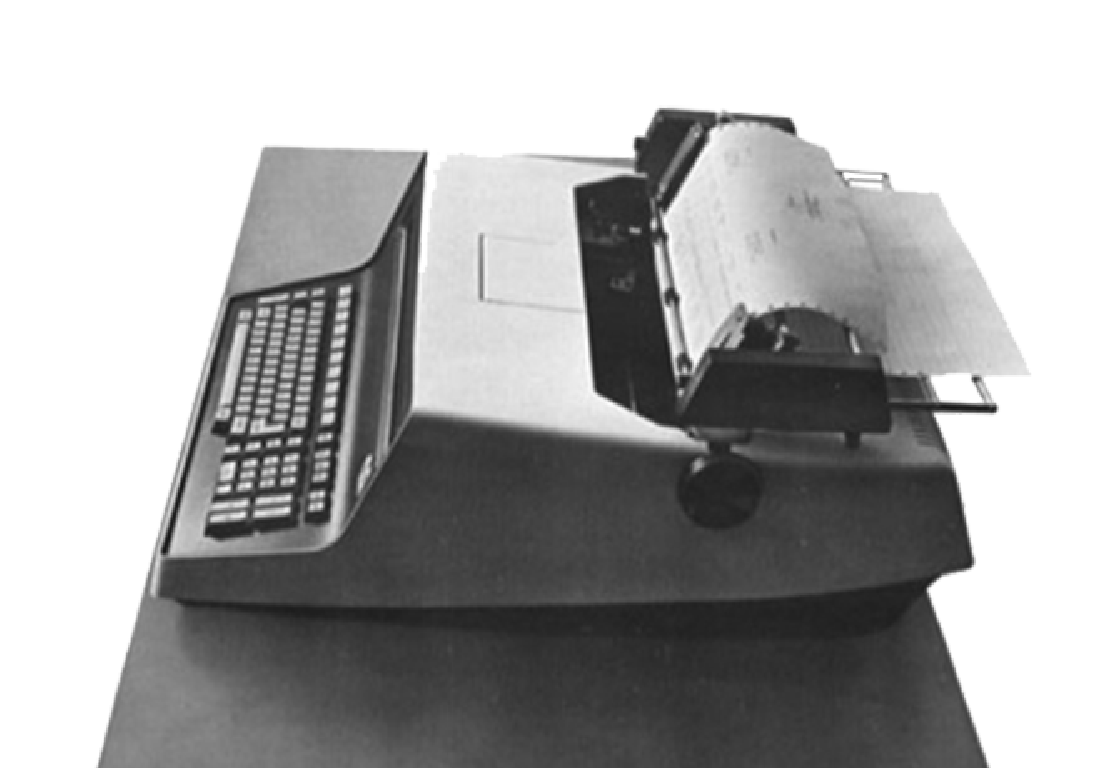
The irony is that this machine is almost entirely forgotten about. The original unit may have looked more like a typewriter, pictured here. If you have any first hand knowledge, or especially software, documentation, or surviving hardware bits, make sure to check in to add to the knowledge pool about this amazing little machine.

It’s an important milestone, and the development of the Q1 may have been a direct cause of Intel developing the more powerful 8080 microprocessor. It seems that Daniel Alroy’s work on this machine literally kicked off the microcomputer revolution, and it’s been missing from our computer lore for too many years. We’re very hopeful to see more of this story come together, and the history of the Q1 fully recovered.

And if retro hardware is your jam, we’ve got you covered, including among others, the parallel story about the first microprocessor.

Continue reading “The First Microcomputer: The Q1”

Animated LED Arrows Point The Way

Visitors at the Garden D’Lights in Bellevue, Washington had a problem. While touring the holiday lights show, they kept straying off the path. The event organizers tried some simple LED arrows, but they were just more points of light among a sea filled with them. This is when [Eric Gunnerson] was asked to help out. He’s apparently had some experience with LED animations, even cooking up a simple descriptor language for writing animations driven by an ESP32. To make the intended path obvious, he turned to a PVC board with 50 embedded WS2812 pixels –RGB controllable LEDs. The control box was a USB power adapter and an ESP8266, very carefully waterproofed and connected to the string of pixels. The backer board is painted black, to complete the hardware. Stick around after the inevitable break, to get a look at the final

The description of the build process is detailed and contains some great tips, but without a clever LED animation, it’s still of questionable utility. The pattern chosen is great, with the LEDs being blue most of the time, and a flame-like gradient chasing through the arrow every couple seconds. It’s obviously different from the lights of the show, and seems to be a real winner. [Eric] has published his code, with the sheepish caveat that he had to reinvent the wheel once again, and couldn’t reuse any of his previous LED animation work on this one. It’s a simple hack, but a great build log, and an effective solution to a subtle problem. And if addressable LEDs are your thing, check out our other hacks!

Continue reading “Animated LED Arrows Point The Way”

This Week In Security: Malwarebytes Goes Nuts, Uber

I got a rude awakening Wednesday morning this week. HaD writers don’t necessarily keep normal hours — don’t judge. A local client called, complaining that Google Maps was blocking on one of their computers, and the browser stated that it was a malicious site. Well that got my attention. Standard incident response: “Turn off the affected computers, I’m on my way.” Turns out, it was Malwarebytes that was complaining and blocking Google Maps, as well as multiple other Google domains. That particular machine happened to have a fresh install of the program, and was still in the trial period of Malwarebytes premium, which includes the malicious IP and domain blocking feature.

Oof, this could be bad. The first possibility that came to mind was a DNS hijack. The desktop’s DNS was set to the router, and the router’s DNS was set to the ISP’s. Maybe the ISP had their DNS servers compromised? Out came the cell phone, disconnected from the WiFi, for DNS lookups on some Google domains. Because Google operates at such a massive scale, they have multiple IPs serving each domain, but since the two different results were coming from the same subnet, the suspicious DNS server was likely OK. A whois on the blocked IP also confirmed that it was a Google-owned address. We were running out of explanations, and as a certain fictional detective was known for saying, “whatever remains, however improbable, must be the truth.” And, yes, Malwarebytes did indeed accidentally add Google to its bad list. The upside was that my customer wasn’t compromised. The downside? I had to answer a phone call before my first cup of coffee. Blegh.

Continue reading “This Week In Security: Malwarebytes Goes Nuts, Uber”

Simple Internet Radio Transplant

While we have a definite sweet spot in our hearts for analog radio, there are times that just call for a digital upgrade. One of the downsides that can come with this upgrade is complexity. For example, the more software-minded among us might base their build on the Music Player Daemon, and use a web interface for control. But that’s not everyone’s idea of a good time, and particularly an older user of your gizmos might really appreciate a simple, tactile user interface. That’s the situation [Blake Hannaford] was in, while building an Internet powered radio for someone else.

The solution was to take a familiar analog radio, the Tivoli Audio Model One, and give it a digital makeover. Now before you get worked up about wrecking the purity of a classic radio, note that the Model One is a faux-classic, made in 2000. No antiques were harmed in the making of this hack, and the exterior is essentially left stock — the only visible modification being the taped-on tuner label.

Inside it’s a Raspberry Pi Zero, the Adafruit Audio Bonnet, and a 3D printed bracket to tie a variable potentiometer to the tuning knob. The original volume knob and speaker are re-used. As [Blake] says, sometimes all you need is tuning and volume. Plus, re-using the speaker means that the whole unit still sounds great. Sometimes simple really is best.

While you’re here, check out our previous coverage of these style hacks and conversions!

3D Printer Upcycles Computer Case To DAS

Storage technologies are a bit of an alphabet soup, with NAS, SAN, and DAS systems being offered. That’s Network Attached Storage, Storage Area Network, and Direct Attached Storage. The DAS is the simplest, just physical drives attached to a machine, usually in a separate box custom made for the purpose. That physical box can be expensive, particularly if you live on an island like [Nicholas Sherlock], where shipping costs can be prohibitively high. So what does a resourceful hacker do, particularly one who has a 3d printer? Naturally, he designs a conversion kit and turns an available computer case into a DAS.

There’s some clever work here, starting with the baseplate that re-uses the ATX screw pattern. Bolted to that plate are up to four drive racks, each holding up to four drives. So all told, you can squeeze 16 drives into a handy case. The next clever bit is the Voronoi pattern, an organic structure that maximizes airflow and structural strength with minimal filament. A pair of 140mm fans hold the drives at a steady 32C in testing, but that’s warm enough that ABS is the way to go for the build. Keep in mind that the use of a computer case also provides a handy place to put the power supply, which uses the pin-short trick to provide power.

Data is handled with 4 to 1 SATA to SAS breakout cables, internal to external SAS converters, and an external SAS cable to the host PC. Of course, you’ll need a SAS card in your host PC to handle the connections. Thankfully you can pick those up on ebay for $20 USD and up.

If this looks good, maybe check out some other takes on this concept!

This Week In Security: 11,000 Gas Stations, TrustZone Hacks Kernel, And Unexpected Fuzzing Finds

Automated Tank Gauges (ATGs) are nifty bits of tech, sitting unseen in just about every gas station. They keep track of fuel levels, temperature, and other bits of information, and sometimes get tied into the automated systems at the station. The problem, is that a bunch of these devices are listening to port 10001 on the Internet, and some of them appear to be misconfigured. How many? Let’s start with the easier question, how many IPs have port 10001 open? Masscan is one of the best tools for this, and [RoseSecurity] found over 85,000 listening devices. An open port is just the start. How many of those respond to connections with the string In-Tank Inventory Reports? Shodan reports 11,113 IPs as of August of this year. [RoseSecurity] wrote a simple Python script that checked each of those listening IPs came up with a matching number of devices. The scary bit is that this check was done by sending a Get In-Tank Inventory Report command, and checking for a good response. It seems like that’s 11K systems, connected to the internet, with no authentication. What could possibly go wrong? Continue reading “This Week In Security: 11,000 Gas Stations, TrustZone Hacks Kernel, And Unexpected Fuzzing Finds”

ESP32 Adds Bluetooth To An IPod Nano

The iPod Nano was one of Apple’s masterworks, but it’s really tied down by its dependence on wired headphones. At least, that’s what [Tucker Osman] must have thought, as he spent an unreasonable amount of time designing a Bluetooth mod for the 3rd gen Nano. And it’s a thing of beauty — temperamental, brutally difficult to build, and fragile in use, but still beautiful. And while some purists try to keep their signal analog, [Tucker]’s coup d’etat is to intercept the iPod’s audio signal before the DAC chip, keeping the entire signal path digital to the Bluetooth speaker. Oh, and he also managed to make the volume and track skip buttons work, back across the wireless void.

Continue reading “ESP32 Adds Bluetooth To An IPod Nano”