DIY Synth Takes Inspiration From Fretted Instruments

There are a million and one MIDI controllers and synths on the market, but sometimes it’s just more satisfying to make your own. [Turi Scandurra] very much went his own way when he put together his Diapasonix instrument.

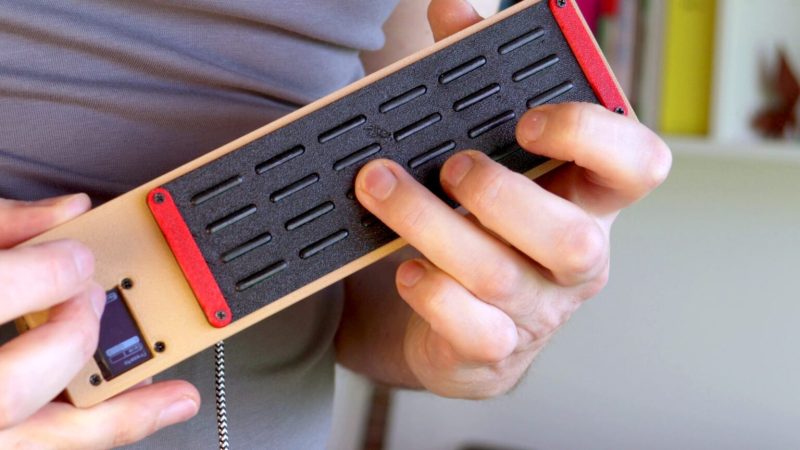
Right away, the build is somewhat reminiscent of a stringed instrument, what with its buttons laid out in four “strings” of six “frets” each. Only, they’re not so much buttons, as individual sections of a capacitive touch controller. A Raspberry Pi Pico 2 is responsible for reading the 24 pads, with the aid of two MPR121 capacitive touch ICs.

The Diapasonix can be played as an instrument in its own right, using the AMY synthesis engine. This provides a huge range of patches from the Juno 6 and DX7 synthesizers of old. Onboard effects like delay and reverb can be used to alter the sound. Alternatively, it can be used as a MIDI controller, feeding its data to a PC attached over USB. It can be played in multiple modes, with either direct note triggers or with a “strumming” method instead.

We’ve featured a great many MIDI controllers over the years, from the artistic to the compact. Video after the break. Continue reading “DIY Synth Takes Inspiration From Fretted Instruments”
A Musically-Reactive LED Christmas Tree

Regular Christmas trees don’t emit light, nor do they react to music. If you want both things in a holiday decoration, consider this build from [dbmaking]. 

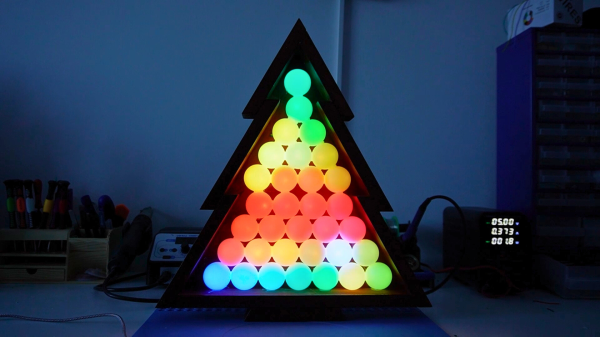
An ESP32-D1 mini runs the show here. It’s hooked up to a strip of WS2812B addressable LEDs. The LED strip is placed on a wooden frame resembling the shape of a traditional Christmas tree. Ping-pong balls are then stacked inside the wooden frame such that they act as a light diffuser for the LEDs behind. The microcontroller is also hooked up to an INMP441 omnidirectional MEMS microphone module. This allows the ESP32 to detect sound and flash the LEDs in time, creating a colorful display that reacts to music. This is achieved by using the WLED web installer to set the display up in a sound reactive mode.

It’s a fun build, and we’d love to tinker around with coding more advanced visualizer effects for a build like this. We’ve seen builds that go the other way, too, by toning down excessive blinkiness in Christmas decorations.

Continue reading “A Musically-Reactive LED Christmas Tree”

LED Hourglass Is A Great Learning Project

An hourglass tells you what it is in the name — a glass that you use to measure an hour of time passing by. [EDISON SCIENCE CORNER] has built a digital project that mimics such a thing, with little beads of light emulating falling sand in the timekeepers of old.

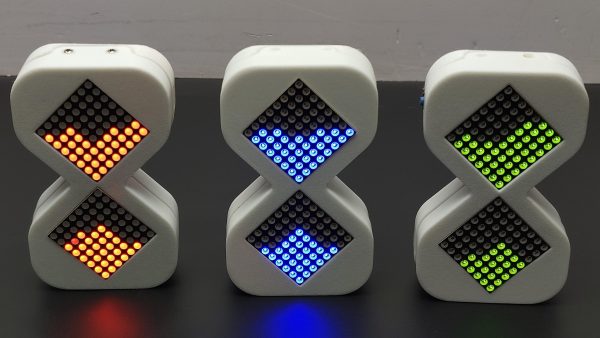
The build is designed around the Arduino platform, and can be constructed with an Arduino Uno, Nano, or Pro Mini if so desired. The microcontroller board is hooked up with an ADXL335 three-axis accelerometer, which is used for tracking the orientation and movement of the digital hourglass. These movements are used to influence the movement of emulated grains of sand, displayed on a pair of 8×8 LED matrixes driven by a MAX7219 driver IC. Power is courtesy of a 3.7 V lithium-ion cell, with a charge/boost module included for good measure. Everything is wrapped up in a vaguely hourglass-shaped 3D printed enclosure.

The operation is simple. When the hourglass is turned, the simulated grains of sand move as if responding to gravity. The movement is a little janky — no surprise given the limited resolution of the 8×8 displays. You also probably wouldn’t use such a device as a timer when more elegant solutions exist. However, that’s not to say builds like this don’t have a purpose. They’re actually a great way to get to grips with a microcontroller platform, as well as to learn about interfacing external hardware and working with LED matrixes. You can pick up a great deal of basic skills building something like this.

Would you believe this isn’t the first digital hourglass we’ve featured on the site?

Continue reading “LED Hourglass Is A Great Learning Project”

Build Yourself A Graphing Weather Display

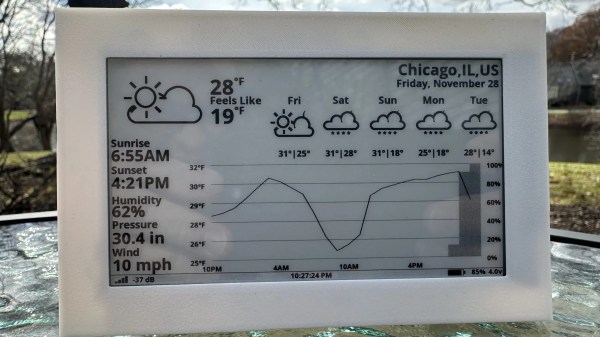
These days, Internet connectivity is ubiquitous, so you can look up live weather data on just about any device around you. Regardless, [Jozerworx] wanted a simple, clean, independent weather display, and came up with this simple design. 

The build is based on the Lilygo T5 EPD devboard, which combines an ESP32-S3 microcontroller with a nice 4.7-inch e-paper display. This display has the benefit that it only uses power when it’s being updated, making it particularly suitable to run off a battery for extended periods of time. Meanwhile, the ESP32 and its inbuilt Wi-Fi connectivity allow it to query the internet for updated weather forecasts. Weather data is sourced via the OpenWeather API, which [Jozerworx] notes comes with the caveat of requiring an API key. It’s a little fussy, but if you want good weather data, there are few easier ways to get it. The display shows a forecast for the next five days, while also showing graphs of ambient temperature and humidity along with useful information like the sunset and sunrise schedule.

Files are on Github for those eager to learn more. [Jozerworx] also notes that getting started with the display is particularly easy with the inclusion of a setup mode. This allows the display to act as a Wi-Fi access point with a web page that you use enter your home Wi-Fi connection details.

We’ve featured a great many charming weather displays over the years, too. If you’re working to plot, chart, or even predict the weather—don’t hesitate to show us your cool projects over on the tipsline!

Continue reading “Build Yourself A Graphing Weather Display”

34-Year-Old Macintosh ROM Bug Revealed By Emulator

Generally, you’d hope that your computer manufacturer got the ROM just right before shipping your computer. As [Doug Brown] found out, Apple actually fumbled this with the release of the Macintosh Classic II several decades ago. And yet… the machines worked! That turns out to be due to a rather weird low-level quirk, as recent tinkering in an emulator revealed. 

The bug was revealed when [Doug] was experimenting with the emulated Macintosh Classic II in MAME. He was exploring keyboard shortcuts for launching the debugger, but soon found a problem. He needed to load MacsBug to enable the debugging shortcut, and that required the use of 32-bit addressing. However, the emulated system wouldn’t boot in this mode at all, instead landing on a Sad Mac error screen.

Heavy debugging ensued, which makes for great reading if you love to chase problems on an instruction-by-instruction basis. Ultimately, [Doug’s] conclusion was a mindboggling one. He determined that the crash in MAME came down to a difference between the emulator’s behaviour versus the original Motorola 68030 CPU in the Classic II. There was simply a problematic undocumented instruction baked into the ROM. The real CPU runs this undocumented instruction, which modifies a certain register, allowing boot without issue. Meanwhile, the emulated CPU tries to execute the bad instruction, fails to modify the right register, and everything falls in a heap. [Doug] speculates that had the 68030 CPU hadn’t hidden the bug, Apple’s engineers might have found it many years ago. He even proved his theory by whipping up multiple custom ROMs to verify what was going on.

We love it when bugs from decades past rear their heads; we love it even more when they get fixed. If you’re chasing down issues with an Amiga or you’re ironing out the kinks in software for the Acorn Archimedes, be sure to let us know on the tips line.

[via Tom’s Hardware, thanks to Jason Morris for the tip!]

A Touchscreen MIDI Controller For The DIY Set

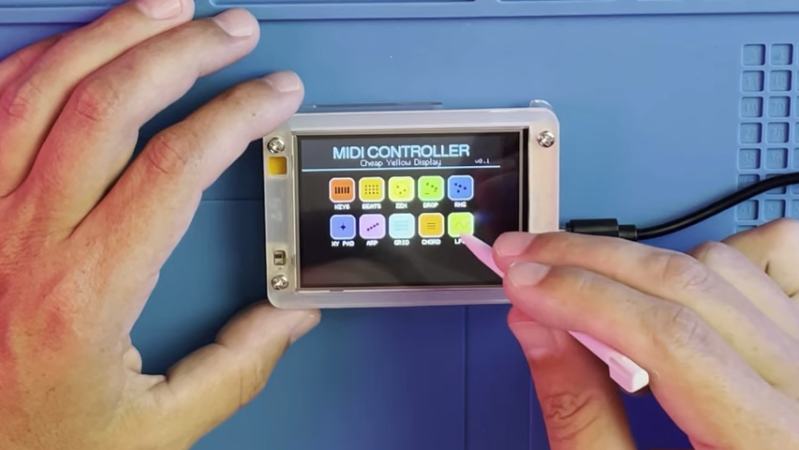
MIDI controllers are easy to come by these days. Many modern keyboards have USB functionality in this regard, and there are all kinds of pads and gadgets that will spit out MIDI, too. But you might also like to build your own, like this touchscreen design from [Nick Culbertson].

The build takes advantage of a device colloquially called the Cheap Yellow Display. It consists of a 320 x 240 TFT touchscreen combined with a built-in ESP32-WROOM-32, available under the part number ESP32-2432S028R.

Continue reading “A Touchscreen MIDI Controller For The DIY Set”

Neat Techniques To Make Interactive Light Sculptures

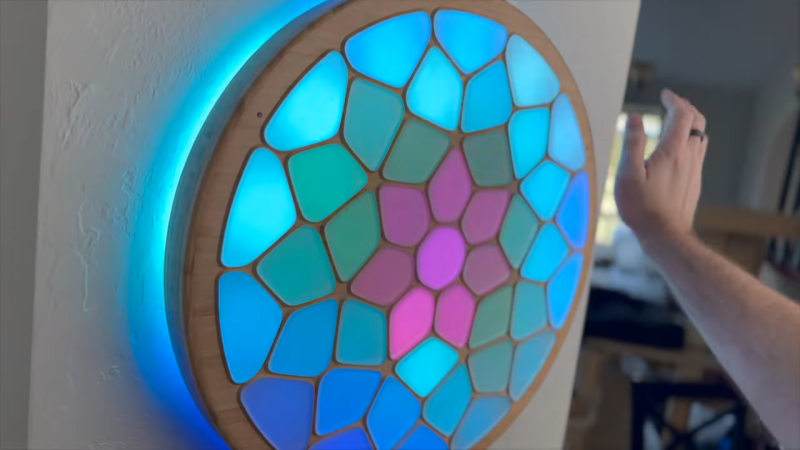
[Voria Labs] has created a whole bunch of artworks referred to as Lumanoi Interactive Light Sculptures. A new video explains the hardware behind these beautiful glowing pieces, as well as the magic that makes their interactivity work.

The basic architecture of the Lumanoi pieces starts with a custom main control board, based around the ESP-32-S3-WROOM-2. It’s got two I2C buses onboard, as well as an extension port with some GPIO breakouts. The controller also has lots of protection features and can shut down the whole sculpture if needed. The main control board works in turn with a series of daisy-chained “cell” boards attached via a 20-pin ribbon cable. The cable carries 24-volt power, a bunch of grounds, and LED and UART data that can be passed from cell to cell. The cells are responsible for spitting out data to addressable LEDs that light the sculpture, and also have their own microcontrollers and photodiodes, allowing them to do all kinds of neat tricks.

Continue reading “Neat Techniques To Make Interactive Light Sculptures”