Liquid Nitrogen (finally) Makes An Arduino Project Cool

At $1.5 a liter in Moscow, [Michail] couldn’t resist buying some liquid nitrogen for himself. He thought that because Arduinos were quite popular among geeks, he’d try to overclock one while bringing its temperature down to -196°C/-320°F.

To check the ATmega was still working correctly, [Michail] designed several stability tests: SRAM read/write, flash read, arithmetic math and program flow tests (code with some conditionals). He used a standard HD44780 LCD to view the tests results but also an LED, blinking the number of the test it would have failed. The Arduino was externally clocked by a TTL-logic based square signal generator he designed, which can produce a clock between 16 and 100MHz. It turns out that you can run an Arduino at 65.3MHz when it is cooled with liquid nitrogen!

[Michail]’s article also explains what happens to the different on-board components when cooled with LN2: electrolytic capacitors becomes virtually non-existent, X7R capacitors’ impedance drop by 2/3, silicon diodes voltage drop increase by 50% and LED’s colors change. Check out the video below:

Continue reading “Liquid Nitrogen (finally) Makes An Arduino Project Cool”

Electronic Wedding Attire For A Geeky Wedding

In the past we featured many projects that were used at [Bill] and [Mara]’s wedding. However we forgot the most important thing: their electronically enhanced clothes.

As you can see from the picture above, the wife opted for LEDs while the husband preferred Electro Luminescent (EL) wires/panels. The ATtiny based platform LilyTiny was picked to control all the LEDs, and charlieplexing was implemented as only 4 IO pins were available. Animations were made using Vixen and exported via a python script.

To power the EL wires, [Bill] hacked a Sparkfun EL battery pack/inverter. He removed the shell and took out the inverter part, reverse engineered the design enough to figure out how to bypass the onboard microcontroller that generated the on/off/blink function. Finally, he 3D printed enclosures to pack the electronics with one Li-Ion battery pack. A boost regulator was used to supply the 12v required by the EL panel power supply.

Don’t forget to also check out their centerpieces and wedding invitations that we previously featured.

Making The Electronics For A Doppler Motion Sensor

There are many different sensors that can be used to detect motion in a given environment. Passive InfraRed (PIR) sensors are the most used today, as they work by detecting moving heat signatures. However, they are less reliable in the hotter days and obviously only work for animals and humans.

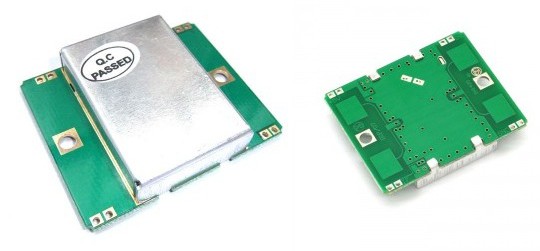
Sensors like the one shown in the above picture started to appear on the internet, they use the doppler effect to detect motion. I (limpkin) designed the electronics you need to add in order to get them to work.

Here is a simple explanation of the doppler effect: if you send an RF signal at a given frequency to a moving target, the reflected signal’s frequency will be shifted. It is commonly heard when a vehicle sounding a siren or horn approaches, passes, and recedes from an observer. The received frequency is higher (compared to the emitted frequency) during the approach, it is identical at the instant of passing by, and it is lower during the recession. Continue reading “Making The Electronics For A Doppler Motion Sensor”

Playing With An Oscilloscope You’ll (probably) Never Own

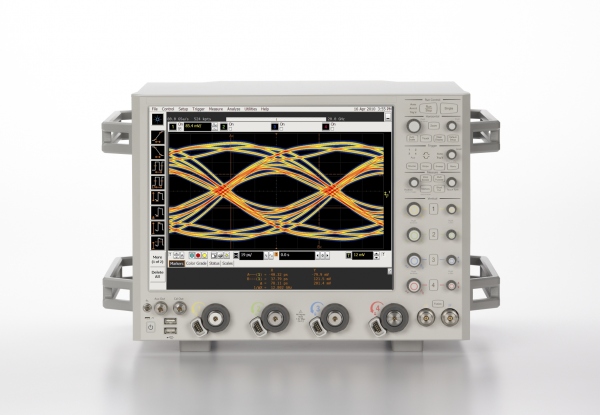
We’ll have to admit that we were really jealous when [Shahriar] sent us a video he made, in which he casually explains how a $500,000 160GS/s 62GHz oscilloscope works and then starts playing with it.

Even though you need to be quite familiar with electronics to fully understand the oscilloscope’s inner workings, [Shahriar]’s step by step explanation is still approachable for those who only understand the basics.

In the first half of the video he uses the manufacturer’s documentation which contains the oscilloscope block diagrams, so you’ll also learn about:

  • timer interleaved Analog to Digital Converters (ADCs), which allows you to increase your input sampling rate by using several of them
  • phase-locked loops, which use a reference clock to generate a much faster clock signal
  • custom made dies and the materials used for high frequency electronic components

In the second half of the video [Shahriar] connects a pseudo random binary sequence generator and uses the oscilloscope to make several measurements that you’d typically want to know for high speed signals (jitters, eye quality factor…). He later performs a small experiment where he up-converts the frequency components of two random 3.12Gbit/s signals and tries to recall each original signal using the oscilloscope functions, making this part of the video a bit harder to keep up with.

Designing A Pressure Sensitive Floor

ccm_activefloor8

[Sean] and his team at Adobe were asked to build “something new” for the Children’s Creativity Museum in San Francisco, so in several months they managed to build a digital/physical environment for kids called “Sense It”.

Part of this project involved designing and building a pressure-sensitive electronic floor which could detect if children were sitting, walking or running. As a camera based detection system couldn’t give them the type of precision they wanted, [Sean] decided to use pressure-sensitive resistors placed under MDF panels.

There are a total of twenty-one 2’x4′ tiles, each one including 8 pressure-sensitive resistors and an ATtiny84 based platform. All the microcontrollers digitize their 8 sensor signals and send their conversion results to a beaglebone over a shared i2c bus in a RJ45 CAT5 cable. As it is [Sean]’s first project, we will cut him some slack but several design mistakes have been made in our opinion:

  • Using i2c instead of RS485 / CAN for long distance data transmission
  • Digitizing the sensor voltages so far from them, as noise is added before the ADC
  • Sending the +5V required by the ATtiny in the RJ45 cable instead of a higher voltage (which would involve putting an LDO on the platforms)
  • Separating the digital and analog ground planes as the platform current consumption is low and transmission speeds slow

But the children who can now play with the complete system certainly won’t care. And you… what do you think of [Sean]’s work? Don’t hesitate to let us know in the comment section below.

Just Swipe Your Card And Enter The Pin… What Could Go Wrong?

We do hope this project makes you shiver.

“Financial risks” is an audiovisual installation that reacts when you swipe your credit card and prints an odd looking receipt if you type in your pin-code. Even though the website contains few technical details (read none) about the build, we chose to feature the project as we find his intent interesting:

‘Financial Risks’ installation is a project designed to present an ironical viewpoint on encoded wallets, as a data input interface invites to overcome fear of impossibility to control spread of confidential information for the sake of curiosity of interaction with an object of art.

The piece consists of 6 bank card readers, a hardware system of sound and video synthesis, a keyboard for pin code entering, a 2-channel sound system and a cash register printer configured to print images. Up to 6 cards simultaneously may be used for playing.

We do hope that nothing is stored in the platform’s memory… but is the installation monitored?

Hacking Transcend Wifi SD Cards

[Pablo] is a recent and proud owner of a Transcend WiFi SD Card. It allows him to transfer his pictures to any  WiFi-enabled device in a matter of seconds.

As he suspected that some kind of Linux was running on it, he began to see if he could get a root access on it… and succeeded.

His clear and detailed write-up begins with explaining how a simple trick allowed him to browse through the card’s file system, which (as he guessed correctly) is running busybox. From there he was able to see if any of the poorly written Perl scripts had security holes… and got more than he bargained for.

He first thought he had found a way to make the embedded Linux launch user provided scripts and execute commands by making a special HTTP POST request… which failed due to a small technicality. His second attempt was a success: [Pablo] found that the user set password is directly entered in a Linux shell command. Therefore, the password “admin; echo haxx > /tmp/hi.txt #” could create a hi.txt text file.

From there things got easy. He just had to make the card download another busybox to use all the commands that were originally disabled in the card’s Linux. In the end he got the card to connect a bash to his computer so he could launch every command he wanted.

As it was not enough, [Pablo] even discovered an easy way to find the current password of the card. Talk about security…