Inside A Fake WiFi Repeater

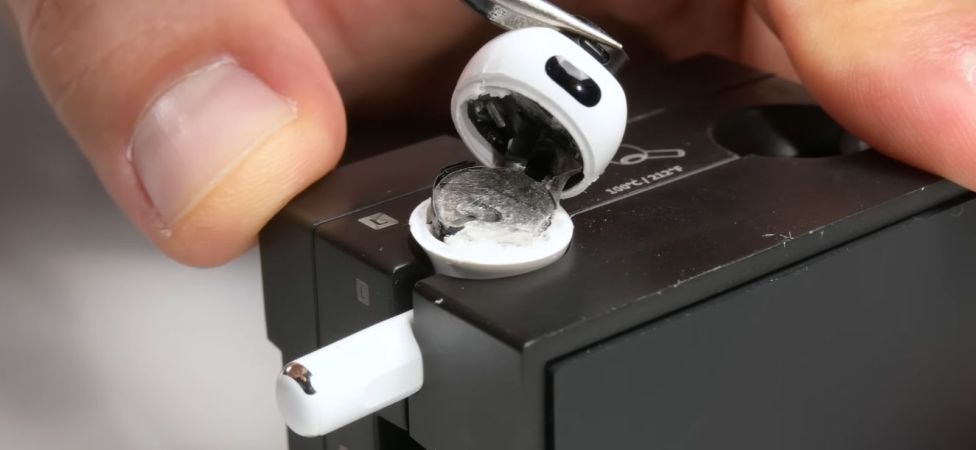
Fake WiFi repeater with a cheap real one behind it. (Credit: Big Clive, YouTube)

Over the years we have seen a lot of fake electronics, ranging from fake power saving devices that you plug into an outlet, to fake car ECU optimizers that you stick into the OBD port. These are all similar in that they fake functionality while happily lighting up a LED or two to indicate that they’re doing ‘something’. Less expected here was that we’d be seeing fake WiFi repeaters, but recently [Big Clive] got his hands on one and undertook the arduous task of reverse-engineering it.

The simple cardboard box which it comes in claims that it’s a 2.4 GHz unit that operates at 300 Mbps, which would be quite expected for the price. [Clive] obtained a real working WiFi repeater previously that did boast similar specifications and did indeed work. The dead giveaway that it is a fake are the clearly fake antennae, along with the fact that once you plug it in, no new WiFi network pops up or anything else.

Inside the case – which looks very similar to the genuine repeater – there is just a small PCB attached to the USB connector. On the PCB are a 20 Ohm resistor and a blue LED, which means that the LED is being completely overdriven as well and is likely to die quite rapidly. Considering that a WiFi repeater is supposed to require a setup procedure, it’s possible that these fake repeaters target an audience which does not quite understand what these devices are supposed to do, but they can also catch more informed buyers unaware who thought they were buying some of the cheap real ones. Caveat emptor, indeed.

Continue reading “Inside A Fake WiFi Repeater”

General Fusion Claims Success With Magnetized Target Fusion

It’s rarely appreciated just how much more complicated nuclear fusion is than nuclear fission. Whereas the latter involves a process that happens all around us without any human involvement, and where the main challenge is to keep the nuclear chain reaction within safe bounds, nuclear fusion means making atoms do something that goes against their very nature, outside of a star’s interior.

Fusing helium isotopes can be done on Earth fairly readily these days, but doing it in a way that’s repeatable — bombs don’t count — and in a way that makes economical sense is trickier. As covered previously, plasma stability is a problem with the popular approach of tokamak-based magnetic confinement fusion (MCF). Although this core problem has now been largely addressed, and stellarators are mostly unbothered by this particular problem, a Canadian start-up figures that they can do even better, in the form of a nuclear fusion reactors based around the principle of magnetized target fusion (MTF).

Although General Fusion’s piston-based fusion reactor has people mostly very confused, MTF is based on real physics and with GF’s current LM26 prototype having recently achieved first plasma, this seems like an excellent time to ask the question of what MTF is, and whether it can truly compete billion-dollar tokamak-based projects.

Continue reading “General Fusion Claims Success With Magnetized Target Fusion”

Why Are Micro Center Flash Drives So Slow?

Every year, USB flash drives get cheaper and hold more data. Unfortunately, they don’t always get faster. The reality is, many USB 3.0 flash drives aren’t noticeably faster than their USB 2.0 cousins, as [Chase Fournier] found with the ultra-cheap specimens purchased over at his local Micro Center store.

Although these all have USB 3.0 interfaces, they transfer at less than 30 MB/s, but why exactly? After popping open a few of these drives the answer appears to be that they use the old-style Phison controller (PS2251-09-V) and NAND flash packages that you’d expect to find in a USB 2.0 drive.

Across the 32, 64, and 256 GB variants the same Phison controller is used, but the PCB has provisions for both twin TSOP packages or one BGA package. The latter package turned out to be identical to those found in the iPhone 8. Also interesting was that the two 256 GB drives [Chase] bought had different Phison chips, as in one being BGA and the other QFP. Meanwhile some flash drives use eMMC chips, which are significantly faster, as demonstrated in the video.

It would seem that you really do get what you pay for, with $3 “USB 3.0” flash drives providing the advertised storage, but you really need to budget in the extra time that you’ll be waiting for transfers.

Continue reading “Why Are Micro Center Flash Drives So Slow?”

Teardown Of Casio Credit Card-Sized Radio

These days we don’t get too fussed about miniaturized electronics, not when you can put an entire processor and analog circuitry on a chip the size of a grain of sand. Things were quite different back in the 1980s, with the idea of a credit card-sized radio almost preposterous. This didn’t stop the engineers over at Casio from having a go at this and many other nutty ideas, with [Matt] from Techmoan having a go at taking one of these miniaturized marvels apart.

The Casio FM Stereo radio in happier days. (Credit: Techmoan, YouTube)

On the chopping block is the FM stereo device that was featured in a previous episode. Out of the four credit card-sized radios in that video, the one with the rechargeable battery (obviously) had ceased to work, so it was the obvious choice for a teardown. This mostly meant peeling off the glued-on top and bottom, after which the circuitry became visible.

In addition to the battery with a heavily corroded contact, the thin PCB contains a grand total of three ICs in addition to the analog circuitry. These were identified by [Spritetm] as an AM/FM tuner system IC (TA7792), an FM PLL MPX (TA7766AF) and a headphone amplifier (TA7767F), all of them manufactured by Toshiba.

Although [Matt] reckons this was a destructive teardown, we’re looking forward to the repair video where a fresh cell is soldered in and the case glued back together. Continue reading “Teardown Of Casio Credit Card-Sized Radio”

Build Customized Raspberry Pi OS Images With Rpi-image-gen

Recently Raspberry Pi publicly announced the release of their new rpi-image-gen tool, which is advertised as making custom Raspberry Pi OS (i.e. Debian for specific Broadcom SoCs) images in a much more streamlined fashion than with the existing rpi-gen tool, or with third-party solutions. The general idea seems to be that the user fetches the tool from the GitHub project page, before running the build.sh script with parameters defining the configuration file and other options.

The main advantage of this tool is said to be that it uses binary packages rather than (cross-)compiling, while providing a range of profiles and configuration layers to target specific hardware & requirements. Two examples are provided in the GitHub project, one for a ‘slim’ project, the other for a ‘webkiosk‘ configuration that runs a browser in a restricted (Cage) environment, with required packages installed in the final image.

Looking at the basic ‘slim’ example, it defines the INI-style configuration in config/pi5-slim.cfg, but even when browsing through the main README it’s still somewhat obtuse. Under device it references the mypi5 subfolder which contains its own shell script, plus a cmdline.txt and fstab file. Under image it references the compact subfolder with another bunch of files in it. Although this will no doubt make a lot more sense after taking a few days to prod & poke at this, it’s clear that this is not a tool for casual users who just want to quickly put a custom image together.

This is also reflected in the Raspberry Pi blog post, which strongly insinuates that this is targeting commercial & industrial customers, rather than hobbyists.

Brazilian Modders Upgrade NVidia Geforce GTX 970 To 8 GB Of VRAM

Although NVidia’s current disastrous RTX 50-series is getting all the attention right now, this wasn’t the first misstep by NVidia. Back in 2014 when NVidia released the GTX 970 users were quickly dismayed to find that their ‘4 GB VRAM’ GPU had actually just 3.5 GB, with the remaining 512 MB being used in a much slower way at just 1/7th of the normal speed. Back then NVidia was subject to a $30/card settlement with disgruntled customers, but there’s a way to at least partially fix these GPUs, as demonstrated by a group of Brazilian modders (original video with horrid English auto-dub).

The mod itself is quite straightforward, with the original 512 MB, 7 Gbps GDDR5 memory modules replaced with 1 GB, 8 Gbps chips and adding a resistor on the PCB to make the GPU recognize the higher density VRAM ICs. Although this doesn’t fix the fundamental split VRAM issue of the ASIC, it does give it access to 7 GB of faster, higher-density VRAM. In benchmarks performance was massively increased, with Unigine Superposition showing nearly a doubling in the score.

In addition to giving this GTX 970 a new lease on life, it also shows just how important having more VRAM on a GPU is, which is ironic in this era where somehow GPU manufacturers deem 8 GB of VRAM to be acceptable in 2025.

Continue reading “Brazilian Modders Upgrade NVidia Geforce GTX 970 To 8 GB Of VRAM”

ReactOS 0.4.15 Released With Major Improvements

Recently the ReactOS project released the much anticipated 0.4.15 update, making it the first major release since 2020. Despite what might seem like a minor version bump from the previous 0.4.14 release, the update introduces sweeping changes to everything from the kernel to the user interface and aspects like the audio system and driver support. Those who have used the nightly builds over the past years will likely have noticed a lot of these changes already.

Japanese input with MZ-IME and CJK font (Credit: ReactOS project)

A notable change is to plug-and-play support which enables more third party drivers and booting from USB storage devices. The Microsoft FAT filesystem driver from the Windows Driver Kit can now be used courtesy of better compatibility, there is now registry healing, and caching and kernel access checks are implemented. The latter improvement means that many ReactOS modules can now work in Windows too.

On the UI side there is a much improved IME (input method editor) feature, along with native ZIP archive support and various graphical tweaks.

Meanwhile since 0.4.15 branched off the master branch six months ago, the latter has seen even more features added, including SMP improvements, UEFI support, a new NTFS driver and improvements to power management and application support. All of this accompanied by many bug fixes, which makes it totally worth it to regularly check out the nightly builds.