Etching PCBs With Vinegar

When we hear about etching PCBs at home we assume that either Ferric Chloride or Cupric Chloride were used to eat away unmasked copper from the boards. But [Quinn Dunki] just wrote up her PCB etching guide and she doesn’t use either of those. Instead, she combines vinegar, hydrogen peroxide, and salt. It’s easier to find vinegar than muriatic acid (Cupric Chloride is made using this, peroxide, and adding the copper) so this is something to keep in mind if you’re in a pinch (or a Macgyver situation).

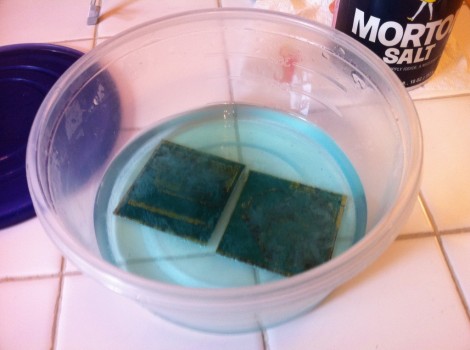
The rest of the process is what we’re used to. She’s using photoresistant boards which can be masked with a sheet of transparency instead of using the toner-transfer method. Once they take a bath in the developer solution she puts them in a shallow dish of vinegar and hydrogen peroxide along with a teaspoon of salt. She wipes the surface with a foam brush every minute or so, and inspects them every ten minutes to see if they’re done.

She does discuss disposal. Seems that she throws the solution in the garbage after each use. The liquid will contain copper salts which are bad for wildlife. We’ve heard that you should neutralize the acid and make a block of concrete using the liquid, then throw it in the garbage. Does anyone have a well-researched, ethical, and environmentally friendly way of getting rid of this stuff?

MITx First Course Announce – 6.002x: Circuits And Electronics

The Massachusetts Institute of Technology just announced the first course offering in their new online classes program. Great news, it’s an analog design course which is right up our alley. The prototype session will be 6.002: Circuits and Electronics.

If you’re a fan of our links posts you may remember hearing about the MITx program a month ago. After seeing the popularity of the Stanford program MIT is throwing their hat into the ring too. So what is this all about? How does it work and what will you learn? There’s bits of information all over the place. We recommend reading the news link at the top of this feature first. Next you should wade through the 6.002x FAQ and if you’re still interested there’s a big maroon enrollment button at the bottom of the course summary page.

Whew, that’s a lot of links. Anyway, expect to spend 10 hours a week on the class; but it’s all free. Future offerings will be free as well, but MIT plans transition to a pay-for-certificate option: “students who complete the mastery requirement on MITx will be able to receive the credential for a modest fee.” If you still haven’t made up your mind take a gander at the promo clip after the jump.

Continue reading “MITx First Course Announce – 6.002x: Circuits And Electronics”

Arduino Lawn Care Is Web-controlled

[Joe Fernandez] is fairly new to the hardware side of the hobby, but he seems to have easily found his way on this project. He wanted to build his own web-bridge for his Toro lawn sprinkler system. He pulled it off with style and shows off the spoils of his work in the clip after the break.

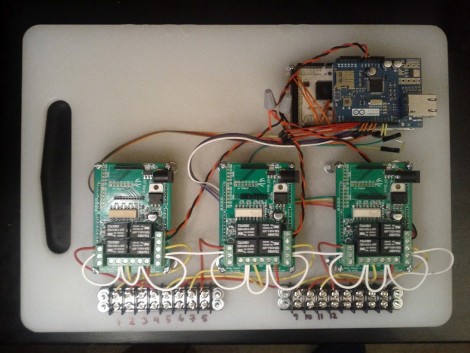
He started with an Android ADK, crafting some web magic to use a REST interface and JSON packets as a communications scheme. This makes it possible to control the system from anywhere as long as you have an Internet connection. The rest of the hardware evolved as his needs became clear. The first hunk was to add an Ethernet shield so that he didn’t need to have his Android phone connected to the system for it to work. From there he needed to control the solenoid valves on the system and grabbed three relay shields from Seeed Studios for this purpose.

As you can see, all of that hardware has a home on a polyethylene cutting board. The terminal blocks at the bottom keep the connections nice and neat as they interface with the sprinkler system. We were happy to hear that the stock controller still works, this add-on doesn’t permanently alter it in any way. That’s going to be important if he ever wants to sell the home.

Still using a traditional sprinkler instead of an in-ground system? Perhaps this variable range hack is for you.

Let There Be Light Inside Your Epilog Laser Cutter

[Bradley Gawthrop’s] biggest gripe about his laser cutter is the lack of Mac support. We don’t think we’d have any gripes if we owned one of these (yeah, that’s a lie…) but we can understand his second biggest issue which is the inability to see the work piece once it’s inside the machine. He figured out a very easy way to light the area as the cutter gets to work.

It occured to him that the optical head is always directly above the part of the work piece he was interested in seeing. He had been using a flashlight to shed some light, but what if he just added lighting to that head? The circuit is certainly nothing hard; some LEDs, resistors and a power source will do the trick. But routing the power is where things get more difficult. You need flexible wiring strung just right so as not to restrict motion on the X/Y axes. Most of his time was spent routing some 14 gauge stranded speaker wire for this task. He added his own 5V DC supply to power the adhesive LED strip which enjoys a resting place on the bottom rail of the head unit. Boom, problem solved.

Tears From Your Lonely Heart Will Activate A Comforting Tune

If you’re forever alone we’d guess you’ve long since stopped crying about it. But if you’re still prone to shed a tear on a dateless Valentine’s day this project’s for you. [Mikeasaurus] spruced up this pillow to play a tune when it senses your lonely soul. It’s got a moisture sensor which triggers an audio greeting card just when your weeping really starts to get soggy.

If you look closely at the top portion of the white fabric in the picture you can see there are rows of stitching. These hold a matrix of conductive wire mesh fabric on the inside of the pillow case. There are two buses made up of alternating rows (think of the tines of two forks pointed together) which make up the probes. When the gap is bridged by moisture a transistor circuit triggers the audio bits from a greeting card to play a song. Check out the demo after the break. We’re not satisfied that [Mikeasaurs’] couldn’t even bring himself to cry real tears for the clip, but maybe years of solder fumes have clogged up those tear ducts.

Continue reading “Tears From Your Lonely Heart Will Activate A Comforting Tune”

AltSoftSerial Looks To Speed Up Arduino Software UART

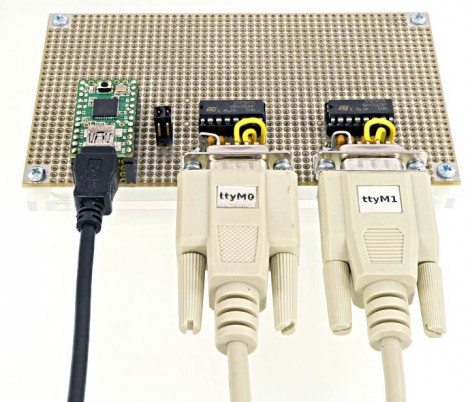
So let’s say your using an Arduino in your project. You already have the hardware-based serial interface working with one portion of the project and need a second serial port for unrelated hardware. The obvious solution is to write one in software. But this is a place where working in the Arduino environment gets really hairy. Since there’s a layer of abstraction between the code and the hardware interrupts, it can be difficult to know if you are going to have timing problems. But there’s a new library available which seeks to reduce the latency of software-based serial communications so that you don’t have to worry about it.

It’s named AltSoftSerial because it is a software-based serial library that is an alternative to the NewSoftSerial package. The former can function with just  2-3 microseconds of latency, while the latter has as much as a 174 microsecond hit. If it functions as advertised that’s quite an improvement. It’s not hard to put together a hardware test platform, and the example program is only about a dozen lines of code (which is the beauty of working in this environment) so give it a try if you have a free hour here or there.

Connecting A Dumb Scale To Your Smartphone

[Casainho] wanted to track his body weight using an app on his Android phone. He just needed a way to get the weight readings onto the device automatically. He ended up adding Bluetooth to a bathroom scale and hacking the app to grab data from it.

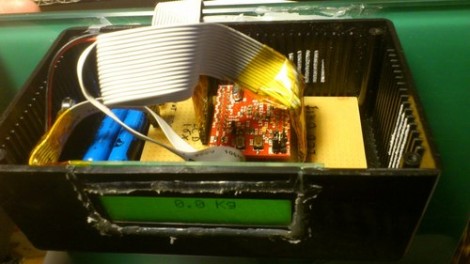
The scale which he hacked is a digital model, which makes it possible to read the weight data if you know what you’re doing. [Casainho] already completed a weight logging scale hack which stored the data on an SD card. So this was a recreation of that project but with a Bluetooth module for the output rather than the card for storage.

Now you can buy WiFi enabled scales, but that’s not nearly as fun as a hack like this. Plus one of those will cost you around $200 and the hardware for this version came it at only $75. It includes an LPC2103 dev board, $6 Bluetooth module, character display, batteries, and misc. supplies. The software end of the hack was helped greatly by the fact that the Android apps which [Casainho] is using are both open source.