Hackaday Links: March 20, 2011

SNES Arcade Cabinet

arcade_cabinet

[Daniel] let us know that he finished up a SNES arcade cabinet he has been working on for awhile. It looks so good, he says that his wife has even agreed to let him keep it in the house!

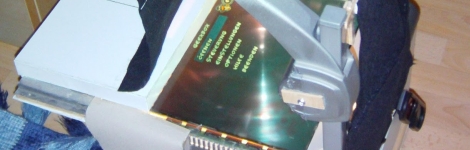
DIY Overhead projector beamer
diy_beamer

[Liquider] sent us some information about a DIY beamer he built using an overhead projector and an old LCD panel. It looks like a great way to get a big-screen wall display set up in no time.

WordClock gets a makeover

wordclock

[Doug] wrote in to share with us some progress he has made on his WordClock. You might remember our coverage of this creative timepiece a little while back. This time around, he has built a new control board, and is using vinyl stencils for a much cleaner look.

Interactive water fountain

interactive_fountain

[Gerry Chu] is well known for his water-based imagery and projects. His most recent project is a water fountain that interacts with passers by. There are no real build details as of yet, but we hope to see some soon.

Sixty Symbols explains why glass is transparent

glass

Do you think you know why glass is transparent, but a brick is not? If you looked it up via Google, you are likely mistaken. A professor from the University of Nottingham explains why the Internet is so, so wrong about this, as well as how energy gap determines if photons of light can make it through a piece of glass. [via i09]
GPS-enabled Bag Allows For Carefree City Roaming

mapbag_lilypad

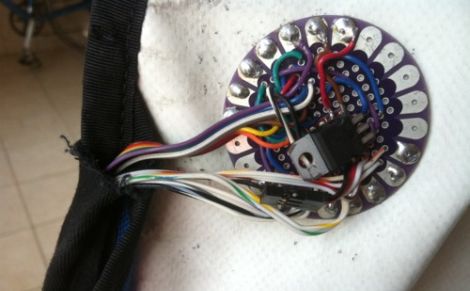
[Josh] was looking for a way to enjoy exploring the city of Chicago safely, and hacked together a messenger bag navigation system to ensure he always knew where he was going.

While riding, he wanted to embrace the idea of Dérive, but he felt that he was being too overly conscious of time as well as his location, which took all the fun out of his unplanned excursions. Having recently been “doored” by a car, he was also looking for a way to help him navigate the city streets without being overly distracted with finding his way around.

His “Map Bag” solves both of these problems for him, without being obtrusive. He fit a messenger bag with a LilyPad Arduino and a GPS receiver for keeping track of his location. The Arduino can constantly monitor speed, heading, and location, directing [Josh] to his destination by vibrating one of 8 shaftless motors that are installed throughout the bag’s chest strap. Now while he rides, he can take in the city’s atmosphere while also knowing that he will get exactly where he needs to – on time.

He does not have any source code or schematics on his site as of yet, but we hope to see some in the near future. If you are interested, check out the videos of the bag’s construction embedded below.

Continue reading “GPS-enabled Bag Allows For Carefree City Roaming”

Third Time’s A Charm – 512 LED Cube Kicks It Up A Notch With RGB LEDs

rgb_led_cube

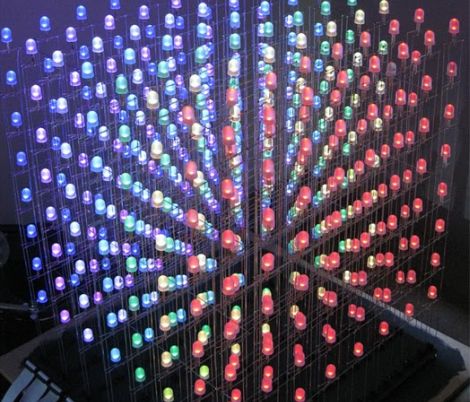
In the comments section of our 512-LED cube post from the other day, several people suggested that to take the project up a notch, building a similar cube using RGB LEDS was the next logical step. It seems that Hack-a-Day reader [vespine] was way ahead of the curve, as he sent us the build details of his 8x8x8 RGB cube shortly after the other story was published.

His cube, which was finished earlier this year, uses 512 10mm RGB LEDs, arranged on top of a simple elevated stand. The stand conceals all of the circuitry he uses to control the cube, the centerpiece of which is a PIC32 MCU. A dozen TLC5940 16-channel PWM drivers are used alongside the PIC in order to adjust the color output of the LEDs, each of which can be addressed and colored individually.

The end result is just about as amazing as you would imagine. He has created several quick demonstration animations, which you can view in the video below. Be sure to stop by his site to see all of his build details – there’s quite a lot there.

Continue reading “Third Time’s A Charm – 512 LED Cube Kicks It Up A Notch With RGB LEDs”

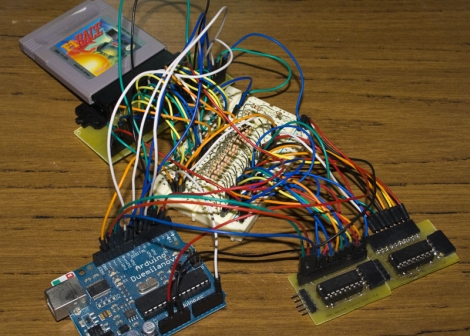
Gameboy ROM Backups Using An Arduino

gameboy_cart_reader

[Alex] collects retro gaming consoles. One day while playing a SNES title, his save games got wiped when he powered off the system. It turned out that the battery inside the game cartridge got disconnected somehow, and it got him thinking. He decided he wanted to find a way to back up his save games from the cartridges for safe keeping.

While cart readers exist, he says that they are hard to find nowadays, so he decided to construct his own using an Arduino. SNES cartridges are relatively complex, so he opted to focus on Gameboy cartridges for the time being. Before attempting to back up save games, he first chose to learn how to communicate with the cartridges in general, by reading the ROM.

He breaks the cartridges down in detail, discussing how they are constructed as well as how they can be addressed and read using the Arduino. He was ultimately successful, and offers up code as well as schematics on his site for any of you interested in doing the same. We imagine that save game reading (and perhaps editing) will likely happen in the near future.

Check out the video below to see his cart reader in action.

Continue reading “Gameboy ROM Backups Using An Arduino”

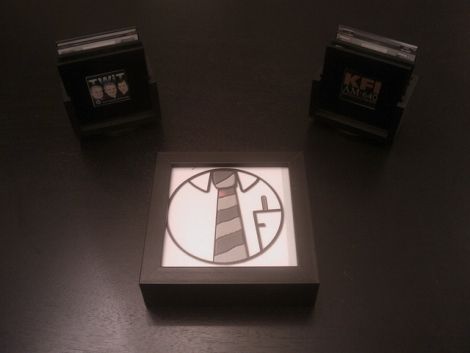
RFID-based HTPC Controller Gets A Wireless Refresh

RFiDJ_Refresh

[roteno] recently wrote in to let us know that he has completed work on the RFiDJ Refresh, a follow up to his 2009 project, the RFiDJ.

The concept is pretty simple – he has a set of RFID enabled tiles, which contain references to particular online streaming audio stations. He uses these tiles to tune into audio feeds on his HTPC by placing them on a block containing an RFID reader.

His previous implementation had the RFID reader tethered to his HTPC, which didn’t make it all that convenient to use. The newer version utilizes a 433 MHz transmitter/receiver pair in order to communicate with the PC, so it can be used anywhere through out his house. The reader and transmitter were placed in a shadow box picture frame, along with a rechargeable Li-poly battery that powers the whole setup. He also mentions that he has added a tactile interface that allows him to initiate mobile phone calls from the RFiDJ as well.

It’s a nice update to an already great project. We imagine it’s a bit more fun for [roteno] and his guests to tap a coaster on the transmitter box than fumble with a remote to change radio stations on the HTPC, but that’s just us.

Check out the videos below to see his new setup in action.

Continue reading “RFID-based HTPC Controller Gets A Wireless Refresh”

Test Your Etching Chops With PCB Map Making

pcb_map

[Martin] had been using standard perf board for most of his electronics projects, but as he was starting to utilize more surface mount ICs, he quickly realized that it was time to start making his own PCBs. Having never etched any PCBs using the toner transfer method, he figured it was as good a time as any to give it a try.

Rather than make a board for a particular project, he decided to try his hand at etching a very detailed map of the Paris Metro as a test pattern instead. He grabbed a large image of the subway map, then printed it out on the back of a supermarket flyer. He attached it to his PCB and ran it through a lamination machine to transfer the toner. He figured that the laminator would be easier than an iron to use, and was right for the most part. The only issue he had was that the laminator did not generate enough heat, so he supplemented the its heat output with a hair dryer.

When everything was said and done, he had a pretty good looking PCB on his hands. Most of the Metro tracks and text came out just fine, though he admits there is a bit of room for improvement. It looks nice when mounted in a frame, though we would love to see a functional circuit made out of a PCB map like that. Heck, we’d even settle for a double-sided PCB with a street-level map on one side an the Metro on the other!

Hardware-based Security Keypad Keeps It Simple

hardware_keypad_lock

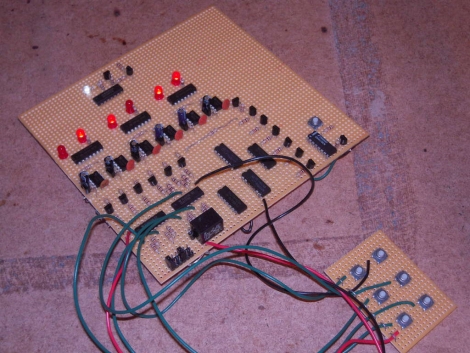
Instructables user [trumpkin] recently built an all-hardware based keypad lock for a contest he was entering, and we thought it was pretty neat. The lock uses mostly NAND gates and 555 timers to get the job done, which makes it a nice alternative to similar software-based projects we have seen in the past.

The lock has 6 keys on the keypad, which is connected to the main logic board. The keycode is set using a series of headers at the bottom of the board, and you get 10 chances to enter the proper code before the board locks up completely. If this occurs, a “manual” reset via a button built into the main board is required before any more attempts can be made.

As you can see in the video below, the lock works quite well, but suffers from one shortcoming. Any permutation of the key code can be used to deactivate the lock, which is something [trumpkin] says he would like to improve in the future.

If you are looking for some more security-related reading, be sure to check out these other hacks we have featured in the past.

Continue reading “Hardware-based Security Keypad Keeps It Simple”