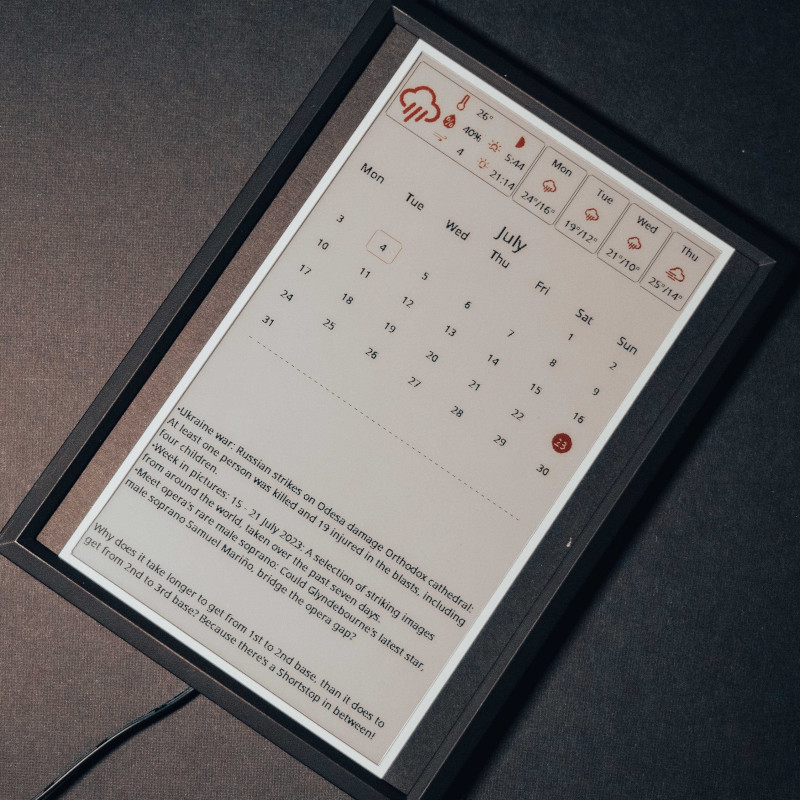
Inkycal Makes Short Work Of E-Paper Dashboards

The e-paper “dashboard” is something we’ve seen plenty of times here at Hackaday. Use it to show your daily schedule, the news, weather, maybe the latest posts from your favorite hardware hacking website. Any information source that doesn’t need to be updated more than every hour or so is a perfect candidate. All you’ve got to do is write the necessary code to pull  down said data and turn it into a visually attractive display.

Well, that last part isn’t always so easy. There are plenty of folks who have no problem cobbling together a Raspberry Pi and one of the commercially available e-paper modules, but writing the software to turn it into a useful information center is another story entirely. Luckily, Inkycal is here to help.

This open source project uses Python to pull information from a wide variety of sources and turns it into an e-paper friendly dashboard. It works with Waveshare displays ranging from 4.2 inches all the way up to the massive 12 inch tricolor panels. While it could theoretically be deployed on any operating system running a modern version of Python, it’s primarily developed to be run under Linux and on the Raspberry Pi. All of the versions of the Pi are supported, so no need to spring for the latest and greatest model. In fact, the notoriously pokey Raspberry Pi Zero is their recommended platform thanks to its low power consumption.

With Inkycal on the Pi — they even provide a pre-configured SD card image — and the e-paper display hooked up, all you need to do is pick which sources you want to use from the web-based configuration page. Look ma, no code!

Not feeling like putting the hardware together either? Well, we might wonder how you’ve found yourself on Hackaday if that’s the case. But if you really would rather buy then build, you can get a pre-built Inkcal display right now on Tindie.

Microsoft Sculpt Keyboard Lives Again With RP2040

Hackaday readers are likely the kind of folks that have a favorite keyboard, so you can probably imagine how devastating it would be to find out that the board you’ve sworn by for years is going out of production. Even worse, the board has some internal gremlins that show up after a few years of use, so functional ones in the second-hand market are becoming increasingly rare. So what do you do?

This is the position [TechBeret] recently found himself in with his beloved Sculpt keyboard. When Microsoft decided to step back from the peripheral market last year, he started looking at alternatives. Finding none of them appealing, he decided instead to breathe new life into the ergonomic keyboard with the RP2040. Every aspect of the resurrection is covered in a phenomenally detailed write-up on his blog, making this a valuable case study in modernizing peripherals with the popular microcontroller.

Continue reading “Microsoft Sculpt Keyboard Lives Again With RP2040”

Multi-Material Printing Enables Low Cost Silicone Prototypes

While it’s the ideal choice for mass production, injection molding is simply no good for prototyping. The molds are expensive and time-consuming make, so unless you’ve got the funding to burn tens of thousands of dollars on producing new ones each time you make a tweak to your design, they’re the kind of thing you don’t want to have made until you’re absolutely sure everything is dialed in and ready. So how do you get to that point without breaking the bank?

That’s not always an easy question, but if you’re working with silicone parts, the team at OpenAeros thinks they might have a solution for you. As demonstrated through their OpenRespirator project, the team has developed a method of 3D printing single-use molds suitable for large silicone parts that they’re calling Digital-to-Silicone (D2S).

In the video below, [Aaron] and [Jon] explain that they started off by simply printing injection molds in the traditional style. This worked, but the molds can get quite complex, and the time and effort necessary to design and print them wasn’t a great fit for their iterative development cycle. They wanted to be able to do from design to prototype in a day, not a week.

Eventually they realized that if they printed the mold out of a water-soluble filament, they could simplify its design greatly. They’ve documented the design process in detail, but the short version is that you essentially subtract the 3D model of the design you want to produce from a solid shape in your CAD package, and add a few holes for injecting the silicone. Once the silicone has cured, the mold can be dissolved away in warm water to reveal the finished part.

They then took this concept a step further. Thanks to the multi-material capabilities offered by some of the latest 3D printers, it’s possible to print structures within the mold. Once the silicone is injected, these structures can become part of the finished part. For the OpenRespirator, this lets them add PETG stiffening rings around where the filters to snap into the silicone mask body.

Continue reading “Multi-Material Printing Enables Low Cost Silicone Prototypes”

OpenSCAD Library Creates QR Codes On The Fly

If you’ve been reading Hackaday for awhile, you’ll know we’re big fans of OpenSCAD around these parts. There’s a number of reasons it’s a tool we often reach for, but certainly one of the most important ones is its parametric nature. Since you’re already describing the object you want to generate with code and variables, it’s easy to do things like generate an arbitrary number of cloned objects by using a for loop.

There are a number of fantastic OpenSCAD libraries that explore this blurred line between code and physical objects, and one that recently caught our eye is scadqr from [xypwn]. The description says it lets you “Effortlessly generate QR codes directly in OpenSCAD”, and after playing around with it for a bit, we have to agree.

Continue reading “OpenSCAD Library Creates QR Codes On The Fly”

Portable Multi-SDR Rig Keeps Your Radios Cool

With as cheap and versatile as RTL-SDR devices are, it’s a good idea to have a couple of them on hand for some rainy day hacking. In fact, depending on what signals you’re trying to sniff out of the air, you may need multiple interfaces anyway. Once you’ve amassed this arsenal of software defined radios, you may find yourself needing a way to transport and deploy them. Luckily, [Jay Doscher] has you covered.

His latest creation, the SDR SOLO, is a modular system for mounting RTL-SDRs. Each dongle is encased in its own 3D printed frame, which not only protects it, but makes it easy to attach to the base unit. To keep the notoriously toasty radios cool, each frame has been designed to maximize airflow. You can even mount a pair of 80 mm fans to the bottom of the stack to really get the air moving. The current design is based around the RTL-SDR Blog V4, but could easily be adapted to your dongle of choice.

In addition to the row of SDR dongles, the rig also includes a powered USB hub. Each radio connects to the hub via a short USB cable, which means that you’ll only need a single USB cable running back to your computer. There’s also various mounts and adapters for attaching antennas to the system. Stick it all on the end of a tripod, and you’ve got a mobile radio monitoring system that’ll be the envy of the hackerspace.

As we’ve come to expect, [Jay] put a lot of thought and effort into the CAD side of this project. Largely made of 3D printed components, his projects often feature a rugged and professional look that really stands out.

Video Baby Monitor Repair Uncovers Private Data

As the name of the channel implies, [BuyItFixIt] likes to pick up cheap gadgets that are listed as broken and try to repair them. It’s a pastime we imagine many Hackaday readers can appreciate, because even if you can’t get a particular device working, you’re sure to at least learn something useful along the way.

But after recently tackling a VTech video baby monitor from eBay, [BuyItFixIt] manages to do both. He starts by opening up the device and going through some general electronics troubleshooting steps. The basics are very much worth following along with if you’ve ever wondered how to approach a repair when you don’t know what the problem is. He checks voltages, makes sure various components are in spec, determines if the chips are talking to each other with the oscilloscope, and even pulls out the thermal camera to see if anything is heating up. But nothing seems out of the ordinary.

The scope uncovers some serial data.

While poking around with the oscilloscope, however, he did notice what looked like the output of a serial debug port. Sure enough, when connected to a USB serial adapter, the camera’s embedded Linux operating system started dumping status messages into the terminal. But before it got too far along in the boot process, it crashed with a file I/O error — which explains why the hardware all seemed to check out fine.

Now that [BuyItFixIt] knew it was a software issue, he started using the tools built into the camera’s bootloader to explore the contents of the device’s flash chip. He uncovered the usual embedded Linux directories, but when he peeked into one of the partitions labeled Vtech_data2, he got a bit of a shock: the device seemed to be holding dozens of videos. This is particularly surprising considering the camera is designed to stream video to the parent unit, and the fact that it could record video internally was never mentioned in the documentation.

Continue reading “Video Baby Monitor Repair Uncovers Private Data”

Walking The Plank: Add-Ons For The Bus Pirate

The Bus Pirate multi-tool has held a place of honor in many a hardware hacker’s toolbox for years, and the latest generation of the gadget powered by the Raspberry Pi RP2040/RP2350 offers significantly enhanced capabilities over the original PIC versions. We took a look at the new Bus Pirate when it started shipping back in February, and while the firmware was still in the early stages back then, it was already clear that creator [Ian Lesnet] and his team had put together a compelling product.

Over the last several months, the Bus Pirate software has improved dramatically. New features have started showing off the hardware’s capabilities, and the user experience is far improved over where it was at release. Following the firmware development is a roller coaster ride, with [Ian] sometimes pushing out several updates a day. Luckily, like the Pi Pico itself, updating the new Bus Pirate only takes a second.

But as impressive and important as those software updates have been, that’s not what we’re talking about today. In this post, we’ll take a look at one of the most exciting aspects of the new Bus Pirate — the ability to easily develop add-on modules for it.

Continue reading “Walking The Plank: Add-Ons For The Bus Pirate”