Regretfully: $3,000 Worth Of Raspberry Pi Boards

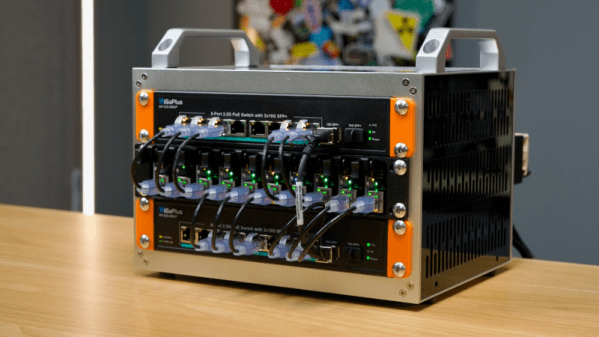
We feel for [Jeff Geerling]. He spent a lot of effort building an AI cluster out of Raspberry PI boards and $3,000 later, he’s a bit regretful. As you can see in the video below, it is a neat build. As Jeff points out, it is relatively low power and dense. But dollar for dollar, it isn’t much of a supercomputer.

Of course, the most obvious thing is that there’s plenty of CPU, but no GPU. We can sympathize, too, with the fact that he had to strip it down twice and rebuild it for a total of three rebuilds. One time, he decided to homogenize the SSDs for each board. The second time was to affix the heatsinks. It is always something.

With ten “blades” — otherwise known as compute modules — the plucky little computer turned in about 325 gigaflops on tests. That sounds pretty good, but a Framework Desktop x4 manages 1,180 gigaflops. What’s more is that the Framework turned out cheaper per gigaflop, too. Each dollar bought about 110 megaflops for the Pis, but about 140 for the Framework.

Continue reading “Regretfully: $3,000 Worth Of Raspberry Pi Boards”

Raspberry Pi RP2350 A4 Stepping Addresses E9 Current Leakage Bug

The RP2350 MCU in A4 stepping.

When Raspberry Pi’s new RP2350 MCU was released in 2024, it had a slight issue in that its GPIO pins would leak a significant amount of current when a pin is configured as input with the input buffer enabled. Known as erratum 9 (E9), it has now been addressed per the July 29 Product Change Note from Raspberry Pi for the A4 stepping along with a host of other hardware and software issues.

Although the PCN is for stepping A4, it covers both steppings A3 and A4, with the hardware fixes in A3 and only software (bootrom) fixes present in A4, as confirmed by the updated RP2350 datasheet. It tells us that A3 was an internal development stepping, ergo we should only be seeing the A4 stepping in the wild alongside the original defective A2 stepping.

When we first reported on the E9 bug it was still quite unclear what this issue was about, but nearly a month later it was officially defined as an input mode current leakage issue due to an internal pull-up that was too weak. This silicon-level issue has now finally been addressed in the A3 and thus new public A4 stepping.

Although we still have to see whether this is the end of the E9 saga, this should at least offer a way forward to those who wish to use the RP2350 MCU, but who were balking at the workarounds required for E9 such as external pull-downs.

Chasing A Raspberry Pi Bottleneck

The Raspberry Pi has been used for many things over its lifetime, and we’re guessing that many of you will have one in perhaps its most common configuration, as a small server. [Thibault] has a Pi 4 in this role, and it’s used to back up the data from his VPS in a data centre. The Pi 4 may be small and relatively affordable, but it’s no slouch in computing terms, so he was extremely surprised to see it showing a transfer speed in bytes per second rather than kilobytes or megabytes. What was up? He set out to find the bottleneck.

We’re treated to a methodical step-through of all the constituent parts of the infrastructure between the data centre and the disk, and all of them show the speeds expected. Eventually, the focus shifts to the encryption he’s using, both on the USB disk connected to the Pi and within the backup program he’s using. As it turns out, while the Pi is good at many things, encryption is not its strong point. Some work with htop shows the cores maxed out as it tries to work with encrypted data, and he’s found the bottleneck.

To show just how useful a Pi server can be without the encryption, we’re using an early model to crunch a massive language corpus.

Header image: macrophile, CC BY 2.0.

Dummy Plug Gets Smarter With Raspberry Pi

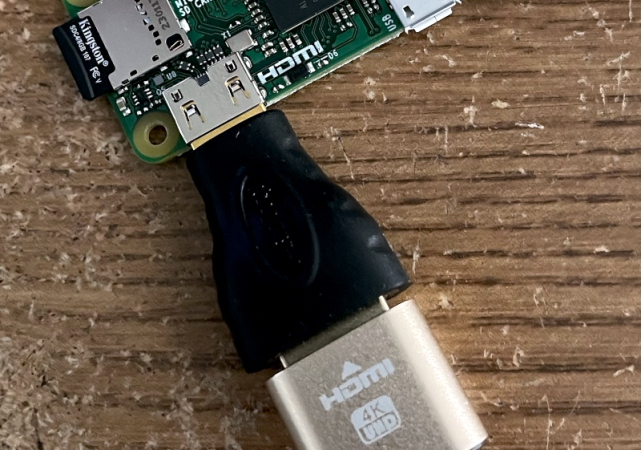
[Doug Brown] had a problem. He uses a dummy HDMI plug to fool a computer into thinking it has a monitor for when you want to run the computer headless. The dummy plug is a cheap device that fools the computer into thinking it has a monitor and, as such, has to send the Extended Display ID (EDID) to the computer. However, that means the plug pretends to be some kind of monitor. But what if you want it to pretend to be a different monitor?

The EDID is sent via I2C and, as you might expect, you can use the bus to reprogram the EEPROM on the dummy plug. [Doug] points out that you can easily get into trouble if you do this with, for example, a real monitor or if you pick the wrong I2C bus. So be careful.

Continue reading “Dummy Plug Gets Smarter With Raspberry Pi”

What Use Is An Original Raspberry Pi?

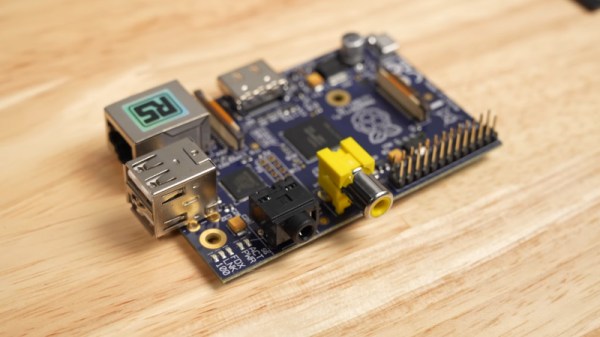
Almost uniquely among consumer grade computer manufacturers, the Raspberry Pi folks still support their earliest boards. We’re guessing that’s in part due to the much more recent Pi Zero using the same 32-bit system-on-chip, but it’s still impressive that a 13-year-old single board computer still has manufacturer OS support. With so many of these early boards out there, is there much you can do with them in 2025? [Jeff Geerling] gives it a try.

His test Pi is unusual in itself, the 2013 blue special edition that RS gave away in a social media promotion. Sadly we didn’t win one back in the day and neither did he, so he picked it up in an online auction. We’re treated to some very slow desktop exploration, but it’s clear that this is not where the strengths of a Pi 1 lie. It was reckoned at the time to be roughly equivalent to a Pentium II or Pentium III in PC terms, so that shouldn’t be a surprise. Instead he concludes that it’s better as a headless machine, though he notes how projects are starting to abandon 32 bit builds. The full video is below the break.

We asked the same question not so long ago, and the Hackaday Pi 1 now quietly analyses news content on its two-watt power budget. It’s still a useful little Linux box for your script-based projects even if it will never win any speed prizes.

Continue reading “What Use Is An Original Raspberry Pi?”

An LLM For The Raspberry Pi

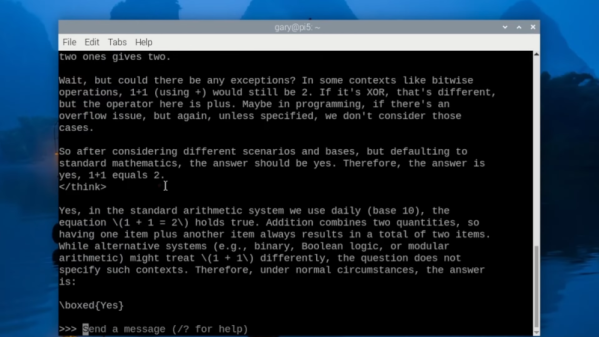
Microsoft’s latest Phi4 LLM has 14 billion parameters that require about 11 GB of storage. Can you run it on a Raspberry Pi? Get serious. However, the Phi4-mini-reasoning model is a cut-down version with “only” 3.8 billion parameters that requires 3.2 GB. That’s more realistic and, in a recent video, [Gary Explains] tells you how to add this LLM to your Raspberry Pi arsenal.

The version [Gary] uses has four-bit quantization and, as you might expect, the performance isn’t going to be stellar. If you are versed in all the LLM lingo, the quantization is the way weights are stored, and, in general, the more parameters a model uses, the more things it can figure out.

Continue reading “An LLM For The Raspberry Pi”

Jenny’s (Not Quite) Daily Drivers: Raspberry Pi 1

An occasional series of mine on these pages has been Daily Drivers, in which I try out operating systems from the point of view of using them for my everyday Hackaday work. It has mostly featured esoteric or lesser-used systems, some of which have been unexpected gems and others have been not quite ready for the big time.

Today I’m testing another system, but it’s not quite the same as the previous ones. Instead I’m looking at a piece of hardware, and I’m looking at it for use in my computing projects rather than as my desktop OS. You’ll all be familiar with it: the original Raspberry Pi appeared at the end of February 2012, though it would be May of that year before all but a lucky few received one. Since then it has become a global phenomenon and spawned a host of ever-faster successors, but what of that original board from 2012 here in 2025? If you have a working piece of hardware it makes sense to use it, so how does the original stack up? I have a project that needs a Linux machine, so I’m dusting off a Model B and going down memory lane.

Continue reading “Jenny’s (Not Quite) Daily Drivers: Raspberry Pi 1”