Make A Mean-Sounding Synth From Average Components

A while back, [lonesoulsurfer] stumbled upon a mind-blowing little DIY synth on YouTube and had to make one of his own. We don’t blame him one bit for that, ’cause we’ve been down that cavernous rabbit hole ourselves. You might want to build one too, after you hear the deliciously fat and guttural sounds waiting inside those chips and passives. Don’t say we didn’t warn you.

The main synth is built on five LM358 op-amps that route PWM through a pair of light-dependent resistors installed near the top. There are two more oscillators courtesy of a 40106 hex inverting Schmitt trigger, which leaves four more oscillators to play with should you take the plunge and build your own.

He didn’t just copy the guy’s schematic and call it good. He added [a 555-based arpeggiator that’s controlled with two homebrew optocouplers. These sound fancy and expensive, but can be bred easily at home by sealing an LED and an LDR inside a piece of black heat shrink tubing and applying a bit of PWM. With the flick of a toggle, he can bypass the momentary buttons and use the yellow knob at the top to sweep through the pitch range with a single input.

Although he doesn’t hold your hand through the build, [lonesoulsurfer] has plenty of nice, clear pictures of the process that nearly give a step-by-step guide. That plus the video demo and walk-through should get you well on your way to DIY synthville.

If this all seems very cool, but you’d really like to understand what’s happening as you descend into the rabbit hole, our own [Elliot Williams]’s Logic Noise series is an excellent start.

Continue reading “Make A Mean-Sounding Synth From Average Components”

A Slightly Bent ESP8266 Sensor Platform

The ability to get professionally manufactured PCBs, at least small ones, for dirt cheap has had a huge impact on the sort of projects we see around these parts. It’s getting to the point where experimenting with PCB enclosures is not only a way to make your next project stand out, but an economical choice.

Which is how this ESP8266 sensor gadget from [Josef Adamčík] got its unique “folded over” look. The top panel is where the microcontroller and headers for various sensors live, the bottom panel is home to the TP4056 USB charging module, and the center panel provides mechanical support as well as holds the single 18650 cell. Rather than close the whole thing up with a fourth panel, he decided to leave it open so the battery can easily be removed. Plus, of course, it looks cooler this way.

Could [Josef] have fit all his electronics on a single 100 x 100 PCB and then put the whole thing into a 3D printed enclosure? Well, sure. But that’s been done to death at this point, and besides, he was looking for an excuse to get more comfortable doing PCB design. We think it also makes for a considerably more visual appealing final product than simply taking the “normal” way out.

Currently [Josef] has an SHT21 humidity/temperature sensor and a BH1750 light sensor slotted into the headers on the top side of the device, but they could just as easily be swapped out with something else if you wanted to do something a bit more exciting. We notice that homebrew air quality monitors are becoming increasingly popular.

Building bespoke enclosures from PCBs is a fantastic trick that frankly we’d love to see more of. It’s somewhat of an artform in itself, but if you’re willing to put the effort in to do it right the results can be truly phenomenal.

Better Controls For Your Chromecast Through CEC

Modern home cinema equipment is well-equipped with features for interoperability and convenience, but in practice, competing standards and arcana can make it fall over. Sometimes, you’ve gotta do a little work on your own to glue it all together, and that’s what led [Victor] to develop a little utility of his own.

ChromecastControls is a tool that makes controlling your home cinema easier by improving Chromecast’s integration with the CEC features of HDMI. CEC, or Consumer Electronics Control, is a bidirectional serial bus that is integrated as a part of the HDMI standard. It’s designed to help TVs, audio systems, and other AV hardware to communicate, and allow the user to control an entire home cinema setup with a single remote. Common use cases are TVs that send shutdown commands to attached soundbars when switched off, or Blu-Ray players that switch the TV on to the correct output when the play button is pressed.

[Victor]’s tool allows Chromecast to pass volume commands to surround sound processors, something that normally requires the user to manually adjust their settings with a separate remote. It also sends shutdown commands to the attached TV when Chromecast goes into its idle state, saving energy. It relies on the PyChromecast library to intercept traffic on the network, and thus send the appropriate commands to other hardware. Simply running the code on a Raspberry Pi that’s hooked up to any HDMI port on a relevant device should enable the CEC commands to get through.

It’s a project that you might find handy, particularly if you’re sick of leaving your television on 24 hours a day because Chromecast never bothered to implement a simple CEC command on an idle timeout. CEC hacks have a long history, too – we’ve been covering them as far back as 2010!

A Vintage Phone In 2020

When we make a telephone call in 2020 it is most likely to be made using a smartphone over a cellular or IP-based connection rather than a traditional instrument on a pair of copper wires to an exchange. As we move inexorably towards a wireless world in which the telephone line serves only as a vehicle for broadband Internet, it’s easy to forget the last hundred years or more of telephone technology that led up to the present.

The iconic British telephone of the 1960s and 1970s, the GPO model 746. Mine is from 1971.
The iconic British telephone of the 1960s and 1970s, the GPO model 746. Mine is from 1971. (That isn’t my phone number)

In a manner of speaking though, your telephone wall socket hasn’t forgotten. If you like old phones, you can still have one, and picture yourself in a 1950s movie as you twirl the handset cord round your finger while you speak. Continue reading “A Vintage Phone In 2020”

A Replica From WarGames, But Not The One You Think

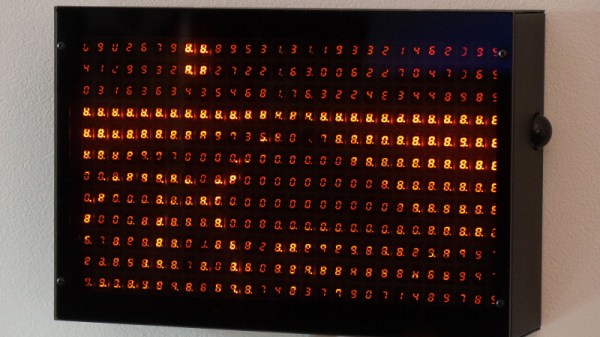
Remember the WOPR from WarGames? The fictional supercomputer that went toe-to-toe with Matthew Broderick and his acoustic coupler was like a love letter to the blinkenlight mainframes of yesteryear, and every hacker of a certain age has secretly yearned for their own scaled down model of it. Well…that’s not what this project is.

The [Unexpected Maker] is as much a WarGames fan as any of us, but he was more interested in recreating the red alphanumeric displays that ticked along as the WOPR was trying to brute force missile launch codes. These displays, complete with their thoroughly 1980s “computer” sound effects, were used to ratchet up the tension by showing how close the supercomputer was to kicking off World War III.

The display as it appeared in the film.

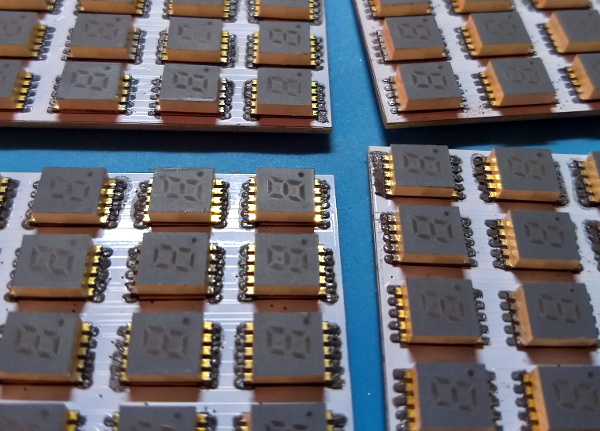
Of course, most us don’t have a missile silo to install his recreated display in. So when it’s not running through one of the randomized launch code decoding sequences, the display doubles as an NTP synchronized clock. With the retro fourteen segment LEDs glowing behind the smoked acrylic front panel, we think the clock itself is pretty slick even without the movie references.

Beyond the aforementioned LEDs, [Unexpected Maker] is using a ESP32 development board of his own design called the TinyPICO. An associated audio “Shield” with an integrated buzzer provides the appropriate bleeps and bloops as the display goes through the motions. Everything is held inside of an understated 3D printed enclosure that would look great on the wall or a desk.

Once you’ve got your launch code busting LED clock going in the corner, and your illuimated DEFCON display mounted on the wall, you’ll be well on the way to completing the WarGames playset we’ve been dreaming of since 1983. The only way to lose is to not play the game! (Or something like that…)

Continue reading “A Replica From WarGames, But Not The One You Think”

Raspberry Pi 4 And The State Of Video Game Emulation

The modern ideal of pixel art is a fallacy. Videogame art crammed onto cartridges and floppy discs were beholden to the CRT display technology of their day. Transmitting analog video within the confines of dingy yellow-RCA-connector-blur, the images were really just a suggestion of on-screen shapes rather than clearly defined graphics. Even when using the superior RGB-video-over-SCART cables, most consumer grade CRT televisions never generated more than about 400 lines, so the exacting nature of digitized plots became a fuzzy raster when traced by an electron beam. It wasn’t until the late 90s when the confluence of high resolution PC monitors, file sharing, and open source emulation software that the masses saw pixels for the sharp square blocks of color that they are.

More importantly, emulation software is not restricted to any one type of display technology any more than the strata of device it runs on. The open-source nature of videogame emulators always seems to congregate around the Lowest Common Denominator of devices, giving the widest swath of gamers the chance to play. Now, that “L.C.D.” may very well be the Raspberry Pi 4. The single board computer’s mix of tinker-friendly IO at an astonishingly affordable entry price has made it a natural home for emulators, but at fifty bucks what options unlock within the emulation scene?

Continue reading “Raspberry Pi 4 And The State Of Video Game Emulation”

CircuitPython Now Working On Teensy 4.0

Python is often touted as a great language for beginner coders to learn. Until recently, however, it simply wasn’t a viable choice in the embedded space. That’s begun to change with projects like CircuitPython, and now it’s available on the Teensy 4.0!

This milestone is thanks in part to [arturo182], who did the ground work of getting CircuitPython to run on the iMX RT series of microcontrollers. This was built upon by [tannewt], who is the lead in charge of the CircuitPython project.

There are some bugs to work out; currently, the project is in a very early stage of development. [Paul Stoffregen], who heads Teensy development, has already pointed out that there needs to be allowance for the 4096 byte recovery partition in the Teensy 4.0’s storage, for example. Development continues at a rapid pace, and those with ideas about where the project should go can weigh in online.

It’s an exciting development, which brings easy Python development to one of the more powerful embedded development platforms on the market. We look forward to seeing many more projects take advantage of the power of the Teensy 4.0 moving forward. If you’re eager to see what can be done with CircuitPython, be sure to check out projects we’ve featured before. Video after the break.

Continue reading “CircuitPython Now Working On Teensy 4.0”