Amiibo Emulator Becomes Pocket 2.4 GHz Spectrum Analyzer

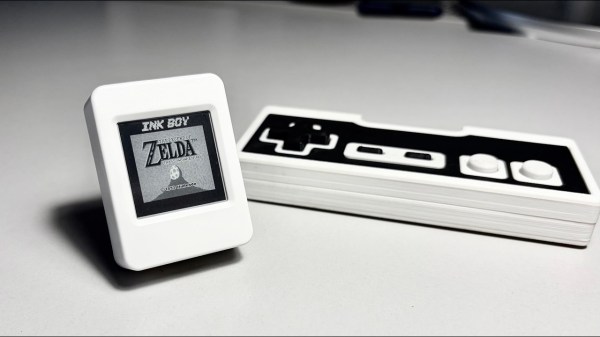
As technology marches on, gear that once required expensive lab equipment is now showing up in devices you can buy for less than a nice dinner. A case in point: those tiny displays originally sold as Nintendo amiibo emulators. Thanks to [ATC1441], one of these pocket-sized gadgets has been transformed into 2.4 GHz spectrum analyzer.

These emulators are built around the Nordic nRF52832 SoC, the same chip found in tons of low-power Bluetooth devices, and most versions come with either a small LCD or OLED screen plus a coin cell or rechargeable LiPo. Because they all share the same core silicon, [ATC1441]’s hack works across a wide range of models. Don’t expect lab-grade performance; the analyzer only covers the range the Bluetooth chip inside supports. But that’s exactly where Wi-Fi, Bluetooth, Zigbee, and a dozen other protocols fight for bandwidth, so it’s perfect for spotting crowded channels and picking the least congested one.

Flashing the custom firmware is dead simple: put the device into DFU mode, drag over the .zip file, and you’re done. All the files, instructions, and source are up on [ATC1441]’s PixlAnlyzer GitHub repo. Check out some of the other amiibo hacks we’ve featured as well.

Continue reading “Amiibo Emulator Becomes Pocket 2.4 GHz Spectrum Analyzer”

Extremely Rare Electric Piano Restoration

Not only are pianos beautiful musical instruments that have stood the test of many centuries of time, they’re also incredible machines. Unfortunately, all machines wear out over time, which means it’s often not feasible to restore every old piano we might come across. But a few are worth the trouble, and [Emma] had just such a unique machine roll into her shop recently.

What makes this instrument so unique is that it’s among the first electric pianos to be created, and one of only three known of this particular model that survive to the present day. This is a Vivi-Tone Clavier piano which dates to the early 1930s. In an earlier video she discusses more details of its inner workings, but essentially it uses electromagnetic pickups like a guitar to detect vibrations in plucked metal reeds.

To begin the restoration, [Emma] removes the action and then lifts out all of the keys from the key bed. This instrument is almost a century old so it was quite dirty and needed to be cleaned. The key pins are lubricated, then the keys are adjusted so that they all return after being pressed. From there the keys are all adjusted so that they are square and even with each other. With the keys mostly in order, her attention turns to the action where all of the plucking mechanisms can be filed, and other adjustments made. The last step was perhaps the most tedious, which is “tuning” the piano by adjusting the pluckers so that all of the keys produce a similar amount or volume of sound, and then adding some solder to the reeds that were slightly out of tune.

With all of those steps completed, the piano is back in working order, although [Emma] notes that since these machines were so rare and produced so long ago there’s no real way to know if the restoration sounds like what it would have when it was new. This is actually a similar problem we’ve seen before on this build that hoped to model the sound of another electric instrument from this era called the Luminaphone.

Continue reading “Extremely Rare Electric Piano Restoration”

Jenny’s Daily Drivers: Haiku R1/beta5

Back in the mid 1990s, the release of Microsoft’s Windows 95 operating system cemented the Redmond software company’s dominance over most of the desktop operating system space. Apple were still in their period in the doldrums waiting for Steve Jobs to return with his NeXT, while other would-be challengers such as IBM’s OS/2 or Commodore’s Amiga were sinking into obscurity.

Into this unpromising marketplace came Be inc, with their BeBox computer and its very nice BeOS operating system. To try it out as we did at a trade show some time in the late ’90s was to step into a very polished multitasking multimedia OS, but sadly one which failed to gather sufficient traction to survive. The story ended in the early 2000s as Be were swallowed by Palm, and a dedicated band of BeOS enthusiasts set about implementing a free successor OS. This has become Haiku, and while it’s not BeOS it retains API compatibility with and certainly feels a lot like its inspiration. It’s been on my list for a Daily Drivers article for a while now, so it’s time to download the ISO and give it a go. I’m using the AMD64 version.

Continue reading “Jenny’s Daily Drivers: Haiku R1/beta5”

TinyCore Board Teaches Core Microcontroller Concepts

Looking for an educational microcontroller board to get you or a loved one into electronics? Consider the tinyCore – a small and nifty octagon-shaped ESP32 board by [MR. INDUSTRIES], simplified for learning yet featureful enough to offer plenty of growth, and fully open.

The tinyCore board’s octagonal shape makes it more flexible for building wearables than the vaguely rectangular boards we’re used to, and it’s got a good few onboard gadgets. Apart from already expected WiFi, BLE, and GPIOs, you get battery management, a 6DoF IMU (LSM6DSOX) in the center of the board, a micro SD card slot for all your data needs, and two QWIIC connectors. As such, you could easily turn it into, say, a smartwatch, a motion-sensitive tracker, or a controller for a small robot – there’s even a few sample projects for you to try.

You can buy one, or assemble a few yourself thanks to the open-source-ness – and, to us, the biggest factor is the [MR.INDUSTRIES] community, with documentation, examples, and people learning with this board and sharing what they make. Want a device with a big display that similarly wields a library of examples and a community? Perhaps check out the Cheap Yellow Display hacks!

Continue reading “TinyCore Board Teaches Core Microcontroller Concepts”

Creating User-Friendly Installers Across Operating Systems

After you have written the code for some awesome application, you of course want other people to be able to use it. Although simply directing them to the source code on GitHub or similar is an option, not every project lends itself to the traditional configure && make && make install, with often dependencies being the sticking point.

Asking the user to install dependencies and set up any filesystem links is an option, but having an installer of some type tackle all this is of course significantly easier. Typically this would contain the precompiled binaries, along with any other required files which the installer can then copy to their final location before tackling any remaining tasks, like updating configuration files, tweaking a registry, setting up filesystem links and so on.

As simple as this sounds, it comes with a lot of gotchas, with Linux distributions in particular being a tough nut. Whereas on MacOS, Windows, Haiku and many other OSes you can provide a single installer file for the respective platform, for Linux things get interesting.

Continue reading “Creating User-Friendly Installers Across Operating Systems”

Iteration3D Is Parametric Python In The Cloud

It’s happened to all of us: you find the perfect model for your needs — a bracket, a box, a cable clip, but it only comes in STL, and doesn’t quite fit. That problem will never happen if you’re using Iteration3D to get your models, because every single thing on the site is fully-parametric, thanks to an open-source toolchain leveraging 123Dbuilds and Blender.

Blender gives you preview renderings, including colors where the models are set up for multi-material printing. Build123D is the CAD behind the curtain — if you haven’t heard of it, think OpenSCAD but in Python, but with chamfers and fillets. It actually leverages the same OpenCascade that’s behind everyone’s other favorite open-source CAD suite, FreeCAD. Anything you can do in FreeCAD, you can do in Build123D, but with code. Except you don’t need to learn the code if the model is on Iteration3D; you just set the parameters and push a button to get an STL of your exact specifications.

The downside is that, as of now, you are limited to the hard-coded templates provided by Iteration3D. You can modify their parameters to get the configuration and dimensions you need, but not the pythonic Build123D script that generates them. Nor can you currently upload your own models to be shared and parametrically altered, like Thingiverse had with their OpenSCAD-based customizer. That said, we were told that user-uploads are in the pipeline, which is great news and may well turn Iteration3D into our new favorite.

Right now, if you’re looking for a box or a pipe hanger or a bracket, plugging your numbers into Iteration3D’s model generator is going to be a lot faster than rolling your own, weather that rolling be done in OpenSCAD, FreeCAD, or one of those bits of software people insist on paying for. There’s a good variety of templates — 18 so far — so it’s worth checking out. Iteration3D is still new, having started in early 2025, so we will watch their career with great interest.

Going back to the problem in the introduction, if Iteration3D doesn’t have what you need and you still have an STL you need to change the dimensions of, we can help you with that. 

Thanks to [Sylvain] for the tip!

Building Rust Apps For Cheap Hackable Handheld Console

The age of cheap and powerful devices is upon us. How about a 20 EUR handheld game console intended for retro game emulation, that runs Linux under the hood? [Luiz Ferreira] kicks the tires of a R36S, a very popular and often cloned device running a quad-core RK3326 with an Ubuntu-based OS, and shows us how to write and cross-compile a simple app for it using Rust – even if you daily drive Windows.

Since a fair bit of the underlying Linux OS is exposed, you can quickly build even text applications and have them run on the console. For instance, [Luiz]’s app uses ratatui to scan then print button and joystick states to the screen. Perhaps the most important thing about this app is that it’s a detailed tutorial on cross-compiling Rust apps for a Linux target, and it runs wonders using WSL, too.

Installing your app is simple, too: SSH into it, username ark and password ark. Looking for a Linux-powered device with a bright screen, WiFi, a fair few rugged buttons, and an OS open for exploration? This one is quite reassuring in the age of usual portables like smartphones getting more and more closed-off to tinkering. And, if the store-bought hackable Linux consoles still aren’t enough, you can always step it up and build your own, reusing Joycons for your input needs while at it.