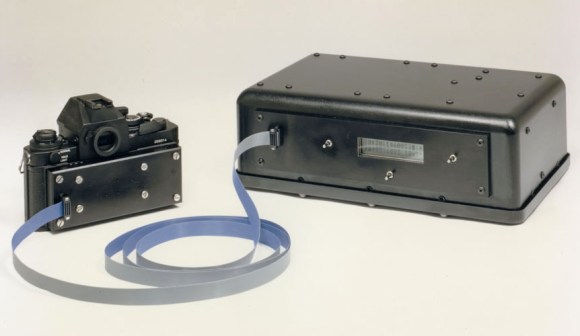
TIQ probe and test box

TIQ Probe Is More Logical Than Most

[youtube=https://www.youtube.com/watch?v=XZz1W-LurlU&w=580]


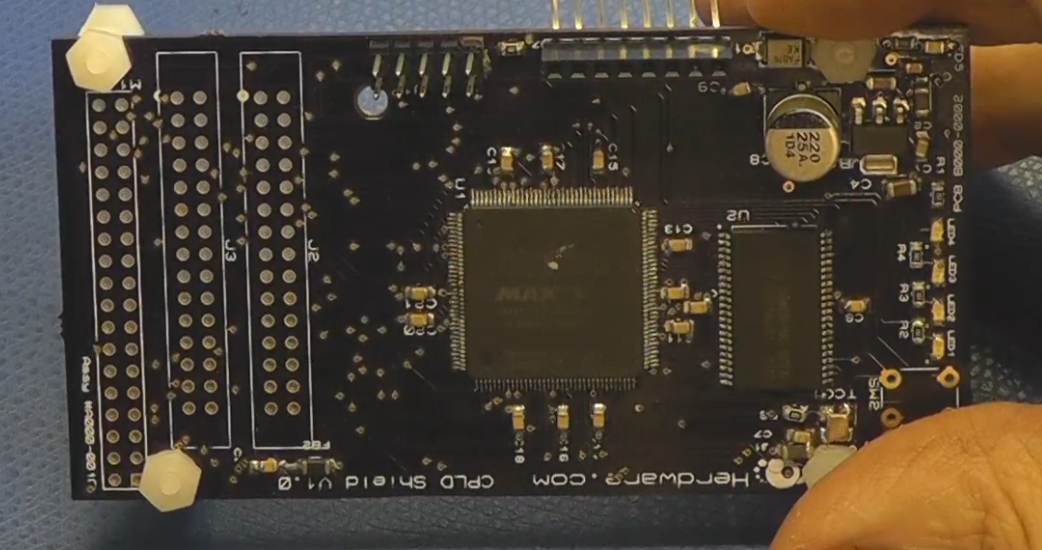
We had [Mark] on our “dance card” for people to find at Maker Faire. But before we could track him down he bumped into us holding the TIQ Probe in one hand and a testing box in the other. TIQ is conceived in the form factor of a traditional logic probe but thanks to the Cypress PSoC 5LP inside it’s much, much smarter than the decades-old bench tools. Sure, it can tell you if that uC pin is a 1 or a 0, but it can also detect what type of signal it’s probing and has built-in protection for over-voltage.

The point of the tool is to bridge the gap between things which would be measured with a DMM and those measured with a proper Oscilloscope. We think he did a pretty good job of including the things that someone just starting out without expensive bench equipment might want. For instance, you can set it to trigger on common data protocols like i2c, and use the probe itself as a rudimentary pulse generator.

The bulk of the details on the probe can be found on its Kickstarter page (which has just a few days left). You may also be interested in his company page. We’re curious about the insides of the test rig he was hauling around. [Mark] is a regular reader so hopefully he’ll leave a comment below with the details of that black box.

Meet Jimmy: An Open Source Biped Robot From Intel

Jimmy_Arm_Up

Intel’s CEO [Brian Krzanich] stopped by the Re/Code conference to announce Jimmy, the first robot from the 21st Century Robot project. The project is the brainchild of [Brian David Johnson], Intel’s resident futurist. We love the project’s manifesto:

 Robot Is: Imagined first. Easy to build. Completely open source. Fiercely social. Intentionally iterative. Filled with humanity and dreams. Thinking for her/him/itself.

Jimmy may not be all those things yet, but he definitely is exciting. For starters, he wasn’t built in some secret lab at Intel HQ. Much of Jimmy’s construction took place at Trossen Robotics, a name well known to Hackaday. [Matt] and [Andrew] at Trossen describe all the details in their video down past the break.

This version of Jimmy is a research robot, which mean’s he’s not going to come cheap. Jimmy sports an Intel i5 NUC motherboard, 20 Dynamixel servos, a 5052 aluminum frame and a host of sensors. A  4S 14.8v 4000mAh LiPo battery will power Jimmy for 30 to 60 minutes between charges, so be sure to budget for a few spare packs. The most striking aspect of Jimmy is his 3D printed shell. The 21st Century Robot Project gave him large, friendly eyes and features, which will definitely help with the social aspect of their goals.

Jimmy is all about open source. He can run two flavors of Linux: Ubuntu 14.04 LTS or a custom version of Yocto Pokey. There is a lot to be said for running and developing on the same hardware. No specialized toolchains for cross compiling, no NFS shares to move binaries around. If you need to make a change, you can plug a monitor (or launch an VNC session) and do everything with Jimmy’s on-board computer. Jimmy’s software stack is based upon the DARwIn OP platform, and a ROS port is in the works.

We’re excited about Jimmy, but at $16,000 USD, he’s a bit outside our budget. Thankfully a smaller consumer version of Jimmy will soon be available for around 1/10th the cost.

Continue reading “Meet Jimmy: An Open Source Biped Robot From Intel”

Hackable Arduino Cellphone

Phoenard: Arduino Phone As Small As An Arduino Mega

[youtube=https://www.youtube.com/watch?v=_hXgwTRqwRU&w=580]


Hanging out at one side of the Atmel booth at Maker Faire was [Pamungkas Sumasta] who was showing off his Arduino cellphone called Phoenard. We really like the form-factor but its hackability is where it really shines. [Sumasta] showed off the menu system which is quite snappy and makes it simple for you to add your own applications. Software isn’t the only thing you can customize, as there’s a connector at the bottom of the phone. He showed off a breadboard attachment which was hosting LEDs of various colors. Their intensity can be altered using a simple slider app on the touchscreen. But there’s more power if want it. Also on exhibit was a self-balancing robot body which has a connector at the top for the phone.

[Sumasta] won the Atmel Hero contest and we assume that’s how he made it all the way to San Francisco from The Netherlands for Maker Faire. You can learn a few more technical details about Phoenard on the Facebook page.

Super Simple Gimbal For Multi-Rotor Aircraft Laughs In The Face Of Complexity

Super Simple Multi Rotor Gimbal

After the first flight of your newly built multi-copter, you will immediately want to add a camera. This sequence of events follows the laws of physics and is as predictable as gravity. Just strapping a camera on by way of a fixed bracket may technically solve that problem, but it creates another. A multi-copter tilts and rolls as a result of changing flight direction. If the multi-copter tilts and rolls, so does your camera. This is where a gimbal comes in handy, it adjusts the camera in an equal and opposite direction than that of the aircraft. If the aircraft tilts forward, the gimbal tilts the camera backward the same amount. The result is a steady camera for capturing some sweet videography.

Super Simple Multi Rotor GimbalTeam SSG over at rcgroups.com has come up with what they are calling the Super Simple Gimbal. Their vision was a gimbal that would be inexpensive, easy to build and add minimal weight to the aircraft. On a normal gimbal, there are two motors or servos, each one specifically controls a single axis of movement. On the SSG, there are 2 servos but they do not move independently from one another. The camera is mounted to a plate that is supported on one end by a piece of silicone tube which becomes a fulcrum for the system. The other side of this plate is supported by 2 linkages (also made of silicone tube) that are themselves connected to the servos. If both servos move up, the camera is tilted down. If the right servo moves up and the left down, the camera is tilted to the left.

Continue reading “Super Simple Gimbal For Multi-Rotor Aircraft Laughs In The Face Of Complexity”

Man Builds Concrete 3D Printer In His Garage

[Andrey Rudenko] is building a house in his garage. Not with nails and lumber, but with concrete extruded by his 3D printer. We’ve seen concrete 3D printers in the past, but unlike those projects, [Andrey] isn’t part of a of a university or corporation. He’s just a contractor with a dream. His printer is directly derived from the RepRap project. It’s even commanded by Pronterface.

[Andrey] started with an Arduino Mega 2560 based RepRap RAMPS style controller. His big printer needed big NEMA34 stepper motors, far beyond the current capacity of the stock RAMPS stepper drivers. [Andrey] got in touch with [James] at MassMind who helped him with an open source THB6064AH based driver. [James] even came up with an adaptor cable and PCB which makes the new drivers a drop-in replacement.

Now that his printer was moving, [Andrey] needed a material to print. Concrete chemistry is a science all its own. There are many specialty blends of concrete with specific strength and drying times. Trucking in custom mixtures can get expensive. [Andrey] has come up with his own mixture based on bags of regular concrete mix, sand, and some additives. [Andrey’s] special sauce doesn’t cure especially quickly, but it is viscous enough to print with.

Every piece of [Andrey’s] printer had to be designed and refined, including the nozzle. The concrete printer works somewhat like a frostruder, extruding concrete in 20mm wide by 5mm tall layers. He’s even managed to print overhanging layers and arches exactly like a giant RepRap Mendel.

The printer’s great unveiling will be this summer. [Andrey] plans to print a playhouse sized castle over the course of a week. He’s looking to collaborate with architects, builders, and other like-minded folks. We’d suggest uploading the project to  Hackaday.io!

Continue reading “Man Builds Concrete 3D Printer In His Garage”

Physical Keys Not Just For Doors Anymore, Now Available For Windows

Physical Key Locks and Unlocks Windows Computer

If you have ever forgotten your computer password after a long weekend or maybe you can remember it but just can’t seem to type it correctly, [Thomas] has a project for you. It’s a physical key that locks and unlocks your PC.

So how does it work? The heart of the project is an Arduino Leonardo. You may recall that this board is a bit different from the preceding Arduinos as it can enumerate on a host computer as a Human Interface Device (HID), such as a keyboard or mouse. The Arduino sketch continually reads an input pin using an internal pull-up resistor to make it logic high with the key switch connecting the signal to ground. When the Arduino sees the pin change from high to low, it sends out a keyboard command consisting of the Windows Key and “L”, which is the keyboard shortcut for locking the computer.

When the physical key is turned again, the Arduino sees the pin change back to a high state and it again emulates a keyboard but this time enters your password. You do have to include your password in the Arduino sketch for this to work. In addition, there are two LED’s wired up to show if the computer is locked or not, but you’ll be able to tell pretty quick when trying to get back to work.

Continue reading “Physical Keys Not Just For Doors Anymore, Now Available For Windows”

E-reader Becomes Sailplane And Paraglider Computer

sail [Tweepy] flies unpowered aircraft, and he’d like to use the XCSoar flight computer app for gliders, sailplanes, and paragliders, but couldn’t find any hardware. XCSoar is an amazing app that can keep track of terrain, route, thermals, and a whole bunch of other variables that make flying more enjoyable, but running it on a device useful for a hang glider pilot is a challenge.

He eventually found a nearly perfect device in the Kobo mini e-reader. It’s e-ink, so it’s sunlight readable, uses a glove-compatible resistive touchscreen, runs Android, and is dirt cheap. The only thing lacking was a GPS receiver. What was [Tweepy] to do? Mod an e-reader, of course.

The electronic portion of the mod was simple enough; serial GPS units can be found just about everywhere, and the Kobo has a serial headers on the board. The case, however, required a bit of thingiverseing, and the completed case mod looks fairly professional.

With a few software updates, new maps, and of course the phenomenal XCSoar app, [Tweepy] had an awesome flight computer for under 100 Euro. The only thing missing is an integrated variometer, but a Game Boy will work in a pinch.