Manual Bitcoin Transactions

bitcoin

For something that’s used for such banal transactions like buying drugs and sending the Jamaican bobsled team to the Olympics, cryptocurrencies such as Bitcoin are actually very impressive pieces of software. It’s a very ingenious solution to the Two Generals Problem, and the fact it made a few Bitcoin early adopters very, very rich doesn’t hurt either. [Ken Shirriff] decided to take a look at the Bitcoin protocol by creating a Bitcoin address and transferring a small amount of bitcoin to that address, manually. It’s a great look at how the Bitcoin protocol actually works, and how ingenious this protocol actually is.

[Ken]’s first task was to create a Bitcoin address. This is a 256-bit private key is the basis for the Bitcoin wallet private key (after being encoded as ASCII characters), and as the 512-bit public key (after being sent through an elliptic curve algorithm). The 512-bit public key is then hashed with SHA-256 and RIPEM 160 to generate the 160-bit public key hash and the Bitcoin address.

After creating a bitcoin address and wallet, [Ken] set out on manually creating a transaction. The idea was to buy a few cents (USD) from Coinbase and send them to his manually created address. This involved creating a transaction according to the Bitcoin spec and signing the transaction. Signing each Bitcoin transaction is the key to Bitcoin’s security, and is done with a small bit of code written in the Bitcoin scripting language.

With everything written in Python, [Ken] was ready to send his transaction off into the Bitcoin network. This was done by finding a few peers on the Bitcoin network and sending off a few packets. After a little bit of mining on the network, [Ken]’s transaction went through, confirmed by a deposit into his Bitcoin wallet.

It’s an awesome writeup and impressive achievement to manually send a few Bitcoins from one wallet to another. More impressively, [Ken] provided some amazing insight into how the Bitcoin protocol works, and how much work went into its creation.

Weaponized Quadrotor Upgrades

Today we’re looking at a few fun hacks, although they are perhaps a bit ill-advised. What’s the craziest thing you could strap to a quadrotor? Rockets? Lasers? Turns out… they’ve both been done already.

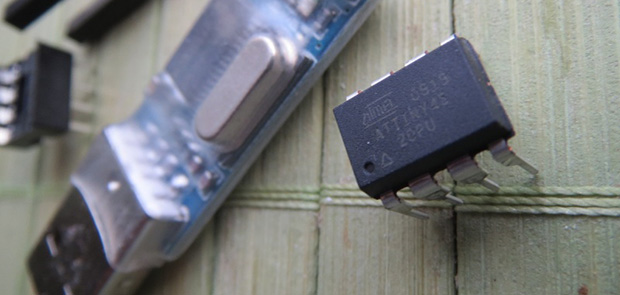
First up is [Ramicaza’s] firework launching quadrotor. The drone is stabilized using the ArduPilot Mega 2.6, and it carries a pair of “rockets” which are ignited by a pair of steel elements. An ATtiny analyzes the auxiliary radio channel’s PWM signal which controls the relays that power the elements. He’s tested it high up in the sky, so he’s actually being pretty safe about it.

Next is [JLaservideo’s] laser quadrotor. He’s taken a RC controller of a cheap toy to add wireless capabilities to his Arduino Uno. He’s re-routed the original RC toy’s motor wires to an input on the Arduino which in turn activates a 5V relay that powers the 1W laser. It looks awesome thanks to the bright beam — we just really hope he’s wearing proper eye protection, as a laser of that power can do some serious damage to your retinas!

Stick around after the break to see both quadrotors in action!

Continue reading “Weaponized Quadrotor Upgrades”

Musician On A Budget MIDI Bass Pedals

bass_pedal1

Organ pedal boards have been around forever — they’re an easy way to multitask while playing the piano, organ, or even the guitar. [Ville] plays the electric guitar and wanted to give bass pedals a shot — the only problem is, the commercial versions are pretty pricey. So he decided to make his own temporary solution using an old MIDI keyboard he had lying around.

The beauty of this hack is it’s completely non-destructive — although you might find you like it so much you won’t want to take it apart! [Ville] started by marking out spacer keys using green cardboard. He then grouped together other sets of keys using tape and polystyrene sheets, which he recycled from a plastic waste bin. He then marked off each set of keys with the range of notes to program into the MIDI receiver — on a 49 key keyboard you get just a bit more than an octave of bass pedal keys! It’ll certainly do until you get your hands on a proper organ pedal unit.

From there it was just a matter of re-mapping the keys on the software end of things, and disabling the other unused keys. He offers a few different methods of doing this, including using VST plugins, and Pure Data — to which he’s provided a patch he made to simplify the process.

To see it in action, stick around after the break and hear [Ville] play One Hour Backwards on electric guitar.

Continue reading “Musician On A Budget MIDI Bass Pedals”

Decascrap: A Three Servo Decapod

IMG_2718

[Drewtoby] loves making robots. His latest project is a 10-legged bot called the Decascrap, which makes use of only 3 servos!

What we like most about this project is the leg mechanism [Drew] has cooked up. The legs are made of guitar picks hinged to what look like popsicle sticks. Each guitar pick has a hole punched in it which allows the servo rod to go through the legs. Strategically placed globs of hot glue on either side of each leg on the servo rod allows for the parallel motion during the actuation of the legs. A third servo tilts the bot back and forth as the legs are moved, allowing the bot to scuttle about.

Stick around after the break to see it tackle some rough terrain — well, actually it’s just a piece of uneven foam, but hey!

Continue reading “Decascrap: A Three Servo Decapod”

Controlling Alphanumeric LCDs With Three Wires

shift

The HD44780 LCD controller is the defacto way of adding a small text display to your next project. If you need a way to display a few variables, a few lines of text, or adding a small user interface to a project, odds are you’ll be using one of these parallel LCDs. These displays require at least six control lines, and if you’re using a small microcontroller or are down to your last pins, you might want to think about controlling an LCD with a shift register.

[Matteo] used the ubiquitous ‘595 shift register configured as a serial to parallel converter to drive his LCD. Driving the LCD this way requires only three pins on the Arduino, [Matteo]’s microcontroller of choice.

For the software, [Matteo] modified the stock Arduino LiquidCrystal library and put it up on his Git. Most of the functions are left untouched, but for this build the LCD can only be used in its four bit mode. That’s not a problem for 99% of the time, but if you need custom characters on your LCD you can always connect another shift register.

If you just can’t spare three pins for a display, you could squeeze this down to just two, or add a second microcontroller for a one-wire-like interface.

IKEA LED Table Mod Doesn’t LACK Awesome

Some people look at IKEA LACK tables as cheap furniture. Our readers look at them as a blank canvas. [Klaas] has turned a LACK Side table into an interactive LED table featuring 144 RGB LEDs. After attending a class on WS2801 pixel strings at his student IEEE chapter, [Klaas] was inspired to design something of his own. He settled on an IKEA LACK table and started sketching. He didn’t actually have a table on hand, so he had to deduce the size from the website images and dimensions. He calculated a usable size of around 45cm, which was pretty close to the mark. After running a few tests, [Klaas] determined that a 12×12 grid of squares 35mm on a side would provide that enough resolution to play simple games. The 35mm x 35mm grid would also be small enough for the LEDS to illuminate. He used a laser cutter to cut the an interlocking grid from 3mm MDF. A base plate with 144 12mm LED holes was also cut out, and the entire assembly was glued together.

For illumination, [Klaas] settled on WS2812B LEDs, as they were cheaper than their WS2801 couterparts. The WS2812B’s also snapped easily into his 12mm holes. At this point [Klaas] actually purchased his IKEA table and proceeded to cut a huge hole in it. The grid glued right in, and some aluminum L-profile cleaned up the top edge. Driving all those LEDs would need a bit of processing power, [Klaas] chose a Teensy 3, and the well-known OctoWS2811 library. He also added a USB host shield, which allowed him to use an Xbox 360 USB game pad as his controller. For software, he created a simple Tetris clone, and ported snake from the Arduino game shield. A menu and some scrolling text ties everything together. The only thing left to add is a glass top. [Klaas] hasn’t settled on clear or diffuse glass yet. We a suggest clear to avoid hiding any details of this great build.

Continue reading “IKEA LED Table Mod Doesn’t LACK Awesome”

Laser-Based PCB Printer

Being able to create PCB’s at home is a milestone in the DIYer’s arsenal. Whether you physically mill or chemically etch boards, it’s a tricky task to perfect. [Charlie & Victor] are working towards a solution to this complicated chore. They call their machine the DiyouPCB. DiyouPCB is an open source PCB etching project consisting of both hardware and software components.

The project is based on using a Blue Ray optical pickup. The pickup was used in its entirety, without any modification, to simplify the build process. In order to use the stock pickup, [Charlie & Victor] had to reverse engineer the communication protocol which also allowed them to take advantage of the auto-focus feature used while reading Blue Ray discs. The frame of the machine is reminiscent of a RepRap, which they used to do preliminary testing and laser tuning. The X and Y axes run on brass bushings and are belt driven by stepper motors which are controlled by an Arduino through a specially designed DiyouPCB Controller Shield.

Continue reading “Laser-Based PCB Printer”