LEDs Invade Coffee Table Crevice

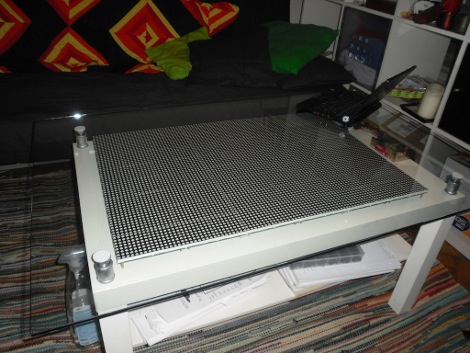
That’s a lot of LEDs, and a little bit of glass cleaner. [Tobias] spiced up his IKEA coffee table by adding 6144 LEDs. This is a larger realization of SparkFun’s LED coffee table which used 64 8×8 modules. [Tobias] sourced three display boards from Sure Electronics for a total of 96 8×8 modules. These boards are addressed through a serial interface; four serial lines for each board but a shared data bus for each of the row select pins and the data/latch/clock pins.  This method uses 19 of the 20 pins on the Arduino that drives the display. After the break you can see a demonstration. If this is more than you need there’s always the 112-LED and 81-LED table projects that can produce a full color range. Continue reading “LEDs Invade Coffee Table Crevice” →

Dr. Boardman’s Color Conundrum

We feel like trumpets should be sounding. Someone took the overused project of connecting RGB LEDs to a microcontroller and produced something useful. [Paul] created Dr. Boardman’s Color Conundrum which works much like a simple mechanical coin-op game you might find at a carnival. When switched on, a random color is displayed by the ping-pong ball covered LED on the left. The player then manipulates three knobs to color-match the two lights.

Inside you’ll find a minimalist set of hardware. An ATmega8 polls the three potentiometers and uses them to mix the appropriate user color. Everything is wired-up using prototyping board and draws power from two AA batteries. He’s using a random seed stored in EEPROM and increments it every time the uC boots up. This keeps the input color different for every game.

Fun and simple, it’s not going to make your guests marvel at the complexity but [Paul’s] come up with a unique game that we think has marketing potential.

Give 1984 Mac A Leopard Makeover

[Jake Howe] brought his 1984 Mac up-to-date by cramming new guts inside of the classic case. The goal from the start was to run OS X Snow Leopard on the machine without altering the externals. He heated and formed acrylic around the original CRT screen to make a bezel for the replacement LCD screen. The floppy drive slot was used to hide an SD card slot and USB port. The original serial port openings were even outfitted with their own USB ports. In the end he did a brilliant job of hiding the Hackintosh mini-ITX board and components inside this iconic enclosure.

Lava Lamp Centrifuge

[youtube=http://www.youtube.com/watch?v=8-i9iI0ZA4M]

Like many projects, this one started with a harmless question. “Will lava lamps work in a high-gravity environment such as Jupiter?”. Well, as it turns out, this harmless question was not so easily answered. The only real solution was to test and prove for sure. To do this, [Neil Fraser] built a centrifuge in his living room. At 10 feet across and roughly 50 kilograms, this is no small toy. The end with the lava lamp is set to pivot, so at a stand still, it is positioned vertically and at full speed it is positioned horizontally. The whole process is recorded on video for proof. So, does a lava lamp work in high gravity? Watch the video or read the article to find out.

[via Makezine]

Don’t Worry Occifer, There Is No Blood In My Alcohol!

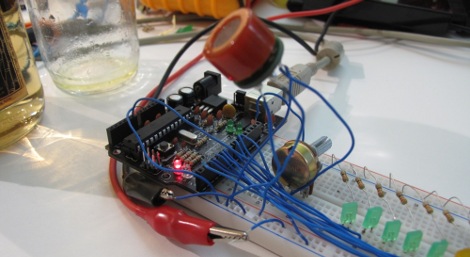
[Daniel] wrote up a quick tutorial on interfacing with the MQ-3, or better known Breathalyzer from SparkFun with Arduino. While we would have used perhaps an op-amp/comparator based system and kept it in a much smaller package, the idea was so quick and simple and enjoyable we hoped an article might keep some hackers from drinking and driving.

[Thanks CletustheYokel for pointing out our silly category mistake.]

137 Years Of Popular Science Online Free

137 years of the magazine Popular Science are now being hosted online by Google. You can peruse at your leisure, though you’ll have to search by keyword. We don’t see a date or issue browsing option. The cover art alone is worth your time, even if you’re not a fan of the articles. Many of us have fond memories of our childhood being influenced by the contents of these pages.

[via BoingBoing]

Time Delay Door Alarm

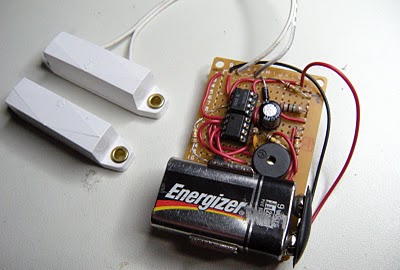
Ever accidentally left your front door ajar and had a pet escape? [BlackCow] came up with a simple solution to this problem. The circuit is fairly rudimentary but a great example of using the basics to get the job done. Now, instead of having an alarm that sounds as soon as the door is open, he has a 30 second delay. This helps avoid the “boy who cried wolf” effect also known as the “vista security warning” effect of being bothered too many times for a non issue.  We also have to say that we like his taste in blog layouts.

[via Hacked Gadgets]