E3D Introduces Tool Changing 3D Printer

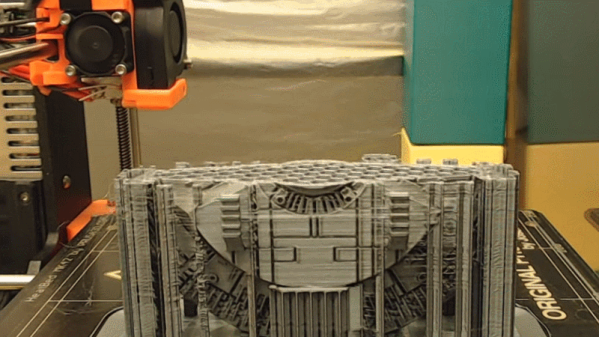
E3D has introduced their latest answer to multimaterial printing at the Midwest RepRap Festival this weekend. Their research project into a 3D printer with the ability to change toolheads is the latest advancement in multimaterial printing. It’s a work of engineering brilliance, and they’ve already written up their teardown on how this all came to be.

While milling machines and other fancy industrial CNC have had tool changing for decades, and the subject has been pursued by the RepRap community for a few years now, it really hasn’t caught on. The question then is, what is tool changing on a 3D printer good for? The answer is multimaterial printing, and doing it in a way that doesn’t have the downsides of current methods of printing with multiple materials.

There are three current methods of printing in multiple materials. The first is putting two nozzles on the same extruder, but this has the downside of one nozzle interfering with the other. The second is pushing two different kinds of plastic through the same nozzle, such as in the E3D Cyclops, or Prusa’s multimaterial upgrade. This has the downside of cross-contamination, and you can’t print in materials that require different temperature profiles. The third method is simply using multiple carriages on the same machine, such as the lovely stuff from Autodesk or Project Escher. This last method is horrifically complex.

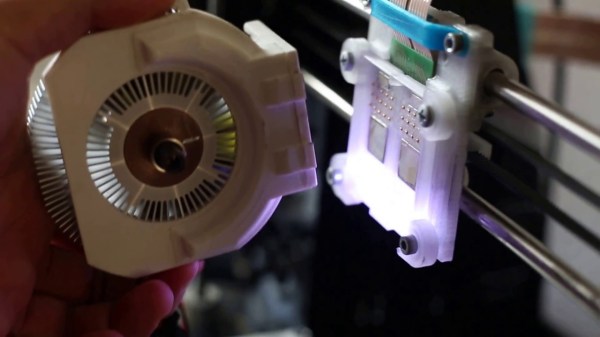
The answer the problem of multimaterial printing is hot-swapping toolheads, but to do this you need precision and repeatability. The folks at E3D have been working on this for years, and I remember seeing some experiments with electro-permanent magnets a few MRRFs ago, but now they finally have a solution. The answer is simply a cam that’s turned by a cheap hobby servo. This is kinematic coupling that allows the carriage to clamp onto a toolhead with 5 μm precision.

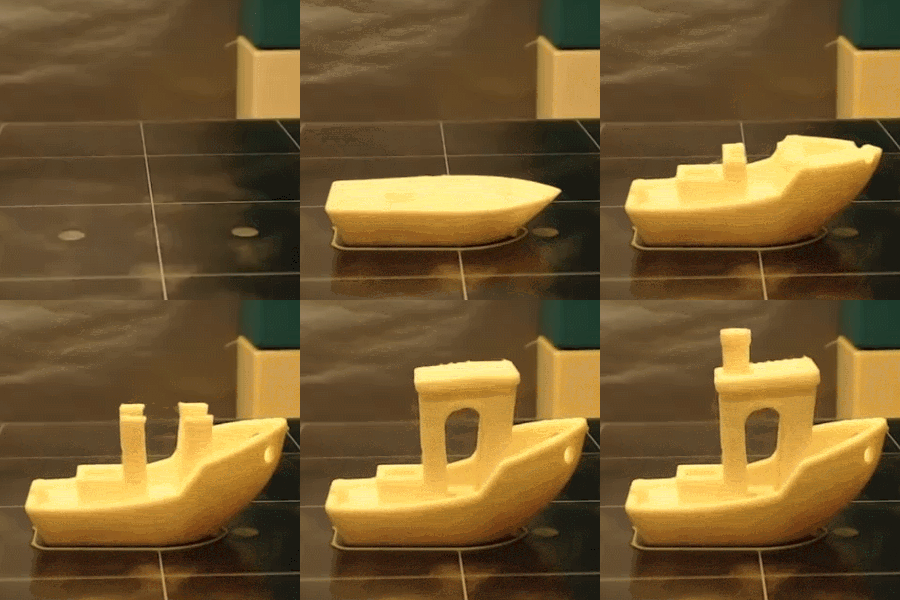
Right now, E3D’s experiments in toolchanging 3D printers have culminated in a single 3D printer featuring their toolchange carriage, four toolheads, some amazing linear rails, and a CoreXY configuration. The prints that are coming off of this printer are spectacular. There are four-color Benchies, and the drivetrain of a remote-controlled car with gears printed in Taulman plastic and a driveshaft printed in ABS. The car was a single print made with multiple hotends, demonstrating most of the problems of multimaterial printing disappear with the E3D swapping toolhead printer.

If you’re interested in purchasing one of these printers, E3D currently has a survey for potential buyers and a deposit queue for any future purchases.

Want A Leak-Proof Camper? Better Fire Up The 3D Printer Now.

Ah, the great outdoors.  Rejuvenating air rife with mosquitoes and other nasties, and spending some time hanging out in the woods sleeping in a 3D printed camper. Wait– what was that last one again?

Yep, it’s exactly what it sounds like. A Canadian team headed by [Randy Janes] of Wave of the Future 3D, printed a camper at [Create Cafe] in Saskatoon, Saskatchewan, using high-flow nozzles on one of the largest 3D printers in North America. These layers are 10.3mm thick!!

This trailer is one single printed piece, taking 230 hours — nine and a half days — of straight printing with only a few hangups. Weighing 600lbs and at 13 feet long by six feet wide — approximately 507 cubic feet, this beats the previous record holder for largest single piece indoor print in size by three times over.

Continue reading “Want A Leak-Proof Camper? Better Fire Up The 3D Printer Now.”

3D Printed Raspberry Pi NAS With Dual Drive Bays

While it might not pack the computational punch you’d usually be looking for in a server platform, you can’t beat how cheap the Raspberry Pi is. As such, it’s at the heart of many a home LAN, serving up files as a network attached storage (NAS) device. But the biggest problem with using the Pi in a NAS is that it doesn’t have any onboard hard drive interface, forcing you to use USB. Not only is this much slower, but doesn’t leave you a lot of options for cleanly hooking up your drives.

This 3D printable NAS enclosure designed by [Paul-Louis Ageneau] helps address the issue by integrating two drive bays which can accommodate 2.25 inch laptop hard disk drives and their associated IB-AC6033-U3 USB adapters. The drives simply slide into the “rails” designed into the case without the need for additional hardware. There’s even space in the bottom of the case for a USB hub to connect the drives, and a fan on the top of the case to help keep the whole stack cool. It still isn’t perfect, but it’s compact and doesn’t look half bad.

The design is especially impressive as it doesn’t require any supports, an admirable goal to shoot for whenever designing for 3D printing. As an added bonus, the entire case is designed in OpenSCAD and licensed under the GPL v3; making modification easy if you want to tweak it for your specific purposes.

This certainly isn’t the strongest Raspberry Pi enclosure we’ve ever seen, that title would have to go to the ammo case that does double duty as a media streamer, but looks like it would make a great home for that new 3 B+ you’ve got on order.

Repurposing Inkjet Technology For 3D Printing

You would be forgiven for thinking that 3D printing is only about plastic filament and UV-curing resin. In fact, there are dozens of technologies that can be used to create 3D printed parts, ranging from welders mounted to CNC machines to the very careful application of inkjet cartridges. For this year’s Hackaday Prize, [Yvo de Haas] is modifying inkjet technology to create 3D objects. If he gets this working with off-the-shelf parts, this will be one of the most interesting advances for 3D printing in recent memory.

The core of this build is a modification of HP45 inkjet print heads to squirt something other than overpriced ink. To turn this into a 3D printer, [Yvo] is filling these ink cartridges with water or alcohol. This is then printed on a bed of powder, either gypsum, sugar, sand, or ceramic, with each layer printed, then covered with a fine layer of powder. All of this is built around a 3D printer with an X/Y axis gantry, a piston to lower the print volume, and a roller to draw more powder over the print.

The hardest part of this build is controlling the inkjet cartridge itself, but there’s prior work that makes this job easier. [Yvo] is successfully printing on paper with the HP45 cartridges, managing to spit out 150 x 150 pixel images, just by running the cartridge over a piece of paper. Already that’s exceptionally cool, great for graffiti, and something we can’t wait to see in a real, working printer.

You can check out [Yvo]’s handheld printing efforts below.

Continue reading “Repurposing Inkjet Technology For 3D Printing”

RoMA: Robotic modeling assistant

3D Printing And Modelling With A Robot Assistant

[Huaishu Peng] and a group of other researchers have come up with a system that allows them to use virtual reality (VR) to model an object in a space in front of them while a robot simultaneously 3D prints that object in that same space, a truly collaborative effort they call the RoMA: Robotic Modelling Assistant. This is a step toward fixing the problem of designing something and then having to wait for the prototype to be made before knowing how well it fits the design goals.

The parts: designer, AR headset, AR controller, rotating platform, robotic printer
The parts

How does the designer/robot collaboration work? The designer wears an Oculus Rift VR headset with a camera mounted to the front, turning it into an AR (Augmented Reality) headset. In front of the designer is a rotating platform on which the object will be 3D printed. And on the other side of the platform is the 3D printing robot. In the AR headset, the designer views the platform, the object, and the robot as seen by the camera but with the model he’s working on overlayed onto the object. An AR hand controller allows him to work on the model. Meanwhile, the robot 3D prints the model. See it in action in the video below.

Continue reading “3D Printing And Modelling With A Robot Assistant”

3D Printer Halts And Catches Fire — Analysis Finds A Surprising Culprit

Let’s build a robot that gets hot. Really hot — like three times hotter than McDonald’s coffee. Then make it move around. And let’s get the cost in at around $100. Sounds crazy? Not really, since that describes the cheap 3D printers we all have been buying. [John] found out the hard way that you really need to be careful with hot moving parts.

The short story is that [John’s] Anet A8 caught on fire — significantly caught on fire. Common wisdom says that cheap printers often don’t have connectors for the heated bed that can handle the current. There have been several well-publicized cases of those connectors melting, especially on early production models of several printers. However, this printer had an add-on heater with a relay, so that shouldn’t be the problem. Of course, a cheap power supply could do it, too, but the evidence pointed to it being none of those things.

Continue reading “3D Printer Halts And Catches Fire — Analysis Finds A Surprising Culprit”

3D Printed Stethoscope Makes The Grade

On the off chance that initiatives like the Hackaday Prize didn’t make it abundantly clear, we believe strongly that open designs can change the world. Putting technology into the hands of the people is a very powerful thing, and depending on where you are or your station in life, can quite literally mean the difference between life and death. So when we saw that not only had a team of researchers developed a 3D printable stethoscope, but released everything as open source on GitHub, it’s fair to say we were pretty interested.

The stethoscope has been in development for several years now, but has just recently completed a round of testing that clinically validated its performance against premium brand models. Not only does this 3D printed stethoscope work, it works well: tests showed its acoustic performance to be on par with the gold standard in medical stethoscopes, the Littmann Cardiology III. Not bad for something the researchers estimate can be manufactured for as little as $3 each.

All of the 3D printed parts were designed in OpenSCAD (in addition to a Ruby framework called CrystalSCAD), which means the design can be evaluated, modified, and compiled into STLs with completely free and open source tools. A huge advantage for underfunded institutions, and in many ways the benchmark by which other open source 3D-printable projects should be measured. As for the non-printed parts, there’s a complete Bill of Materials which even includes links to where you can purchase each item.

The documentation for the project is also exceptional. It not only breaks down exactly how to print and assemble the stethoscope, it even includes multi-lingual instructions which can be printed out and distributed with kits so they can be assembled in the field by those who need them most.

From low-cost ultrasounds to truly personalized prosthetics, the future of open source medical devices is looking exceptionally bright.

[Thanks to Qes for the tip]