Turning A Game Boy Into An Android Gamepad

gameboy

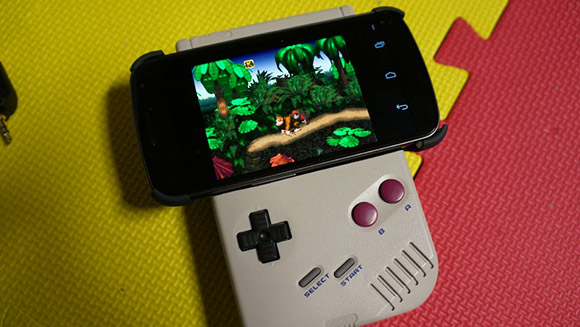
[Chad] has been messing around with emulators on his phone, but as anyone with a smart phone knows, even the most advanced touchscreen controls are terrible. Wanting something that pays tribute to the classic systems he was emulating, he decided to turn a classic old school brick Game Boy into an Android gamepad.

After gutting an old DMG-01, [Chad] set to work turning the D-pad and buttons in the Game Boy into something his Galaxy Nexus could understand. He chose a Bluetooth connection to provide input for his emulators, with the hardware generously donated from a Nintendo Wiimote.

The Game Boy PCB was cut up and a few leads attached to the Wiimote PCB. After modifying the case to include space for the Wiimote and a cell phone mount, [Chad] had a functional game pad, perfect for his adventures in emulation.

You can see [Chad]’s demo of his game pad after the break,

Continue reading “Turning A Game Boy Into An Android Gamepad”

Bubble Wrap Cure For Nexus 7 Speaker Distortion

nexus-7-bubble-wrap-fix

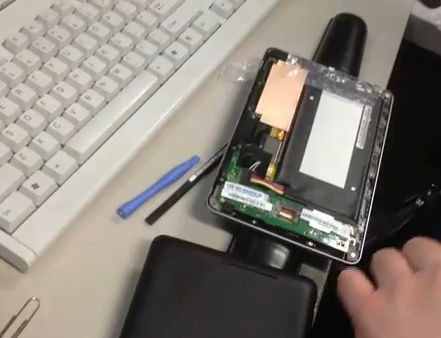
[Home Brand Cola] is quite happy with his Nexus 7 with the exception of the built-in speaker. It produces fairly good audio quality until he reaches about 50% volume level. Anything above that produces distortion. He figured out how to fix it using a small piece of bubble wrap.

The eureka moment came when he was using his Nexus 7 and discovered he could fix the distortion by gripping the top and bottom parts of the case strongly between his finger and thumb. This led him to realize that the speaker unit is a bit loose and the unwanted noise is produced when it vibrates against the case. The video after the break shows the fix, which places a strip of bubble wrap (looks to be about 1″ by 3″) on top of that speaker unit. When the case is snapped back together the packing material helps hold everything in place and now he can use his tablet at full volume without any problems. One of the comments on the Reddit thread asks about heat problems with the addition of this plastic. He’s been using it for a few weeks and so far no issues there.

Continue reading “Bubble Wrap Cure For Nexus 7 Speaker Distortion”

Is Entropy Slowing Down Your Android Device?

071210_1705_AndroidDev11.jpg

[Lambgx02] got tired of his Android device getting bogged down and decided to dig down to the cause of the issue. His investigation led him to believe that entropy is causing the slowdown. He believes that his workaround reduces 90% of the lag on the average Android device.

So how is it possible that entropy is causing the problem? It seems there is a bottleneck when an app requests a random number from the Linux kernel running at the lowest level of the device. Android is set up to use /dev/random for all random number requests, but [Lambgx02] says that location has a very shallow pool of numbers available. When they run out the kernel has to reload with a new seed and this is blocking the app that requested the data from continuing.

His solution was to write his own app that seeds /dev/random once every second using a number from /dev/urandom. He mentions that this might cause a security vulnerability as seeding the random data in this way is not quite as random. There may also be issues with battery life, so make sure to monitor performance if you give it a try.

[via Reddit]

How To Used An Android Device With A Shattered Screen

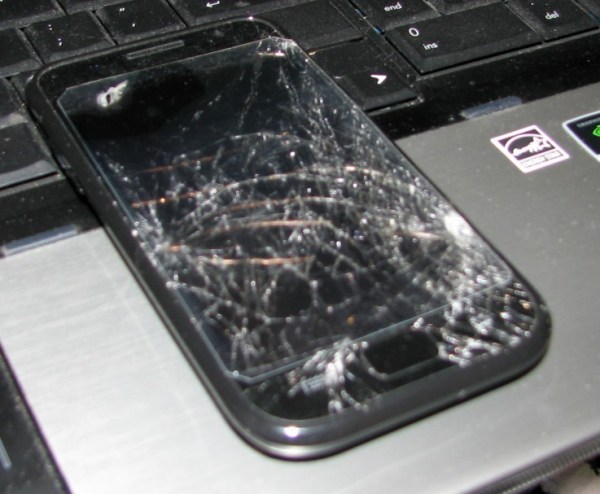
This screen is not just cracked, it’s devastated. We can all agree that you’re not going to be carrying this around with you anymore, but it might still be useful in other endeavors. [Mr Westie] wanted to use it for the camera which is undamaged. The issue is how do you control an Android device with a broken screen?

He knew there are apps out there that let you control your device remotely. But these still depend on you being able to install and launch the program. He found he could get the image from the screen on his computer using a package called Screencast. It runs on your computer and doesn’t need to be installed on the phone, but it will require a rooted phone and the user must click to authorize root access. He got around that hangup by pushing keypress commands to the phone via ADB. The only problem left is if debugging mode is not enable.

Unlocking Verizon Galaxy Note II And Galaxy S3

galaxy-note-II-verizon-unlock

[Adam Outler] and friends have been hard at work unlocking the bootloader of some Verizon Android devices. His most recent adventure involves unlocking the Verizon branded Samsung Galaxy Note II.

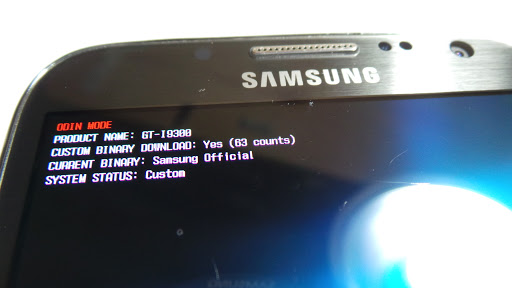
You can’t run Cyanogenmod on a device that has a locked bootloader. This is presumably why it took no time at all for the XDA forum users with Verizon phones to raise enough money to put one of these puppies in [Adam’s] hands. He walks through the process he used to find the exploit in the video after the break. We’re not experts on the process, but apparently the .pit file used when flashing Odin is the entry point for the exploit. A bit of code has been injected into it which provides an opening to flash a replacement bootloader.

We mentioned the Galaxy S3 in the title. Apparently that has been unlocked as well but with one big hang-up. An over-the-air update could possibly brick the S3. To avoid this issue with the Galaxy Note II the original bootloader is patched and reflashed as part of the exploit.

Continue reading “Unlocking Verizon Galaxy Note II And Galaxy S3”

Common Linux Tools On Android Without Root By Installing BusyBox

[Adam Outler] shows us how to expand the Linux tools available on Android without rooting the device. He does this by installing BusyBox. The binary is copied to the device using the Android Developer Bridge. He then opens an ADB shell, adds execution permissions to the binary, and runs it. BusyBox calls itself the Swiss Army Knife of Embedded Linux. It provides a set of very common tools which you’ll find useful in your tinkering. The one that [Adam] shows off in his video is the vi editor, but the basics that make a shell work are all there like: ls, mkdir, grep, dmesg, mount… you get the point.

So what are you going to do with your unrooted device now that you have these commands at your disposal? That’s really for you to figure out. [Adam] continues his demonstration by installing a package that does require root access. It’s BotBrew Basil, which adds apt-get and a few more complex packages. He then uses vi to write a C++ Hello World program, then compiles it and runs it. So if you’re looking to do some development on your phone this is one way.

Continue reading “Common Linux Tools On Android Without Root By Installing BusyBox”

ODROID-U2 Is Latest Barebones Board Begging To Be Used

odroid-u2

Oh hey, another barebones dev board. Well, that’s what we said to ourselves when we first saw this picture, but the way this is presented is like crack for geeks. It starts with this tiny board, which has a footprint smaller than a credit card. But once you start looking at the add-ons you’ll want to watch out or you’ll cover yourself in drool.

The name of the game here is speed. It’s running a quad-core Cortex-A9 chip with a Mali-400 graphics accelerator. There is no on-board storage, but the microSD slot is meant to be used for OS and storage. A faster option is to use a NAND add-on board offered in 8, 16, and 64 gig capacities ($25-$79). There is a micro type-D HDMI connector and the device is powered by a cellphone charger. It ships with a big heat sink that acts as a case for the board.

After the break you can see it booting Android and immediately loading into XBMC. The menu looks mighty snappy, making us think this is a great alternative to using Raspberry Pi as a media center. But you’ll pay for the faster speed and ability to run Android. The rig they’re showing off, plus the add-ons, comes out to about $132. There are also questions to be answered as to which video formats are supported through hardware decoding.

Continue reading “ODROID-U2 Is Latest Barebones Board Begging To Be Used”