LED Matrix Shield Starts With A Very Loud Snap

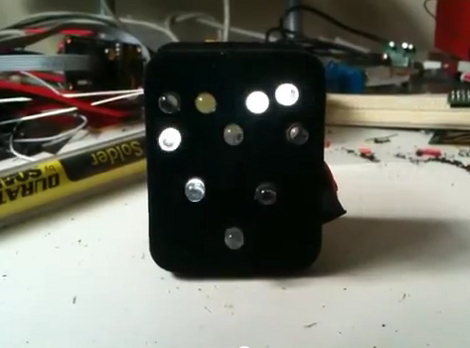
We see a lot of LED matrix projects. They’re fun, and you can learn a lot of basic lessons during the build. But this one is out of the ordinary. [Rtty21] built an oddly sized, and sound controlled matrix shield for his Arduino. That’s it right there, the shield is the large chunk of protoboard but you can just see the Arduino peeking up over the top of it.

Now we say oddly sized because a 9×9 matrix doesn’t make much sense with an 8-bit micro controller. There’s no schematic but in the clip after the break he mentions that the columns and rows are driven by a decade counter and shift register and that’s what makes it possible to drive nine bits easily. Also of note on the board is that washer above and to the right of the matrix. It’s a touch-sensitive reset button. But the main control mechanism is a Clapper clone circuit. Just snap your fingers and it turns the project on or off. [Rtty21] based the design on this step-by-step sound input build.

Continue reading “LED Matrix Shield Starts With A Very Loud Snap”

Arduino BASIC Interpreter Using LCD, Keyboard, And SD

This Arduino BASIC interpreter will make a really fun one-day project if you’ve already got the parts on hand. [Usmar A. Padow] put together an Arduino Uno, SD card, four line character LCD, and PS/2 keyboard. but he’s also included alternative options to go without an LCD screen by using a computer terminal, or without the SD card by using only the Uno’s RAM. As you can see in his demo after the break, this simple input/output is all you need to experiment with some ancient computing.

It’s hard for us to watch this and not think back to an orange or green monochrome display. Just like decades past, this implementation of BASIC has you start each line of code with a line number, and doesn’t allow for character editing once the line has been input. The example programs that [Usmar] shows off are simple to understand but cover enough to get you started if you’ve never worked with BASIC before.

Last August we saw another hack which ported Tiny BASIC to the Arduino. You may want to take a gander at that one as well.

Continue reading “Arduino BASIC Interpreter Using LCD, Keyboard, And SD”

Interactive Table Is Slightly Different Than Most.

[DanNixon] has put together this unique interactive table concept. Usually, when we see the term interactive table, we think of an LED grid. That just happens to be what we see the most of. While this table does, in fact, have an LED grid in the table top, it also has several other features and some very nice construction.

Instead of going the usual boring rectangular route, [DanNixon] decided to build a more visually appealing structure. The build log on that part alone is worth a peek. After that, he has a small LCD screen for displaying headlines and song titles as well as a compact LED matrix for some visualizations.

Great Job [DanNixon]

Continue reading “Interactive Table Is Slightly Different Than Most.”

Text Adventures For Arduino Starting With Hunt The Wumpus

Let’s be honest, you’re going to have trouble getting kids to play text-based adventure games these days. But this is one way to get them interested. This weekend you should get together with niece, nephew, son, or daughter and help them build their own hardware and program it with an adventure game. One last project before school’s out and the weather’s nice.

This is [Dan’s] shiny example of Hunt the Wumpus. He used Adafruit’s RGB LCD shield for Arduino. It’s got a character LCD and five buttons. But you can easily breadboard this yourself using a few tactiles plus a screen and uC of your own choosing. One nice touch with this one is the RGB backlight which is used to add an element of danger to the story line. He also mentions a few bugs in the Arduino language which he found while setting up the game.

We’ve been meaning to make our version of Zork using an Arduino, GLCD, and PS/2 keyboard ever since we read “Ready Player One”. This is just a bit more encouragement to get moving on that project.

[Thanks PT]

Sip-and-Puff Ipod Dock Highlights Assistive Technology

Check it out, a Sip-and-Puff Arduino shield. This is an assistive technology that allows the physically challenged to control things using a plastic air tube. Different combinations of sucking (Sip) or blowing (Puff) differentiate between control commands.

In this case the device is used to control an iPod dock, but [Bob Johnson’s] Kickstarter project seeks to put the Sip-and-Puff functionality out there so that it can bridge the control gap no matter what the need. One example that he mentions in the video after the break is a Morse Code keyboard.

This shield uses a pressure sensor to receive input from the plastic tubing. But we’ve also seen it done using mechanical pressure switches. That technique is what was used in the Sip-and-Puff Kayak build.

Continue reading “Sip-and-Puff Ipod Dock Highlights Assistive Technology”

Driving A T6963C Based Graphic LCD

[Tom Fleet] spent the dreary weekend inside learning how to drive this T6963C based graphic LCD controller. Although this is his first time venturing away from HD44780 character displays, the availability of an Arduino library helped him go from being a newbie to coding his own animated graphics.

The hardware setup is straight-forward. The screen has a 20-pin connector and operates at 5V. We don’t see it on his protoboard, but usually these displays also need a potentiometer which serves as a voltage divider for the screen contrast. The data and control pins eat up most of the available I/O on the ATmega328 chip he used, but the I2C and SPI pins are still open and he plans a future project to make this a wireless display for his PC using one of those protocols.

As for fonts and animation, [Tom] links to several tools which will come in handy. There’s a font program that will convert Windows system fonts into a C file for use on the Arduino. The animations start with a 1:1 ratio animated graphic drawn with his favorite image editing software. He then converts those to monochrome bmp files and used bmp2c to convert each frame to a C array. After the break there’s a seven second example that would work well as a boot screen for his project.

Continue reading “Driving A T6963C Based Graphic LCD”

Tank Wars: A Video Game Controlling A Physical Bot

[Joe] sent us an email to show off his latest build. Tank Wars is the beginning of a video game/robot hybrid. You control the tank via an iPad, telling it where to go and how to fire. You have real life targets, in this case another robot. When you hit your target, the interface is updated with game stats.  Currently, this is only a step past being a wifi controlled robot. [Joe] is working on making the game part of it a little more interactive.

The tank and the target are both run by Arduinos with RN-XV WiFly modules.  The tank has obstacle avoidance both forward and backward, which, from the video,  seems like it might make navigating a bit challenging at times. The iPad interface is just a web page, so it could really be used on any device. This is pretty cool, we can’t wait to see how he proceeds from here.

Continue reading “Tank Wars: A Video Game Controlling A Physical Bot”