IPhone Used To Control Squad Of UAVs

[youtube=http://www.youtube.com/watch?v=CRcld5aAN2E&hl=en]
Building UAVs
is only half the work involved in making them fly; the other half is a control system. The Center for Collaborative Control of Unmanned Vehicles (C3UV) from the University of Califorina, Berkeley has devised a way to control a squad of RC airplanes with an iPhone. The system works by submitting commands and coordinates to a web site via the iPhone’s web browser. The site then sends the commands to the team of drones, which carry out the orders. The drones are outfitted with cameras and a tracking device, which allows them to be monitored on the ground using Google Maps.

The iPhone Terms of Service specifically prohibits it being used to drive remote vehicles, but that shouldn’t really pose a problem: since the orders are deployed via the iPhone’s web browser, they could technically be given by any web-enabled device. Before anyone cries foul, though, bear in mind that the idea is to issue orders from the field, and the iPhone is perhaps the most high-profile mobile web device on the market, which maximizes the project’s exposure. Still, we can’t help but think that they’d have gotten more media attention if they had used a hacked Kindle instead.
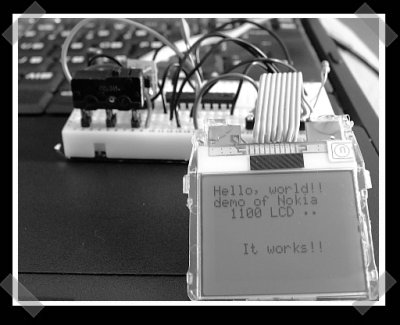
Nokia Color LCD Flickr Frame


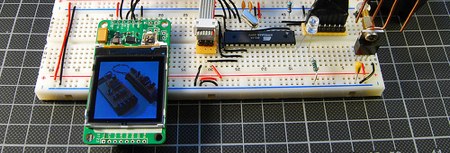
Tinkerlog got their hands on a color LCD from SparkFun and set it up to receive images from Flickr. These color LCDs are 128×128 pixel and the include a breakout board with a separate power supply for the backlight. Communication is via a three wire SPI bus plus a reset line. [Alex] used an ATmega48 for control, which is connected to the computer using an RS232 to USB converter. The wiring schematic is here.

For the software side of things, he adapted Sparkfun’s example ATmega8 code for the microcontroller (he couldn’t get the Arduino code to work). Beej’s Python Flickr API was used to grab the images. The Python Imaging Library converted them, and finally, they were sent to the display using pySerial. SparkFun has been offering these displays for quite some time; it’s good to see a quality writeup of one in use.

[via Make Flickr Pool]

Ultraportable Laser Graffiti?


[Sittiphol Phanvilai]’s multitouch screen project was posted a couple different places today. It uses the Nokia N95 to track light pens and draws the resulting paths on the video output. We immediately saw the applications for this in laser tagging. Right now if you want to do laser tagging you need to haul a laptop with you in addition to the projector. With some modification to the NeuScreen software you could replace the laptop with just cellphone plugged directly into the projector.

Covert IPhone Moleskine Case


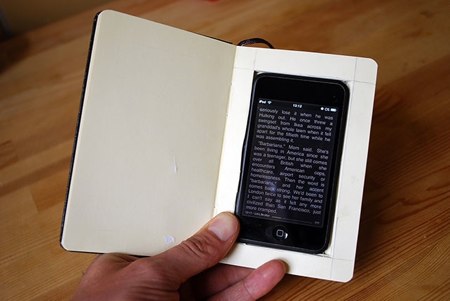
Crafting isn’t really our thing, but just last week we were planning on doing this project. Thanks to the how-to singularity: the longer we wait, the more likely someone else will do our dirty work. The instructions are this:

  1. Cut a hole in a book.
  2. Stick your phone in that book.
  3. Let her open the book.

Wired’s write up has about 600 more words if you need clarification. The ebook on the screen is Cory Doctorow’s Little Brother, so expect to see this on BoingBoing… and again when it’s fan translated into Polish. [bre] made a similar hidden compartment book last Fall for Make’s PDFcast.

In all seriousness, we do enjoy the idea of carrying an innocuous little book around that could be doing some covert WiFi scanning, acting as a mobile accesspoint, or live streaming our location to friends. Unfortunately, since it’s an iPhone, most of this isn’t possible yet; you can’t even voice dial from your headset, while leaving the notebook in your pocket. This case also blurs what is considered rude. Most people would be annoyed if you started txting mid conversation, but people taking notes in Moleskines don’t get the same treatment.

Wiping An IPhone (more Thoroughly)


You may be hoping to subsidize the purchase of an iPhone 3G with the sale of your old one, but since you should wipe all your personal data from the old one first, we brought you [Rich Mogull]’s method for wiping all your private data off of an iPhone. The method, which involves overwriting your data with music, is slightly flawed, mainly because of live files that can’t be deleted while the phone’s OS is working and because the OS reserves a portion of the hard drive as unwritable space, which will make it impossible to completely fill it with music.

For those looking to annihilate every scrap of personal information, check out [Jonathan Zdziarski]’s method. It involves restoring the phone as a new phone, then jailbreaking it. Once the user has shell access, umount is used to force the two mount points into read-only mode. Now the partitions can be overwritten with /dev/zero, which should wipe them clean. The phone should then be forced into recovery mode to perform another full system restore, and the process is complete. As [Zdziarski] notes, several iterations of the process with /dev/random should prevent even NAND recovery, but there is an even better way of ensuring full data destruction: “simply take a sledgehammer to the device.” If you are unfamiliar with the command line though, chances are [Rich Mogull]’s method will be easier for you to handle, but don’t blame us if you sell your phone and the Feds get wise to the evidence you left on it.

[via Engadget]

GSM Remote Control Project


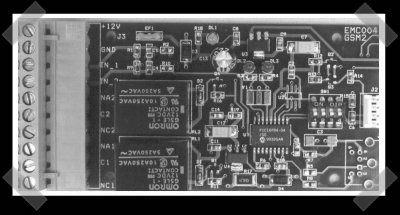
It’s been a while since we’d seen any new SMS/GSM/serial remote interface projects. [Emanuele] sent in his version of a project to do just that. It uses a PIC16F84 and will send or receive commands. A pair of relays provide options for controlling whatever you want to hook it up to. You’ll need a login, but he’s released the full schematics and firmware. He developed this to find uses for old phones, but an alternative is to pick up a cheap calling card cell and dedicate it to a project like this. This seems like a great way to add an out of band alarm system to your house/car/robotic minion.