Controlling Robots With A TRS-80

[DJ Sures], mastermind behind the EZ-B Bluetooth Robot controller, sent in a really interesting build where he controls a robot with a 1983 TRS-80 computer.

The robot in question is [DJ Sures]’ adorable WALL-E we’ve seen before. WALL-E is controlled through a Bluetooth connection to a desktop PC with the EZ-Builder hardware and software package.

To get the Trash-80 talking to WALL-E, [Sures] connected a tiny Bluetooth module to the TX pin of the 6402 UART. It’s a very, very simple modification that adds a Bluetooth serial connection to one of the first notebook computers. After syncing the TRS-80 and WALL-E to the computer running EZ-Builder, it’s a piece of cake to make the robot respond to the clanging of a 30-year-old keyboard.

There’s a video of [DJ Sures] going over his build after the break with a wonderful demo of WALL-E freaking out to a little dubstep. Check that out after the break.

Continue reading “Controlling Robots With A TRS-80”

Building A 4-bit TTL Computer

When [GG] was 12 years old, he was introduced to BugBooks, the wonderful ‘introduction to digital design’ books from the early 1970s. It has always been a dream of [GG] to build the TTL computer featured in the BugBooks, and now that he has the necessary time and money available to him, the Apollo181 has become a reality.

[GG]’s computer is built around a 74181 ALU, an exceptionally old-school chip that provides the core of a computer in a neat 24-pin chip. With a 256-byte RAM and a few additional logic chips, [GG]’s computer is an exceptional piece of engineering able to perform 625,000 instructions per second when clocked at 2.5 MHz.

This isn’t [GG]’s first homebrew computer build; last year we saw his incredible Z80 minicomputer. Now we can’t wait to see what’s on tap for next year. After the break, you can check out [GG] loading in operands and operators into his computer and letting the Apollo181 churn away on its program.

Continue reading “Building A 4-bit TTL Computer”

[Engineerguy] Explains How A CCD Works

[Bill] is back with another fantastic video explaining a piece of intriguing hardware. This time, he’s explaining how a CCD works. For many of us, these things are part of our daily life, but aside from the fact that they capture an image, we don’t put much thought into them. [Bill]  breaks things down in a way that we really enjoy. Fast paced and detailed, yet simple enough for even non-engineers to follow. This time, however, he’s also promoting his companion book which includes tons more information, not only on the construction and function of these ideas, but the underlying scientific principles.

The book, called Eight Amazing Engineering Stories, covers the following items:

  • Digital camera imagers
  • tiny accelerometers
  • atomic clocks
  • enriched uranium
  • batteries
  • microwave ovens
  • lasers
  • anodized metals

We’re excited about the book and it looks like they’ve worked really hard to deliver a quality product. Great job guys.

You’ll Throw Your Back Out Playing This Analog TV Synth

de-rastra

While CRT televisions fall to the wayside as more people adopt flat-panel TVs, the abundance of unused sets gives hacker/artist [Kyle Evans] an unlimited number of analog canvases on which to project his vision. He recently wrote in to share his latest creation which he dubs “de/Rastra”.

The “CRT Performance Interface” as he calls it, is an old analog television which he hacked to display signals created by moving the TV around. Fitted with an array of force sensors, accelerometers, and switches, the display is dynamically generated by the movements of whomever happens to be holding the set.

Signals are sent wirelessly from his sensor array to an Atmel 328 microcontroller with the help of a pair of XBee radios, where they are analyzed and used to generate a series of audio streams. The signals are fed into a 400W amplifier before being inserted into the CRT’s yoke, and subsequently displayed on the screen.

We’re sure [Kyle] is probably trying to express a complex metaphor about man’s futile attempts to impose his control over technology with his project, but we think it simply looks cool.

Check out [Kyle’s] work for yourself in the video below and give us your take in the comments.

Continue reading “You’ll Throw Your Back Out Playing This Analog TV Synth”

Mapping The Motor Cortex

[Bruce] sent us another fantastic final project from the ECE4760 class at Cornell. What you see above is an array of 36 near infra red LEDs shining into this young man’s brain for the purpose of spectroscopy. Light bounces back differently based on brain activity (blood flow). For this project, they are mapping their motor cortex and displaying it on a PC using a java app. You can see the entire rig, as well as the readings in the two videos after the break.

When this tip came in, one of our writers,[Jesse Congdon], chimed in as well.

hey I actually used to work in this as an intern, at Upenn. two frequencies of near infrared light are used that both penetrate skin and bone, one bounces off of blood in general and the other bounces off oxygenated blood. Since your brain actually regulates the flow of blood to parts that are in use you can see brain activity by looking at blood flow, but then you also need to see if the brain is actually using that blood, so oxygenation gives you a full picture. The frontal cortex is a nice place to measure cause there is no hair on that portion of the skull, and it gives you emotional responses and the “aha!” moment when you figure out a problem.

One article from way back said the system was going to be used as a lie detector, since when you lie you think about the truth and the lie simoltaneously and show an increase in activity.

It’s tough though to categorize a response since you can’t really establish “base line” activity by turning off the brain

Continue reading “Mapping The Motor Cortex”

Your Guide To Building A Homebrew 6502 Computer

If you’ve ever thought about getting down to bare metal and building a homebrew computer from scratch [Garth Wilson] put up a great primer to the 6502, the same CPU found in Apple ][ computers, BBC Micros, Vic-20s, and the venerable Commodore 64 (a 6510 in the C64, but it’s close enough).

In his guide to building a 6502 computer, [Garth] goes over all the basics – what you want the computer to do, how to decode addresses, and other important technical requirements for getting a homebrew project running.

If that’s not enough, [Garth] directs his readers to the fabulous 6502.org forums  where just about every topic is discussed. The guys on the forum have a standardized I2C pinout for the 6502, allowing noobs to easily connect pre-designed keyboards, displays, and storage devices to their projects. There are a ton of tutorials on the 6502.org site, more than enough to get a homebrew project off the ground.

If you’d like to see what you can do with a homebrew 6502, check out the homebrew projects page featuring a 6502 Nixie clock and CLPD-based 65816 single board computer. There’s a treasure trove of information here, just waiting to be pulled from the vine.

Hackaday Links May 9th 2012

Homecut – CNC Cutting Directory

homecut

So you have a CNC machine that you use as a hobby, but would like to do some actual work on the side? Or maybe you have an idea you’d like made. Homecut is a map directory where you can maybe hook up with the right person.

The Curta Mechanical Calculator

curta calculator

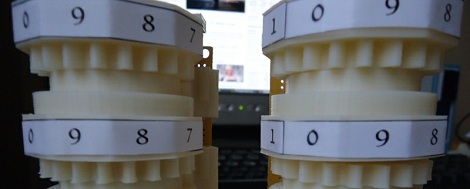
As [leehart] mentioned in our comments section, the Curta mechanical calculator is a truly ingenious piece of engineering. A quick Google search should find all kinds of information on it, but this article could be a good place to start for some mechanical hacking inspiration!

Luxman Amplifier DAC Upgrade

nand-dac

[R. Barrios] wasn’t happy with using the sound card for his HTPC setup, so decided to add a DAC module onto his reciever. The resulting audio quality was very good, and the build came out quite clean.  Check it out if you’re thinking of a hack-upgrade to your stereo equipment.

3D Printable Tilt-Shift Adapter

tilt-shift-lens

A tilt-shift lens a neat piece of equipment that is used to make a large scene look like they were miniatures. It’s a cool effect, but professional lenses to do this can cost thousands of dollars. This Instructable tells you how to go about printing your own. For more info on the technique itself, check out this Wikipedia article.

New 3D Printer on the Block

3d-printer

If you would like to take the plunge into 3D printing, but are looking for somewhere to get a parts kit, the [ORD Bot Hadron 3D Printer] may be worth a look.  The build quality looks great, and the price for the mechanical components is quite reasonable at $399. You’ll need to provide the electronics and extruder. Thanks [comptechgeek]!