USB Switched Power Strip


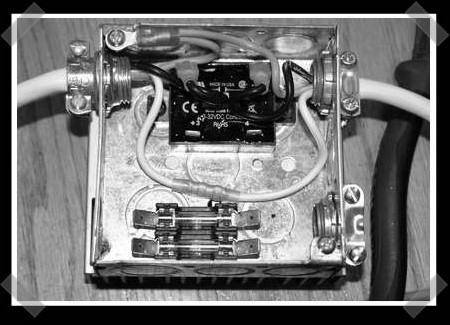
[toymotorhead] pieced together this USB controlled power strip to help with his electrical bill. His goal was to be able to have devices turned off automatically when he shut down his computer as well as powered on when he turned his computer on. Another requirement was that the USB be isolated to protect the motherboard from spikes.

The cost of the parts in total were less than $30, and consisted of a solid state relay, some fuses, and some transient voltage surge suppressing diodes. The unit only switches power off or on depending on whether or not the computer is powered up, it doesn’t control the outlets via software. He goes pretty in depth as to how everything works as well as showing nice diagrams and pictures. This should be a fairly quick and simple project, as long as you take the proper precautions for working with high voltage.
Acer Aspire One Hard Drive Upgrade


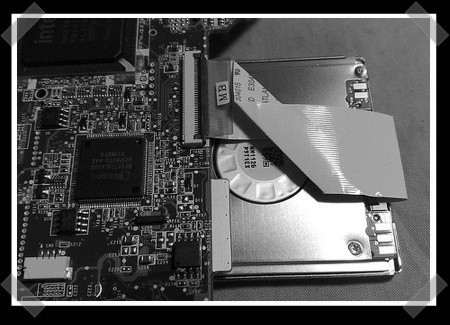
As promised, [tnkgrl] has published part two of Acer Aspire One upgrade. In part one she added Bluetooth and more RAM. This time around she focuses on the storage. The subnotebook comes from the factory with an 8GB SSD. The flash based storage readily unplugs from a small ZIF connector. [tnkgrl] replaced it with a 60GB PATA Samsung drive salvaged from an iPod. It’s a 1.8inch disk and is only 5mm thick, so it can be tucked under the motherboard. Knowing its previous use, it should prove fairly resilient. You can view a video of the swap and more photos on Flickr.

Up next is part three, where she’ll add 3G support.

Biometric Locks Turned Trojan


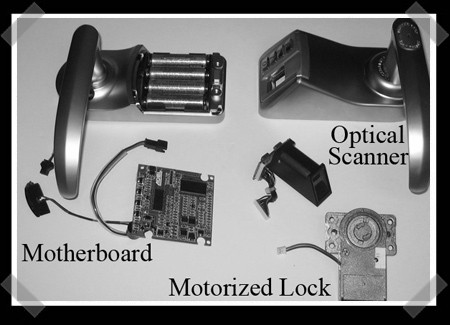
In the same vein as our recent Defcon article on biometric cloning, White Wolf Security has released this article about turning a biometric door lock into a trojan. They note that there are many common ways to break into one, from harvesting fingerprints to using gummy bears to fake a finger. This hack involves having full access to the unit so you can disassemble it.

The unit has a system built-in where you can touch a 9-volt battery to some connectors on the bottom to power it in case of a building power failure. The researchers simply routed some wires from the motorized lock to the plates used for the 9-volt and then reassembled the lock. The door can then be opened at any time without verification, even if the software on the unit is reset.

[Thanks, dwight]

Modding The Acer Aspire One With Bluetooth


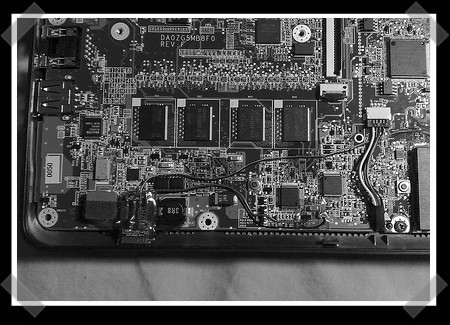
[tnkgrl], a regular around here, is at it again. This time she has modded an Acer Aspire One subnotebook to have internal Bluetooth. She’s released part 1 of a multi part tutorial on beefing up the Aspire One. In this part, she covers disassembly, adding more RAM, and adding the Bluetooth hardware. She suggests that you look at her Bluetooth install on an Asus 701 to find more information as the process is nearly identical.

Part 2 of the tutorial is going to cover upgrading the SSD to a 1.8″ PATA hard drive and putting it back together.

RGB Monome Clone


[Julien Bayle] has posted this great breakdown of building an RGB monome clone. He is a musical performer using Ableton Live. He wanted to do away with the need for a computer screen and found that the monome would have been perfect had it been RGB. So he decided to build his own.

The parts list for the entire project is as follows:

  • 1x Arduino board
  • 4x Sparkfun breakout PCB
  • 4x Sparkfun buttons pads (like our door lock)
  • 4x Sparkfun buttons bezel
  • 64x RGB LEDs common cathode
  • 64x Diodes Small Signal (1N4148)
  • 1x MAX7221 (LED Driver)
  • 1x 74HC164 (8-Bit Serial-In, Parallel-Out Shift Register)
  • 1x 74HC165 (8-Bit Parallel-In, Serial-Out Shift Register)

He also has files for the schematics and source code as well as information on how to assemble and test it.

The RGB aspect is still under development. He is using the LEDMatrix-Serial Interface-RGB from Sparkfun Electronics to run it. It is expensive, but is exactly what he was looking for.

There aren’t very many pictures of the project, and none of the working RGB unit. He makes up for it in sheer information. Many parts have links to manufacturers or support forums. Hopefully he’ll post some pictures and video of the final product soon.

Drive A Robot In Australia Over The Web


BP Australia has commissioned an online game where you get to drive robots around an obstacle course. Make no mistake, these are real robots. Actually they are modified versions of the Surveyor SRV-1 vehicles that are popular with research labs, and schools everywhere.

Go to the website, get in queue and pray for no clouds. These babies are solar powered, so you’ll have to try to get in while its day time in Australia. The entire set is built in miniature, so you feel like you’re driving a tank around a city.

[via Robots Dreams]

Free Parking Garage Access

This hack is an interesting twist that will allow you to get in or out of some parking garages when the attendant isn’t looking. Using something metal to trip the parking lot’s proximity sensor that is meant to let cars out automatically you can get into the garage or vice-versa without opening your wallet. A magnet from a hard drive might work a bit better because it is able to trip multiple types of sensors, but for this hack any kind of metal will work. This proximity sensor is a high–frequency oscillation type, so anything that attenuates, varies the frequency or stops the oscillation trips the sensor. When you can’t find a place to park, this hack will certainly impress your friends more than this method, but your street credibility could quickly turn into never lived down stories, if you end up driving over tire strips and ruining your tires, get a huge parking or trespassing ticket, or worse yet get your vehicle towed!