Hacklet 82 – Halloween Hacks 2015

Halloween is when the ghouls start haunting and the hackers start hacking. All hallows eve is the perfect holiday for eerie blinking LEDs, spooky audio oscillators, and wild animatronics. We had a double dose of Halloween hacks last year on the Hacklet. This year we’re bringing you even more of the best Halloween hacks on hackaday.io!
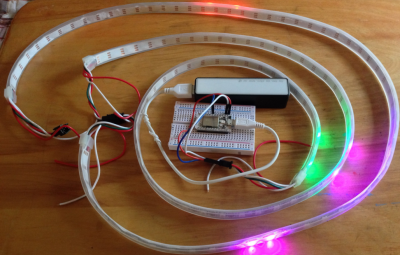
eyes1We start with [dougal] and Halloween Blinky Eyes. [Dougal] wanted to create the effect of creatures peeking at you from the dark corners of the room, and he’s certainly nailed it. A strip of WS2812 LEDs is the trick here. Pairs of LEDs light up, blink, and fade away like spooky eyes. The Strip is controlled by a Particle Core using Adafruit’s NeoPixel Library, though [Dougal] plans to move to the FastLed library. Everything is powered by a USB power pack. This hack isn’t much to look at with the lights on, so check out the video to see these eyes really shine!

 

witch1Next up is [controlmypad] with Blair the Witch Project. A normal trip to Home Depot turned paranormal when [controlmypad] spotted an awesome witch decoration. The free-standing mannequin had some basic animatronics and the all important manual trigger. [controlmypad] already had a discarded electric wheelchair. After replacing the chair batteries he modified it with a Sabertooth 2×32 Motor Controller and a standard radio control receiver. A spare channel was connected to Blair’s manual trigger. An aluminum tube joins the witch and the scooter. The hardest part of this hack was keeping Blair’s skirt out of the scooter wheels. Home Depot to the rescue! A simple hoop made of lawn edging plastic keeps the fabric and wheels apart.

 

tweet-trick

[Alex Cordonnier] and his team participated in Boilermake 2015, a 24 hour Hackathon at Purdue University. The fruit of their labor is Trick or Tweet, the tweeting Jack-o’-lantern. Yes folks, we now have the internet of gourds. Hiding inside Trick or Tweet is a Raspberry Pi and a Pi Camera. The pumpkin itself is also a giant capacitive touch switch. Touching the pumpkin triggers a count down after which Trick or Tweet snaps a photo. It then adds some spooky Halloween overlays, a pun or two, and throws the whole thing up on twitter @PumpkinPiPics. [Alex] hasn’t uploaded the code yet, but we’re guessing it consists of a few Python scripts. Pretty awesome for 24 hours of work!
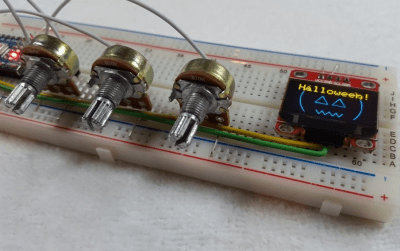
 

hariSometimes Halloween hacks take on a life of their own. That’s exactly what happened when [Hari Wiguna] sat down with a few parts he ordered from China. Happy Halloween 2015 is the result. [Hari’s] order included some potentiometers, a two color OLED display, and some Arduino clones. In no time [Hari] had three pots wired up to the Arduino’s analog inputs. The OLED quickly followed, displaying graphics via the Arduino’s I2C bus. He really wanted a Jack-o’-lantern though. It took a bit more tweaking, but eventually [Hari] was successful. The first pot sets eye size.  The second controls eye rotation. The third pot changes the width of Jack’s mouth. [Hari] has all the code for this hack up on his most recent project log.

Not spooked enough? If you want to see more Halloween projects, check out our newly updated Halloween hacks list! Did I miss your project? Don’t be shy, just drop me a message on Hackaday.io. That’s it for this week’s Hacklet; As always, see you next week. Same hack time, same hack channel, bringing you the best of Hackaday.io!
Developed On Hackaday – HaDge Is Back To The Drawing Board

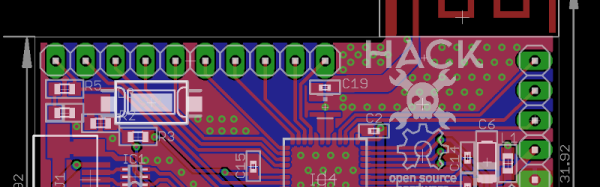
A couple of days back, we wrote about the HACK – a prototyping platform designed by [Michele Perla] based on the Atmel SAM R21 MCU. It’s one of the new breed of devices consisting of an ARM Cortex-M0 MCU + IEEE 802.15.4 Wireless radio bundled together. This was exciting since we could pack a lot of punch in the HaDge hardware. We planned to use the same design later to power the HaDge. Building HACK would have allowed us to get it in the hands of the software team, while the hardware folks worked on the real HaDge layout.

The HACK design was ready for review and we asked around to verify the antenna layout, which was the part we were not too sure about.  We asked Atmel for help with verifying the layout. That’s when we had the facepalm moment. They asked us – “What about FCC certification?” Since we plan to build the badges in quantities of a few hundred at the very least, it’s obvious we cannot escape from FCC certification. A design based around the R21 is ruled out – the cost of obtaining approval is pretty high. This means we need to punt the R21 and instead use an off-the-shelf radio module which is already FCC certified. Sigh.

Now the good news. This is a setback in terms of time, and effort put in by [Michele]. But beyond that, we’re good to go back to the drawing board and start afresh. First off, we decided to revert back to the Atmel D21 as the main controller. It’s a fairly decent MCU, and there’s a fairly robust tool chain available that a lot of people are familiar with. For the Radio, we are looking at some of these available options :

The last one from Microchip looks quite promising. But we’re open for better and cheaper suggestions, so please chime in with your comments.

Code Craft: Using Eclipse For Arduino Development

As we work on projects we’re frequently upgrading our tools. That basic soldering iron gives way to one with temperature control. The introductory 3D printer yields to one faster and more capable. One reason for this is we don’t really understand the restrictions of the introductory level tools. Sometimes we realize this directly when the tool fails in a task. Other times we see another hacker using a better tool and realize we must have one!.

The same occurs with software tools. The Arduino IDE is a nice tool for starting out. It is easy to use which is great if you have never previously written software. The libraries and the way it ties nicely into the hardware ecosystem is a boon.

When you start on larger projects, say you upgrade to a Due or Teensy for more code or memory space, the Arduino IDE can hamper your productivity. Moving beyond these limitations requires a new, better tool.

Where do we find a better tool? To begin, recognize, as [Elliot] points out that There is no Arduino “Language”, we’re actually programming in C or C++. We chose which language through the extension on the file, ‘c’ for C and ‘cpp’ for C++. An Arduino support library may be written in C or C++ depending on the developer’s preference. It’s all mix ‘n match.

Potentially any environment that supports C/C++ can replace the Arduino IDE. Unfortunately, this is not easy to do, at least for inexperienced developers, because it means setting up the language tool chain and tools for uploading to the board. A developer with that much experience might eschew an integrated development environment altogether, going directly to using makefiles as [Joshua] describes in Arduino Development; There’s a Makefile for That.

The reality is the Arduino IDE is not much more than a text editor with the ability to invoke the tools needed to compile and download the code to the Arduino. A professional IDE not only handles those details but provides additional capabilities that make the software development process easier.

Continue reading “Code Craft: Using Eclipse For Arduino Development”

Embed With Elliot: Going ‘Round With Circular Buffers

Why Buffer? Because buffers cut you some slack.

Inevitably, in our recent series on microcontroller interrupts, the question of how to deal with actual serial data came up. In those examples, we were passing one byte at a time between the interrupt service routine (ISR) and the main body of code. That works great as long as the main routine can handle the incoming data in time but, as many people noted in the comments, if the main routine takes too long the single byte can get overwritten by a new one.

The solution? Make some storage room for multiple bytes so that they can stack up until you have time to process them. And if you couple this storage space with some simple rules for reading and writing, you’ve got yourself a buffer.

So read on to see how to implement a simple, straightforward circular buffer in C for microcontrollers (or heck, for anything). Buffers are such a handy tool to have in your programming toolkit that you owe it to yourself to get familiar with them if you’re not already.

Continue reading “Embed With Elliot: Going ‘Round With Circular Buffers”

2015 Hackaday Prize Presentation Draws Near

The judges of the 2015 Hackaday Prize are hard at work right now to choose the five finalists who will receive the top prizes for the 2015 Hackaday Prize. The Judges for the Best Product have finished their work, and the announcements for all of these amazing engineering projects is just around the corner. We’ll be making the announcement in front of a live audience at the Hackaday SuperConference in just two weeks!

It has been amazing to see hundreds of people from the Hackaday Community who took time out of their lives to build something that matters and to document it as their entry. This has far-reaching benefits that will echo for years to come. No matter where your project finishes, standing up and saying “here’s something I built from an idea I had” is an amazing thing. Great work!

We are profoundly thankful for the visionary companies that sponsored the 2015 Hackaday Prize. Atmel, Freescale, Microchip, Mouser, and Texas Instruments made so much of this year’s prize possible. They recognize what it means to use Open Design; a philosophy that lets talented people pass on their skills by their engineering examples.

A big part of their support this year has gone to hosting live events. Hackaday Prize Worldwide was held in Chicago, Mumbai, Toronto, New York, Bangalore, Los Angeles, San Francisco, Shenzhen, New Delhi, Boston, Washington DC, Zurich, and Berlin. Their involvement continues with the presentation planned on Saturday November 14th at the Hackaday SuperConference.

Mouser Electronics has partnered with Grant Imahara of MythBusters fame. Grant is a talented roboticist who will have a talk and Q&A session at the SuperCon about his career. Microchip is giving away [Lucio Di Jasio’s] new book on microcontrollers to conference attendees. Atmel leapt at the opportunity to send development hardware for [Colin O’Flynn’s] workshop (he took Second Place in the 2014 Hackaday Prize), helping to lower the workshop cost for the participants.

Of course, it’s not just the events that were possible due to these sponsorship. Along with Supplyframe who presents the Hackaday Prize each year, these sponsors made the total prize package of about $500,000 a reality. It’s not everyday you can give away a trip into space as a Grand Prize and $100,000 for the Best Product. This is an amazing way to support the hardware ideals we live by and we applaud our sponsors for their meaningful involvement.

The 2015 Hackaday Prize is sponsored by:

Hacking When It Counts: Surviving The Burma Death Railway

In the early days of World War II, the Japanese army invaded Burma (now Myanmar) and forced an end to British colonial rule there. Occupying Burma required troops and massive amounts of materiel, though, and the Japanese navy was taking a beating on the 2,000 mile sea route around the Malay Peninsula. And so it was decided that a railway connecting Thailand and Burma would be constructed through dense tropical jungle over hilly terrain with hundreds of rivers, including the Kwae Noi River, made famous by the Hollywood treatment of the story in The Bridge on the River Kwai. The real story of what came to be known as the Burma Death Railway is far grislier than any movie could make it, and the ways that the prisoners who built it managed to stay alive is a fascinating case study in making do with what you’ve got and finding solutions that save lives.

Nutrition from Next-to Nothing

AWM_P00761_011-540
POWs in camp. [Source: The Thai-Burma Railway and Hellfire Pass]
Labor for the massive project was to come from the ultimate spoil of war – slaves. About 250,000 to 300,000 slaves were used to build the Burma-Siam Railway. Among them were about 60,000 Allied prisoners of war, primarily Australian, Dutch, British and American. POWs were singled out for especially brutal treatment by the Japanese and Korean guards, with punishment meted out with rifle butt and bamboo pole.

With the POWs was Doctor Henri Hekking, who had been born and raised in the former Dutch East Indies colony of Java (now Indonesia). He had spent his early years with his grandmother, a master herbalist who served as “doctor” for the native villagers. Inspired by his oma’s skill and convinced that the cure for any endemic disease can be found in the plants in the area, Dr. Hekking returned to Java as an officer in the Dutch army after completing medical school in the Netherlands.

After his capture by the Japanese, Dr. Hekking did everything he could to help his fellow POWs despite the complete lack of medical supplies, all the while suffering from the same miserable treatment. Hekking realized early on that the starvation rations the POWs endured were the main cause of disease in the camps; a cup of boiled white rice doesn’t provide much energy for men building a railway by hand in jungle heat, and provides none of the B vitamins needed by the body.

Continue reading “Hacking When It Counts: Surviving The Burma Death Railway”

Developed On Hackaday – It’s A Badge. No, It’s The HaDge

Sometime back, we announced start of a new project under the “Developed on Hackaday” series – a Badge for the Hackaday community. At its core, this badge is a single node in an Internet of Badges. At every event this badge is deployed at, a Hackaday Sub-Etha mesh network will be created, and each badge will be able to transmit and receive messages from other badge wearers. There are plans for an Sub-Etha to Internet gateway, so even if badge wearers are on the other side of the world, they’re still connected through the HaDge network.

Things have been moving along quickly, so I thought of doing a quick round-up and share progress with the community. First off, it has a name. HaDge, as in HackaDay Badge. Our objectives up until now were to set up a team, name the project, set up repositories and lock down on a working bill of materials. Within a few weeks, we’ve got all of that tied down. The HaDge group chat channel has been super active, and everyone’s been pitching in with ideas and suggestions. A spreadsheet seemed like a good idea – it let everyone add in their suggestions regarding candidate parts, create a feature list and then talk about it on the channel.

We realized early on that building the hardware is going to take some time. So in the interim, we need a dev kit platform to get in to the hands of the software developers so they can start working on the smarts that will power the HaDge. [Michele Perla] had already built JACK (Just another Cortex kit) – a development kit powered by the Atmel SAM D21. It’s pretty bare bone with just the bare minimum of parts to make it work while keeping an eye on reliability. The microcontroller+radio on the HaDge is the Atmel SAM R21 – a close relative of the D21, so it made sense to respin the JACK and create HACK (Hackaday Cortex kit) – a development kit powered by the Atmel SAM R21 that is going to be used as the core of the HaDge. [Michele] has worked hard single-handedly to complete the design and it is now ready to go for PCB fabrication soon. We are just awaiting some feedback and review of the Antenna part of the design. None of us on the hardware team have a strong RF-fu so we don’t want to make an avoidable mistake. If you’d like to review and help vet the HACK design, grab the design files from the github repo and let us know.

Once HACK board layout is cleared for fabrication, we’ll work on building kits that can be sent out to the software folks. We will also be working on porting the HACK design in to KiCad and this is something I have already stared work on. I started by using the neat Eagle2KiCad conversion tool by [LachlanA]. It’s not perfect, but it does reduce the work involved in porting over from Eagle to Kicad. Once that is done, hardware development for the actual HaDge will see some progress – keep a watch on the project page.