The Future Looks Bleak For Alexa Skill Development

While the average Hackaday reader is arguably less likely than most to install a megacorp’s listening device in their home, we know there’s at least some of you out there that have an Amazon hockey puck or two sitting on a shelf. The fact is, they offer some compelling possibilities for DIY automation, even if you do have to jump through a few uncomfortable hoops to bend them to your will.

That being said, we’re willing to bet very few readers have bothered installing more than a few Alexa Skills. But that’s not a judgment based on any kind of nerd stereotype — it’s just that nobody seems to care about them. A fact that’s evidenced by the recent revelation that even Amazon looks to be losing interest in the program. In a post on LinkedIn, Skill developer [Mark Tucker] shared an email he received from the mothership explaining they were ending the AWS Promotional Credits for Alexa (APCA) program on June 30th.

Continue reading “The Future Looks Bleak For Alexa Skill Development”

Garage Door Automation With No Extra Hardware

Home automation projects have been popular as long as microcontrollers have been available to the general public. Building computers to handle minutiae so we don’t have to is one of life’s great joys. Among the more popular is adding some sort of system to a garage door. Besides adding Internet-connected remote control to the action of opening and closing, it’s also helpful to have an indicator of the garage door state for peace-of-mind. Most add some sensors and other hardware to accomplish this task but this project doesn’t use any extra sensors or wiring at all.

In fact, the only thing added to the garage door for this build besides some wiring is the microcontroller itself. After getting the cover of the opener off, which took some effort, a Shelly Uni was added and powered by the 12V supply from the opener itself. The garage door opener, perhaps unsurprisingly, has its own way of detecting when the door is fully open or closed, so some additional wire was added to these sensors to let the microcontroller know the current state. Shelly Uni platforms have a WiFi module included as well, so nothing else was needed for this to function as a complete garage door automation platform.

[Stephen] uses Home Assistant as the basis for his home automation, and he includes all of the code for getting this platform up and running there. It wouldn’t be too hard to get it running on other openers or even on other microcontroller platforms; the real key to this build is to recognize that sometimes it’s not necessary to reinvent the wheel with extra sensors, limit switches, or even power supplies when it’s possible to find those already in the hardware you’re modifying. This isn’t always possible, though, especially with more modern devices that might already be Internet-connected but probably don’t have great security.

Baseboard Heaters Get Automated

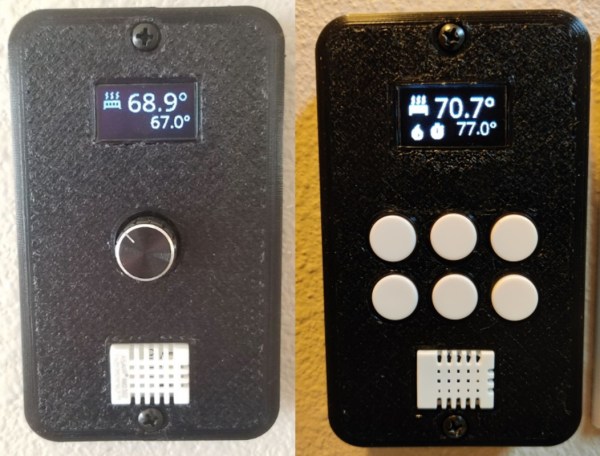
If you’re lucky enough to have central heating and/or air conditioning, with an automatic thermostat, you probably don’t have to worry too much about the outside temperature. But central HVAC is far from the only way of maintaining temperature in a home. From wood stoves to boilers there are many options depending on your climate and home type, and [Murphy’s Law] has a decentralized baseboard system instead of something centralized. An ESP8266 solution was found that was able to tie them all together.

There are other types of baseboard heaters, but in [Murphy’s Law]’s case the heaters were electric with a separate thermostat for each heater. Rather than build a control system from the ground up to replace the thermostats, turnkey smart wall switches were used instead. These switches happened to be based on the popular ESP8266 microcontroller, like plenty of other off-the-shelf automation solutions, which meant less work needed to be done on the line voltage side and the microcontroller’s firmware could be easily customized for use with Home Assistant.

While [Murphy’s Law] doesn’t live in the home with the fleet of electric baseboard heaters anymore, the new home has a single baseboard heater to keep a bathroom warm since the central heating system doesn’t quite keep it warm enough. This system is able to scale up or down based on number of heaters, though, so it’s still a capable solution for the single room and has since been updated to use the ESP32. All of the code for this project is available on GitHub as well, and for those of you attempting to add other HVAC components to a home automation system this project that loops in a heat pump is worth taking a look at as well.

The Easy Way To Make A Smart Appliance

It seems that finding an appliance without some WiFi connectivity and an app to load your laundry data into the cloud is an increasingly difficult thing to do in the 2020s. Many of us resolutely refuse to connect these smart appliances to the Internet, but not because we don’t see the appeal — we just want to do it on our own terms.

[Terence Eden] did just this with his rice cooker, using a surprisingly straightforward approach. He simply connected it to the mains via an energy monitoring smart plug, and that was the hardware part, done. Of course, were it that simple we probably wouldn’t be featuring this here, as the meat of this project lies in connecting it to his smart home systems and getting something useful from it.

He’s using Home Assistant, and after a bit of messing about had it part of his home automation system. Then it was time for Appliance Status Monitor, which allowed him to easily have the rice cooker send him a notification once it has done its thing by monitoring the power it was using. All online, part of a smart home, and not a byte of his data captured and sold to anyone!

This isn’t the first home automation project we’ve brought you from this source.

Screenshot of eBay listings with Gigaset IoT devices being sold, now basically useless

A Giga-Sunset For Gigaset IoT Devices

In today’s “predictable things that happened before and definitely will happen again”, we have another company in the “smart device” business that has just shuttered their servers, leaving devices completely inert. This time, it’s Gigaset. The servers were shuttered on the 29th of March, and the official announcement (German, Google Translate) states that there’s no easy way out.

It appears that the devices were locked into Gigaset Cloud to perform their function, with no local-only option. This leaves all open source integrations in the dust, whatever documentation there was, is now taken down. As the announcement states, Gigaset Communications Gmbh has gotten acquired due to insolvency, and the buyer was not remotely interested in the Smart Home portion of the business. As the corporate traditions follow, we can’t expect open sourcing of the code or protocol specification or anything of the sort — the devices are bricks until someone takes care of them.

If you’re looking for smart devices on the cheap, you might want to add “Gigaset” to your monitored search term list — we’ll be waiting for your hack submissions as usual. After all, we’ve seen some success stories when it comes to abandoned smart home devices – like the recent Insteon story, where a group of device owners bought out and restarted the service after the company got abruptly shut down.

We thank [Louis] for sharing this with us!

Retrogadgets: Butler In A Box

You walk into your house and issue a voice command to bring up the lights and start a cup of coffee. No big deal, right? Siri, Google, and Alexa can do all that. Did we mention it is 1985? And, apparently, you were one of the people who put out about $1,500 for a Mastervoice “Butler in a Box,” the subject of a Popular Science video you can see below.

If you think the box is interesting, the inventor’s story is even stranger. [Kevin] got a mint-condition Butler in a Box from eBay. How did it work, given in 1983, there was no AI voice recognition and public Internet? We did note that the “appliance module” was a standard X10 interface.

Continue reading “Retrogadgets: Butler In A Box”

Automation Makes Traditional Japanese Wood Finishing Easier

Unless you move in architectural circles, you might never have heard of Yakisugi. But as a fence builder, [Lucas] over at Cranktown City sure has, with high-end clients requesting the traditional Japanese wood-finishing method, which requires the outer surface of the wood to be lightly charred. It’s a fantastic look, but it’s a pain to do manually. So, why not automate it?

Now, before we get into a whole thing here, [Lucas] himself notes that what he’s doing isn’t strictly Yakisugi. That would require the use of cypress wood, and charring only one side, neither of which would work for his fence clients. Rather, he’s using regular dimensional lumber which is probably Douglas fir. But the look he’s going for is close enough to traditional Yakisugi that the difference is academic.

To automate the process of burning the wood and subsequently brushing off the loose char, [Lucas] designed a double-barreled propane burner and placed it inside a roughly elliptical chamber big enough to pass a 2×8 — sorry, metric fans; we have no idea how you do dimensional lumber. The board rides through the chamber on a DIY conveyor track, with flame swirling around both sides of the board for an even char. After that, a pair of counter-rotating brushes abrade off the top layer of char, revealing a beautiful, dark finish with swirls of dark grain on a lighter background.

[Lucas] doesn’t mention how much wood he’s able to process with this setup, but it seems a lot easier than the manual equivalent, and likely yields better results. Either way, the results are fantastic, and we suspect once people see his work he’ll be getting more than enough jobs to justify the investment.

Continue reading “Automation Makes Traditional Japanese Wood Finishing Easier”