Whistle To Make The Art Flow

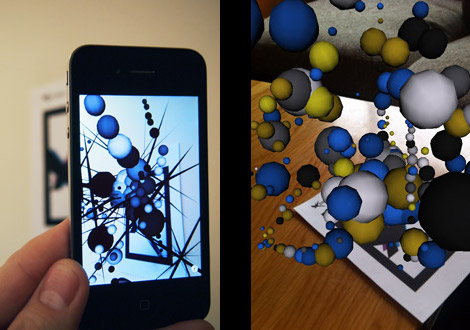
A new project from [James] targets the iPhone with this wild generative art in an Augmented Reality environment (free) app for 3GS and 4 running running iOS 4+. Powered by the String augmented reality library, and written in C + OpenGL the combo present a power AR platform offering over 100,000 polygons on screen with no noticeable dip in frame rate.

The artistic part is influenced by noise the app is picking up through the microphone. Speaking, whistling or blowing at the device creates 3D generative art, which you are then free to explore in 3 dimensions. It would be interesting to see what it comes up with in a naturally noisy environment. Features also include variety of 3D shapes, color palettes, and settings that can be mixed to create “endless” combinations along with a good to have save snapshot feature.

Join us after the break for a quick video, and be sure to check out some of [James] other work, like  the Augmented reality business card
Continue reading “Whistle To Make The Art Flow” →

Using TouchOSC With Your Projects

[Marcus] wrote a guide to using TouchOSC to control your projects. He sent a link to us after reading our feature about using Open Sound Control for Arduino without an Ethernet shield. He’s been using that method for quite some time now, but takes it one step further by using a smartphone as a control device. He designs his own user interface for the iPhone using TouchOSC. This is a package which we’ve seen in other projects but now you can get an idea of how easy it really is.

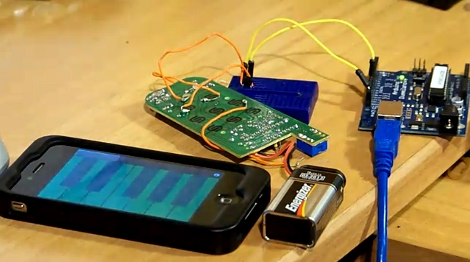
The project starts by interfacing an Arduino with the device you’d like to control. The circuit above patches into a remote control using a couple of transistors. Now the Arduino can simulate button presses on that remote, sending the signal to turn a light on or off. Next, TouchOSC is used for the smartphone – here it’s an iPhone but the suite works on Android as well. In the video after the break you can watch a quick interface design demo. Buttons are dragged into existence, uploaded to the phone, then configured to control you device over a network. A Processing sketch listens for OSC commands and then sends instructions to the Arduino via USB.

Continue reading “Using TouchOSC With Your Projects” →

Our Beloved XBMC Hits IOS Devices

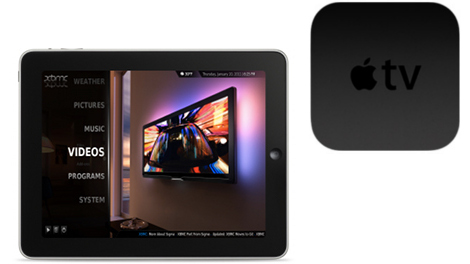
For those who have been longing to unlock the power of the Apple TV 2 the wait is over. XBMC is now available for iOS devices. This isn’t limited to the tiny ARM-based set-top box, but extends to the entire family including iPad and iPhone 4. Included is the ability to play high def video up to 1080p without transcoding. But we think the best feature might be XBMC’s ability to easily stream media over the network from just about any operating system. Goodbye iTunes tethering.

If you’re comfortably using SSH to work with a Jailbroken device, ATV2 installation will be a snap as there’s already a source repository to install from. iPad and iPhone 4 are even easier, just add the repository in Cydia and install. Wow, when we first looked in on the new generation of ATV we really thought it would take longer than it has to see a port of our favorite open source media client. Thanks Team XBMC!

IPhone Tilt Motion Controller

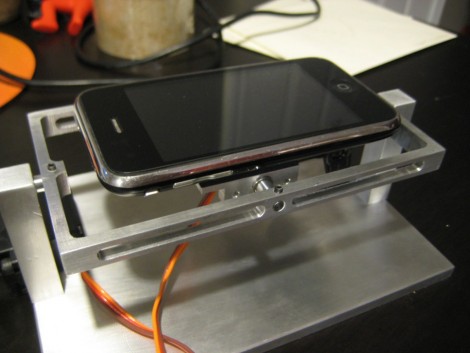
Here’s a mounting system that adds mechanical tilt control to the iPhone (link dead, try the Internet Archive version). It uses two servo motors to rotate along the X and Y axes. An analog joystick is used along with an Arduino to control the movement of the apparatus. As you can see in the video after the break, this works quite well when playing accelerometer-based games. But adding a joystick isn’t the end-goal of the project. [Shane] plans to point a camera at the iPhone and use image recognition to play games automatically. That sounds like a big bite the chew but we’ve seen this work with Guitar Hero so we’re optimistic.

Continue reading “IPhone Tilt Motion Controller” →

PC Monitor Sleep Mode Using IPhone

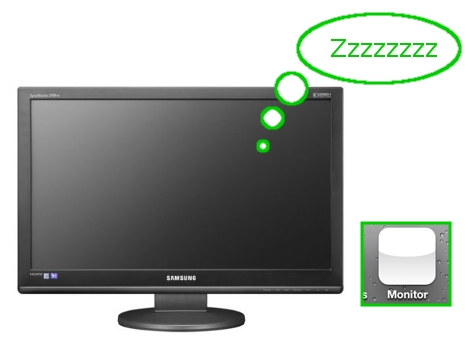
[Mike Silverman] rigged up a way to make his monitor sleep from an iPhone. Working with a Windows system, he installed QuickPHP and NirCmd to add PHP and command line controls. Some quick PHP code writing and this has the effect of creating a sleep button toggled via a network address. He loads up the IP and port information in the Safari browser of his iPhone, creating a Home Screen short cut seen in the image above. Now he clicks on the button and puts the screen to sleep.

It’s not that we find this functionality useful since most monitors sleep after a few minutes of inactivity. But we like the methodology and you can bet we’re already planning uses for this. Any PHP server (like the copy of Apache running on this machine) will do as long as it’s on the same LAN as the iPhone’s WiFi connection.

Android On IPhone: New Treats

It seems that the iPhone 2g and 3g are the newest phones to get Android 2.2, codenamed Froyo. The process for installing Froyo if you have a jailbroken device seems to get even easier every time, with this revision being as simple as adding a repository, downloading Froyo, and pressing go. Follow the link for a wonderful step by step guide, complete with screenshots to take out all of the guess work. Android on iPhone sure has come a long way since the first time we covered it.

[via reddit]

Security Flaw Bypasses IPhone Lock Screen

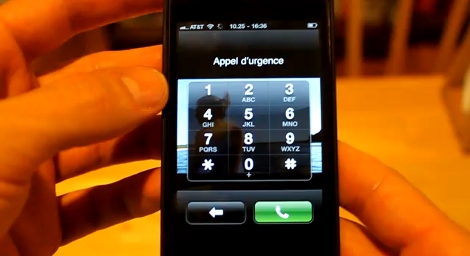
It looks like the iPhone lock screen provides just a marginal level of protection. [Jordand321] discovered a key combination that opens the contact app on a locked iPhone. Just tap the emergency call button, enter the pound sign three times (###), then tap call and immediately tap the lock key on the top of the phone. If this is confusing just look at the video after the break to see how it’s done.

You don’t get access to everything on the device. But this does give an attacker access to all of your contact data and allows that person to make any calls they desire.

Continue reading “Security Flaw Bypasses IPhone Lock Screen” →