High Voltage AVR Programmer

The most common way of programming AVR microcontrollers is the In System Programming port. That little six-pin header with MOSIs and MISOs coming out of it will program every AVR you’ll ever come across. The ISP does have a downside – fuses. Set your fuses wrong, and without a High Voltage Serial Programmer, your chip is bricked. [Dilshan] designed his own HVSP that’s less expensive than the Atmel STK500 and has a nice GUI app.

Instead of following in the footsteps of the USBtinyISP, [Dilshan] is using a PIC18F as the main microcontroller in the programmer. This chip was chosen because of its built-in USB functionality. Because the High Voltage part of a HVSP operates at 12V, actually providing that voltage needed to be taken into consideration. For this, [Dilshan] is using standard 78xx regulators with an 18V input.

The app to control this programmer does everything you would expect, including all the usual AVRdude commands. A great build, and just what we need to reset the fuses on a few dozen chips we have sitting around.
TFT Display

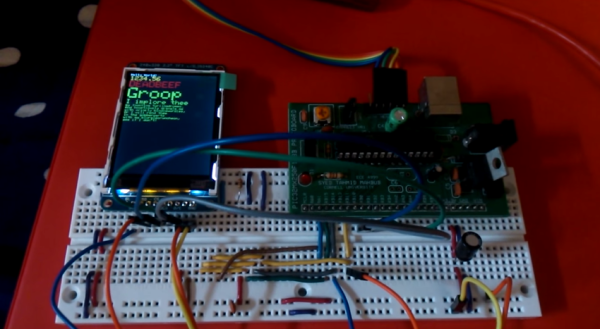
Controlling A Color TFT Display With PIC32

Sometimes it feels like everyone out there is using Arduino. It’s easy to find tutorials and libraries to get things working with Arduino, but if you want to use another platform you might have more trouble. [Tahmid] ran into this problem when he decided to try using a PIC32 to control a 2.2″ color TFT display from Adafruit.

Adafruit is really good about providing tutorials and Arduino libraries for their products. It makes it really easy to get up and running… if you are using Arduino. All of their libraries are open source, which means that the community can take them and modify them as needed. [Tahmid] decided to do exactly this and fork the Adafruit libraries over to the PIC32 platform in C. It’s a great learning experience. You get to see how (good or bad) other people code, and it immerses you in the differences between two different chip families.

He’s released the libraries online for others to use. He says that he’s heavily commented the code to try to make as self-explanatory as possible. The display interfaces with the PIC32 using SPI. The demo video below shows the screen up and running and demonstrates the crisp color graphics. Continue reading “Controlling A Color TFT Display With PIC32”

An Introduction To Clock Dividers And Psychological Warfare

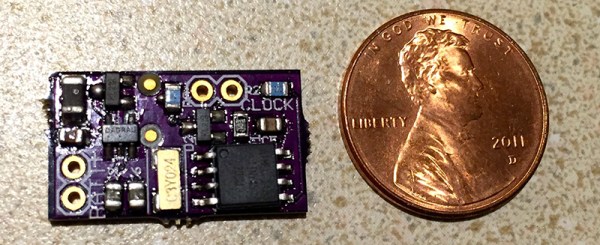
A while ago, [nsayer] was inspired by a Hackaday post to build one of the most insidious means of psychological warfare. I speak, of course, of the [Lord Vetinari] clock, a clock that ticks at random intervals, but still keeps accurate time. His build, the Crazy Clock, is a small controller board for off-the-shelf clock movements that adds the [Vetinari] feature to any clock by soldering only a few wires.

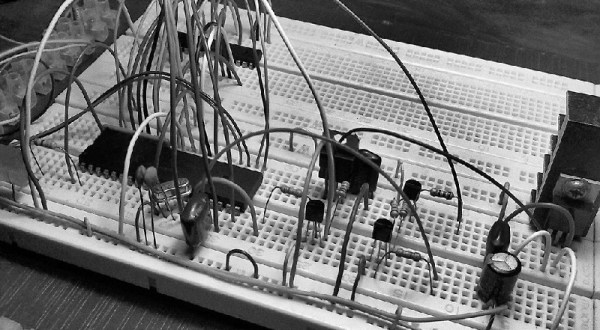
The Crazy Clock is a pretty simple device consisting of only a 32.768 kHz crystal, a microcontroller, and a few transistors to pulse the movement of a clock mechanism. While psyops is great, it recently occurred to [nsayer] that this device could be used for other build.

Since the output of the Crazy Clock doesn’t necessarily have to be connected to a clock movement, [nsayer] decided to connect a LED, generating a 60Hz flashing light for a phonograph strobe. This is easy with timer prescalers and clock dividers; the original 32.768 kHz signal is divided by 8 to produce a clock that ticks every 4.096 kHz.  Divide that again by 120, and you get 34 2/15. Yes, this is all stuff you learned in fourth grade, and if you’re smarter than a third grader you can eventually whittle a 32.768 kHz clock down to a nice, round, binary number – exactly what you need for computing time.

[nsayer] posted a 240 fps (vertical) video of his Crazy Clock blinking at 60 Hz. You can see that below.

Continue reading “An Introduction To Clock Dividers And Psychological Warfare”

A Stack Of Boards For An Edison Breadboard Adapter

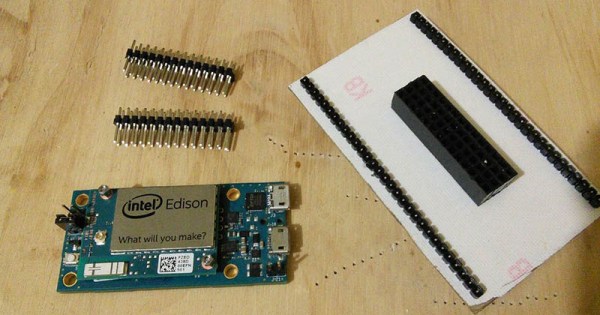
The Intel Edison is a neat piece of hardware, but the connector for the Edison is extremely intimidating and the Mini breakout board is incompatible with breadboards. What’s [Federico], a builder of Internet of Things to do? Etch their own breakout board.

The Mini Breakout board for the Intel Edison is the official ‘minimal’ offering for getting the Edison up and running with a mess of jumper wires and LEDs. While this breakout board handles the USB to UART bridge, power regulation, and exposes all the pins on the Edison connector, it is terrible for prototyping. It’s a 4×14 array of holes on a 0.1″ grid that are hidden underneath the Edison.

[Federico] handled this problem with a copper clad board and a little bit of ferric chloride. He jumped into Eagle and created a breakout board to turn the 4×14 pin grid into a more sensible breadboard-friendly layout.

The breadboard-friendly adapter doesn’t have level shifters, but by using the mini-breakout board between the Edison and the breadboard adapter [Federico] still has the UART to USB hardware and a battery charging circuit. Still, there’s room for improvement and we can’t wait to see what he comes up with next.

Automated Target Practice

Automated Robotic Target Practice

Fan of shooting things? Jealous of proper shooting ranges? Why not build your own automated target practice rig (link dead, try the Internet Archive) with a few servos and an ATMega168?

[Cowboy Bob] of Making Stuff decided he needed a practice target, and wanted to make it a bit more interesting than throwing up some beer cans on a fence. He’s created a highly durable 10-target “Robo-Target” which can be remote controlled or automated.  A thick piece of 1/4″ angle steel makes up the main frame of it, so if you’re practicing with hand guns it’ll take the abuse. If you’re just using  an air soft or paintball gun you probably don’t need to make it this beefy.

Five servo motors swing paper five targets back and forth on 3D printed swing arms — and since each target has a front and a back side, it gives you 10 different things to shoot at. In challenge mode it’ll even show you two targets at a time which will require you to quickfire in order to get both!

Continue reading “Automated Robotic Target Practice”

Injecting SD Card Bootloaders

[Frank] has a Ultimaker2 and wanted to install a new bootloader for the microcontroller without having physical access to the circuitry. That means installing a new bootloader for the ATMega2560 without an In System Programmer, and as is usual on AVRs, the bootloader can only be edited with an ISP. Additionally, modifying the bootloader in any way runs the risk of corruption and a bricked circuit. That’s okay, because [Frank] knows how to do it, and he’s here to show you how.

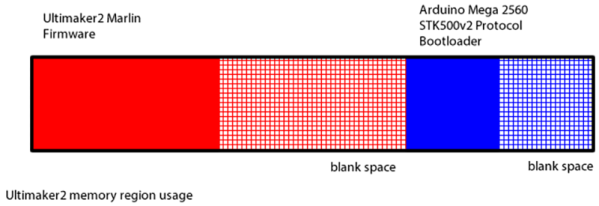
You can think of the memory layout of the ATMega in the Ultimaker as being split in half, with the printer firmware in the first half and the bootloader in the second half. There’s extra space in both halves, and that’s something that comes in very useful. When the circuit powers up, it jumps to the bootloader, does it’s thing, then jumps to the very beginning of the application code – a vector table – that starts up the actual firmware.

[Frank]’s trick to adding on to the bootloader is to place the SD card bootloader in the space normally reserved for applications, not where you would expect to find a bootloader. This code is accessed by the stock bootloader jumping into a modified vector table at the beginning of the application data that points to new executable code. That code is the actual SD card bootloader, but because it is in the application part of the memory, it can’t perform Flash writing or erasing. To fix that, a tiny bit of code is tacked onto the end of the bootloader for performing Flash writes and jumps back to the application part of memory.

3D Printed Mechanical keyboard

3D Printed Mechanical Keyboard

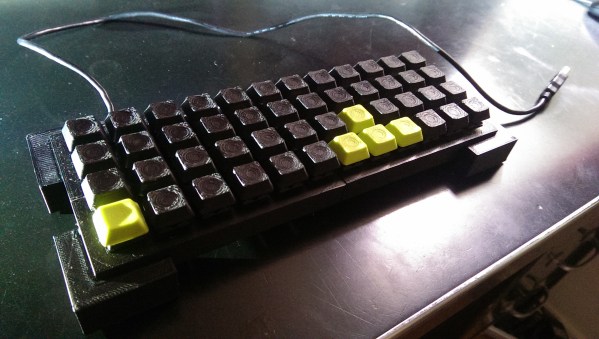
Tired of buying boring keyboards with almost no customization available? We’ve seen lots of keyboard hacks before, but if you want to take it a step further — why not make it from scratch and have it 3D printed?

Reddit user [Wildpanic] has just finished his first attempt at a 3D printed keyboard and he’s even shared the files to make it over at Thingiverse. The frame is entirely 3D printed, but he’s chosen to use pre-manufactured key switches, which is probably for the best. They are the Cherry MX Green variety, which have these little clips in the side which make them super easy to install — especially on a 3D printed frame.

He’s wired them all using 20ga copper wire (which might be a bit overkill) to a Teensy 2.0 microcontroller. The diodes he chosen to use are 1N4148 which he was able to get fairly inexpensively. Total cost is just a bit over $50. Not bad!

Oh and in case you’re wondering, he’s chosen the style of keyboard that makes use of 4 keys for the space bar — as made popular by the planck style custom keyboards — you know, for people who love symmetry.

For more awesome keyboard hacks, check out this roundup [Adam Fabio] put together in a Hacklet last year!

[via reddit]